











Offer letters on your letterhead
Print the Offer Letter PDF straight from the application. Inquiry Acknowledgement, Application Confirmation, Interview Invitation and Offer Letter emails go out on the record's own events and are logged back on it.
 : Run your whole school on one platform
Admissions, academics, fees, library, transport, boarding, meals, HR and Bria AI on one student record — from the first enquiry to the alumni register. For K-12 schools, colleges and universities, priced per student.
Free instant access. No credit card required. Priced per student.
 EduPrime Core
 Academics
 Fees & Billing
 Assessment Engine
 Timetable
 Admissions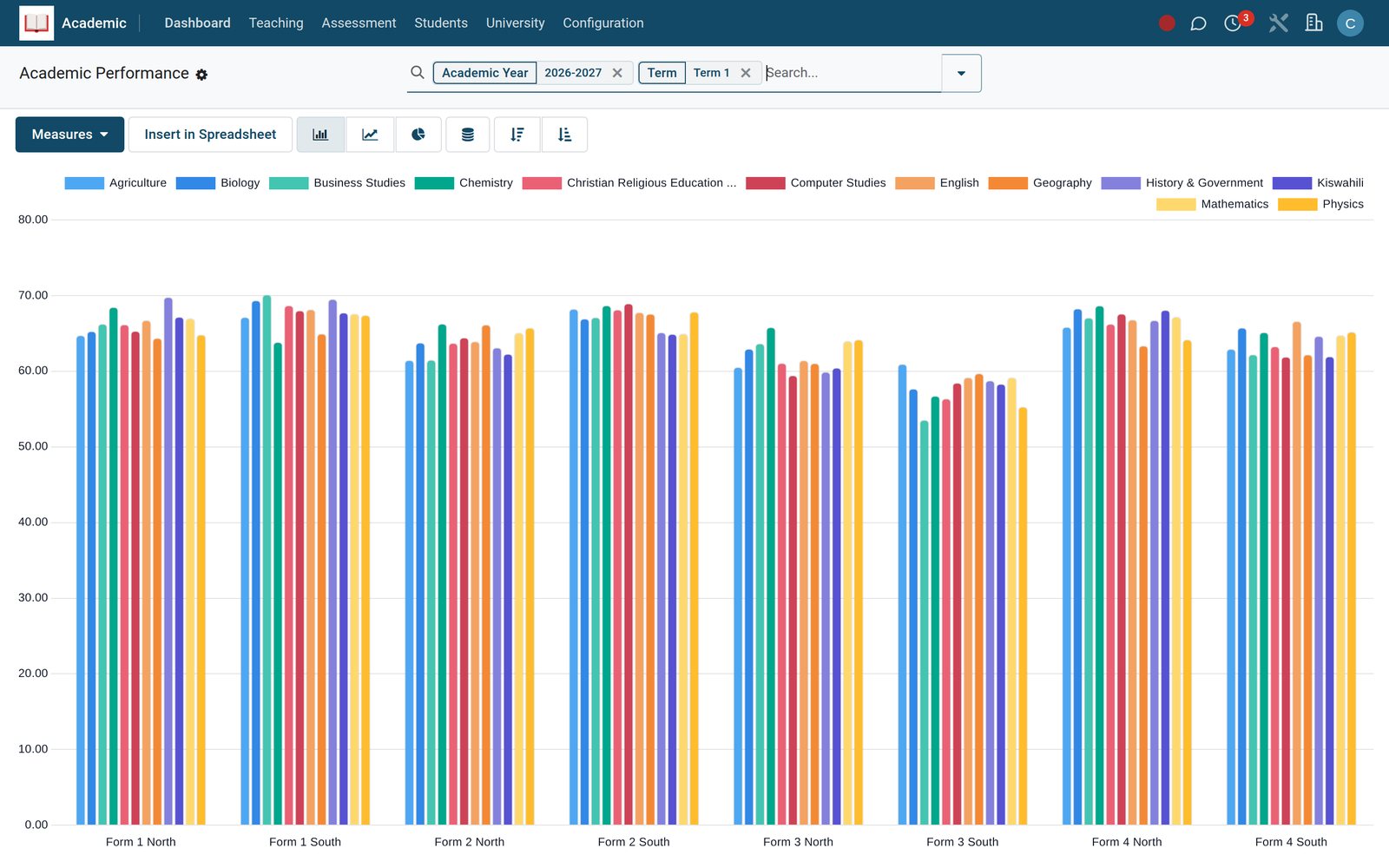
One funnel for web forms, walk-ins and agents. Every lead is staged, followed up and converted into a student record without anything being re-typed.
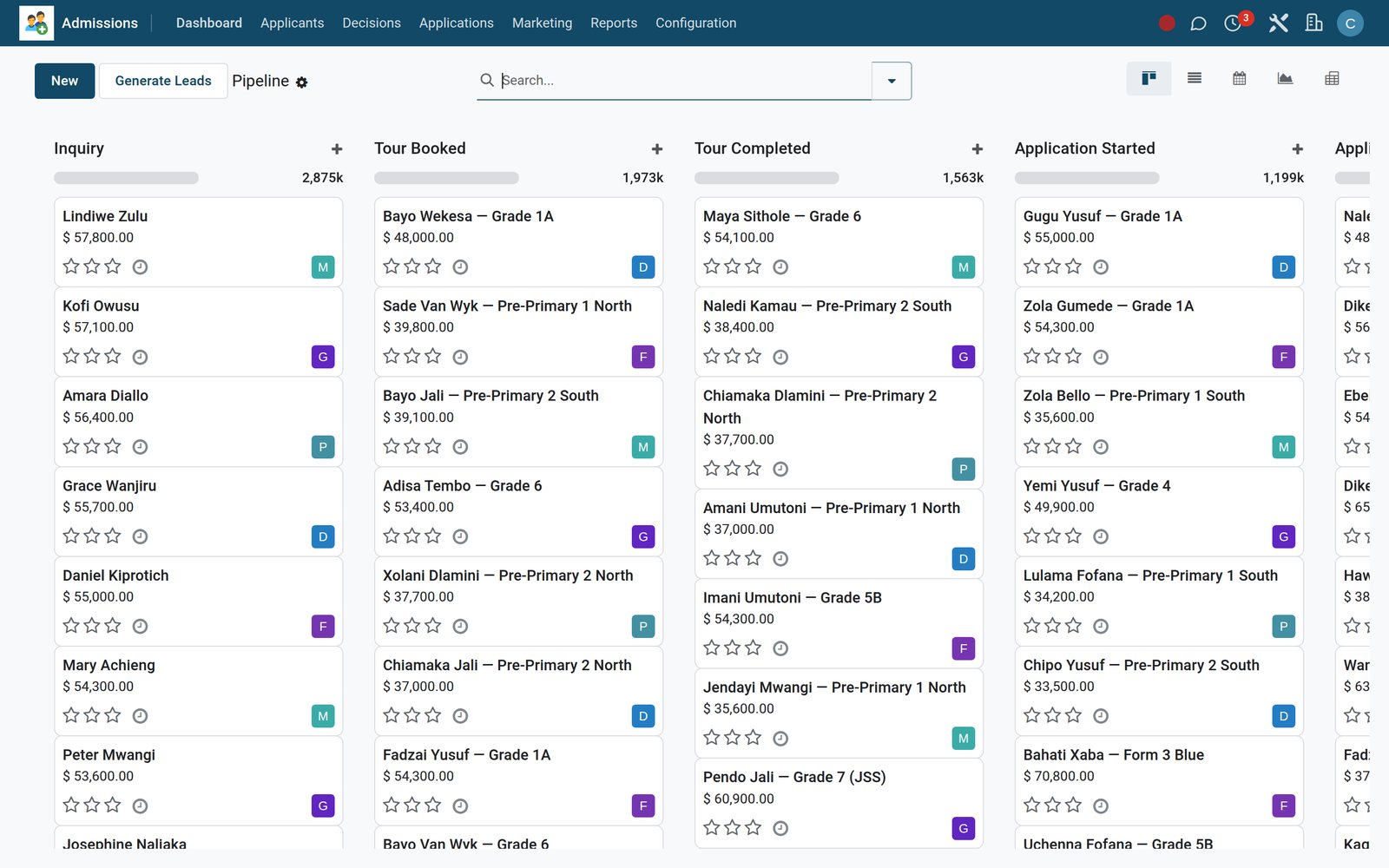
The pipeline board
Print the Offer Letter PDF straight from the application. Inquiry Acknowledgement, Application Confirmation, Interview Invitation and Offer Letter emails go out on the record's own events and are logged back on it.
The Convert Admission Lead to Student assistant creates the student, guardians, class and admission number in EduPrime Core — validated before it writes anything.
Funnel and Source Attribution reports show conversion by campaign, source and medium. Inquiries older than 90 days close themselves.
The register, the gradebook and the report card on one student record — and a timetable solved by a constraint engine, not a spreadsheet.
Daily and per-period registers on any device. Absences roll up by learner and class, the Absence Notification reaches guardians, and a monthly summary goes out by itself.
Bulk mark entry per exam and subject, weighted assessment components, your own grading scales, exam seating and class rankings recomputed nightly.
Report Card, Transcript, University Transcript and Degree Certificate print as PDFs on your letterhead. Report Card Published tells the family the moment it is out.
Strands, sub-strands, learning indicators and rubrics track coverage per subject and class. Lesson plans due show per teacher, every week.
Homework per class and section with online submissions and scored quizzes on BridgeERP eLearning. Overdue reminders run daily without anyone remembering.
One-click CSP auto-solve with real teacher, room and section constraints, a conflict report, and pin-and-re-solve for the slots you want to keep.

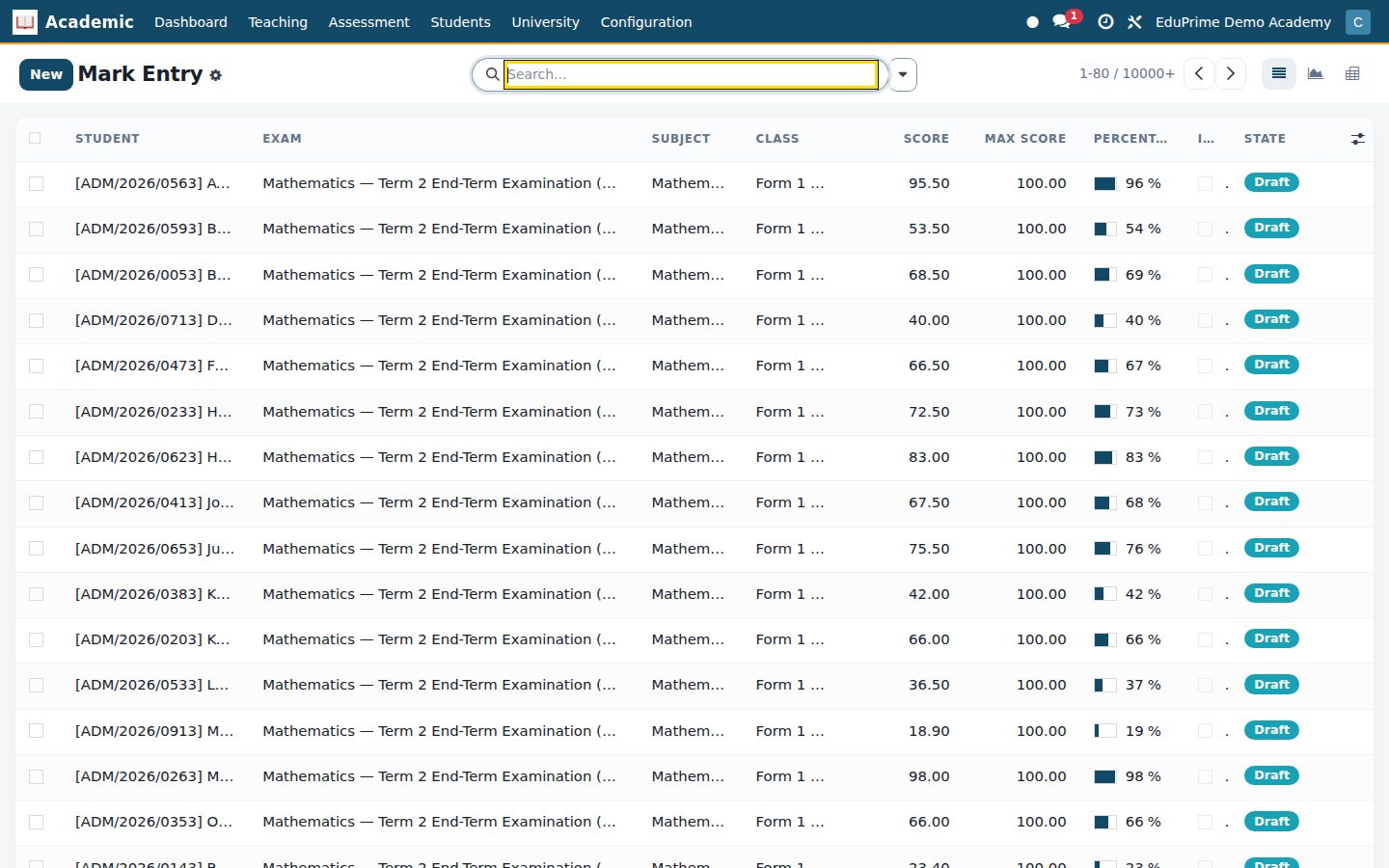
Teachers
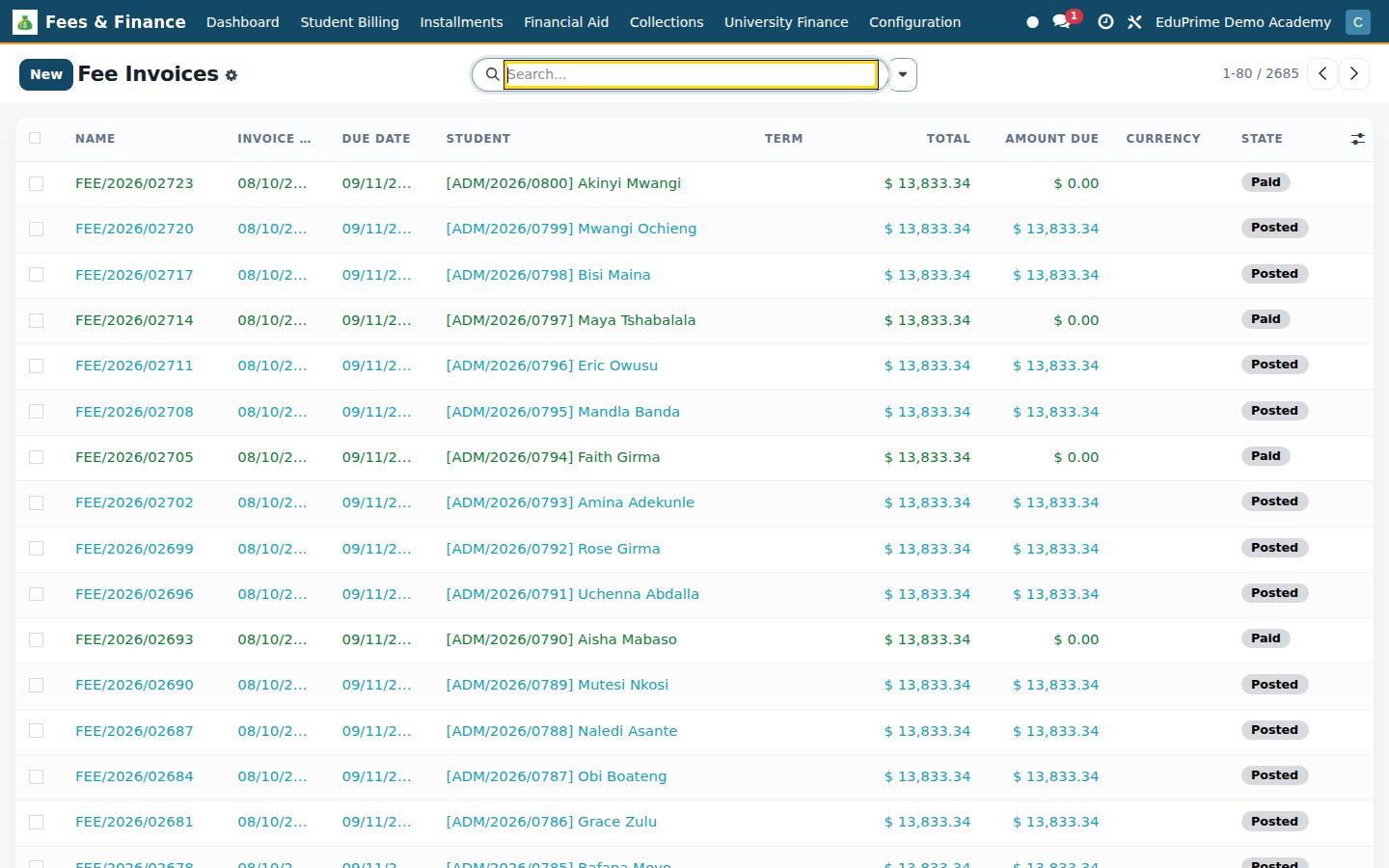
Fee structures, invoices, scholarships, bursaries, instalments and dunning — posted to full double-entry accounting, not a parallel cash book.
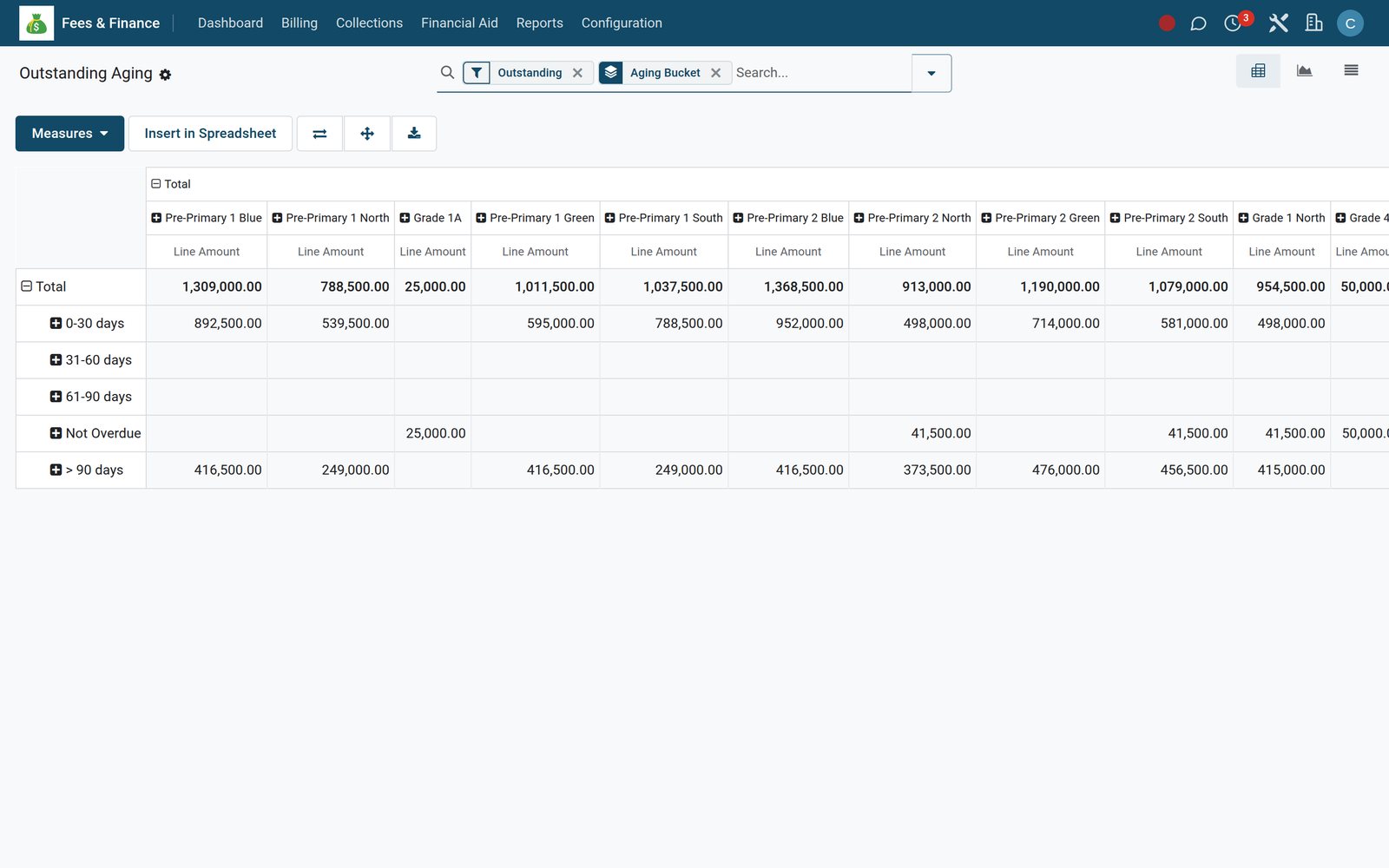
Outstanding aging by class
Scholarship Funds and Awards with approval, means-tested Bursary applications, and government Subsidy Schemes reduce the invoice before it is issued. Expiring subsidies are flagged weekly.
Family Groups, Consolidate Siblings and the daily sibling-discount run produce a single Consolidated Family Bill per guardian.
Late fees apply daily, dunning stages advance daily, and 7-day, 30-day and 60-day reminders go out on the invoice's own dates. The Dunning Log and Legal Actions keep the trail.
Step by step
The bursar sets the structure once. Everything after that is a wizard, a prompt on a parent's phone or a scheduled job.
Bulk Assign Fee Structure applies the term's fees to a class, stream or campus in one pass.
Fees & BillingGenerate Fee Invoices raises the term invoice and the instalment schedule, and sends Fee Invoice Issued to the guardian.
Fees & BillingFrom the parent portal, one tap sends a mobile-money prompt, such as an M-Pesa STK push, to the guardian's phone. Airtel Money, card and bank are on the same rail.
Payments & Mobile MoneyThe secured callback captures the mobile-money receipt and marks the invoice paid the moment the parent confirms. Idempotency guards and per-transaction locks stop any double posting.
Payments & Mobile MoneyPayment Receipt is sent and logged on the invoice. Pending verifications retry every 5 minutes; stuck transactions time out after 15.
Fees & BillingLate fee policies, dunning stages and the weekly balance reminder run unattended. Refunds go through approval and print a Refund Authorization.
Fees & Billing
Front office and bursar
Attendance, marks, fees and engagement combine into a daily risk score with reasons — and an intervention workflow to act on it before the end of term.
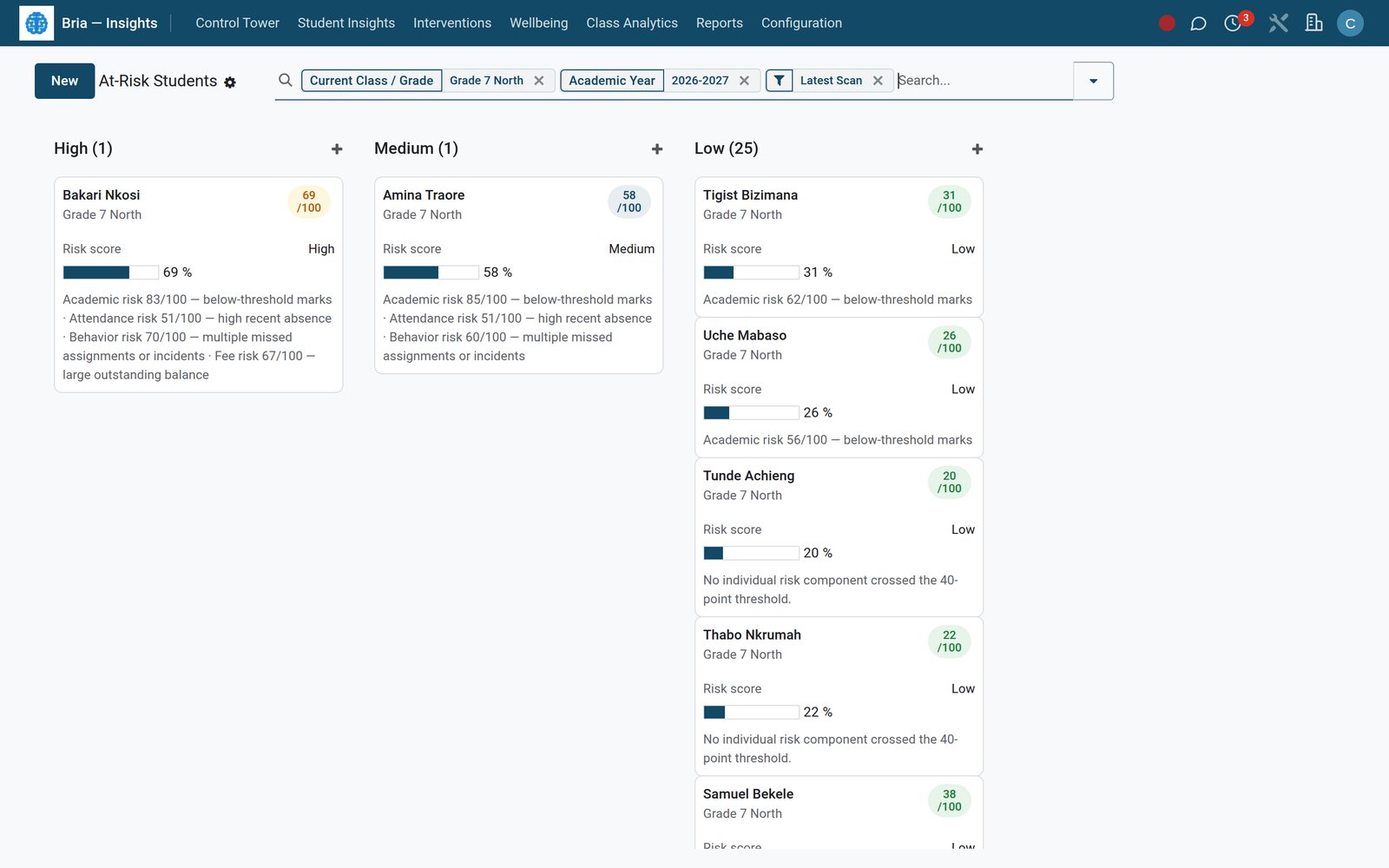
The at-risk board
Open, Planned, Effectiveness Review and Success Stories track what was tried for each learner and whether it moved the score.
Teacher Weekly Digest, Principal Weekly Heatmap Digest and the Board Monthly KPI Pack go out on schedule, with the Class Performance Heatmap and Teacher Load reports behind them.
Urgent wellbeing flags route to Counselling, where sessions, PHQ-9 / GAD-7 / SDQ assessments and crisis cases are restricted to the counselling team by record rules.
Library, bus, boarding house, dining hall, clinic and shop each add to the same student — and to the same term invoice.
MARC21 import, ISBN auto-fill, barcoded copies, OPAC search, loans, reservations, fines and an offline circulation queue that syncs every 15 minutes.
Routes, pickup points, live GPS with geofence alerts, driver PWA boarding scans, child-check sweeps and a transport-compliance pack, such as Kenya's NTSA, with daily expiry alerts.
Block, room and bed allocation, roommate matching, roll call, QR leave passes approved by parents, visitor log, inspections and incident escalation.
Menu plans, dietary profiles and allergy alerts, an attendance scanner and swipe log, RDA targets, waste rate and cost per meal.
Sick-bay visits with vitals, a Medication Administration Record, vaccinations with 14-day due alerts, allergy action plans and drug inventory.
Uniform and stationery till on Point of Sale, pre-orders ready to collect, stock on hand, reorder alerts and charge-to-fees outstanding.

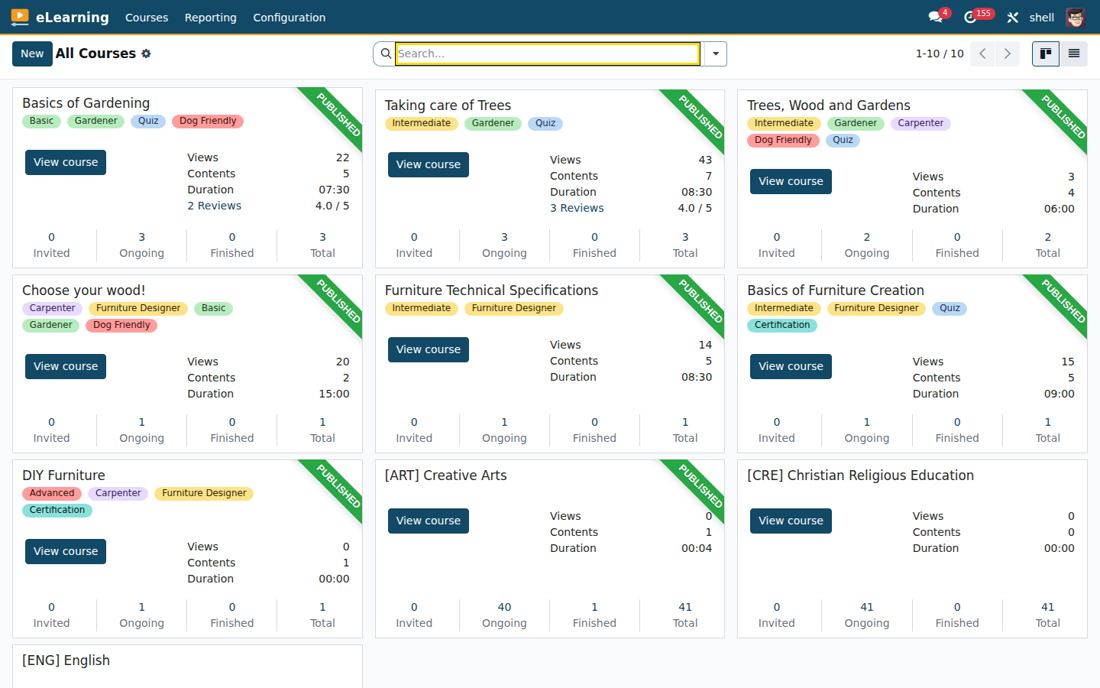
Learners
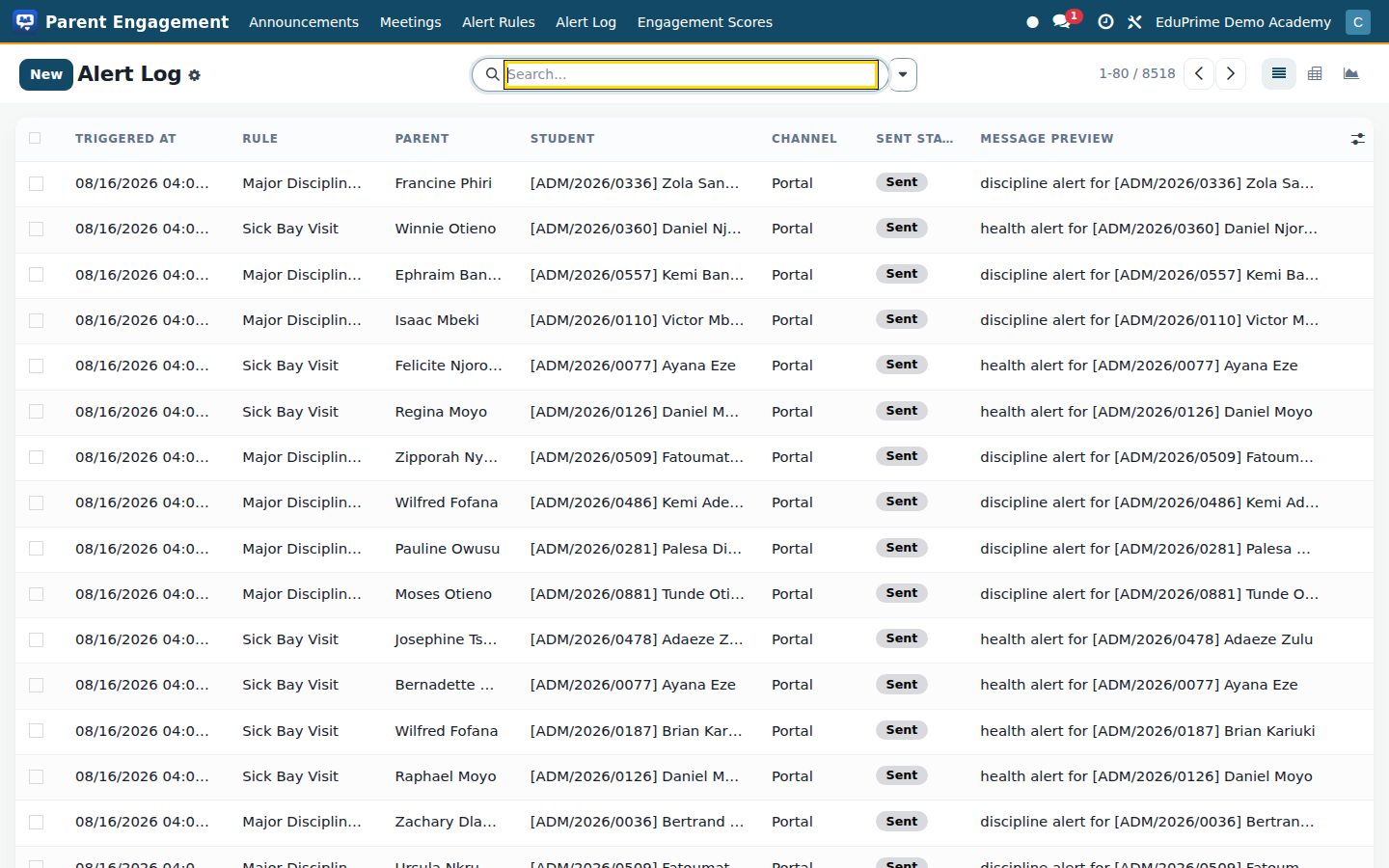
Results, attendance, fees, meetings, consent forms and alerts reach guardians on the portal, by email, SMS or WhatsApp — and every send is logged.
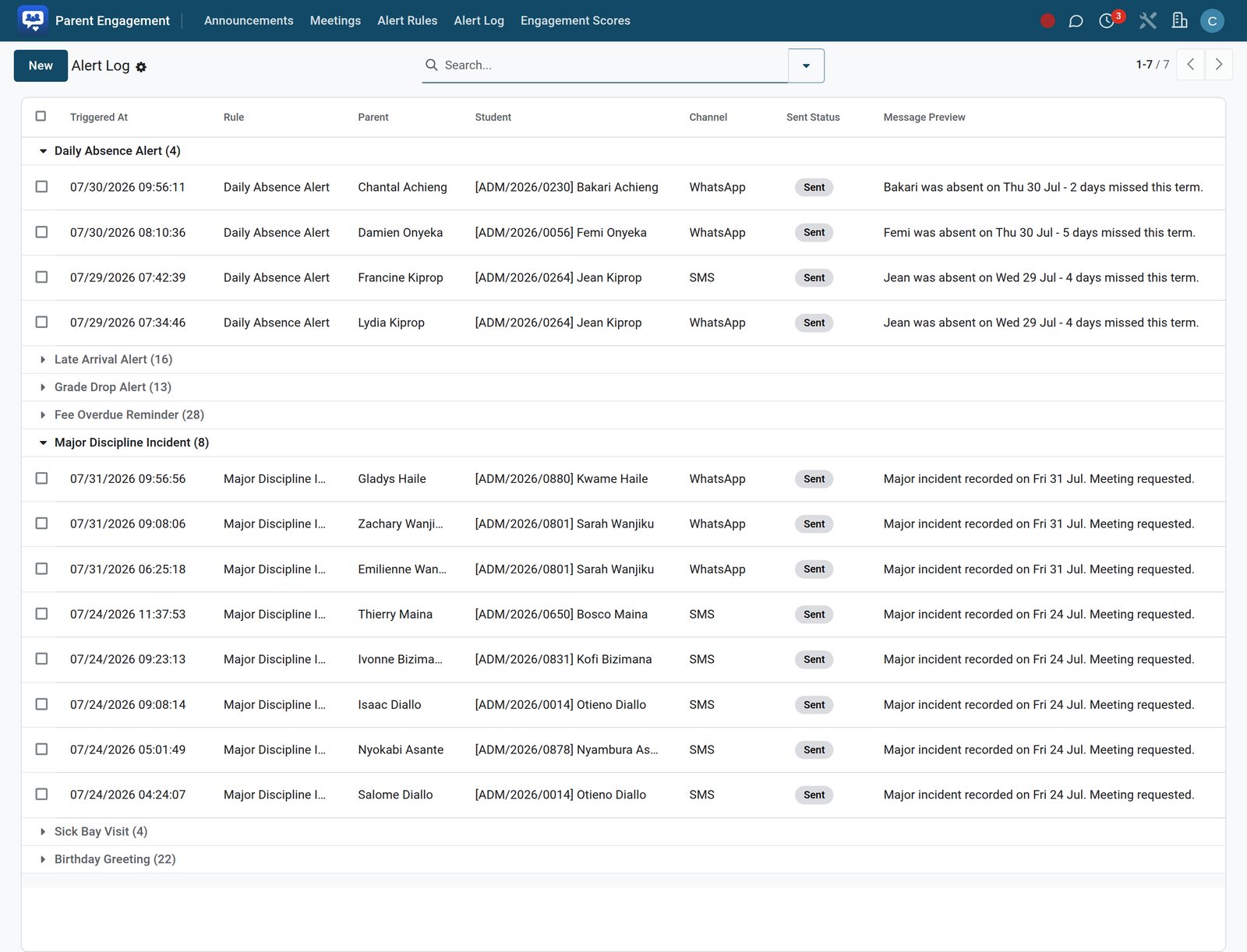
The alert log
Parent-teacher meetings are booked per student, guardian and teacher and shown on a shared calendar.
A field library, form templates and submissions cover trip consent, medical consent and more — printed as PDF and kept on the student.
Engagement scores recompute weekly per family, so the office can call the guardians who never open the portal.

Every role ships as a permission set enforced on every screen, report and API call - not just hidden from a menu.
Applications, admission numbers, transfers, transcripts and government returns. Lives in Core, Admissions and Compliance & Returns.
Fee structures, invoices, mobile-money reconciliation, aging and dunning. Lives in Fees & Billing and Payments & Mobile Money.
Teacher assignments, teaching load, syllabus coverage, mark-entry sign-off. Lives in Academics, Assessment Engine and Timetable.
Allocations, roll call, leave passes, inspections and incidents. Lives in Boarding & Hostel.
Visits, medication record, vaccinations and allergy plans. Lives in School Clinic.
Routes, GPS live track, boarding events and compliance documents. Lives in School Transport.
The returns the ministry asks for, the payroll the staff expect, and the records that must stay private.
12 country packs; CSV, multi-sheet Excel, XML, JSON and PDF exports; validation before submission; a deadline calendar; ROPA, DPIAs, consents, breach incidents with the 72-hour check and the data-protection registration packet.
Staff directory, contracts, probation reviews, leave, attendance, a monthly payroll run created automatically, payslips, the annual employee tax certificate (P9 in Kenya) and statutory returns.
Intake, individual, group and crisis sessions, referral triage, PHQ-9 / GAD-7 / SDQ assessments and safeguarding follow-up — restricted to the counselling team by record rules.
IEPs with goals and team sign-off, 504 plans, therapy sessions, dated progress probes, e-signed parent consent on the portal and a T-30 annual review reminder.

Parents
Step by step
Three steps from the pricing page to a running school.
Pick only the apps your school needs and see exactly what you will pay per student. Add or drop apps as you grow.
Your school's own environment is provisioned instantly — no credit card required.
Data import, training and support from our team to get every campus up and running.
From the first enquiry to the alumni register — each stop is an app, and nothing is re-typed between them.
A parent asks about a place; a learner ends up on the register.
Web form, walk-in or agent — one funnel with stages, tasks and follow-ups.
Admissions →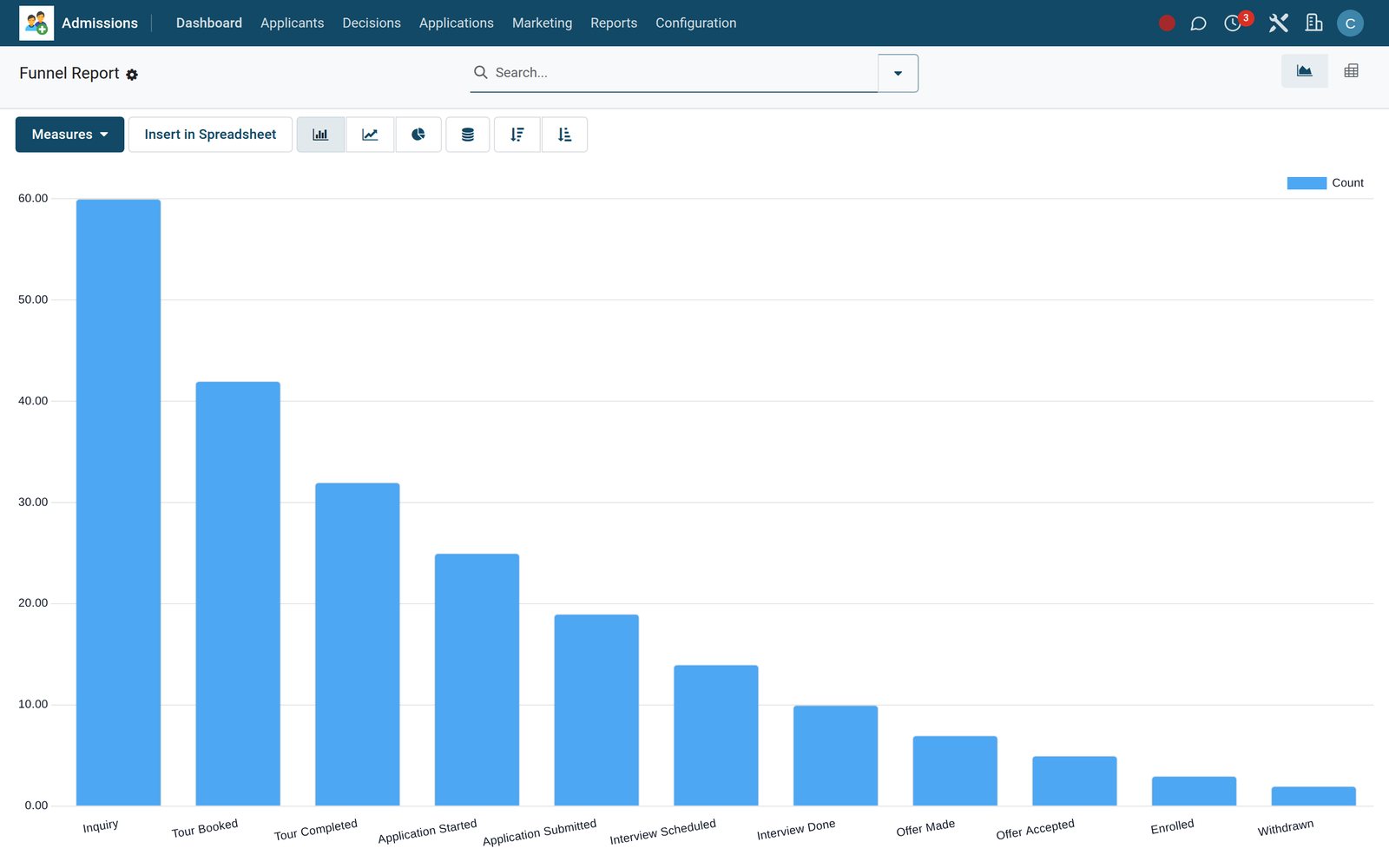
In the suite
One system replaces the paper registers and scattered spreadsheets: every student, guardian, mark, fee and bus route lives in a single database, visible to exactly the people who need it.
EduPrime CoreAcademicsFees & BillingAssessment EngineTimetableAdmissions Library
 School Transport
 School Clinic
 School Shop
 Virtual Classroom
 Payments & Mobile Money
 Bria Insights
 School HR & Payroll
 Boarding & Hostel
 Meals & Catering
 Facilities
 Clubs & Activities
 Discipline
 Parent Portal
 Counselling
 Early Childhood
 Science Labs
 Learner Portfolio
 Special Needs
 Alumni & Giving
 School Events
 SCORM Courseware
 Plagiarism Check
 CBET / CBC
 IB Programmes
 Research Management
 Continuing Education
 Placements & Careers
 Compliance & Returns
 EduPrime eLearning
 School Website
The same plan can carry any of these: one login, one database, no integrations to buy. Pick them app by app on the pricing page; every plan already includes BridgeERP Core.
 BridgeERP Core
 Accounting
 Expenses
 Invoicing
 Sign
Sign Subscriptions
 Advanced Warehouse
 Inventory
 Purchase
 Repairs
 Employees
 Fleet
Fleet Frontdesk
 Payroll
 Recruitment
 Shift Planning
 Time Off
 Appointments
 Field Service
 Helpdesk
 Projects
 Timesheets
 Email Marketing
 Events
 Marketing Automation
 SMS Marketing
 Surveys
 eCommerce
 eLearning
 Live Chat
 Website Builder
 Approvals
 Discuss
 Documents
 Internet of Things
 Knowledge
 Meeting Rooms
 VoIP
VoIPQuestions
Not covered here? Contact us.
Per student, per month, per app. EduPrime Core (the student information system), EduPrime eLearning and the School Website are included at no charge. You add only the apps you use: Academics, Fees & Billing, the Assessment Engine and Timetable sit at the top rate; campus apps such as Admissions, Library, Transport, Clinic, Shop, Payments and Bria Insights below that; Hostel, Meals, Clubs, Counselling and the specialist apps lower still. BridgeERP Core is in every plan. Tick apps on the pricing page and the per-student price updates as you go.
Yes. Going live includes data import by our team, plus training and support for every campus. Inside the product, the Setup Wizard writes the institution, campuses, academic years and terms in one pass; Assign Sections (Bulk) places students; Bulk Assign Fee Structure and Generate Fee Invoices load the term's billing; the Library takes MARC21 files and fills records from an ISBN; the Shop has a bulk uniform order. Standard spreadsheet import is available on the list views.
Payments & Mobile Money ships mobile-money and card rails: M-Pesa (a Lipa Na M-Pesa STK push from the parent portal, using your own Daraja consumer key, Paybill or Till shortcode and passkey, with a sandbox/production switch), Airtel Money, and card and bank payments through Pesapal and Flutterwave. Every payment comes back through a secured, audited callback that marks the fee invoice paid, captures the receipt number and refuses duplicate or replayed callbacks. A Payment UAT scenario runner lets the bursar test the setup before the first real fee.
EduPrime runs in the browser, so most screens need a connection. Two places are built for poor connectivity: the Library's offline circulation queue takes issues and returns and syncs every 15 minutes, and the Transport driver app is a PWA that runs on the driver's phone. Parent alerts can go out by SMS and WhatsApp, so a guardian does not need data to receive them, and Delivery Health shows the status of every message sent.
Compliance & Returns ships 12 country packs with pre-built profiles, including Kenya, Uganda, Tanzania, Rwanda and Nigeria, covering regulators such as KEMIS/NEMIS, UNEB and WAEC. Returns export as CSV, multi-sheet Excel, XML, JSON or PDF, are validated (required fields, patterns, ranges, uniqueness) before submission, and sit on a deadline calendar with acknowledgments and failed runs tracked. The same app keeps the ROPA, DPIAs, parental consents, breach incidents with an hourly 72-hour deadline check, and prints the data-protection registration packet, such as Kenya's ODPC one.
One. EduPrime Core models Schools, Campuses and Departments or Faculties under one institution, with administrative areas, such as counties and sub-counties, for addressing, and Transport, Hostel and Facilities are campus-aware. Every role the suite ships — Registrar, Fees Officer, Fees Manager, HOD, Dean, Academic Manager, Admissions Officer and the rest — is a permission set enforced on every screen, report and API call, so each person sees the screens and records their role allows.
The trial is your school's own environment, provisioned instantly with no credit card. When you go live, our team loads your real students, guardians, staff and fee structures into it, trains your staff and switches on the apps in your plan; you can add or drop apps as the school grows. Inside the product, Tips of the Day guide new staff, Delivery Health shows every SMS and WhatsApp message's status, and the Payment UAT runner proves the mobile-money setup before parents use it.
Yes. Academics carries Country Education Systems and Curriculum Versions with strands, sub-strands, learning indicators and rubrics for competency-based curricula, plus KPSEA readiness. CBET / CBC adds units of competency, national standards, evidence portfolios and competency certificates. IB Programmes covers PYP, MYP and DP planners with internal assessments and CAS activities. For higher education, Academics carries course enrolments, CGPA scales, university transcripts, degree certificates, theses and papers, with Research Management and Continuing Education alongside.
From the first admission enquiry to alumni giving: admissions, academics, fees, library, transport, hostel, meals, HR and Bria AI insights in a single system — priced per student, for K-12 schools, colleges and universities.