

 Website Builder: Build your website on the system that already runs your business
Drag building blocks onto live pages, publish products, jobs and booking pages, and let every web order flow into stock, invoicing and CRM.
Free instant access. No credit card required.
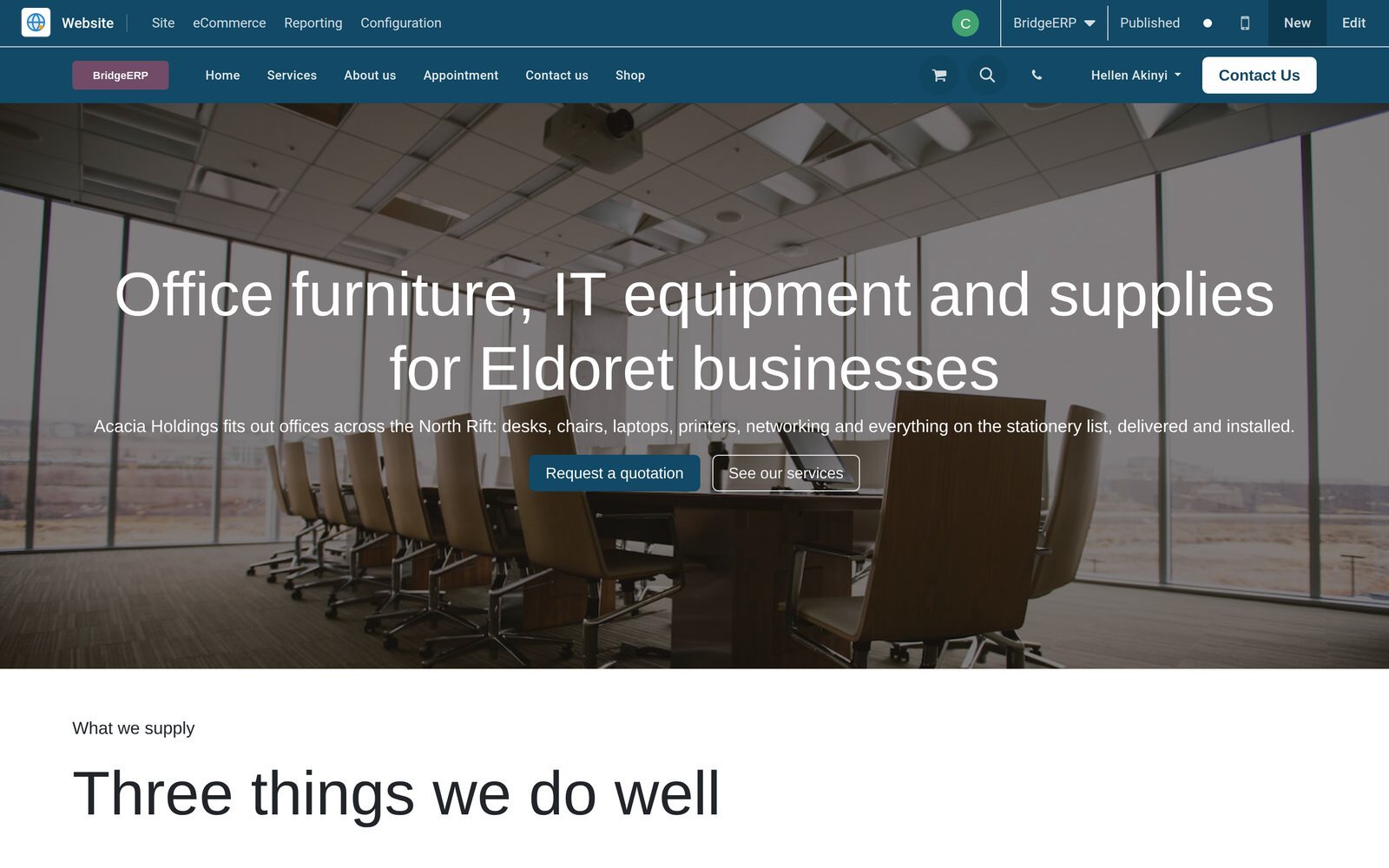
See the shop exactly as customers do, while you build it
The Website app opens your real site inside BridgeERP, with the Site, eCommerce, Reporting and Configuration menus above it and an Edit button to hand.
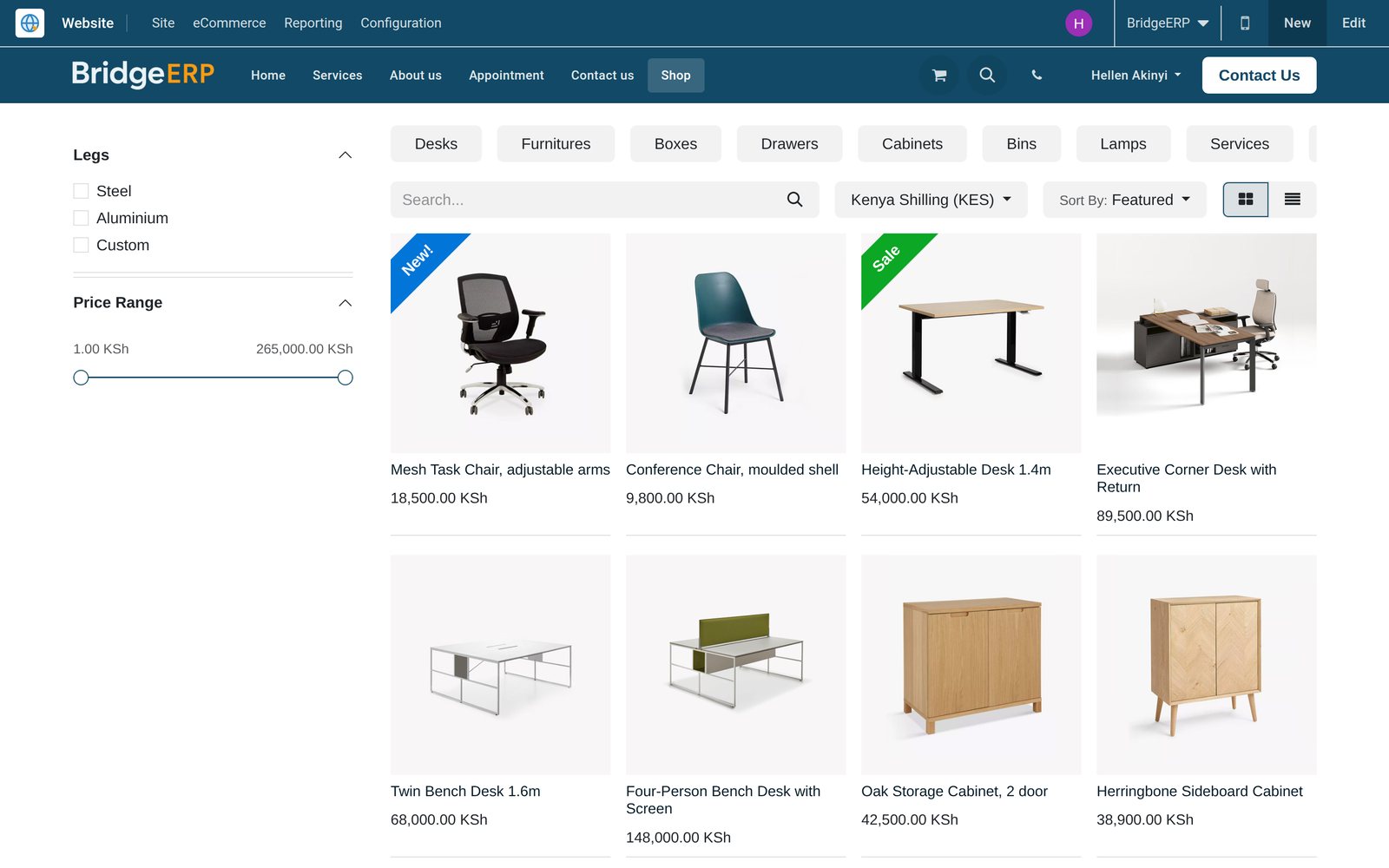
 eCommerce
Publish a product and the shop page shows it
The shop lists every published product with its photo, price and ribbon, grouped by the eCommerce categories you set under Products.
Explore eCommerce →By the numbers
The builder, counted
Counts from the product itself and from the demo database the screenshots on this page come from.
- 31
- ready-made website themes ship with the platform, each a starting design you can restyle block by block
- 17
- payment providers listed under Payment Providers, including Flutterwave, Stripe, PayPal, Adyen and wire transfer
- 96
- delivery orders on the demo created automatically from confirmed website orders, with nothing typed twice
- 403
- page views logged on the demo website, each one tied to one of 184 tracked visitors
Inside the app
Everything a website needs, already in the menu
The Website app groups its tools under Site, eCommerce, Reporting and Configuration, so each job has an obvious home.
Pages and menus
Site / Content / Pages lists every page with its URL and website, and the Menu Editor sets the navigation shown in the header.
Page tools
On any page, This page opens Properties, Optimize SEO, Edit Menu, the Link Tracker and a code editor for HTML and CSS.
Building blocks and themes
In edit mode, drag blocks onto the page, switch between grid and column layouts, and set backgrounds, shapes and colours.
Online catalogue
Products, eCommerce Categories, Attributes, Combo Choices, Product Ribbons and Product Tags decide how each item is found and shown.
Orders and carts
Orders, Unpaid Orders and Abandoned Carts follow every checkout, and Customers keeps the buyers behind them in one list.
Pricelists and loyalty
Pricelists set web prices per website, while Discount & Loyalty and Gift cards & eWallet run promo codes, coupons and gift cards.
Booking and careers pages
Appointment types and job openings publish as their own web pages from Site / Content, so bookings and applications arrive online.
Reporting
Analytics, Online Sales, Page Views, Visitors and the eCommerce dashboard sit together under a single Reporting menu for the site.
Step by step
From first page to invoiced order, in one system
Each step hands over to the next app on the same records, with no export, import or nightly sync.
- Step 1
Set up the site
In Website / Configuration / Settings, name the site, set its domain and logo, and choose the languages it will speak.
Website Builder - Step 2
Design the pages
Open a page, click Edit and drag building blocks into place; the mobile icon previews how each section stacks on a phone.
Website Builder - Step 3
Publish the catalogue
Mark a product as published, file it in an eCommerce category and it appears in the shop with its price and photo.
eCommerce - Step 4
Capture the visitor
Contact-form submissions arrive as CRM leads with Website as their medium, and Live Chat lets an operator answer while the visitor browses.
CRM - Step 5
Take the order
Checkout creates the sales order and collects payment through the provider you enabled; the order then lands under Website / eCommerce / Orders.
eCommerce - Step 6
Deliver and invoice
Confirmed web orders raise delivery orders in Inventory and invoices in Accounting; on the demo, 78 web orders already carry an invoice.
Accounting
Keep every page, job and booking page in order
Site / Content lists what is live on the website, record by record, with its web address and publication state.
- Website Builder
Every page and its address in one list
Pages lists each page with its URL and website; Properties then decides whether it is published, indexed by search engines or restricted.
Explore Website Builder →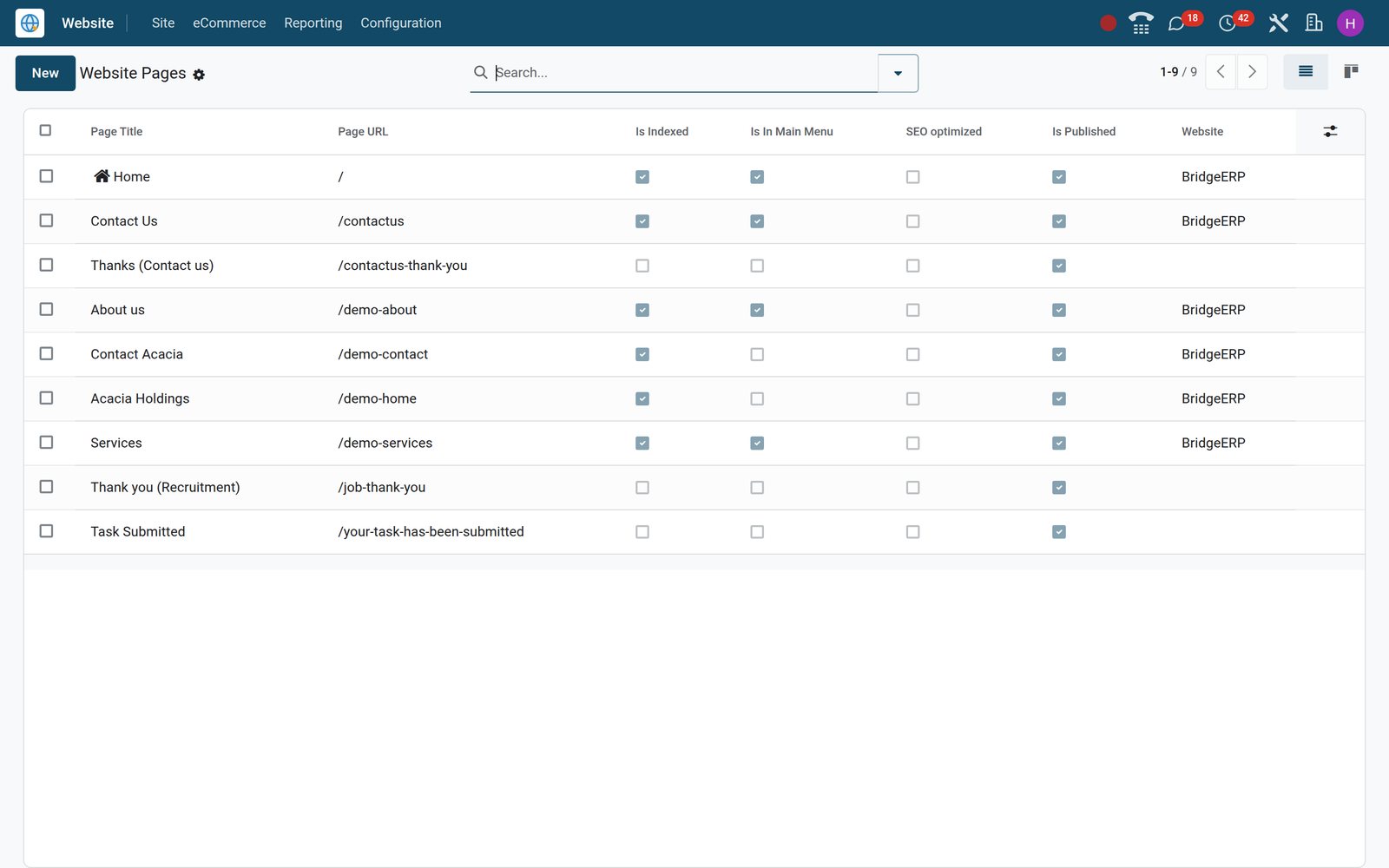
 Recruitment
Job openings become careers pages
Site / Content / Jobs lists every opening from Recruitment with its web page; publish one and the job goes live with an application form.
Explore Recruitment →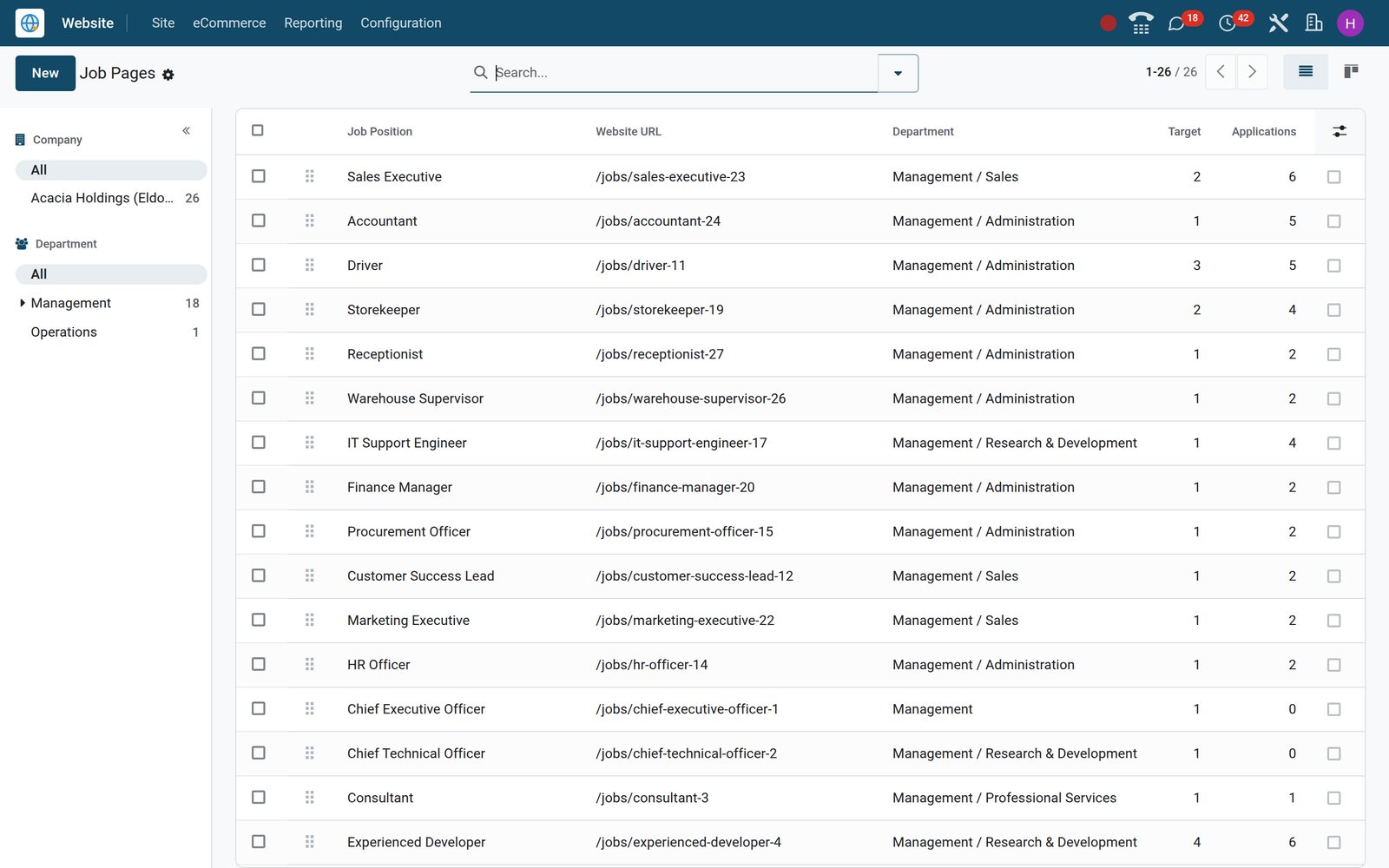
Sell from the catalogue your warehouse already counts
Products, prices and stock exist once; the website, the sales team and the point of sale all read the same records.
- eCommerce
Products ready for the web
Website / eCommerce / Products shows each item with photo and price; ribbons, alternative products and accessories are set on the product form.
Explore eCommerce →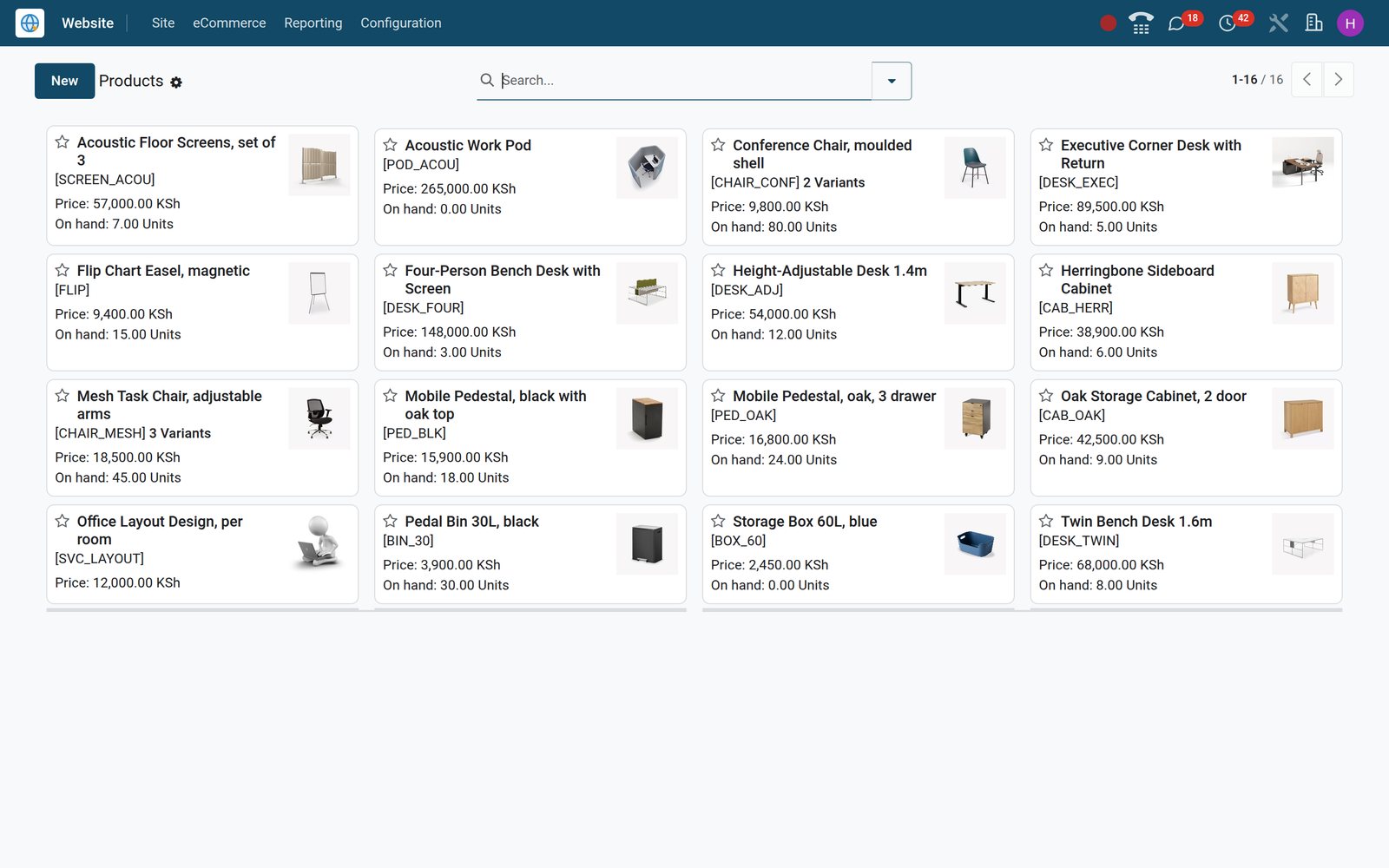
- eCommerce
Web orders beside every other sale
Orders lists confirmed web orders with customer, date, total and status; open one to reach its delivery, invoice and payment transaction.
Explore eCommerce →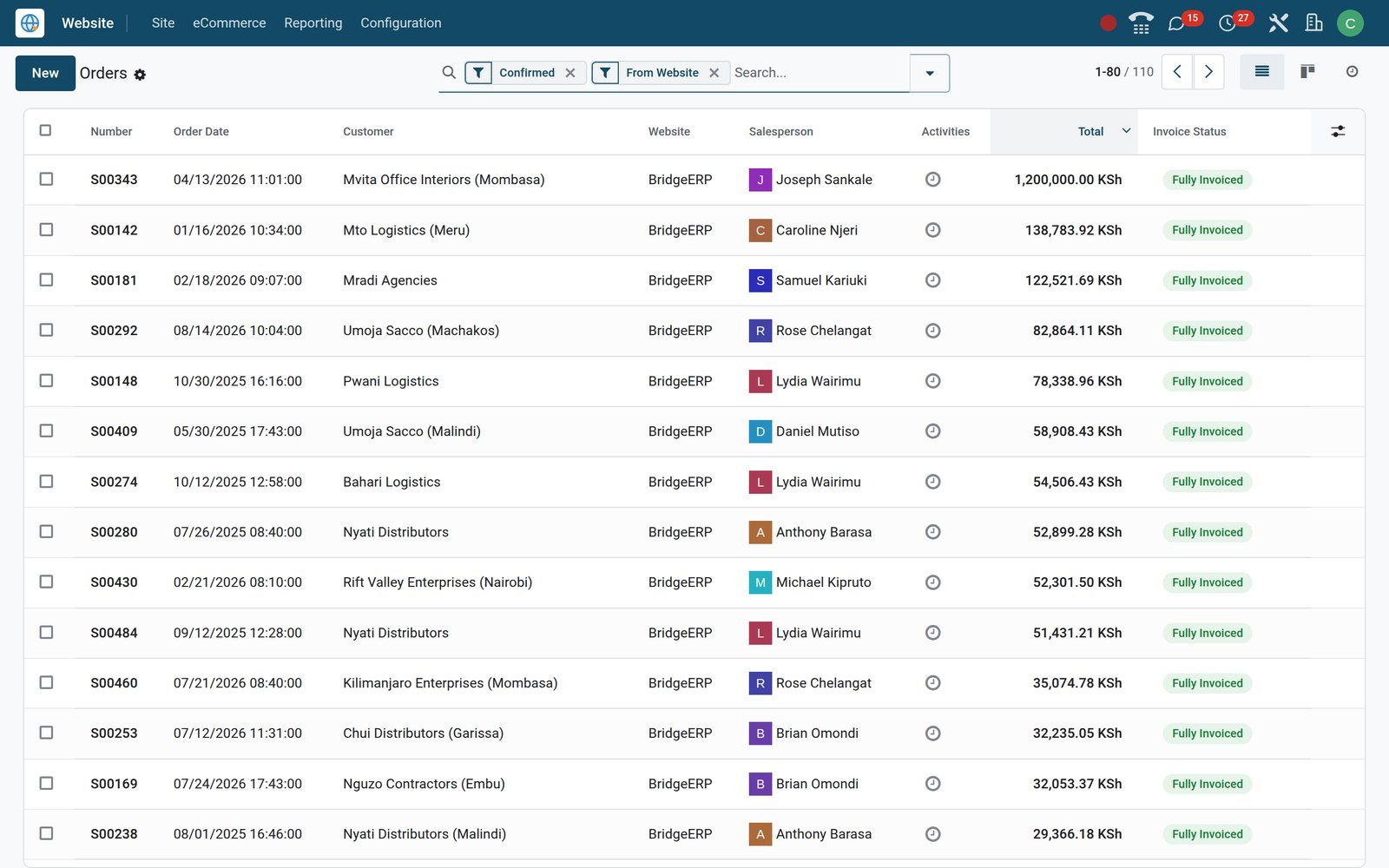
Know who is browsing and what they read
Every visit is logged against a visitor record, so marketing and sales look at the same trail.
- Website Builder
Visitors with their visits and pages
Visitors shows each person or anonymous visitor with country, visit count, pages viewed and last connection; known contacts can be emailed or sent an SMS.
Explore Website Builder →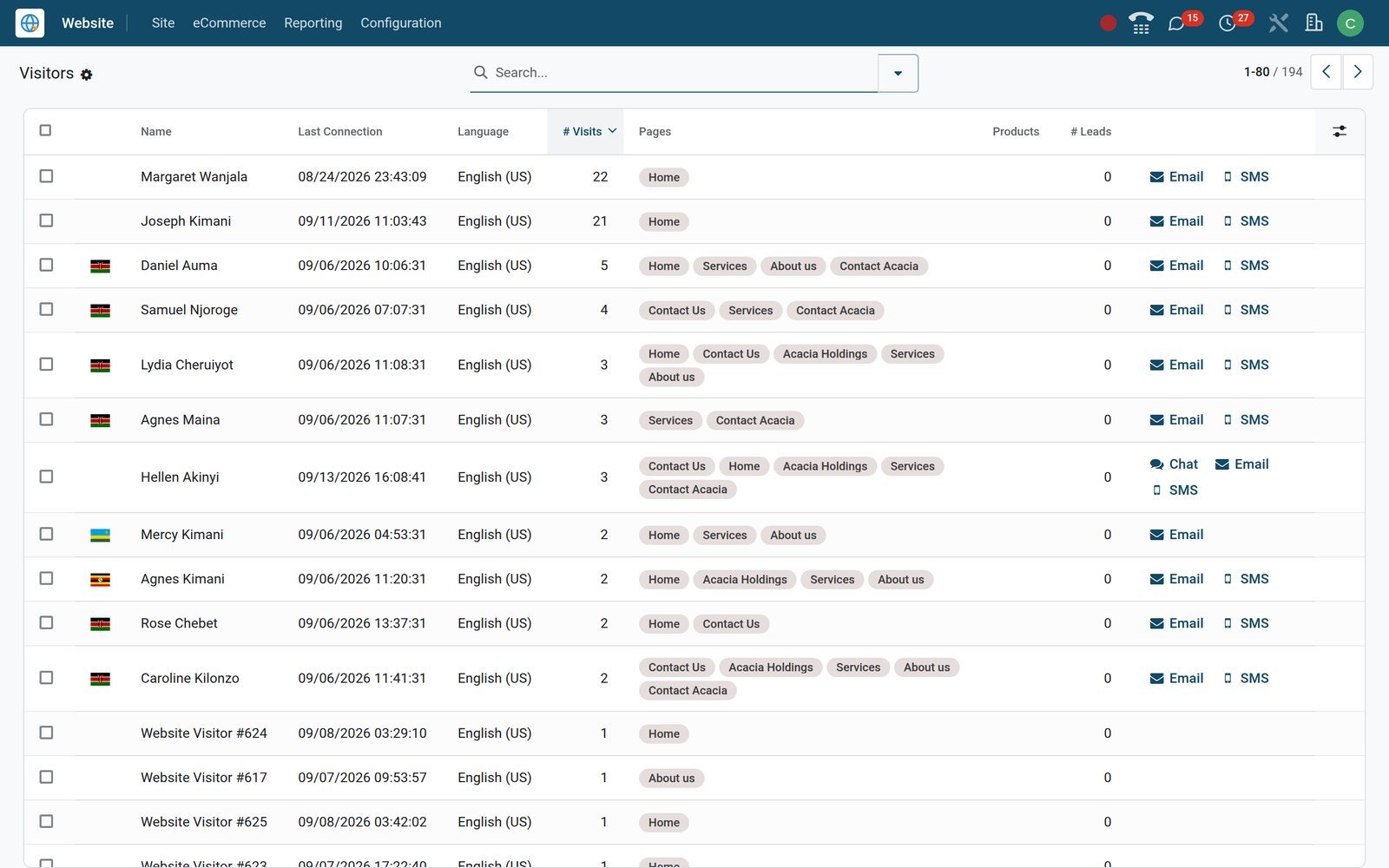
- Website Builder
A page-by-page trail
Page Views records every page opened, with the visitor, the URL and the exact time, so you can see which pages people actually read.
Explore Website Builder →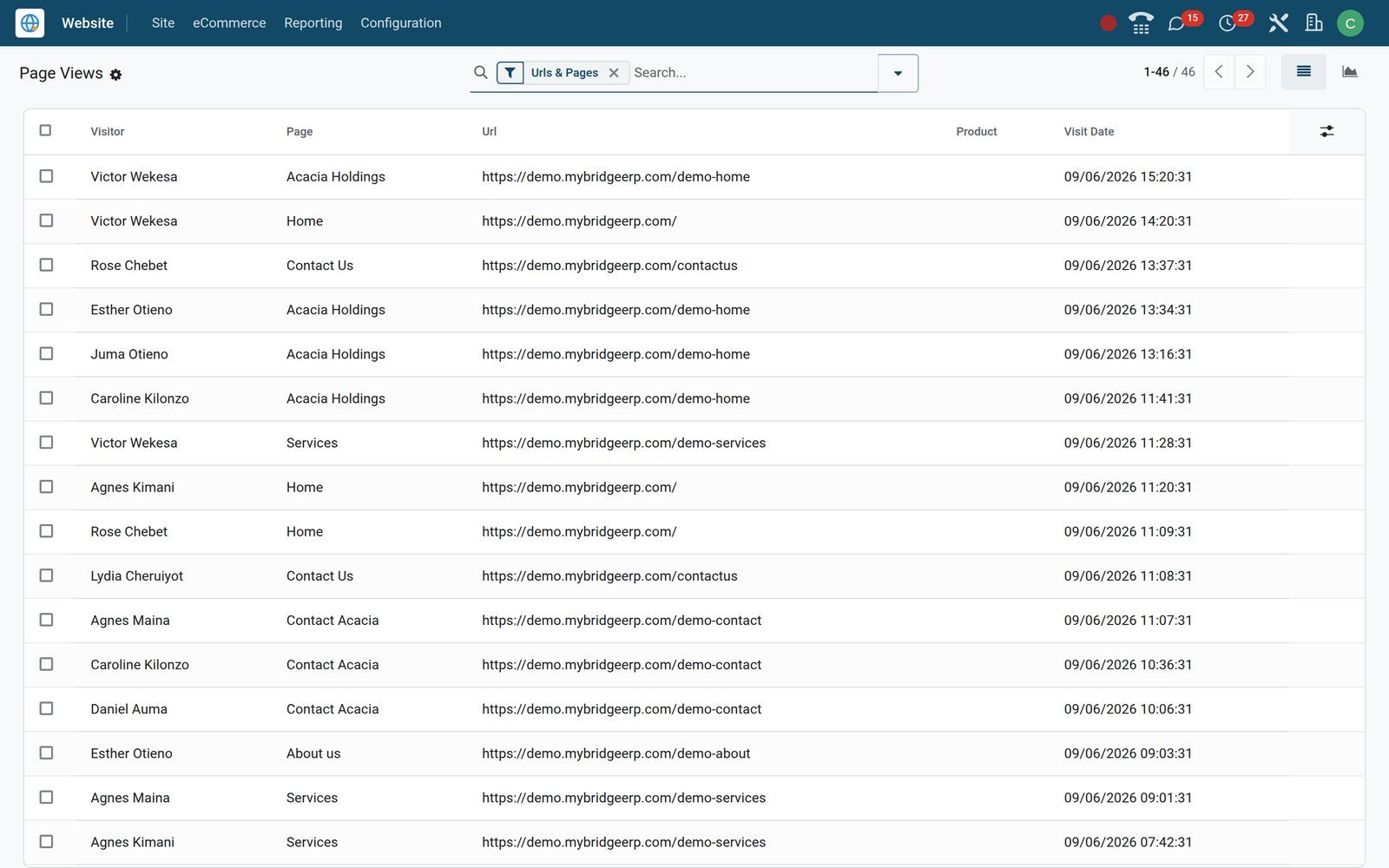
Measure online sales and chase the carts that stalled
Online Sales analyses web revenue over time and by product, while Abandoned Carts keeps unfinished checkouts in front of you.
- eCommerce
Online Sales by month, product or country
Online Sales charts web revenue month by month; switch to the pivot to split the same figures by product, category or customer country.
Explore eCommerce →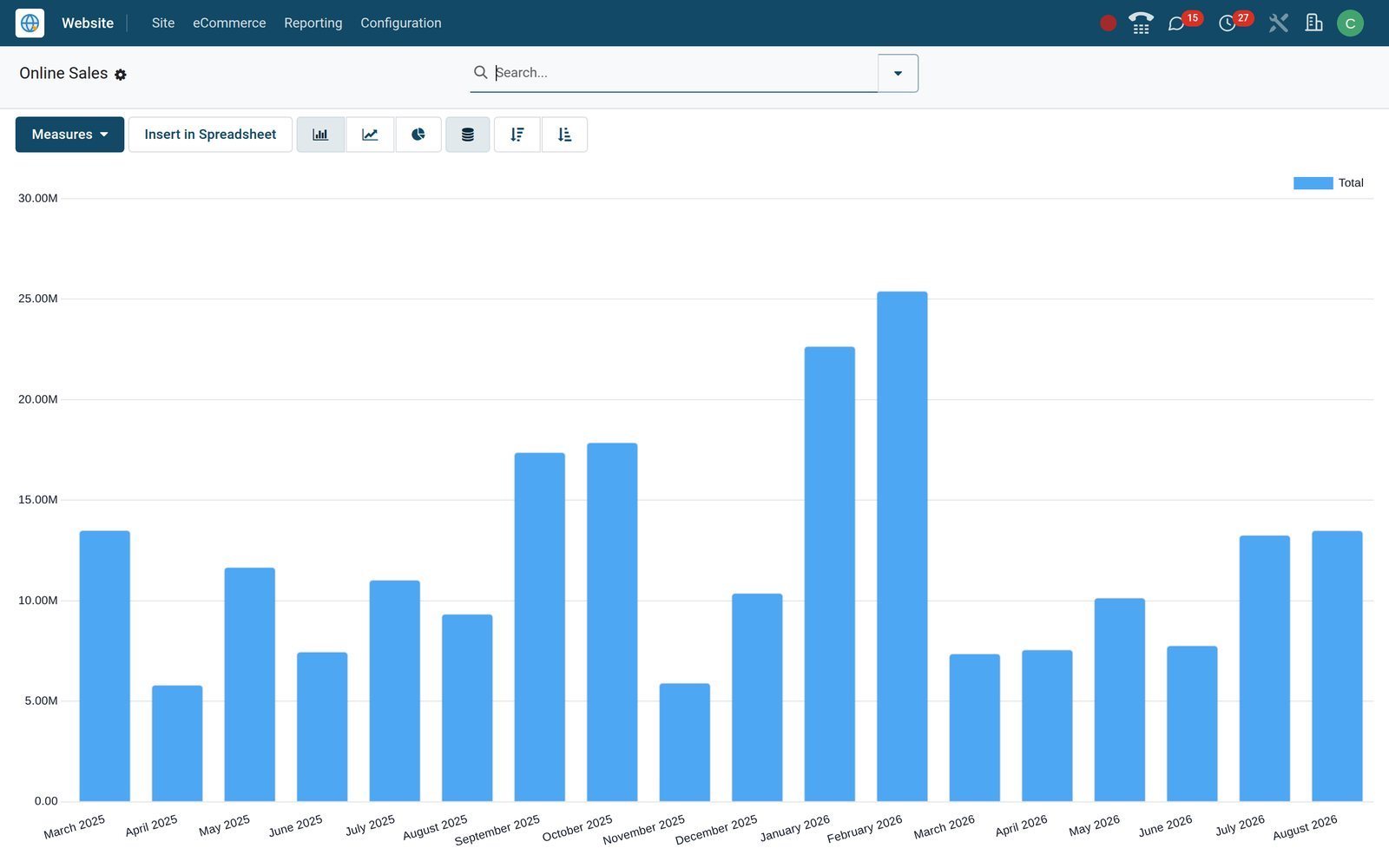
- eCommerce
Carts that stopped at checkout
Abandoned Carts lists unfinished web orders with customer and amount; switch on recovery emails per website and choose how long to wait.
Explore eCommerce →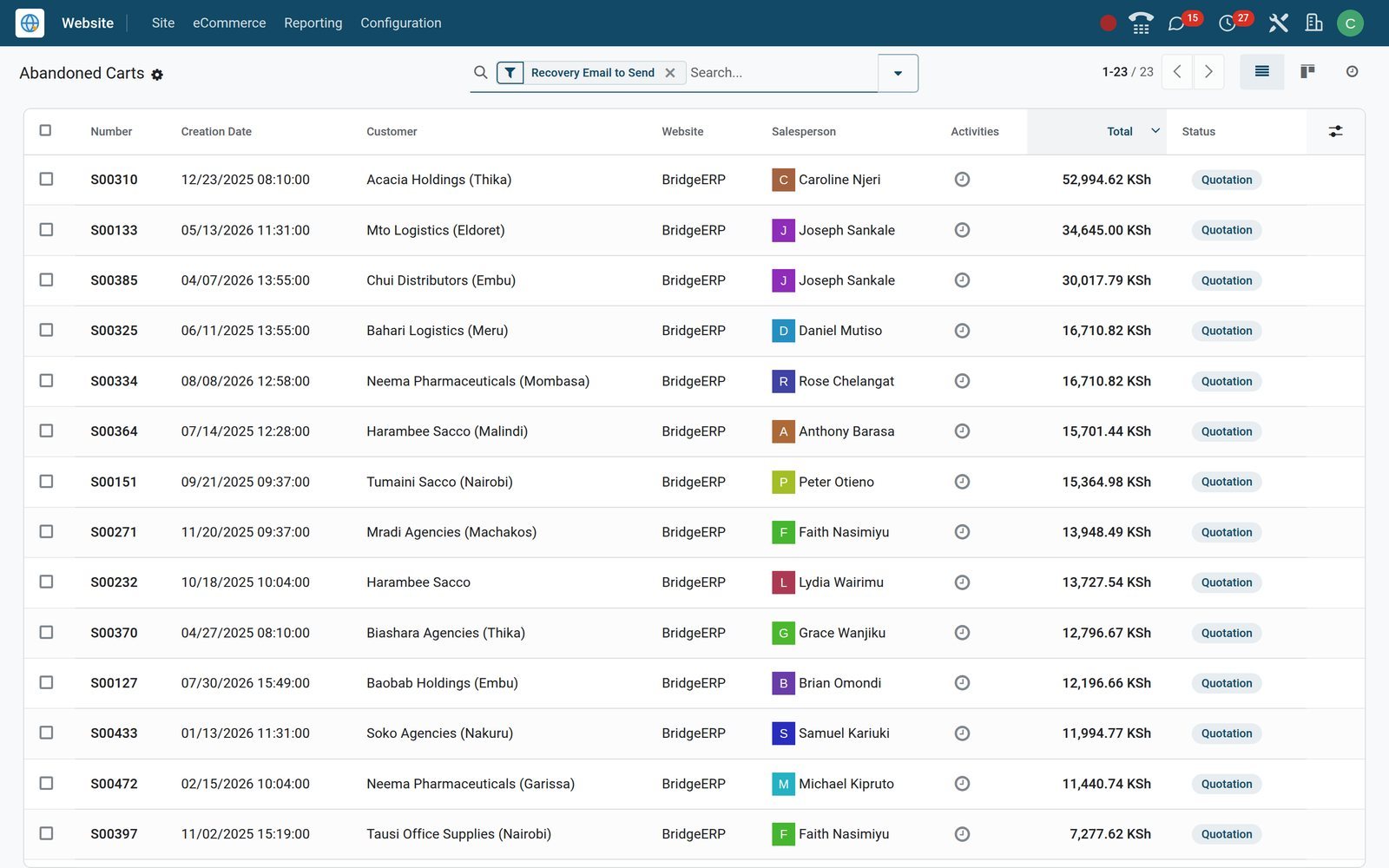
What sets it apart
What sets it apart
Details that matter once the site is live and the orders start coming in.
One database, no sync
A web order, its delivery, its invoice and the customer are the same records Sales, Inventory and Accounting already use.
Pages with rules
Properties can schedule a publishing date, hide a page from search engines, password-protect it or limit it to chosen user groups.
Search-ready pages
Optimize SEO sets each page's title, description, keywords and social-sharing image, and every website keeps its own robots.txt file.
Code when you want it
A built-in HTML and CSS editor changes a page's markup and styles, and each website can carry its own custom head and footer code.
Several sites, one back office
Run more than one website from the same database, each with its own domain, pricelists and languages; the demo runs a second site.
Forms that keep bots out
Google reCAPTCHA is installed on the demo to screen website forms, and each site can show its own cookie consent bar.
Who uses it
What each person sees
Access follows the Website user groups and the apps each person already works in.
Owner
Opens Online Sales and the eCommerce dashboard in Dashboards to follow web revenue without waiting for anyone's spreadsheet.
Web designer
The Editor and Designer group edits every page, menu and theme, and can open the HTML and CSS editor for fine control.
Content editor
The Restricted Editor group lets staff edit the web content of records they already manage, such as products, without full design rights.
Sales rep
Receives contact-form submissions as CRM leads and turns live-chat conversations into leads without retyping the visitor's details.
Shop manager
Works from Orders, Unpaid Orders and Abandoned Carts, and keeps delivery methods and payment providers up to date.
Accountant
Sees invoices raised from web orders in Accounting, posted to the same journals and taxes as every other sale.
In your country
Set up for how businesses sell online, at home and abroad
Currencies, gateways, tax reporting, delivery and languages for selling in any country, as the demo's Kenyan and Ethiopian companies do.
Prices in several currencies
Pricelists can be tied to a website and made selectable in the shop, and the demo carries both KES and USD pricelists.
Card, gateway and bank-transfer payments
Payment Providers lists Flutterwave beside Stripe, PayPal and Adyen, plus wire transfer; install one, enter its credentials and publish it.
E-invoicing on the invoice
Invoices raised from web orders follow the country's e-invoicing; on the demo, a Kenyan company reports them to KRA eTIMS through the OSCU connector.
Delivery your way
Set fixed-price or rule-based delivery methods with free-over thresholds, or switch on DHL, FedEx, UPS, Sendcloud, EasyPost or Shiprocket in Settings.
Languages your customers read
Each website picks its own languages from 92 available, including French, Swahili and Amharic, and sets a default for new visitors.
Phones first
The mobile icon at the top of the editor previews a page on a phone, where columns stack one per line unless you change them.
Reports and control
Reports that show whether the website is working
The Reporting menu and the Dashboards app read live records, not a copy exported overnight.
Online Sales
Pivot and graph views of web revenue by date, product, category and customer country, limited to orders placed on a website.
Visitors
Each visitor's country, language, visit count and last connection, linked to the contact record when a signed-in customer visits.
Page Views
A time-stamped log of every page each visitor opened, which you can filter or group by page, URL or visitor.
eCommerce dashboard
A ready-made eCommerce dashboard in the Dashboards app brings web orders and revenue together on one spreadsheet-style screen.
Web analytics
Reporting / Analytics opens your Plausible dashboard once its shared key is saved in Settings, and a Google Analytics key can be added too.
Link Tracker
Shorten any URL, tag it with a campaign, medium and source, and count the clicks; 313 are recorded on the demo.
Unpaid Orders
Web quotations sent to customers but not yet paid, gathered in one list so someone can follow each of them up.
Leads from the website
CRM leads created from website forms carry Website as their medium, so web-sourced pipeline can be reported on its own.
Works with
Runs with the rest of BridgeERP
The website reads and writes the same records as these apps, so nothing is copied between systems.
- eCommerceShop pages, cart and checkout built on the same product and customer records.
 SalesEvery web checkout becomes a sales order the team can follow up, confirm or amend.
 CRMContact-form submissions arrive as leads with the website recorded as their medium.
 Live ChatOperators chat with visitors on any page and turn useful conversations into CRM leads.
 AppointmentsAppointment types publish as booking pages where visitors choose a free slot themselves.
- RecruitmentJob openings publish as careers pages, and applications land in the recruitment pipeline.
 InventoryConfirmed web orders create delivery orders, and product pages can show stock availability.
 AccountingInvoices from web orders post to the same journals, taxes and bank reconciliation.
 SubscriptionsSubscription products sell through the shop and renew on the recurring plan chosen.
 Point of SaleThe shop counter and the website share the same products, pricelists and loyalty programmes.
 DiscussLive-chat conversations open in Discuss next to the rest of the team's messages.
 InvoicingCustomers find the invoices for their web orders in their online portal account.
Getting started
From empty database to published site
The set-up steps below use standard screens, so your team can repeat them for a second site.
Choose a theme
Start from one of 31 ready-made themes, then adjust colours, backgrounds and shapes block by block in the editor.
Fill in the site settings
Website / Configuration / Settings holds the site name, domain, logo, default language and cookie bar on one screen.
Import your catalogue
Load products and customers from an Excel or CSV file with Import records, test the column mapping, then run the import.
Carry data over from your old system
Keep the IDs from your previous software as External IDs, so re-importing a file updates records instead of duplicating them.
Switch on what you need
Website / Configuration / Apps adds features such as live chat, appointments or subscriptions when the business is ready for them.
Connect payments and delivery
Enable a payment provider and your delivery methods before launch; both sit under Website / Configuration / eCommerce.
Questions
Questions about Website Builder
Not covered here? Contact us.
Do I need to know code to build the site?
No. Pages are built by dragging building blocks into place in edit mode. The HTML and CSS editor is there only if you want finer control.
Can I run more than one website from one account?
Yes. Several websites can share one database, each with its own domain, pages, pricelists and languages. The demo database runs a second site alongside the main one.
Which payment options can my customers use?
Payment Providers lists gateways such as Flutterwave, Stripe, Adyen and PayPal, plus wire transfer. Each is installed, configured with your credentials and published from its own card.
Do web orders update stock and accounting automatically?
Yes. A confirmed web order creates its delivery order in Inventory, and invoicing follows the same rules as any other sales order in Accounting.
Will the site work on mobile phones?
Pages are responsive. On a phone, columns stack one per line by default, and the editor's mobile preview lets you check and adjust each section.
Can I sell in more than one language or currency?
Yes. Each website chooses its languages, and pricelists tied to a website can carry their own currency, such as US dollars or euros.
How do I see who visits the site?
Visitors and Page Views under Reporting log each visitor's visits and pages. Plausible or Google Analytics can also be connected for traffic charts.
Can I move my existing products and customers across?
Yes. Import records reads Excel or CSV files, lets you test the column mapping before importing, and uses External IDs to update rather than duplicate records.
Where Website Builder fits
Nothing here is a silo: the apps around it read and write the same records, so the hand-offs happen on their own.
What feeds it, and what it feeds — these are real app connections, not a diagram.
- Customers & sales
Website Builder
Drag-and-drop site builder with blog, forms, SEO and multi-language.
Website Builder →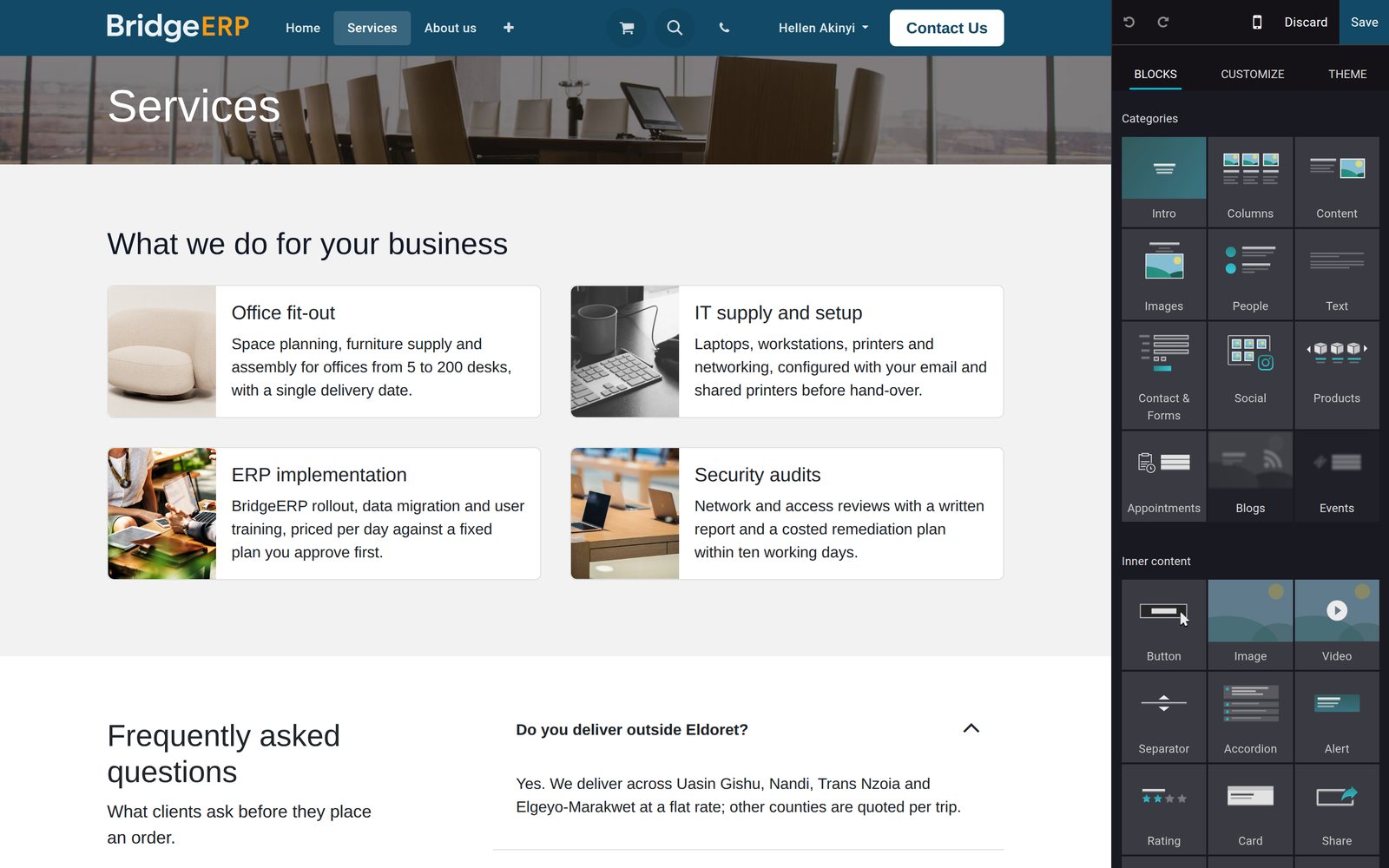
Put Website Builder to work
Add it to your plan and pay only for what you use, or see it running on your own demo first.