

 SMS Marketing: Reach every customer's phone with one message
BridgeERP SMS Marketing sends text campaigns to your lists and contacts, shortens and tracks links, respects opt-outs and reports what was delivered.
Free instant access. No credit card required.
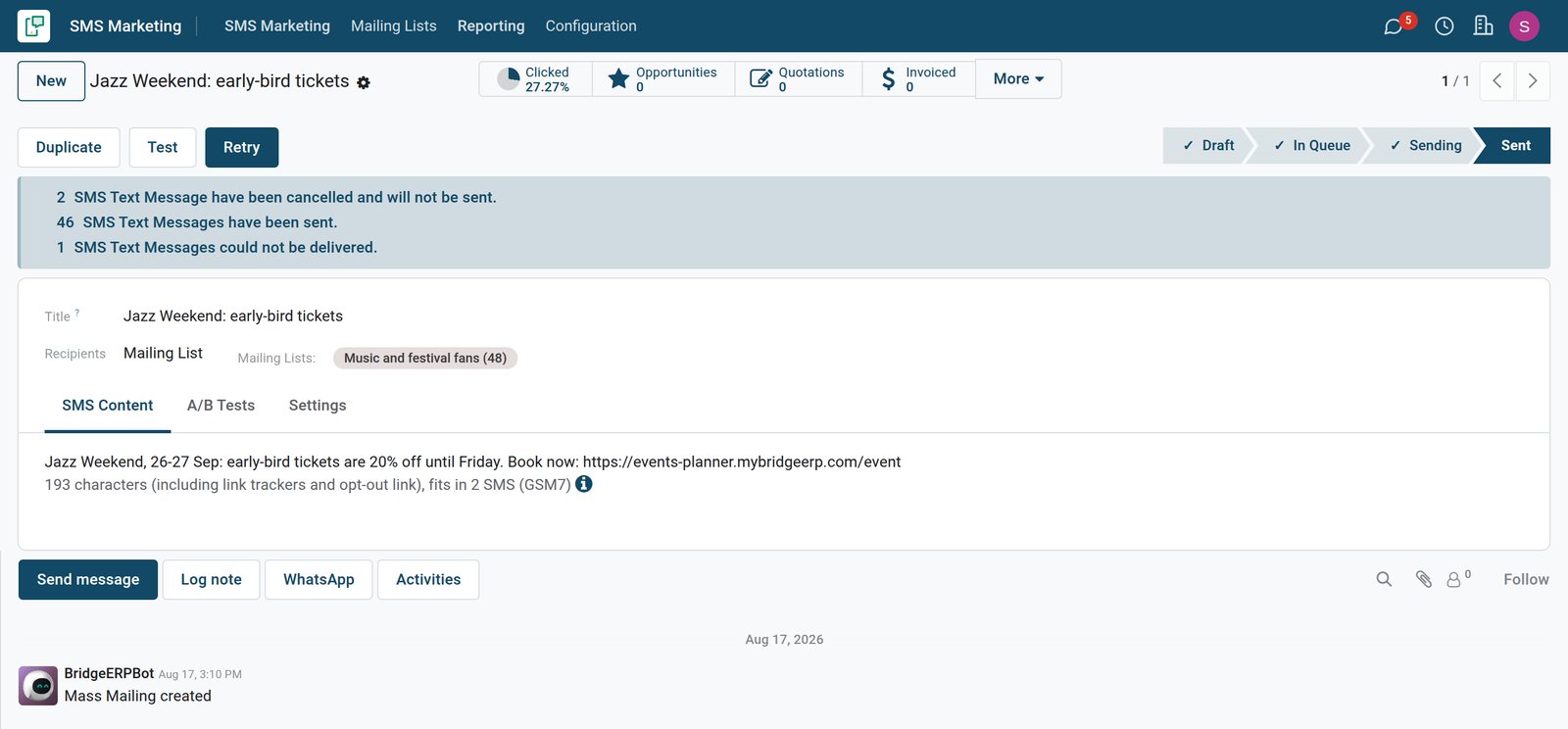
Lists of people who want your texts
Mailing lists keep subscribers with their mobile numbers, ready for the next campaign.
 SMS Marketing
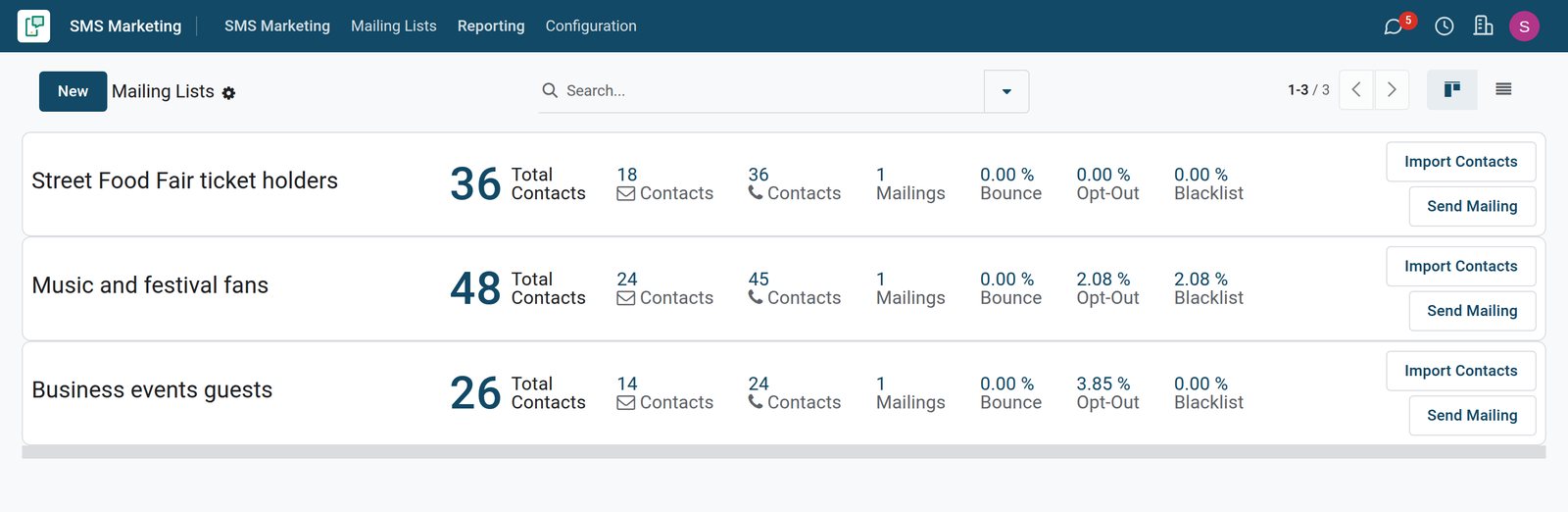
Mailing lists with their SMS contacts
Each list shows its contacts by email and by phone, its mailings, and its bounce, opt-out and blacklist rates.
Explore SMS Marketing →By the numbers
What ships inside SMS Marketing
Counted in the product and on the demo database.
- 10
- reasons a text can fail, recorded per number, from a missing number to an opt-out
- 6
- ready SMS templates on the demo for event registrations, reminders, deliveries and POS orders
- 48
- contacts on the demo's music and festival fans list; 45 of them can receive its texts
Inside the app
What is inside
The parts of SMS Marketing, grouped by what they do for the team.
Bulk text campaigns
Send one message to a mailing list, or to contacts, leads or event attendees picked with a filter.
Mailing lists
Keep lists of people who asked for your news, with their mobile number and subscription.
Opt-out and blacklist
Add an opt-out link to a message, and never text numbers on the blacklist again.
Tracked links
Links in a message are shortened and counted, so you see who clicked from their phone.
Send now or later
Send a campaign straight away, or schedule it for the day and hour customers read messages.
Delivery per number
Each number shows whether the text was sent, delivered, bounced or failed, and why.
SMS templates
Reuse texts for event registrations and reminders, delivery notices and POS receipts.
Campaigns
Group text and email mailings under one campaign to compare their results.
Step by step
From list to results
How a text campaign runs in BridgeERP, and which app does each step.
- Step 1
Build the list
Import contacts into a mailing list, or filter customers, leads or attendees.
SMS Marketing - Step 2
Write
Write a short text with a link, and add the opt-out link where the law asks for it.
SMS Marketing - Step 3
Send
Send now or schedule the campaign; blacklisted and duplicate numbers are skipped.
SMS Marketing - Step 4
Track
Delivered, bounced and clicked texts are counted per campaign and per number.
SMS Marketing - Step 5
Follow up
People who clicked become leads or attendees, followed up by the sales or events team.
CRM

See what reached the phones
Reporting counts the texts sent, delivered, clicked and bounced for each campaign.
 SMS Marketing
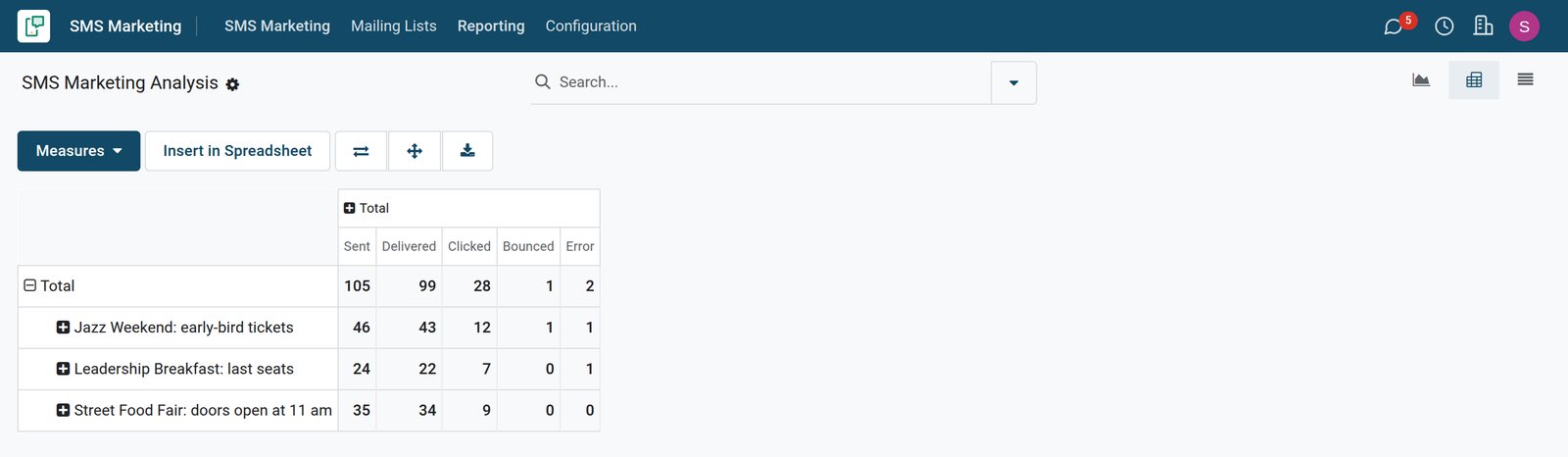
Delivery and clicks per campaign
The report compares the three campaigns sent since August on texts sent, delivered, clicked, bounced and in error.
Explore SMS Marketing →Every number, and what became of its text
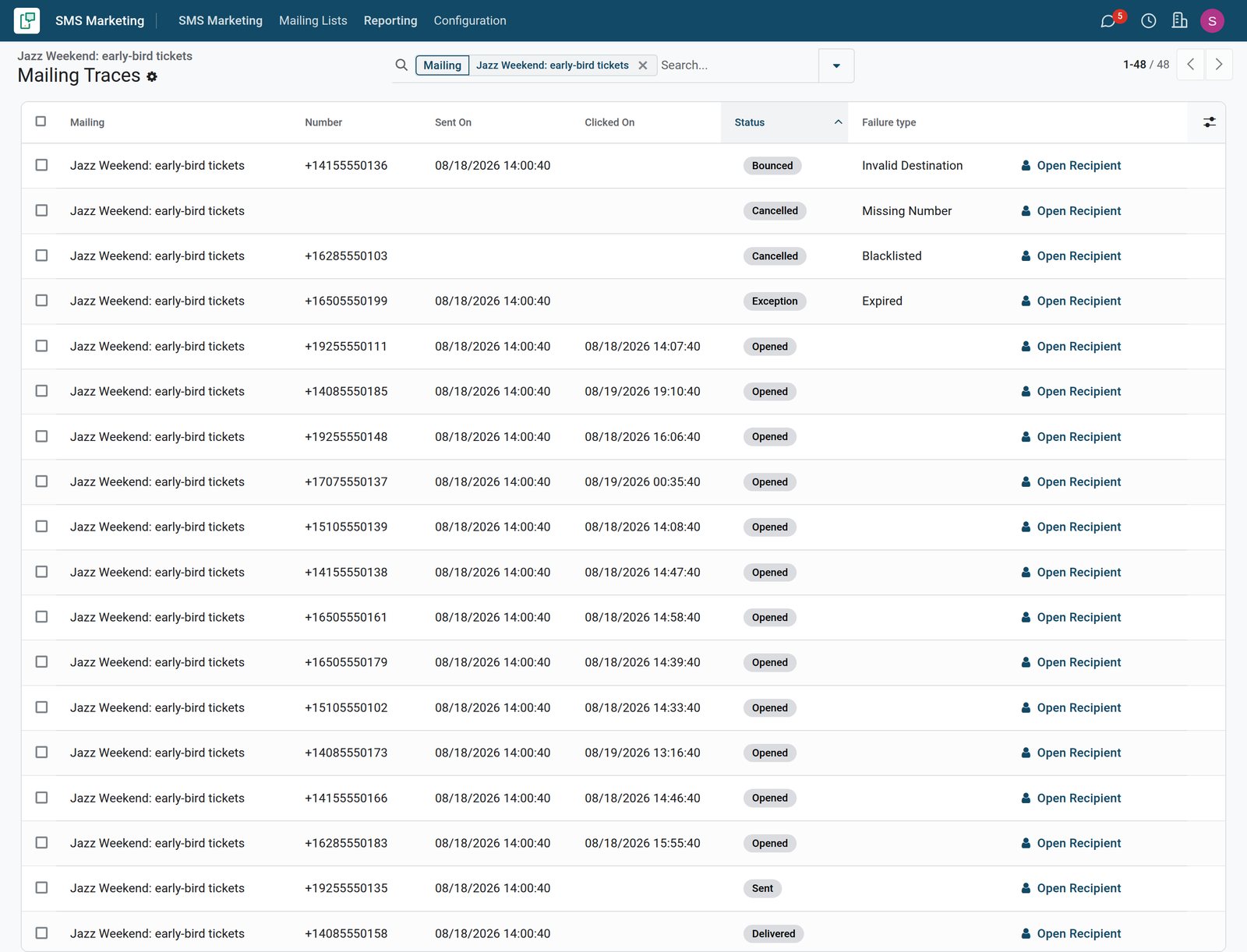
Each campaign keeps one line per recipient: the number, when the text left, when its link was clicked and why a text failed.
 SMS Marketing
Delivery per number
The Jazz Weekend campaign's 48 recipients: an invalid number bounced, a blacklisted and a missing number were cancelled, one text expired and twelve people clicked.
Explore SMS Marketing →Who uses it
Who uses it, and what they see
SMS Marketing is used by the people who talk to customers in numbers.
Marketing officer
Writes and schedules campaigns, and reads delivery and clicks the day after.
Events team
Texts attendees automatically when they register and again as a reminder before the event starts.
Sales team
Follows up the customers who clicked a promotion link, while their interest is still fresh.
Customer
Receives short texts with a link, and can opt out when the message offers it.
Works with
Runs with the rest of BridgeERP
Apps that send or use texts on the demo.


In your country
Built for customers on any phone
What changes when the message has to reach every phone, not only smartphones.
Every phone, no data needed
A text reaches basic phones without internet, where email and apps may never be opened.
Numbers in one format
Mobile numbers are cleaned into the international format, so duplicates and bad numbers are caught.
Opt-outs respected
Numbers that opted out go to the blacklist and are skipped in every later campaign.
Getting started
Getting started
How a team sends its first text campaign.
Import your list
Put the numbers of customers who agreed to hear from you into one mailing list.
Keep it short
One offer, one link and your name, inside a single text where possible.
Pick the hour
Schedule the send for the time your customers usually read their messages.
Try it on the demo
Open the three event campaigns on the demo, with their mailing lists, delivery for every number and the links people clicked.
Questions
Questions about SMS Marketing
Not covered here? Contact us.
Can I send texts to a mailing list?
Yes. Choose one or more mailing lists, or filter contacts, leads or event attendees.
Can I schedule a campaign?
Yes. Send it now or set the date and time it goes out.
Do people who opt out get texts again?
No. Opted-out numbers are kept on a blacklist and skipped in later campaigns.
Can I see which texts were delivered?
Yes. Each number shows whether its text was sent, delivered, bounced or failed, with the reason.
Are links tracked?
Yes. Links are shortened and their clicks are counted for the campaign.
Can other apps send texts?
Yes. Templates send texts for event registrations and reminders, deliveries and POS orders.
Put SMS Marketing to work
Add it to your plan and pay only for what you use, or see it running on your own demo first.