

 Time Off: See who is out next week and clear the requests still waiting, from one team view
Employees request from a balance dashboard or a phone, managers approve from a team gantt, and HR writes the rules once: leave types, accrual plans, public holidays and the work entries payroll reads.
Free instant access. No credit card required.
What an employee sees on the first day
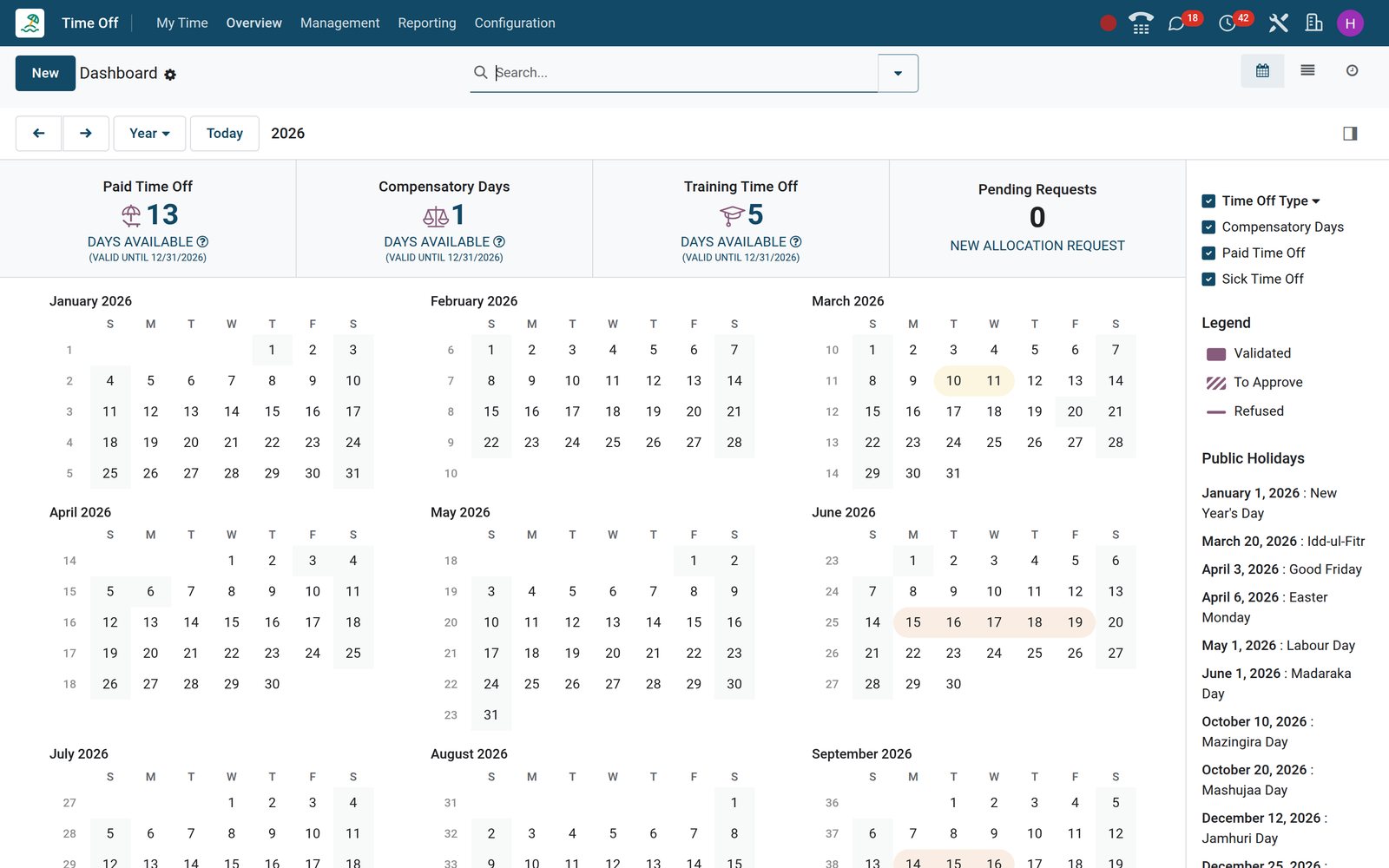
The My Time menu is the whole employee experience: a dashboard of balances, a calendar of their own leave and the public holidays, and a request form short enough to fill in on a phone.
 Time Off
Balances first, then the month
My Time > Dashboard shows a card per leave type with the days still available, above a month calendar with weekends, public holidays and approved leave shaded.
Explore Time Off →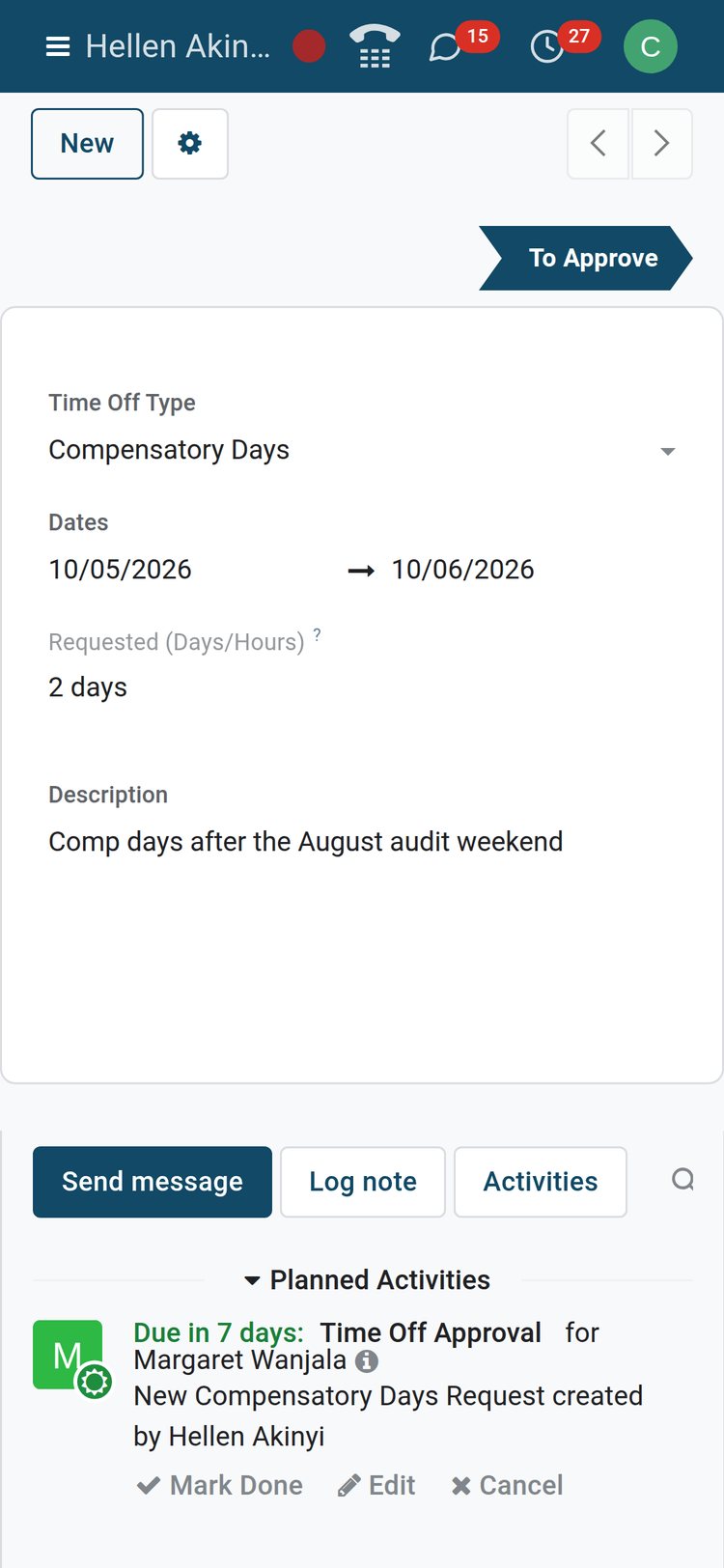 Time Off
A request from a phone
Pick the type, the dates and a line of context. Duration follows the working schedule; half days and custom hours appear only when the type allows them.
Explore Time Off →By the numbers
What the app ships with
Counts of the choices built into the Time Off configuration screens, the same on every installation before any customisation.
- 4
- approval modes per leave type: no validation, Time Off Officer, the employee's approver, or approver then officer
- 3
- units a request can be taken in: whole days, half days or custom hours
- 7
- accrual frequencies for earned leave, from hourly and daily to twice a year and yearly
- 3
- carry-over rules for unused accrued days: reset to zero, carry everything over, or carry over up to a maximum
Inside the app
What is inside
The menus of the Time Off app on the demo and what each one is for.
My Time
Dashboard, My Time Off and My Allocations: the employee's balances, every request they have made with its status, and the allocations behind those balances.
Overview
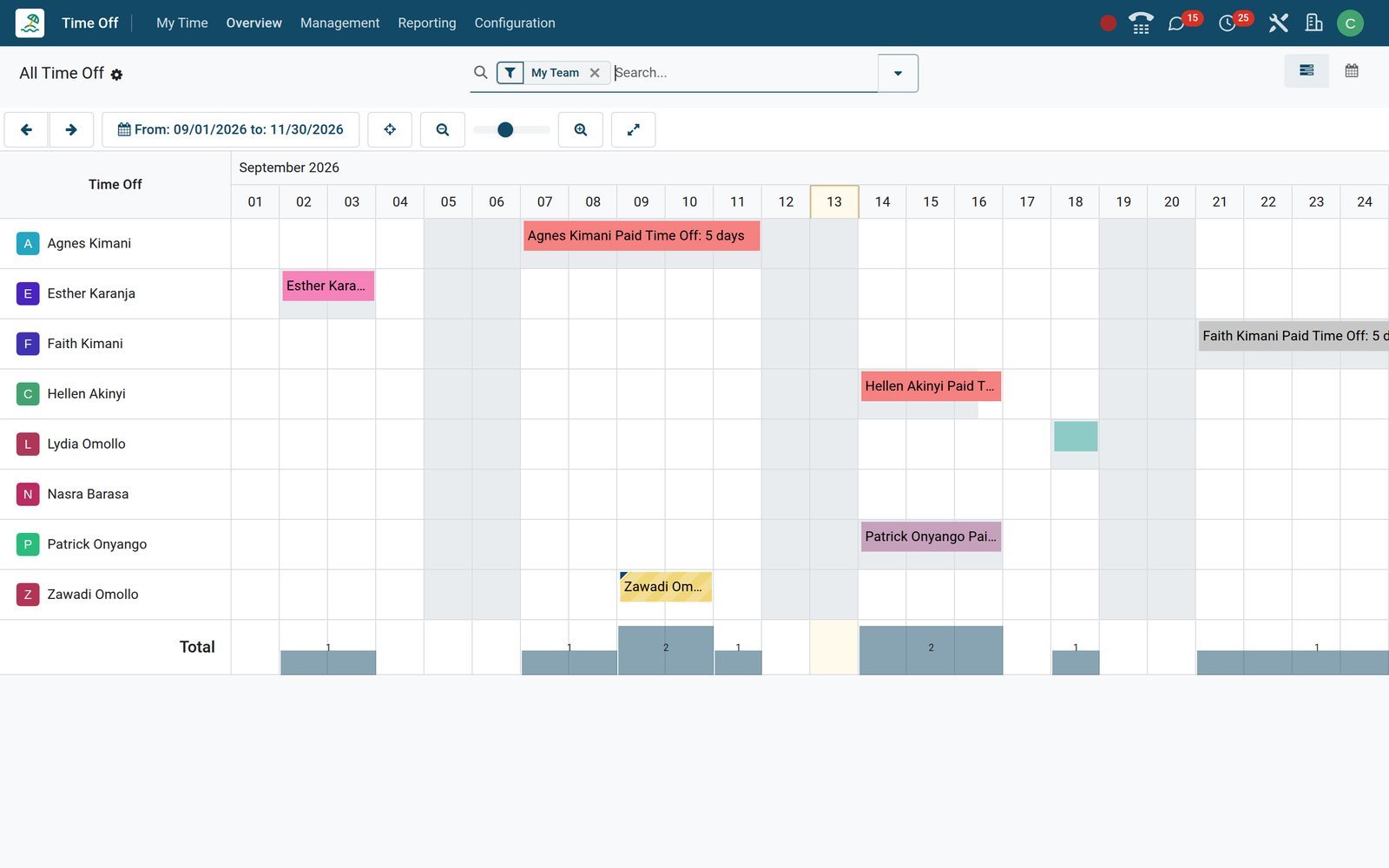
A gantt of the team by week, month or year, one row per employee, hatched bars for requests still waiting and a popover with Approve and Refuse.
Management > Time Off
The approver's inbox: requests waiting for you this year, Approve, Validate and Refuse on each row, and list, cards, gantt, calendar and activity views.
Management > Allocations
Days granted to people: regular allocations with a validity period, accrual allocations tied to a plan, and extra-day requests from employees awaiting a decision.
Time Off Types
Seven types on the demo, Paid, Sick, Unpaid, Compensatory Days, Extra Hours, Training and Parental, each with its own approval, allocation, unit and payroll rules.
Accrual Plans
Milestone rules that earn leave over time: a start delay, a frequency, days or hours per period, a cap and a carry-over rule for each milestone.
Public Holidays and Mandatory Days
Company days off that shorten a request automatically, and mandatory days when leave is blocked, for the whole company or for selected departments.
Reporting
by Employee, by Type and the Balance report: pivots and graphs of allocated, planned, taken and remaining days by period, department and type.
Step by step
From a written policy to a paid payslip
Six steps, each in the app that does the job, with nothing retyped between them.
- Step 1
Define the types
Create each leave type and choose who approves it, whether it needs an allocation, its unit, its colour, the supporting-document rule and the payroll work entry type.
Time Off - Step 2
Allocate the days
Grant the annual entitlement by company, department, employee tag or a list of employees in one go, or attach an accrual plan and let a daily job add the days.
Time Off - Step 3
Request
The employee picks a type and dates from the dashboard; the form flags a clash with a mandatory day and takes a supporting document when the type asks for one.
Time Off - Step 4
Approve
The approver gets a Time Off Approval activity and decides from the list, the gantt or a phone; a second approver validates when the type asks for it.
Time Off - Step 5
Pay and log
An approved request becomes work entries for the payslip through its work entry type, and timesheet lines when the type generates timesheets.
Payroll - Step 6
Report
The Balance report shows what each person has left, by Employee shows the year's pattern, and Overview shows the weeks ahead for the whole team.
Time Off
Approve from the list, the gantt or a phone
Requests reach the approver as activities and sit in one list. Each one opens on a form with the dates, the duration and every step recorded in the chatter.
- Time Off
The approver's list
Management > Time Off opens on the requests waiting for you; filtered to this year, each row shows employee, type, dates, duration, status and Approve and Refuse.
Explore Time Off →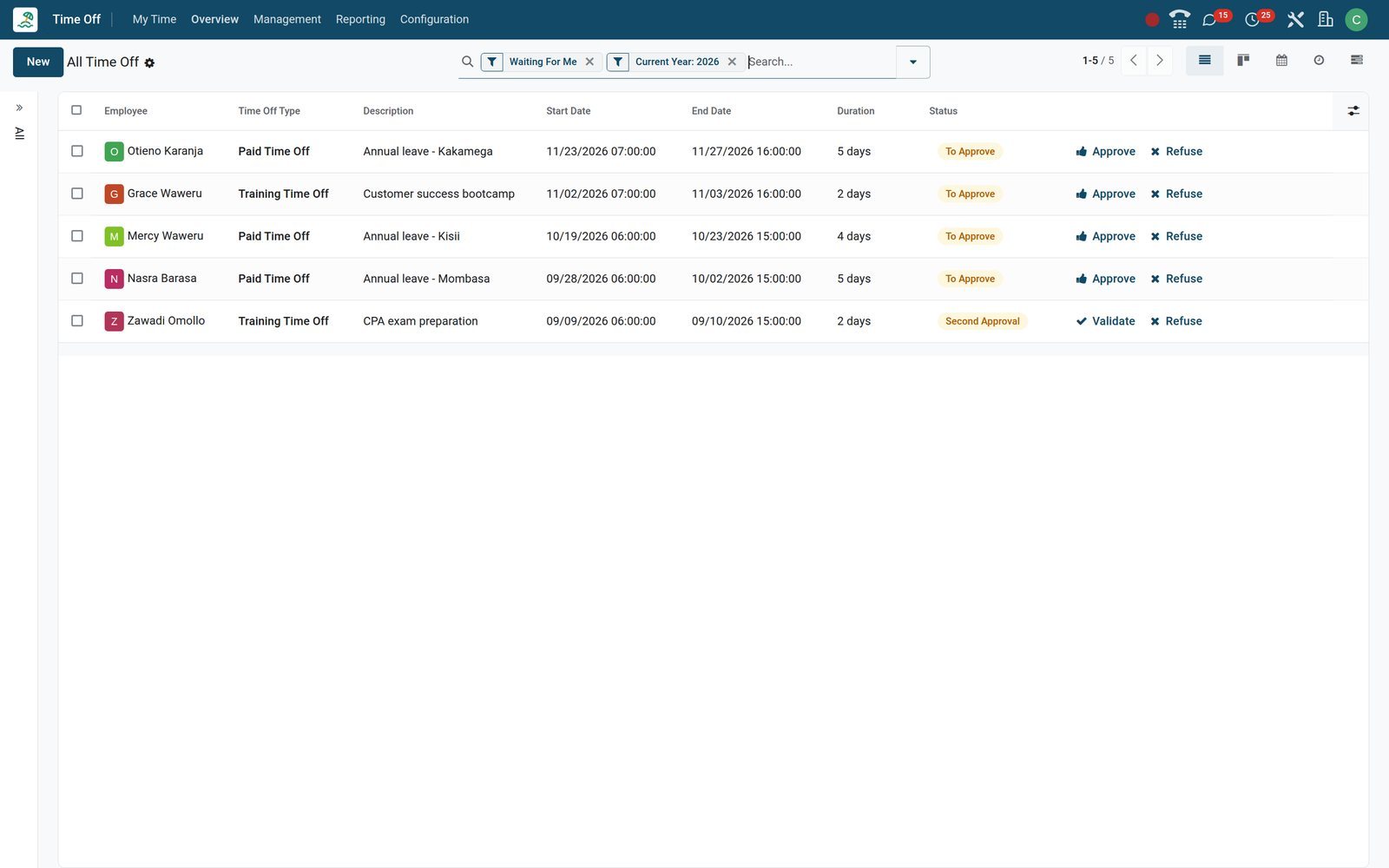
- Time Off
One request, every fact
Nasra Barasa's Mombasa leave request shows type, dates, duration and description, with Approve and Refuse in the header and the approval activity in the chatter.
Explore Time Off →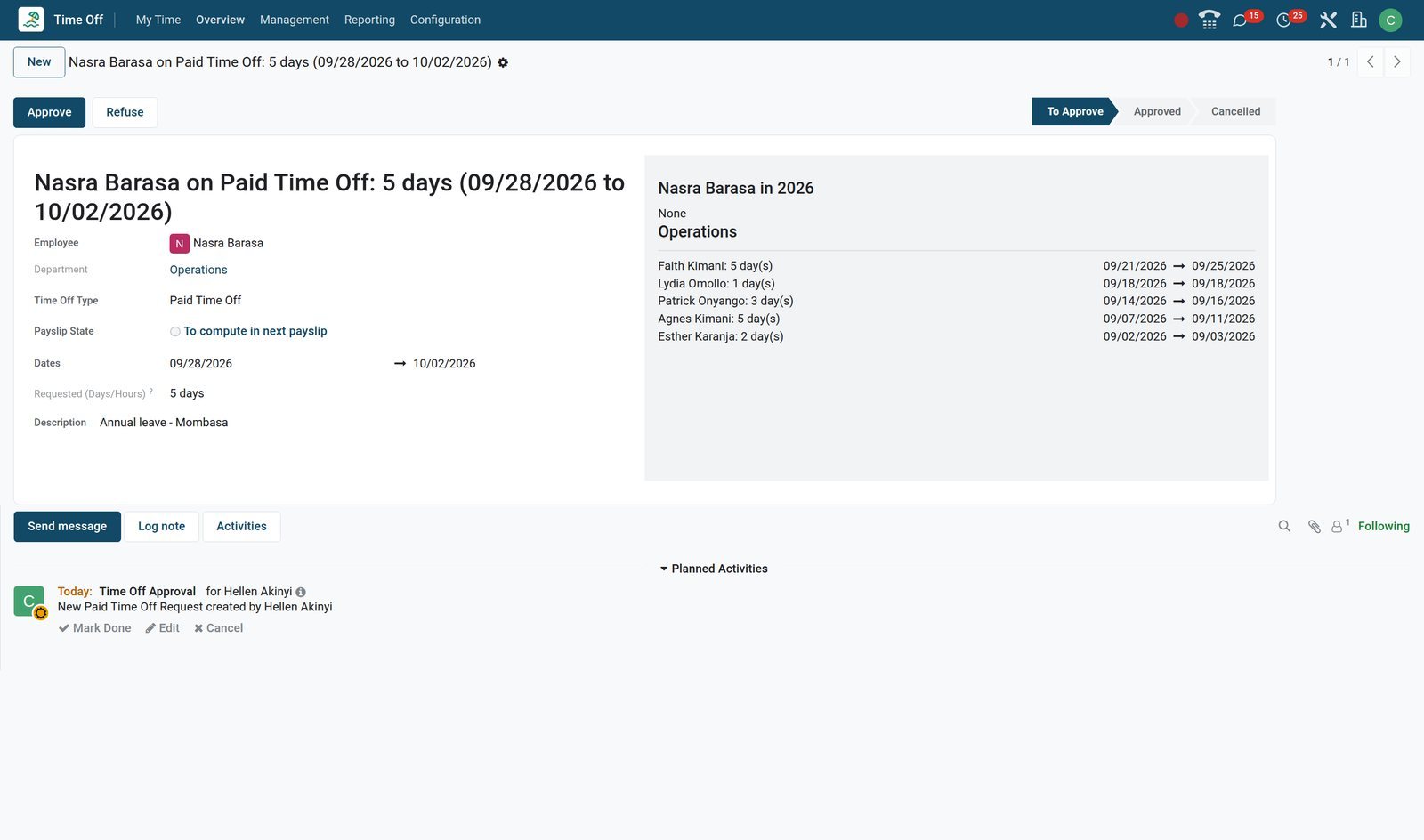
Write the policy once; every request follows it
Every rule lives on the leave type, the accrual plan or the public holiday list. Nobody has to remember that sick leave needs a note or that Mashujaa Day does not count.
- Time Off
The leave type carries the rules
Approval mode, allocation requirement, extra-day requests, the unit, a negative cap, supporting documents, public-holiday counting and the payroll work entry type sit on one form.
Explore Time Off →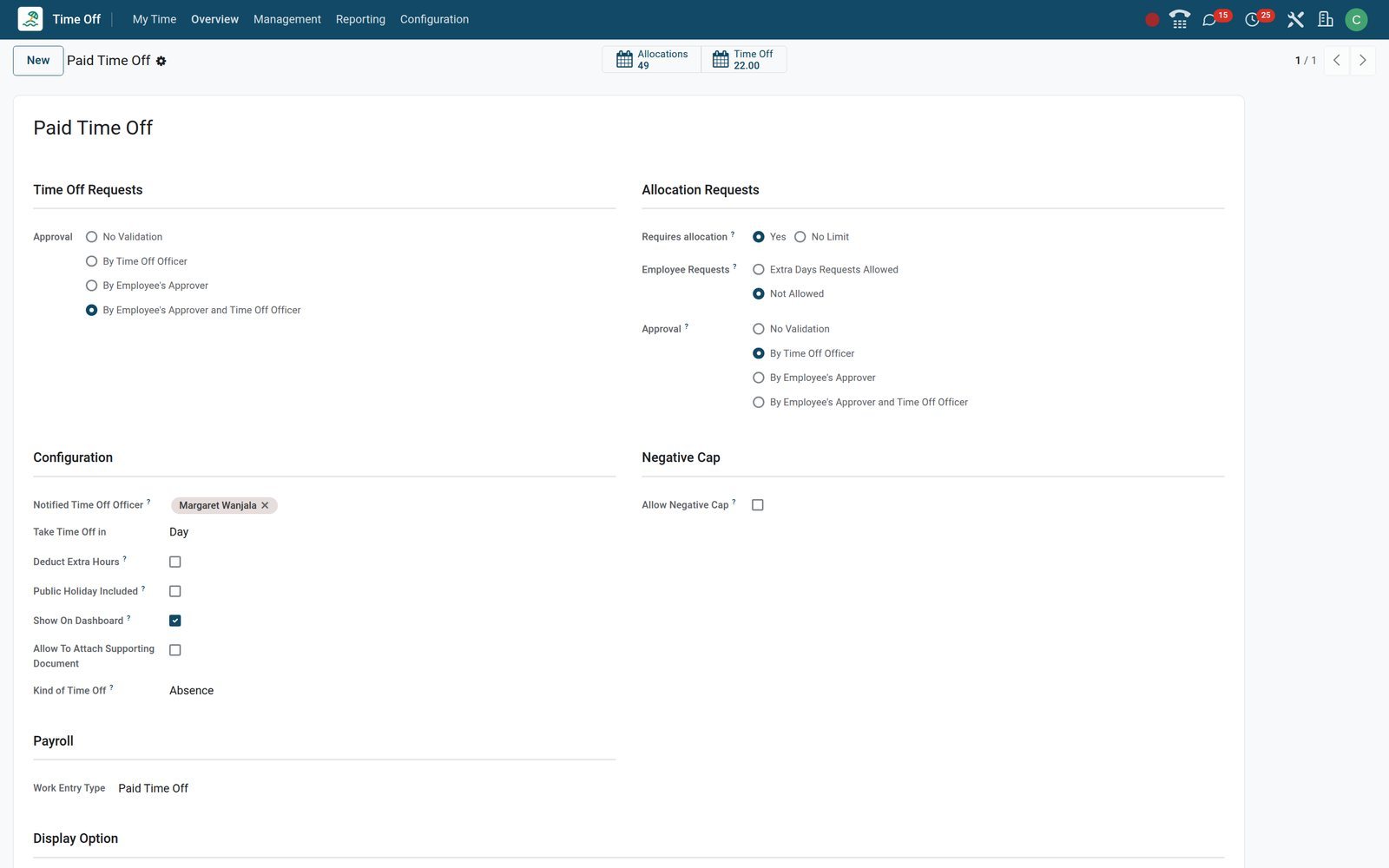
- Time Off
Leave that grows with seniority
The Seniority Plan grants one day a year from the first day, two from the fourth year and three from the eighth, capped and carried over each January.
Explore Time Off →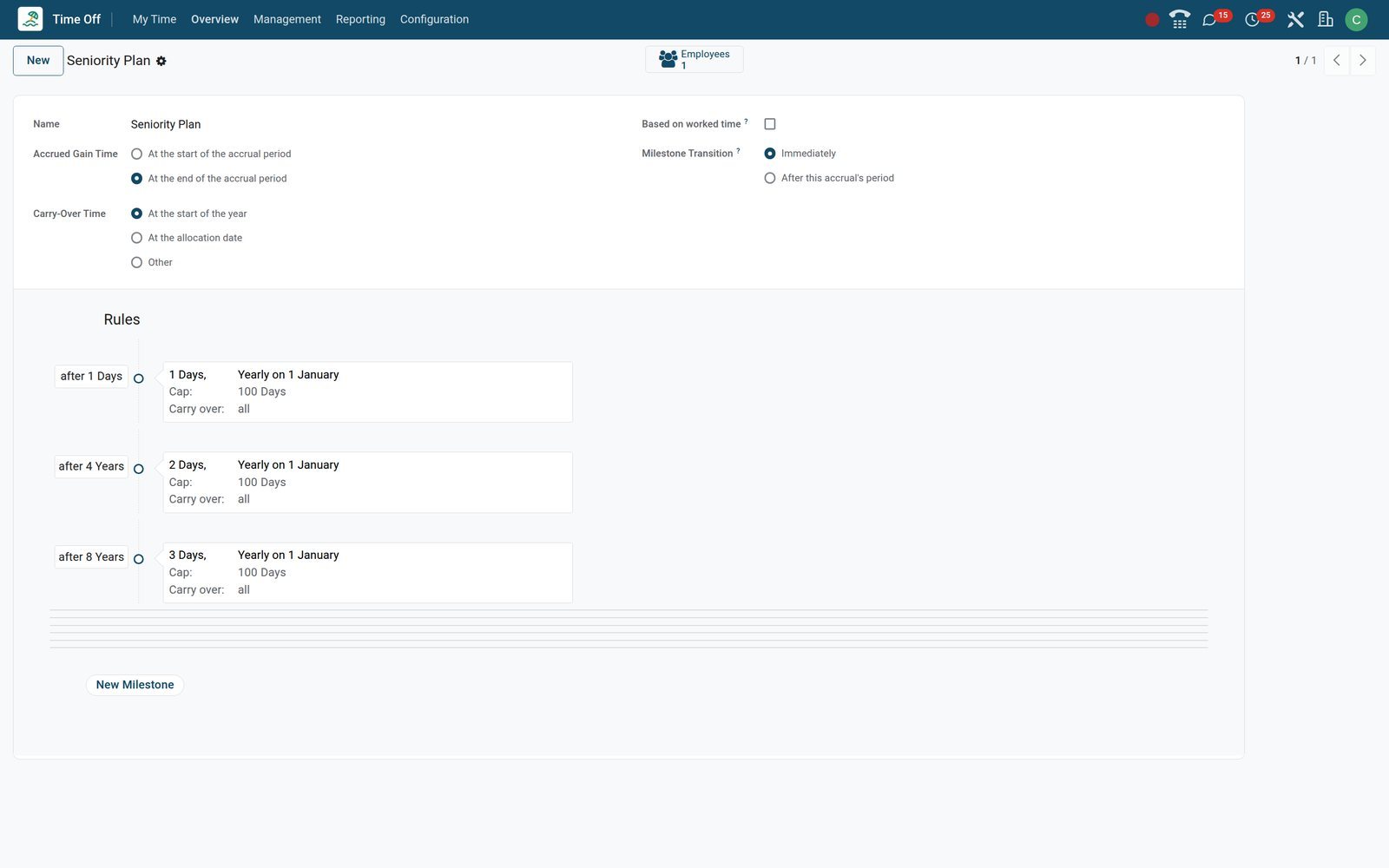
- Time Off
Public holidays, loaded once
Public Holidays lists eleven Kenyan days for the year, from New Year's Day to Boxing Day; a request spanning Mashujaa Day is shortened unless the type counts holidays.
Explore Time Off →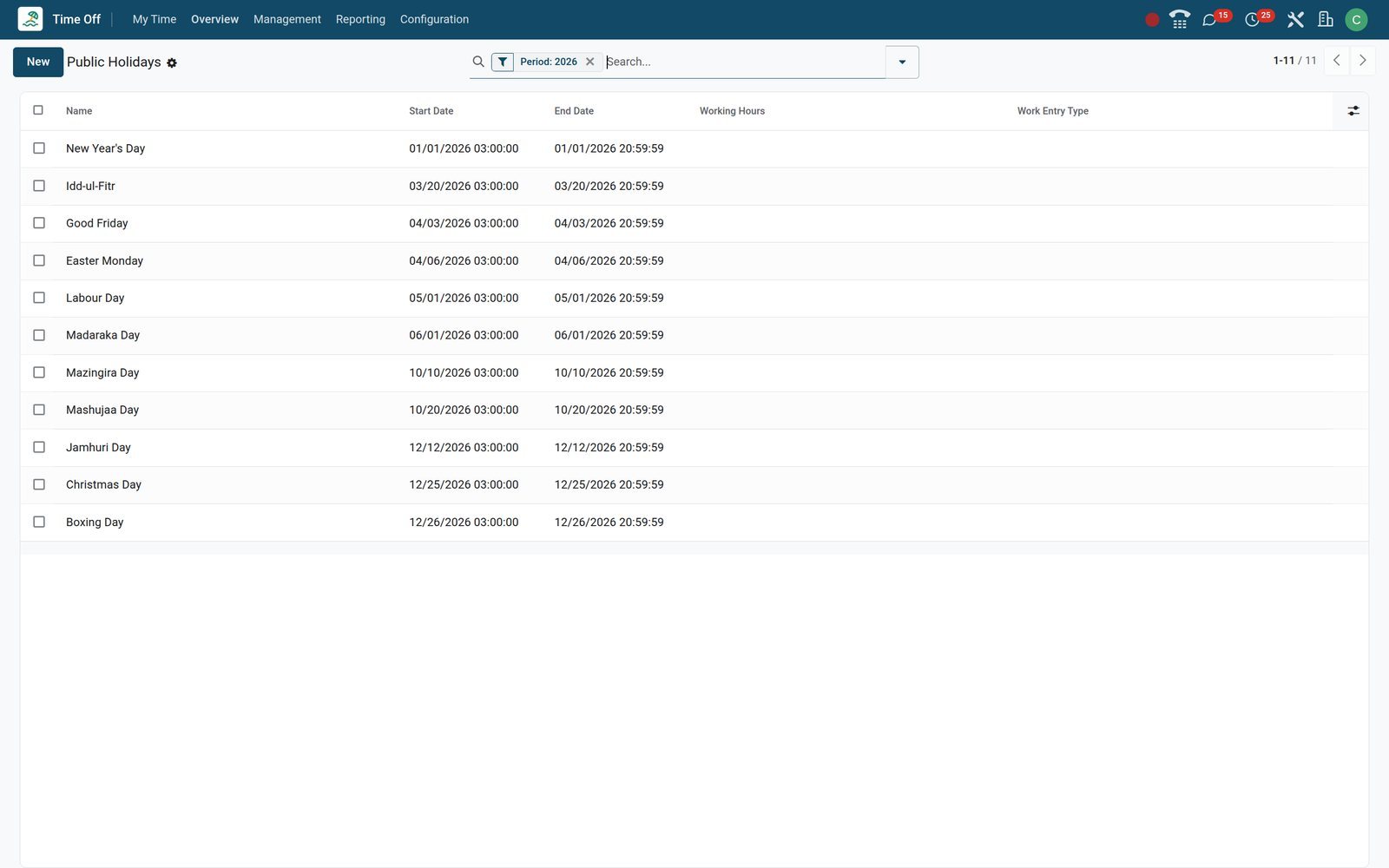
Every balance rests on an allocation
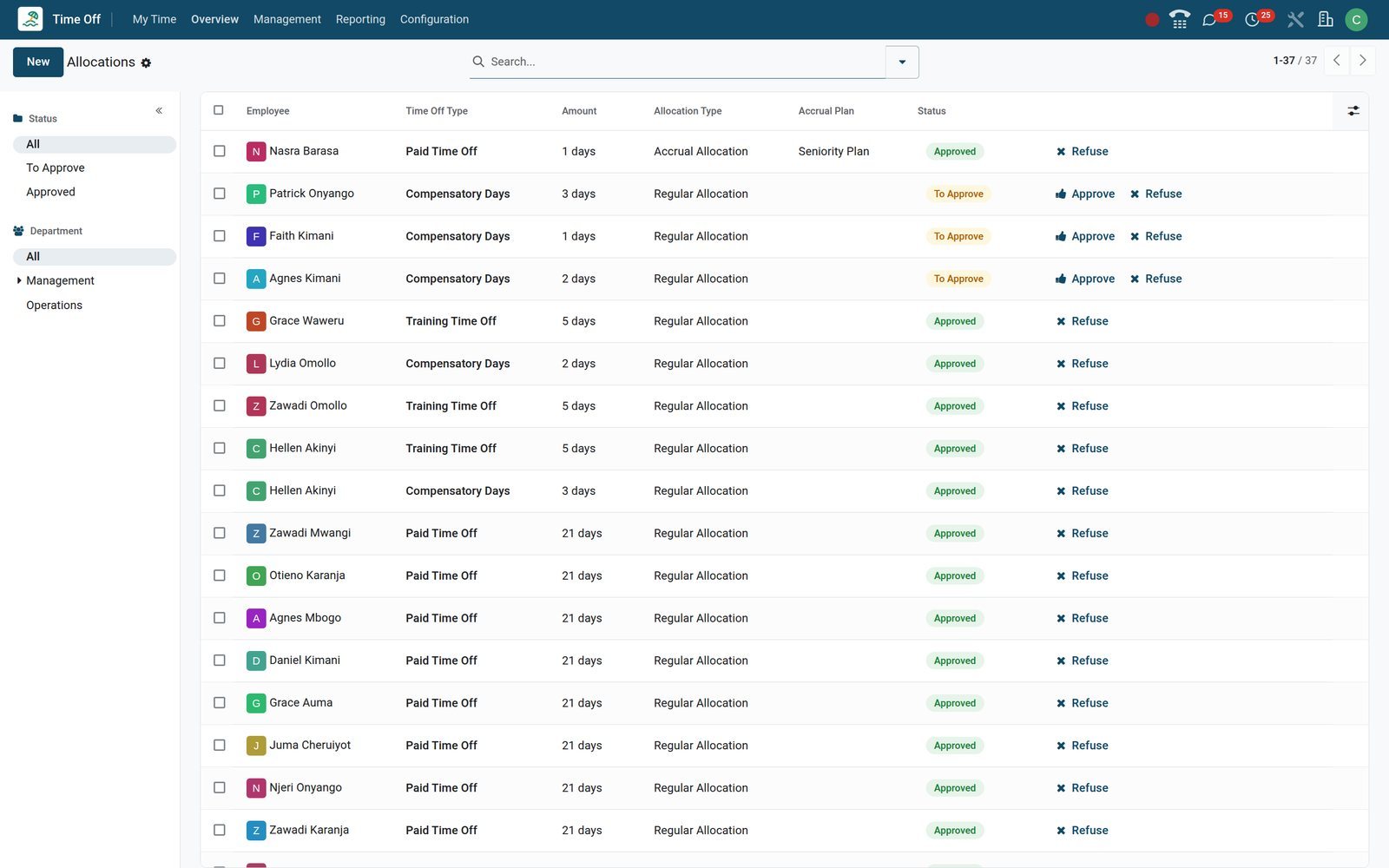
An allocation is the contract behind a balance: a number of days, a validity period and a plan if it accrues. A request beyond it is refused, unless the type allows a capped negative balance.
 Time Off
Regular, accrual, or requested by the employee
The list mixes yearly grants, an accrual allocation on the Seniority Plan and three Compensatory Days requests from staff still To Approve, each with Approve and Refuse.
Explore Time Off →Balances and patterns without a spreadsheet
Reporting holds three analyses built on the same records as the requests, so the balance HR quotes is the balance the employee sees on the dashboard.
- Time Off
The Balance report
Reporting > Balance is a pivot of employees against leave types with planned, taken and left days for the period you pick, one row per employee.
Explore Time Off →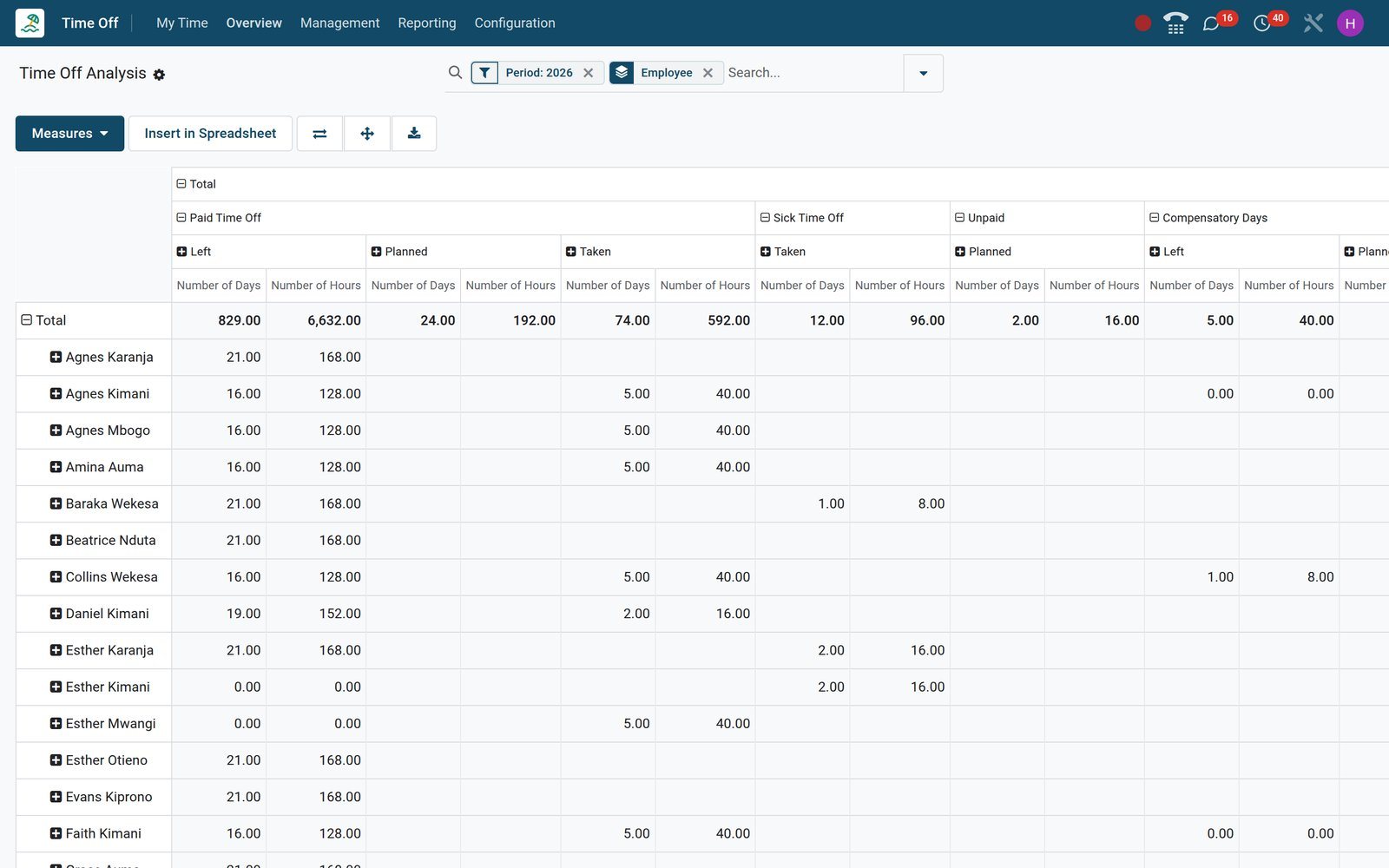
- Time Off
Days taken by employee and type
Reporting > by Employee turns the year's requests into a bar per person, stacked by leave type, and switches to list, pivot or calendar from the view buttons.
Explore Time Off →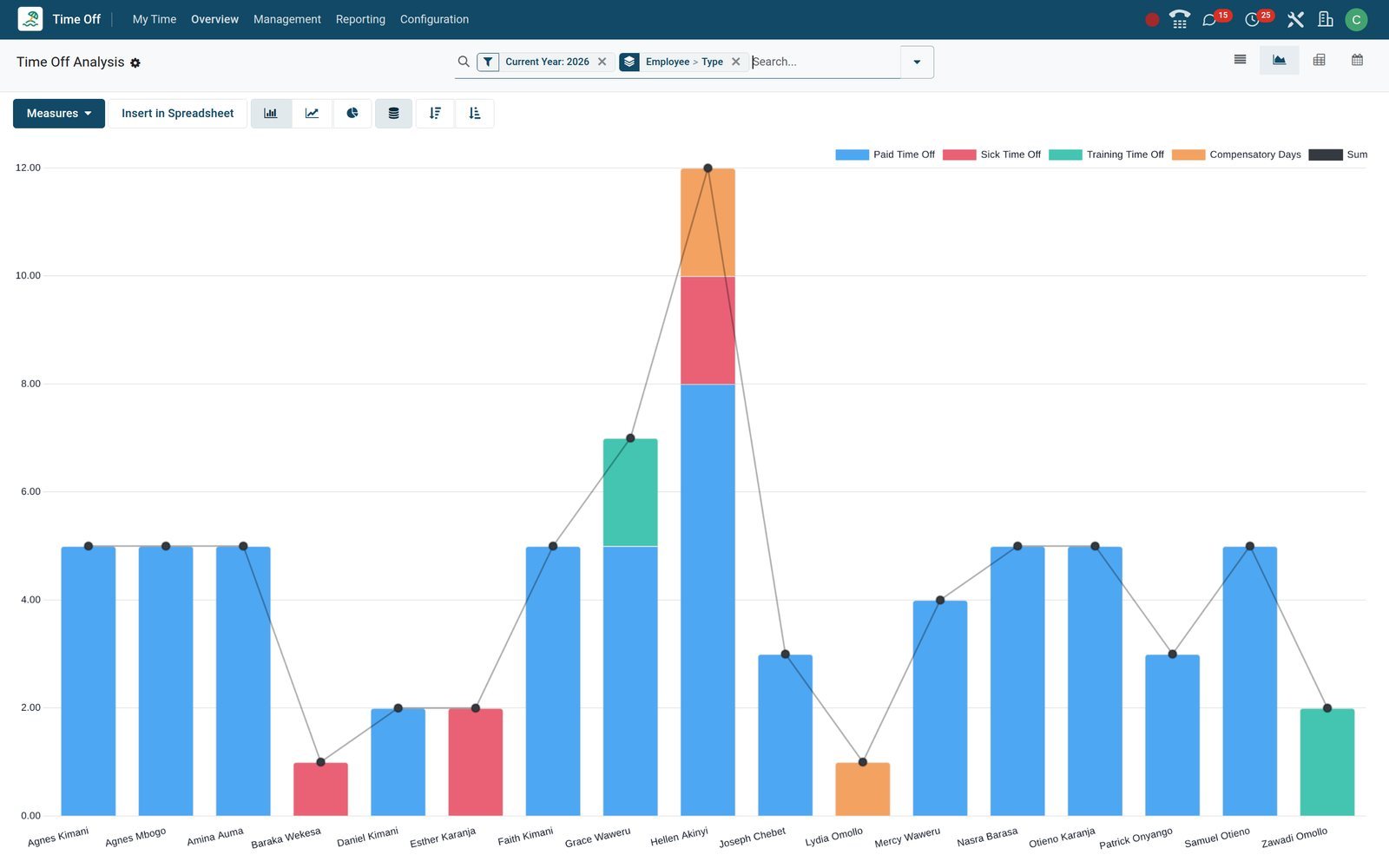
Who uses it
Who it is for
One record, six points of view, each limited to what that person is allowed to see.
Employee
Sees their own balances, requests and allocations under My Time, is notified at each step, and can ask for extra days when the type allows it.
Team manager
Named as Time Off approver on the employee record; receives approval activities, sees the team in Overview, and decides from the list, the gantt or a phone.
Time Off Officer
The Officer group manages all requests: gives the second approval, creates requests and allocations for others, and runs the Multiple Requests wizards.
HR administrator
The Administrator group owns Configuration: leave types, accrual plans, public holidays, mandatory days and which officers are notified for each type.
Payroll officer
Works from work entries: each approved leave reaches the payslip through its work entry type, and late approvals wait under Time Off to Report.
Director
Reads the Balance report before year end, the by Type graph for days allocated against days taken, and Overview before signing off a busy month.
Works with
Runs with
Apps installed on the demo that read or write the same time off records.
 EmployeesWorking schedule, Time Off approver, department and company on the employee record decide durations, routing and who may see what.
 PayrollThe work entry type on each leave type turns approved leave into paid, unpaid or compensatory lines on the payslip.
 TimesheetsTypes marked Generate Timesheets post lines to the time off task on the days of absence, so utilisation figures stay honest.
 ProjectsA task whose assignee is on leave carries a leave warning, so deadlines are moved before they slip.
 ChatEvery request, approval, refusal and comment is a chatter message with a notification in the inbox or by email.
 StudioAdd a field, an automated action or a report to the request form without a developer.
In your country
Built for how leave works in your country
Public holidays per company, statutory entitlements, working schedules, time zones and a workforce that requests from a phone.
Public holidays per company
Each public holiday carries a company, so entities sharing one database can observe different days; the demo's Kenyan list belongs to its Eldoret company.
Statutory leave as an allocation
Grant the statutory entitlement as a dated allocation with a start and an end date, or let an accrual plan earn it month by month with a carry-over cap.
Working schedules decide the count
A request counts only the days on the employee's working schedule; every demo employee is on the standard Monday-to-Friday schedule, so weekends never cost a day.
Time zones on every request
Each request stores the employee's time zone and warns when it differs from the viewer's, so dates read correctly for teams spread across time zones.
Sick notes from a phone
Sick Time Off on the demo has Supporting Document switched on; the form shows Attach File, and a phone can attach a photo of the clinic note.
Unpaid and compensatory days
Unpaid and Compensatory Days are separate types with their own work entry types, and only Unpaid is flagged unpaid, so payroll deducts one and not the other.
Reports and control
Reports and control
What exists on the demo under Reporting and Overview, the printed summary, and the automation behind it all.
Overview gantt
Week, month or year per employee, grouped by department, job position or type, with Off Today, Waiting for Approval, Approved and Refused filters.
by Employee
Every request of the year as a list, graph, pivot or calendar, grouped by employee and type by default, with cancelled requests left out.
by Type
Allocations and requests summed per leave type as a graph or pivot, allocated days positive and taken days negative, to see where the days go.
Balance
A pivot of employees against leave types with planned, taken and left days for any period, built from the same allocations and requests as the dashboard.
Time Off Summary PDF
From the Employees list, print a Time Off Summary for chosen employees from a start date, with approved, confirmed or both kinds of leave, for the personnel file.
Approval activities
Time Off Approval, Second Approve and Allocation Approval activities land on the approver's to-do list and close when the decision is made.
Two daily jobs
A scheduled action adds accrued days each day and another cancels requests that have become invalid, with nothing to run by hand.
Time Off to Report
Leave approved after the payslip was computed waits under Payroll > Work Entries > Time Off to Report, with a Report to Next Month button on the request.
Getting started
Getting started
What the first week looks like on a standard installation.
Import employees
Load the staff list with department, manager, Time Off approver and working schedule through the standard import; the approver column routes the requests.
Set the types
Start from the ready types, Paid, Sick, Unpaid and Compensatory Days among them; rename, recolour or archive them, then set each one's approval, unit and payroll rules.
Allocate to everyone at once
The Multiple Requests wizard grants the same allocation by company, department, employee tag or a list of employees, as a regular grant or on an accrual plan.
Load the holidays
Enter the year's public holidays per company once; every request and balance on that company respects them from then on.
Set an accrual plan
Attach a plan to the allocations that earn leave; a daily job keeps balances current and handles carry-over on the date the plan sets.
Go live with approvals
Approvers work from activities and email notifications; the dashboard, the request form and the approval list all work in a phone browser.
Details that make the difference
Small behaviours that decide whether a leave system is trusted or worked around.
Hatched until approved
Pending requests are hatched in the gantt and the calendar, so a manager sees the plan and the risk at the same time.
Negative balance, with a cap
A type can allow a negative balance up to a maximum excess, as the demo's Training type does, so a new hire can take leave early.
Mandatory days
Block stock-take or launch days for the whole company or selected departments; the request form flags any request that touches one of them.
Half days and hours
Types set to Half Day or Hours offer a morning or an afternoon, or a from-to time, and payroll receives the exact duration.
Extra hours become leave
With Attendances installed, the Extra Hours type deducts overtime already worked, so time in lieu is tracked rather than promised.
Notified officers
Each type names the Time Off Officers told about new requests; on the demo Margaret Wanjala is notified for six of the seven types.
In the Calendar app too
Types with Display Time Off in Calendar create a calendar event for each approved request, so the absence shows when colleagues book meetings.
Extra-day requests
Types with Extra Days Requests Allowed let employees ask for more days; the request becomes an allocation waiting under Management > Allocations.
Questions
Questions about Time Off
Not covered here? Contact us.
Can employees see how many days they have left?
Yes. My Time > Dashboard shows a card per leave type with the days still available, and the Balance report shows planned, taken and left days per employee.
How are public holidays handled?
Public holidays are listed per company under Configuration. A request that spans one is shortened by that day unless the leave type has Public Holiday Included switched on.
Can a request need two approvals?
Each leave type chooses: no validation, the Time Off Officer, the employee's approver, or approver then officer. A request in the second step shows the status Second Approval.
Do balances accrue automatically?
Attach an accrual plan to an allocation. Each milestone sets how many days or hours are earned per period, a cap and the carry-over rule; a daily scheduled action updates balances.
Can staff take half days or a few hours?
Set the type's unit to Half Day or Hours. The form then offers a morning or afternoon, or a from-to time, and payroll receives the exact duration.
How does leave reach payroll?
Each leave type points to a work entry type. Approved leave becomes work entries for the payslip; leave approved after a payslip was computed waits under Time Off to Report.
Can we run several companies on one database?
Yes. Leave types, public holidays, mandatory days and accrual plans each carry a company; a leave type left without one is shared, and approvers see the companies they are allowed to open.
Can a manager see who is off today?
Overview has an Off Today filter, the employee record shows Absent Today, and the Time Off button on the employee form opens that person's requests.
Put Time Off to work
Add it to your plan and pay only for what you use, or see it running on your own demo first.