





Special Needs: IEP and 504 plans, accommodations and progress review cycles

+$1.48/mo at 500 students. Free instant access, no credit card required.

Works with
  • Academics
Special Needs in the EduPrime: IEP and 504 plans, accommodations and progress review cycles
01

Every plan on one register, from draft to archive

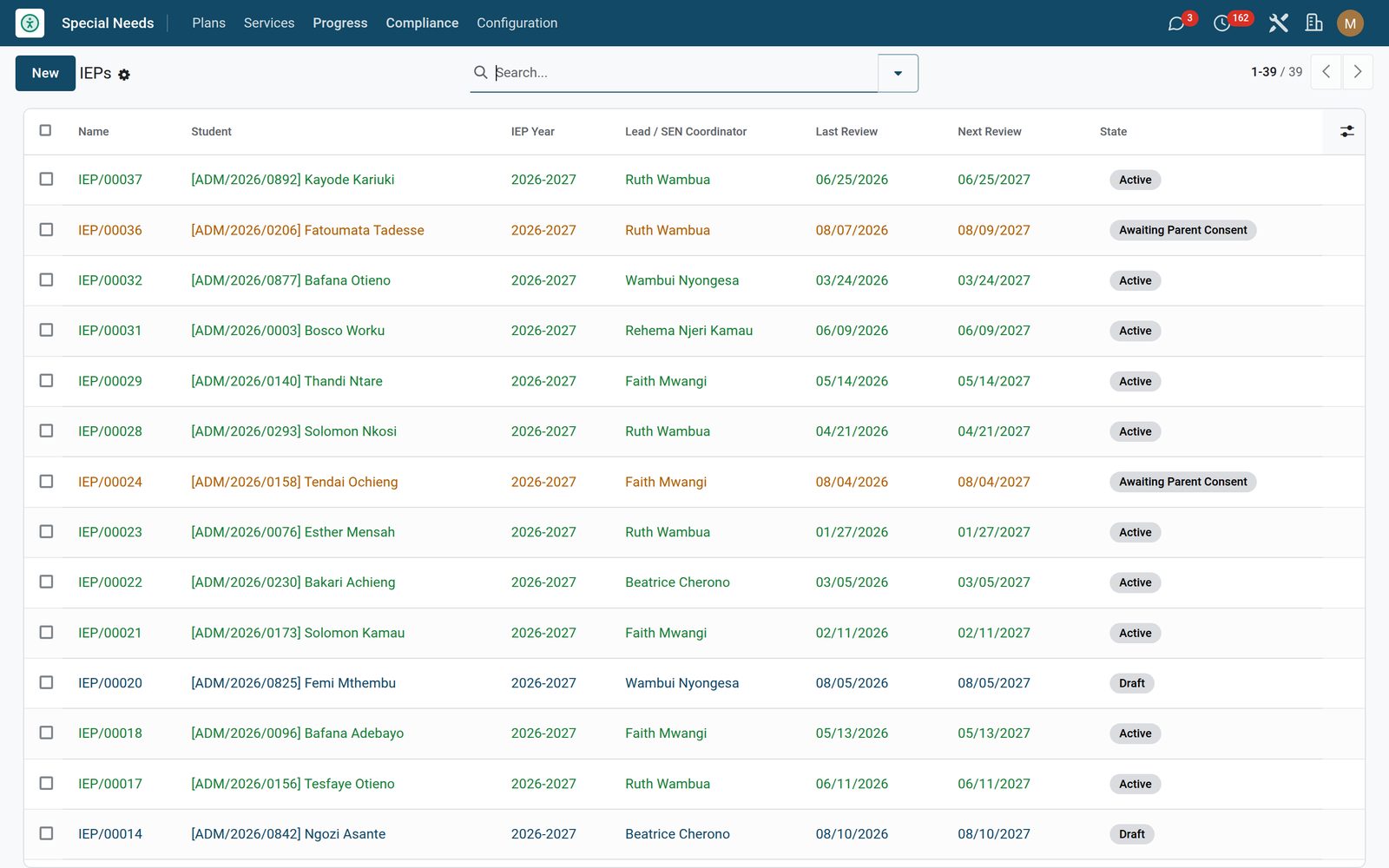
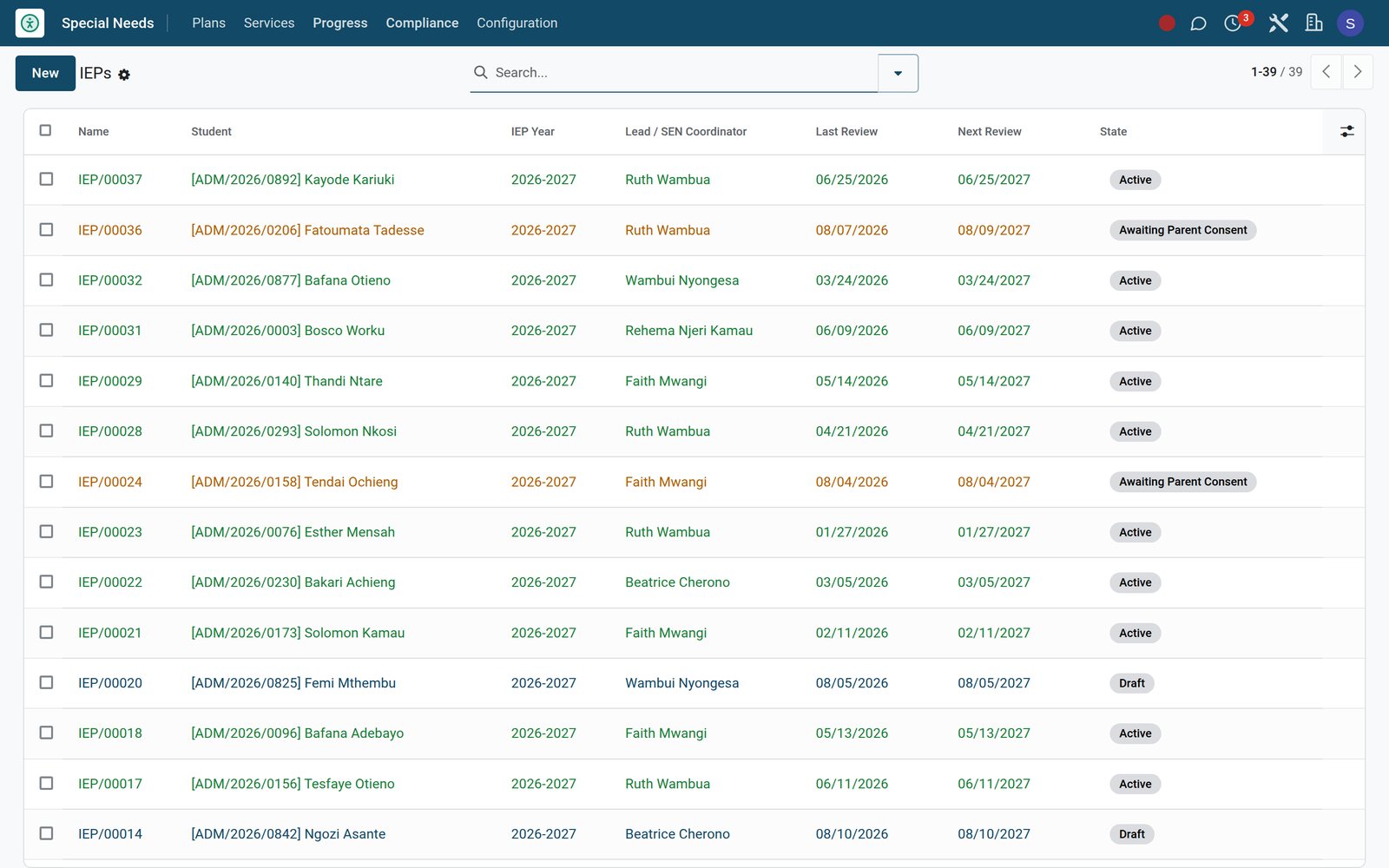
Each IEP is numbered IEP/00001 and carries the student, the academic year and the lead teacher or SEN coordinator, with goals, accommodations and the team as three pages on the same record. The status bar runs draft, awaiting parent consent, active, under annual review and archived, and every move between them is a button on the header — Request Parent Consent, Activate, Start Annual Review, Complete Review and Archive, each shown only at the stage it belongs to — so nobody has to guess the workflow. Completing a review stamps today as the last review and moves the next one a year on. Creating a plan sets the next review a year out and the tri-annual reevaluation three years out unless you enter your own dates, activating one stamps today as the consent date if it is still blank, and ten fields are tracked on the record’s history — the student, the year, the lead, the stage, the review, next-review, reevaluation and consent dates, the typed signer name and the consent decision. The list colours itself by stage, and one-click filters give you Active, Awaiting Consent, Under Review and every student on Extended Time.
Special Needs: Every plan on one register, from draft to archive
02

Measurable goals, with the evidence series behind the bar

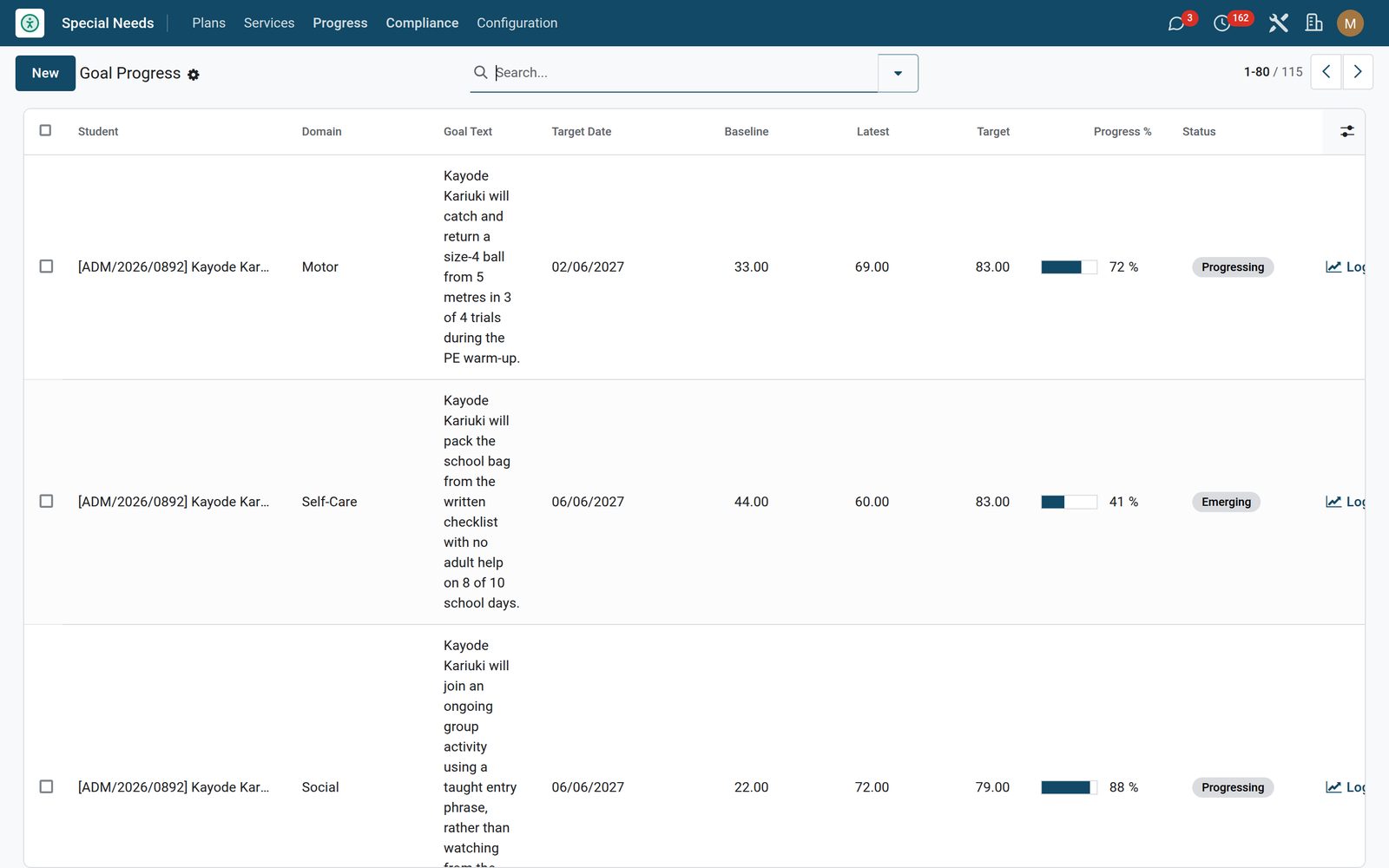
A goal sits in one of seven domains — academic, behaviour, social, communication, motor, self-care and transition or post-secondary — and carries the goal text, the success criteria, a target date and the evidence notes. Give it a baseline and a target and the progress bar computes itself from the latest measurement toward mastery. Log Progress, from the goal form or straight off the line in the IEP, opens a dated data point: the measured value, a status snapshot that includes Regressed, the observation, and the staff member recording it filled in from the signed-in user. The register shows every goal in the school with its baseline, latest and target side by side, mastered rows in green and discontinued ones greyed out, and groups by domain, status or student.

Special Needs: Measurable goals, with the evidence series behind the bar
03

Accommodations written down once, and scoped

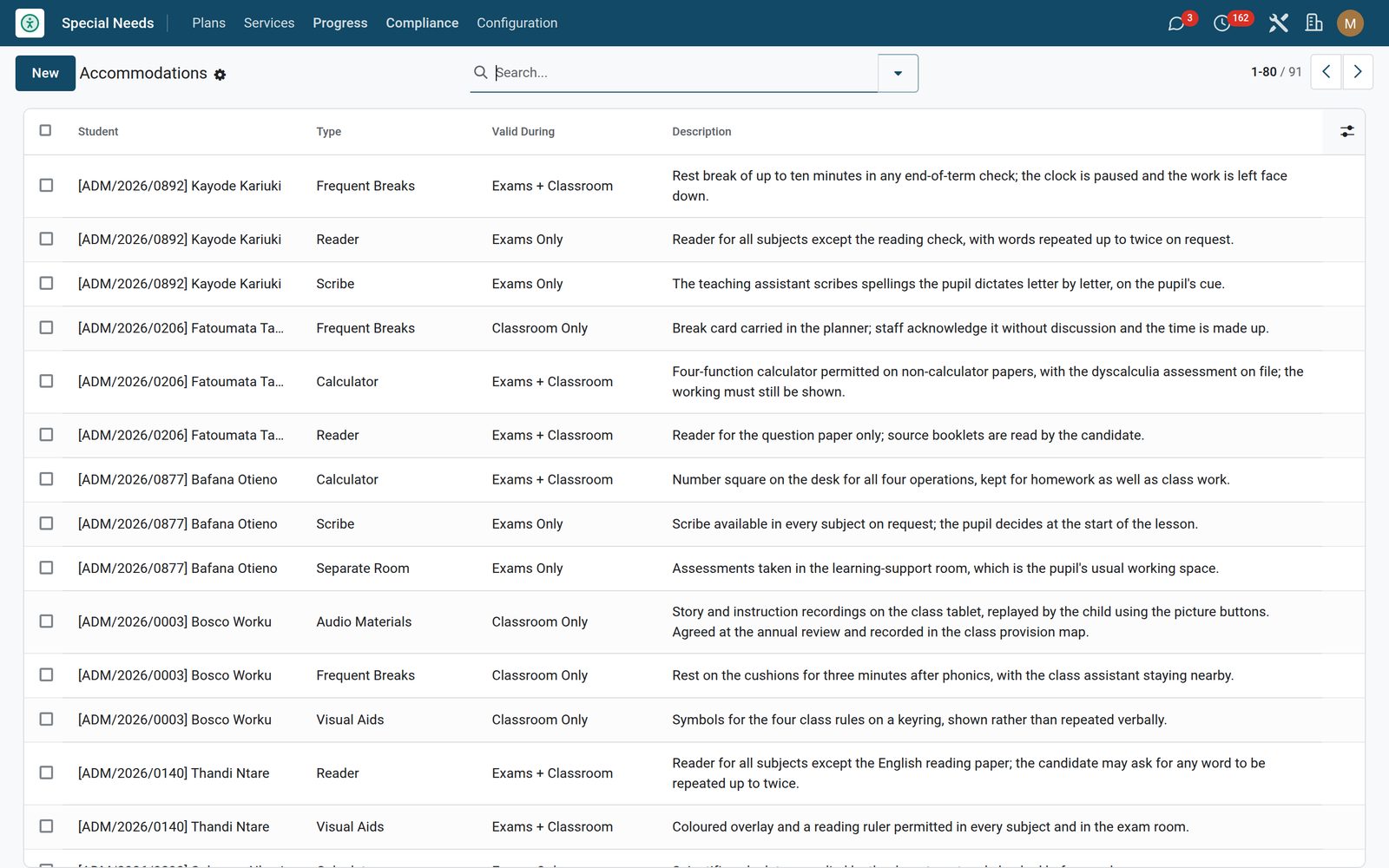
Nine accommodation types — extended time, separate room, scribe, reader, frequent breaks, calculator, large print, audio materials and visual aids — each with a description and a validity of exams only, classroom only or both. Add them inline on the plan, then read the whole school’s provision on one register grouped by type, by validity or by student, which is the list an exams officer and a head of year actually need. Any plan carrying extended time flips a stored Extended Time flag with its own search filter, and the app publishes the multiplier — 1.25 out of the box, yours to change in Settings — so connected exam-timing tools can look up what a given student is entitled to.

Special Needs: Accommodations written down once, and scoped
04

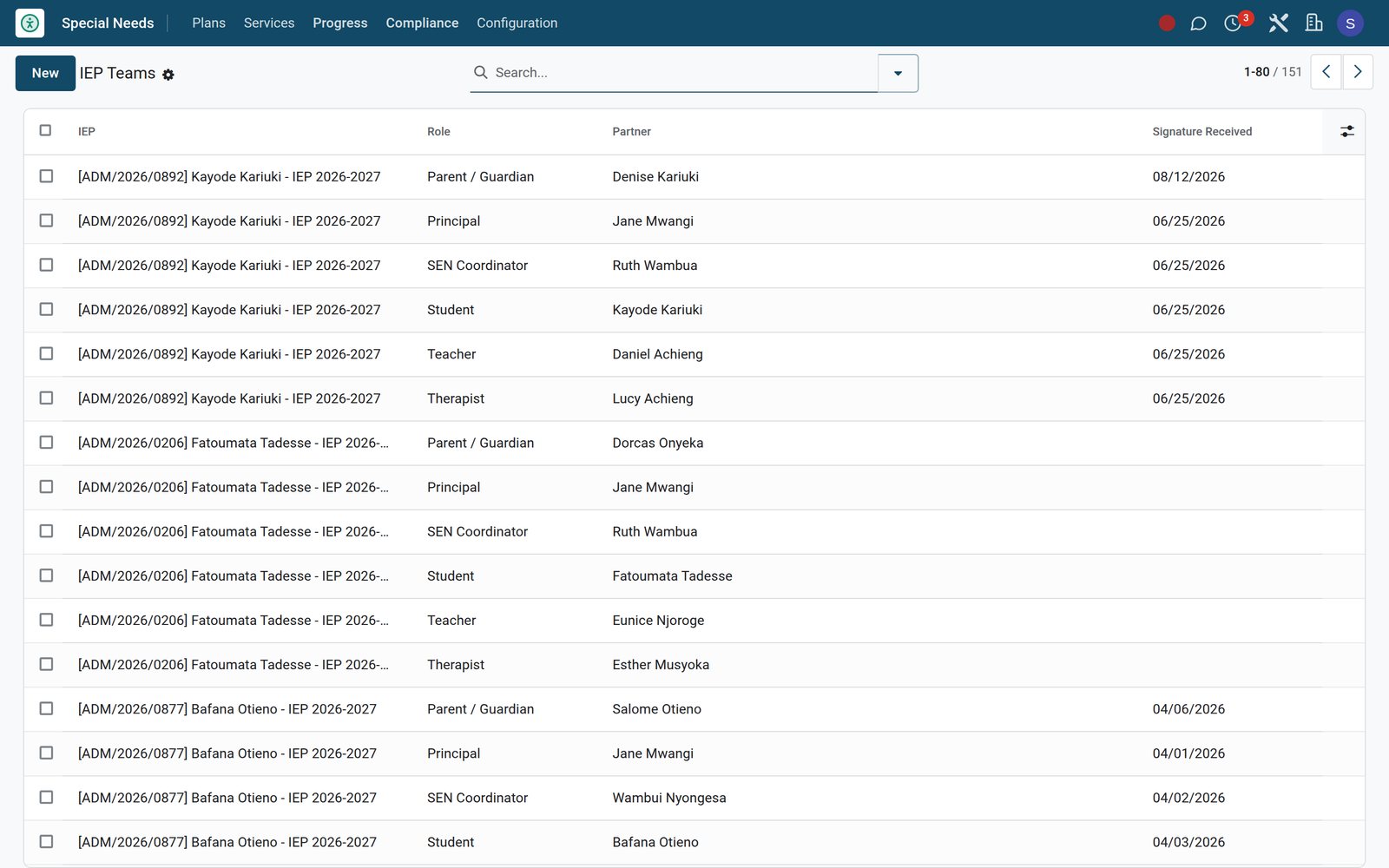
The team round the table, and the signature that starts the plan

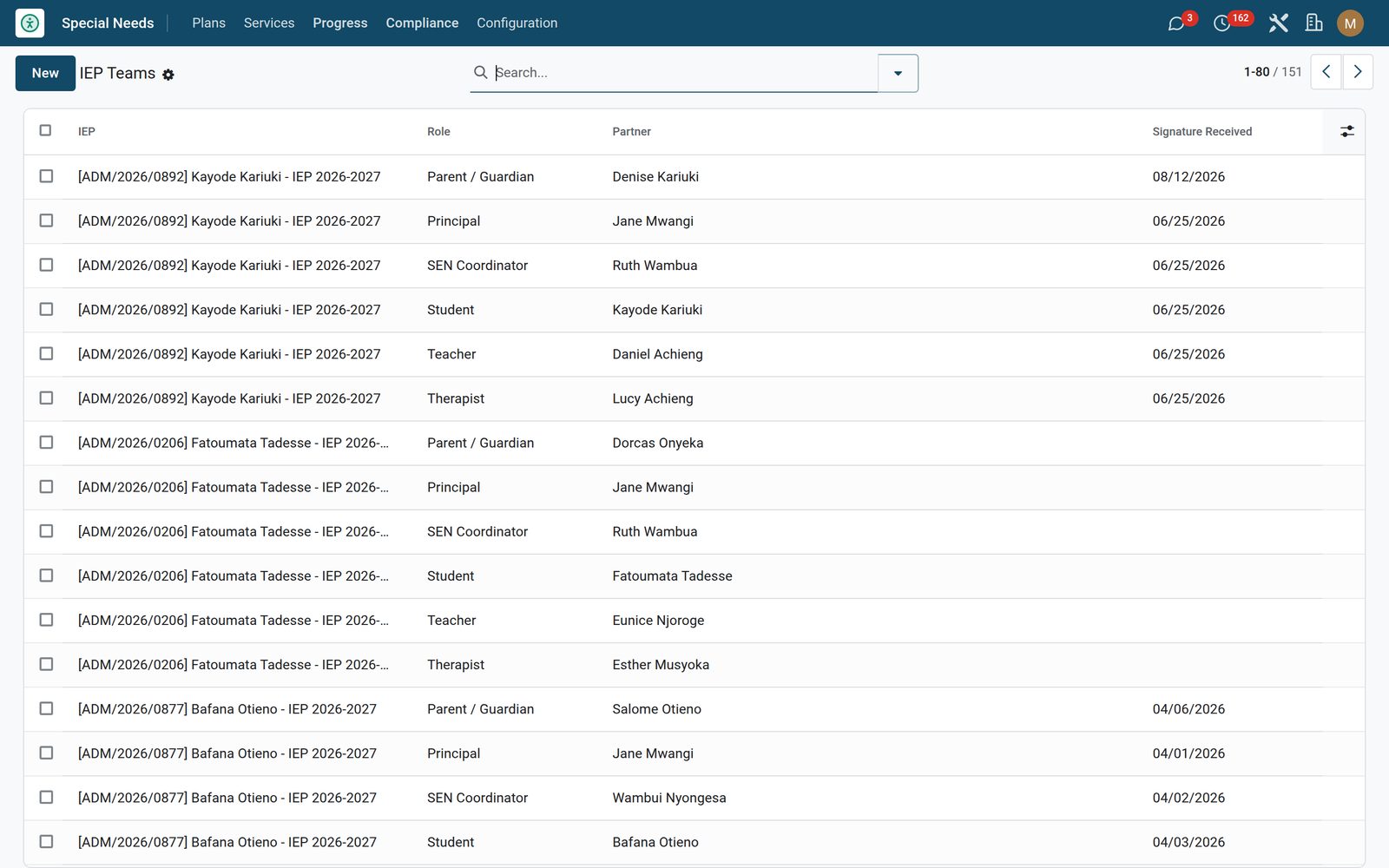
Record the IEP team in six roles — parent or guardian, teacher, SEN coordinator, therapist, principal and the student themselves — each linked to a real contact with the date their signature came back (a plan still waiting on consent honestly carries none yet), and read it back grouped by role or by plan. Then press Request Parent Consent and the family can sign it themselves: a guardian signs in and opens /my/iep, sees only their own children, reads the plan’s reference, year, stage, lead teacher, review date and every accommodation named in full, then types their full name and relationship, ticks the affirmation and chooses Agree & Sign or Decline. Signing writes the typed name, the relationship, the exact time and the IP address onto the IEP, posts the whole thing to the history and moves the plan to active; declining is recorded just as fully, tells the parent the coordinator will be in touch, and leaves the plan where it is.

Special Needs: The team round the table, and the signature that starts the plan
05

504 Plans and therapy sessions — only if you run them

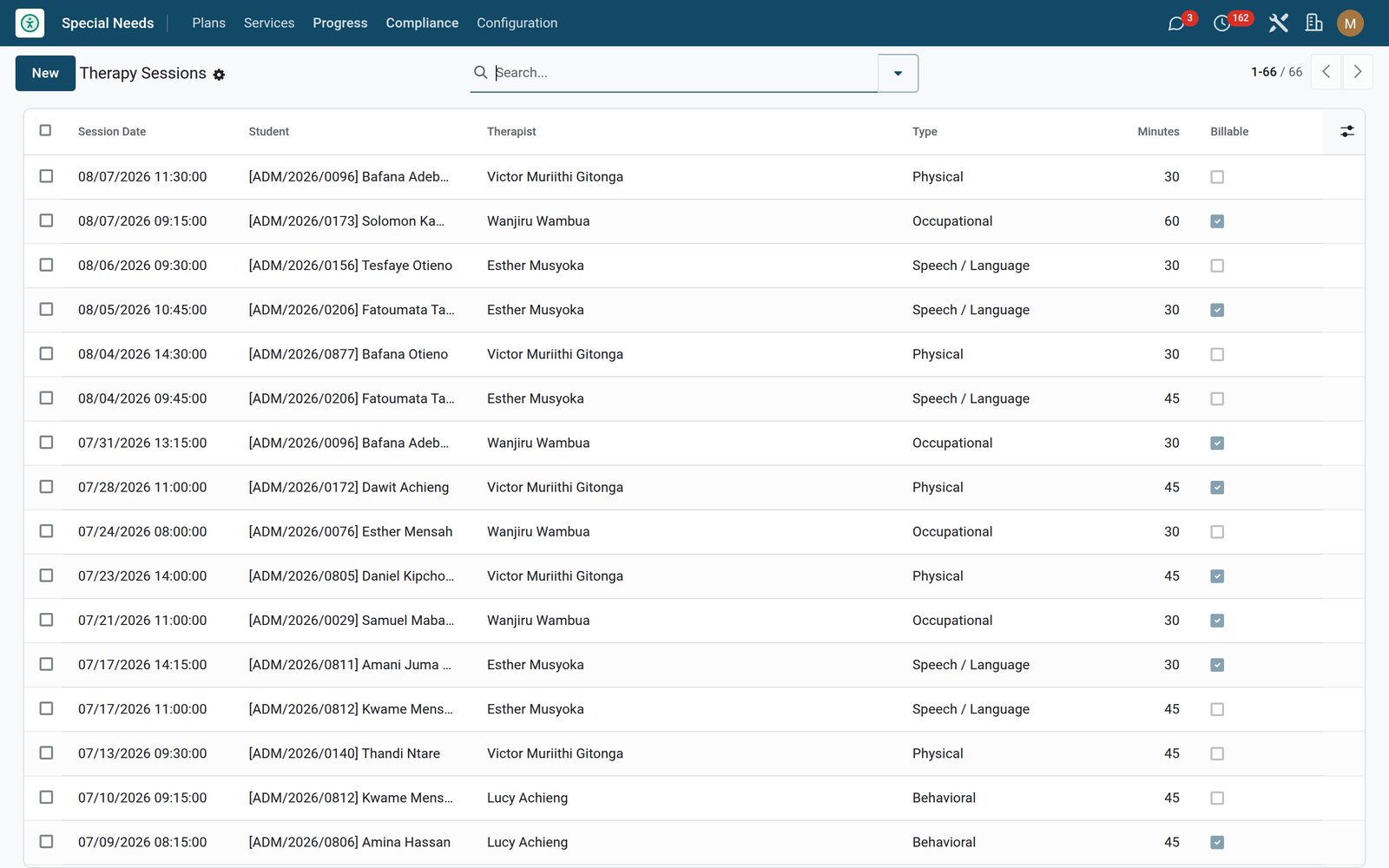
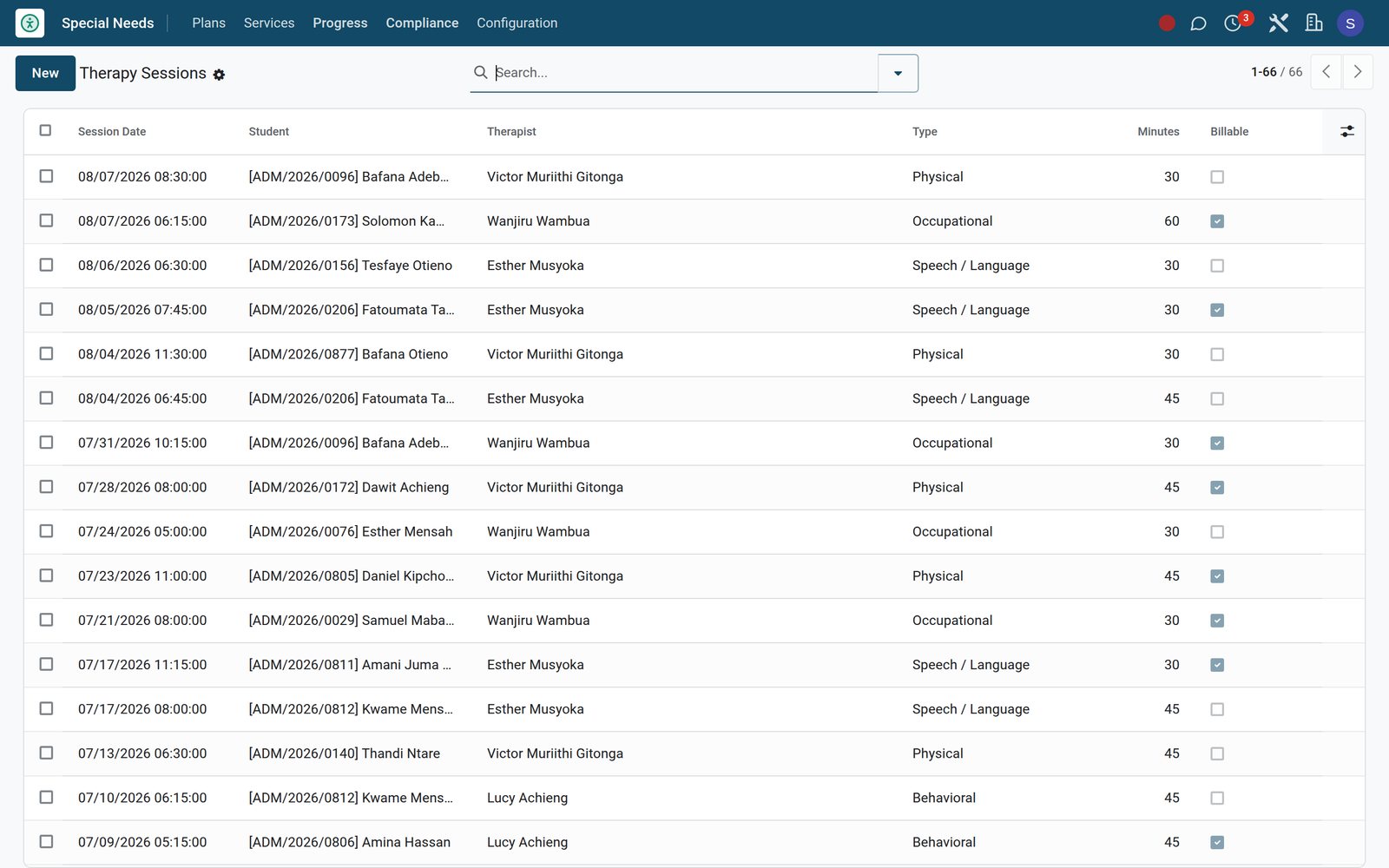
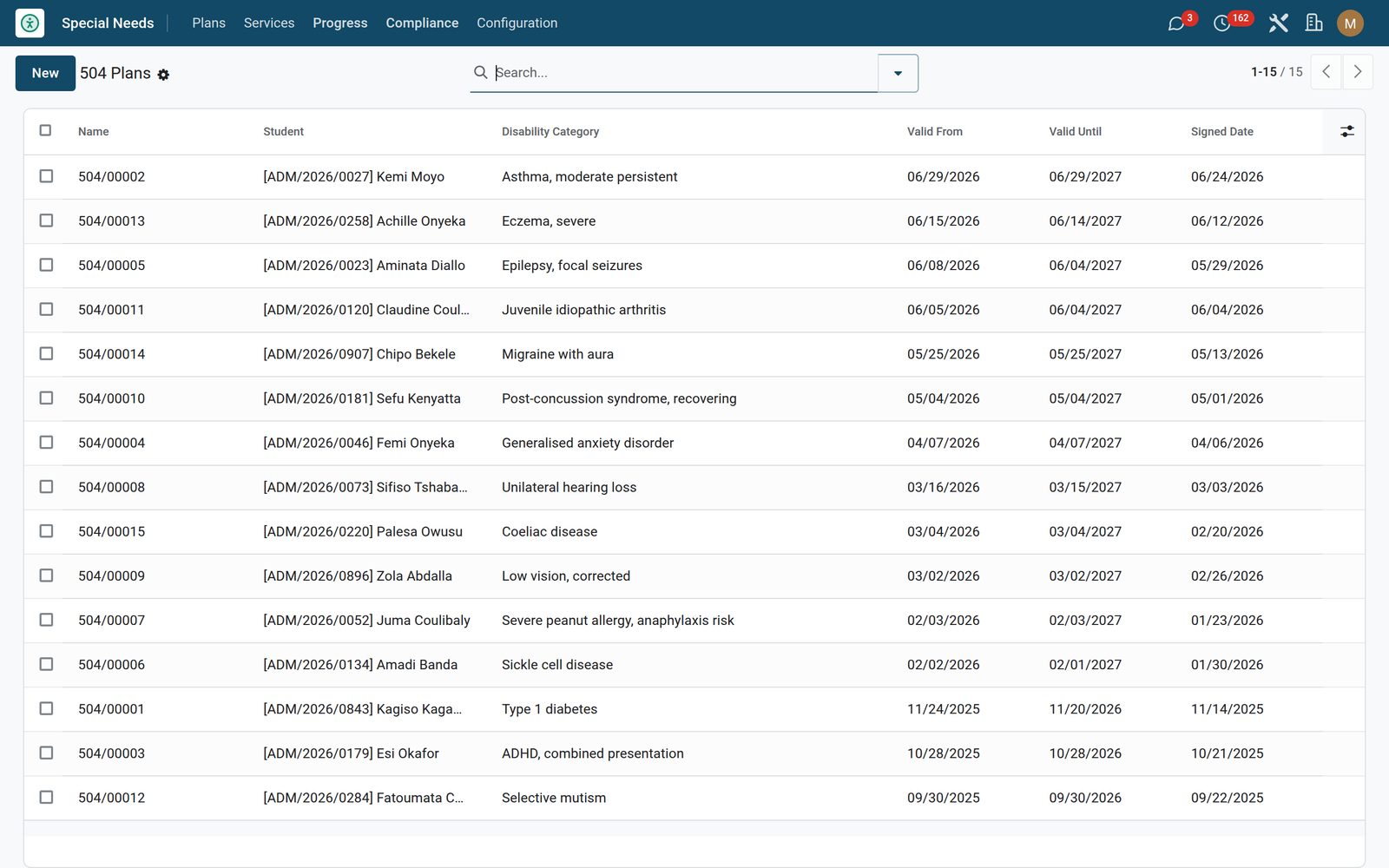
504 Plans cover the students who need accommodations without a full IEP: numbered 504/00001, with the disability category, the accommodations required, the validity dates and the signed date, grouped by category, and with the student, the category and the end date tracked on the plan’s history. Therapy sessions log occupational, speech and language, physical and behavioural work against the student and the therapist from your Employees, with the date and time, the duration in minutes, the progress notes and a billable flag that filters in one click. Both areas sit behind a feature switch in Settings and stay out of the menu until you turn them on — and switching one back off hides the menu without touching the data.

Special Needs: 504 Plans and therapy sessions — only if you run them
06

The annual review chases you, not the other way round

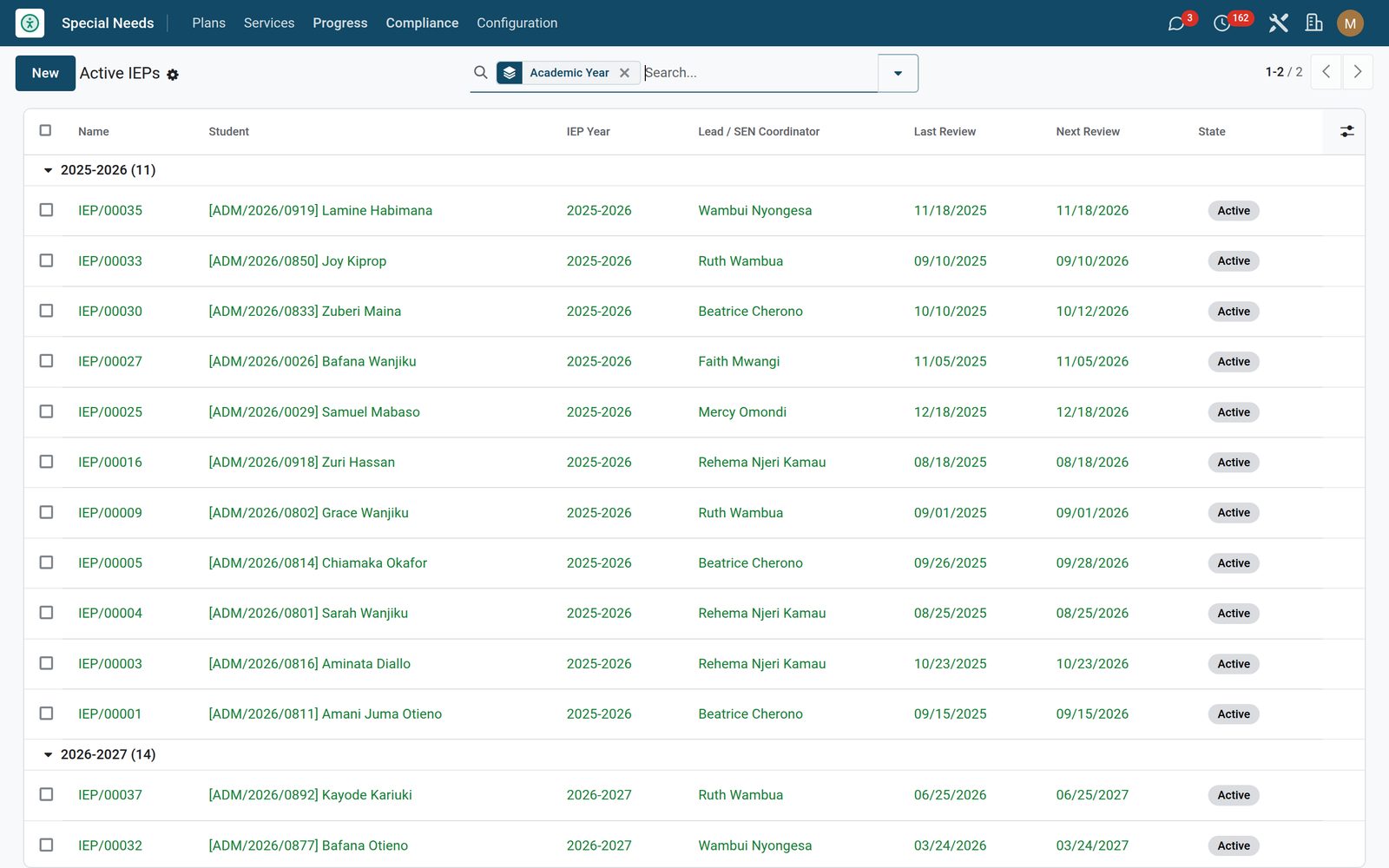
Active IEPs opens every live plan grouped by academic year, which is the register a SEN coordinator is asked for at every review meeting. Each plan holds its own next review and reevaluation dates, and one daily check posts a reminder on the plan’s history once an active IEP comes inside the configured lead time of its next review date — 30 days out of the box, changed in Settings. It posts once per review, records which review it chased, and still catches up a plan whose date has already slipped past. Print IEP At-A-Glance from one plan or from a whole selection and you get the student, the year, the lead, the review and next-review dates, every goal with its domain, status, baseline, latest measure, target, progress and last probe date, and the accommodations with what each one is valid for.

Special Needs: The annual review chases you, not the other way round
07

Compliance

IEPs by review date, so none goes past its annual review.

Special Needs: Compliance

What's inside

Everything in Special Needs

21 items in 10 areas, every one shipping with the app today.

  • Everything a SEN coordinator needs, all on one file.

    • IEPs, goals & team sign-offOne plan per student with goals, accommodations and an IEP team — a clean draft to consent to active to annual-review workflow.
    • Measurable progress monitoringBaseline, target and dated probe data on every goal, with an automatic percent-to-mastery across academic, behaviour, communication and motor domains.
    • 504 Plans & therapy sessionsLog 504 accommodations for non-IEP learners and record occupational, speech, physical and behavioural therapy — with billable session tracking.
    • Parent consent & review alertsCapture e-signed consent on the /my/iep portal with a full audit trail, get automatic annual-review and tri-annual reevaluation reminders, and feed extended time to exams.
  • Configuration

    • Settings
  • Plans

    • IEPs
    • 504 Plans
    • Accommodations
  • Services

    • Therapy Sessions
    • Team Meetings
  • Special Needs

    • Progress
    • Compliance
  • Documents it prints

    • IEP At-A-Glance
  • It runs by itself

    • SPED: IEP Annual Review Reminder (T-30)Runs daily
  • Roles it ships

    • SEN Teacher
    • SEN Coordinator
    • SEN Manager
    • Feature: 504 Plans
    • Feature: Therapy Sessions
  • Guided assistants

    • EduPrime Adaptive Institution Settings
  • More in this app

    • Three roles, each school kept separate, and no surprises about who sees whatThere are exactly three roles, each inheriting the one below: SEN Teacher reads the plans, accommodations, teams, therapy and 504 records and can update a goal and record a new measurement; SEN Coordinator writes and creates; SEN Manager is the only role that can delete an IEP and the only one that reaches Configuration. The whole Special Needs menu carries the SEN Teacher group, so for every other member of staff the app simply is not there — scoping is by role and by menu rather than by caseload, so the SEN team shares one caseload by design. In a group of schools, each school’s plans stay out of the others’, and three feature switches decide what the app shows: two take the 504 Plans and Therapy Sessions menus off without touching a record, and the third turns the parent consent portal on — with it off, /my/iep answers 404 and consent stays in the back office. Two numbers in Settings set the extended-time multiplier and the review reminder lead time.

Put Special Needs to work

Add it to your EduPrime plan, priced per student, or start a free trial and see it running first.