

 Manufacturing: Plan, build and cost every order your workshop makes
BridgeERP Manufacturing turns bills of materials into orders and work orders, schedules them on your work centres, and shows what each product really cost to make.
Free instant access. No credit card required.
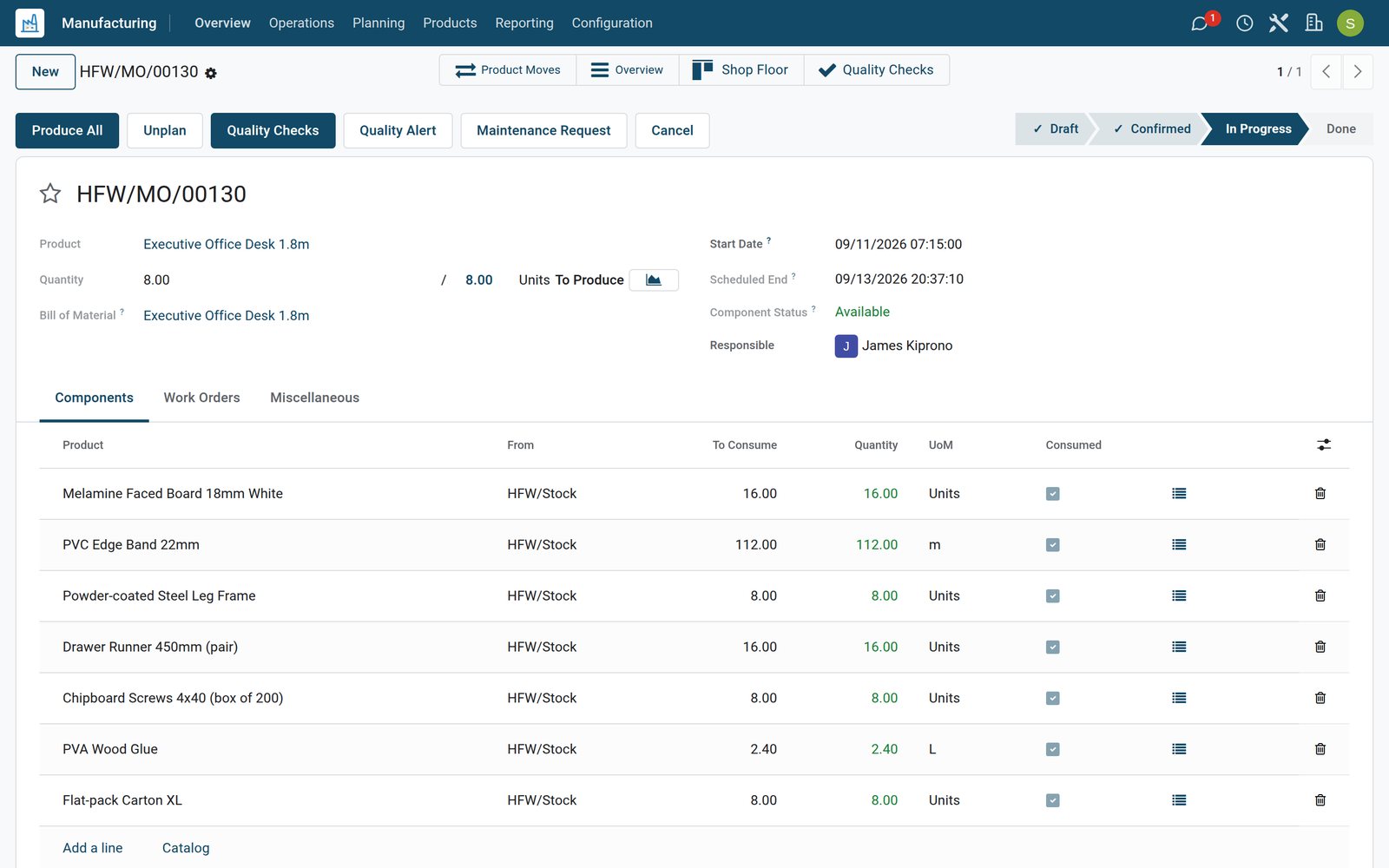
Every order, from confirmed to done, on one list
Manufacturing orders carry the product, quantity, schedule, component availability and status, so the morning meeting starts from facts.
 Manufacturing
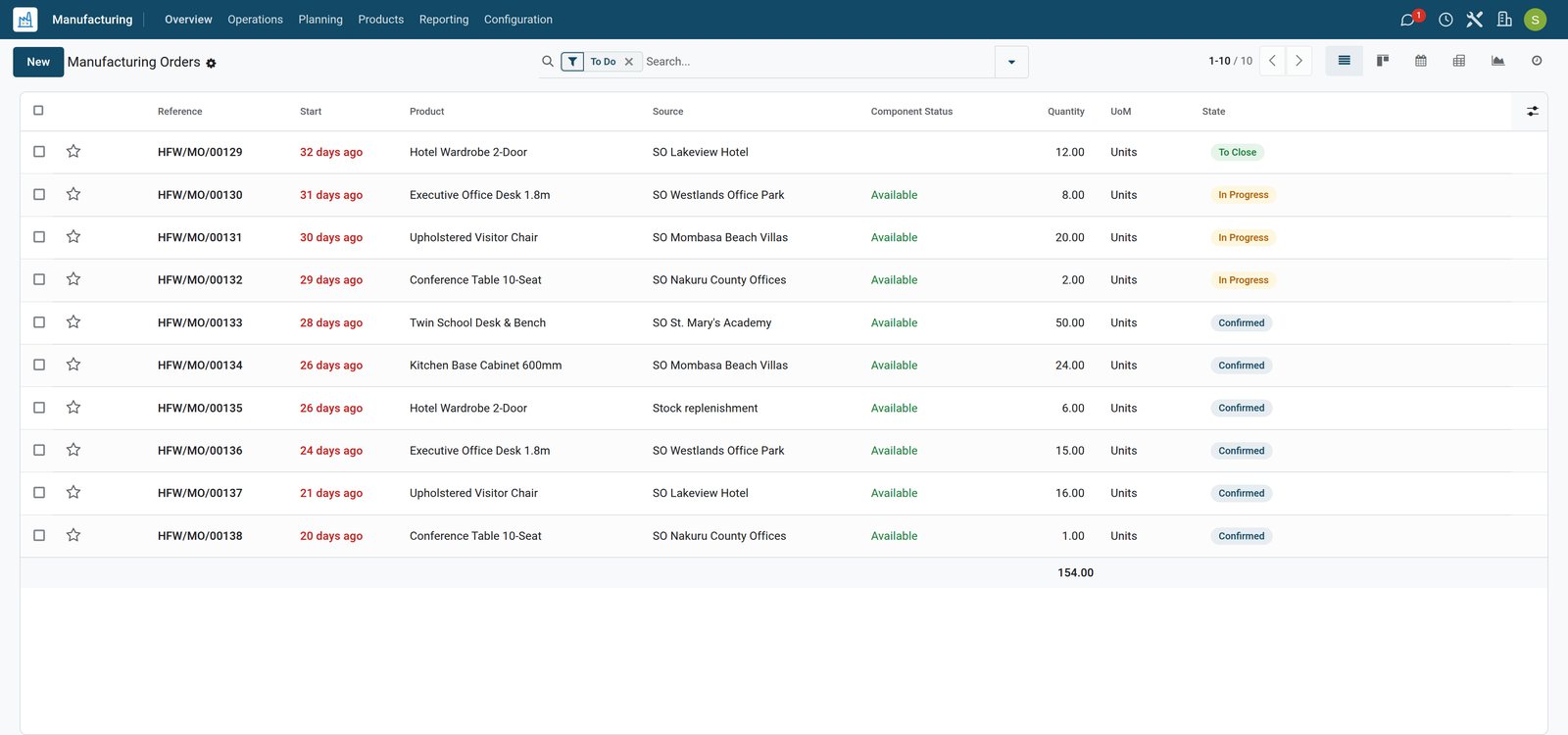
See what is in progress and what is waiting for parts
The order list shows each order's reference, product, quantity, scheduled start, component status and progress, filtered to the work still open.
Explore Manufacturing →By the numbers
What ships inside the Manufacturing app
Counted in the product itself, on the demo database.
- 6
- order statuses from Draft and Confirmed through In Progress and To Close to Done or Cancelled
- 7
- time categories behind OEE, from fully productive time to equipment failure, setup, reduced speed and process defects
- 7
- printable documents, including Production Order, Work Order, BoM Overview, MO Overview, Cost Analysis and finished product labels
- 10
- manufacturing add-ons working together on the demo, from work orders and cost analysis to quality, maintenance, barcode and KRA eTIMS
Inside the app
What is inside
The menus of the Manufacturing app, grouped by what they do for the workshop.
Manufacturing orders
Each order reserves components, follows its bill of materials and posts finished goods to stock when it is marked done.
Work orders
Every operation becomes a work order with its work centre, expected duration and the real time recorded against it.
Bills of materials
Components, operations and by-products per product, as a manufactured product or as a kit sold from its parts.
Work centres
Machines and teams with an hourly cost, capacity, working hours and a live load and OEE figure on the overview.
Planning
Work orders on a Gantt chart by production or by work centre, with dependencies between operations when you switch them on.
Shop Floor
Operators open their work orders on a tablet, start the timer, follow instructions and record quantities without the back office.
Traceability
Lots and serial numbers follow components into finished goods, so a faulty batch can be traced to the orders that used it.
Unbuild and scrap
Take a finished product back into its components or scrap damaged material, with the stock and value adjusted.
Step by step
From demand to finished stock
How an order moves through BridgeERP, and which app does each step.
- Step 1
Demand
A confirmed sale or a reordering rule in Replenishment asks for finished products the warehouse does not hold.
Inventory - Step 2
Manufacturing order
The order takes its components and operations from the bill of materials and reserves what is in stock.
Manufacturing - Step 3
Missing parts
Components short for the order are bought through purchase orders linked back to the production that needs them.
Purchase - Step 4
Work orders
Operations are scheduled on work centres and operators record time and quality checks on the shop floor.
Manufacturing - Step 5
Finished goods
Marking the order done consumes the components and puts the finished products, with their lots, into stock.
Inventory - Step 6
Costs
Component and work centre costs become the product's real cost, visible in Production Analysis and the stock valuation.
Accounting
Know which machine is busy next Tuesday
Work orders sit on a timeline per work centre, so a rush order shows at once what it would push back.
 Manufacturing
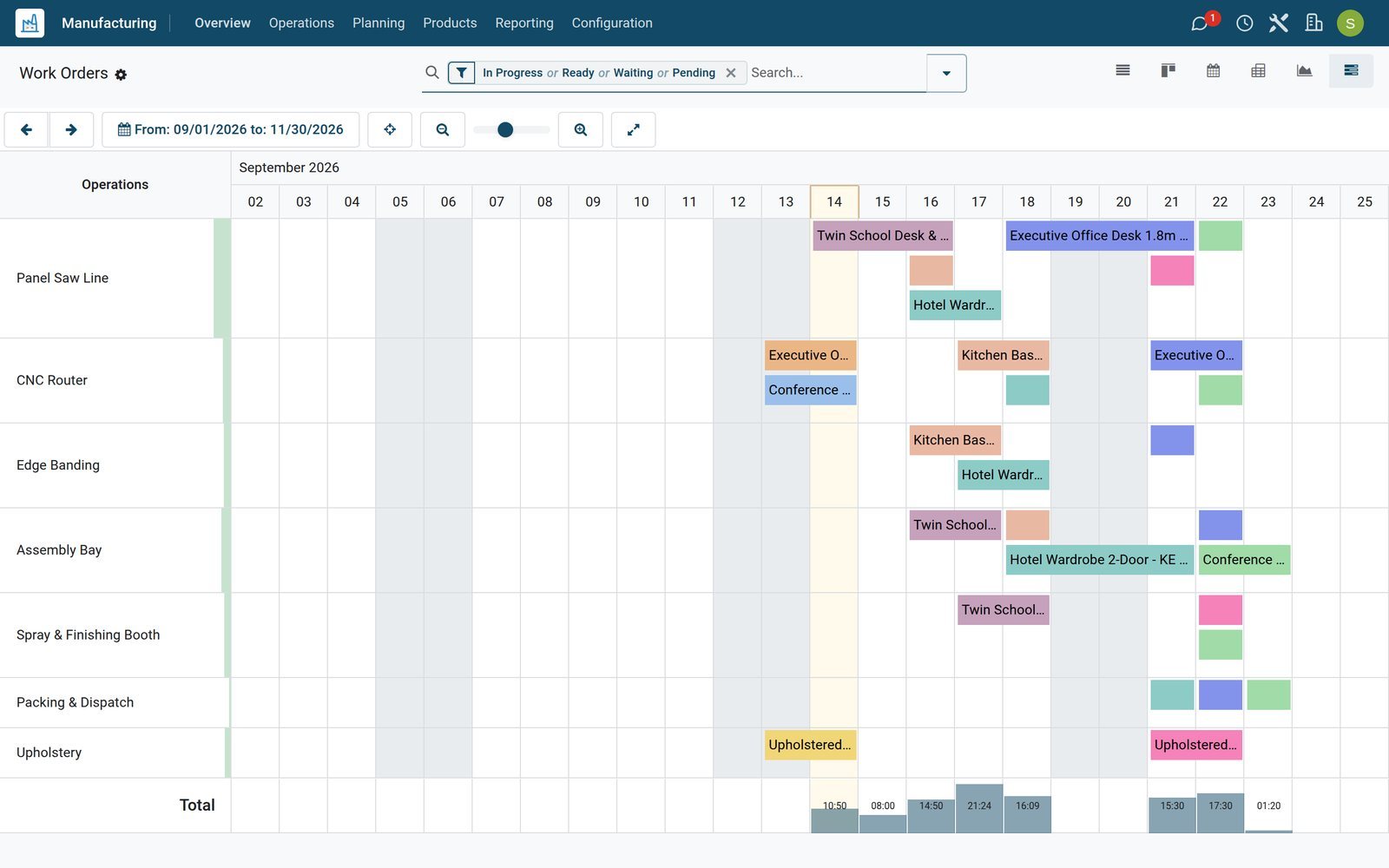
The workshop week on one chart
The Gantt chart lines up cutting, edge banding, routing, assembly, finishing and packing by work centre, with each work order's start and finish.
Explore Manufacturing →See load and effectiveness per work centre
The overview and the OEE report tell a supervisor where time is lost before a delivery date slips.
- Manufacturing
Every work centre with its load and OEE
Each work centre card shows its current status, the load in minutes waiting for it and its overall equipment effectiveness.
Explore Manufacturing →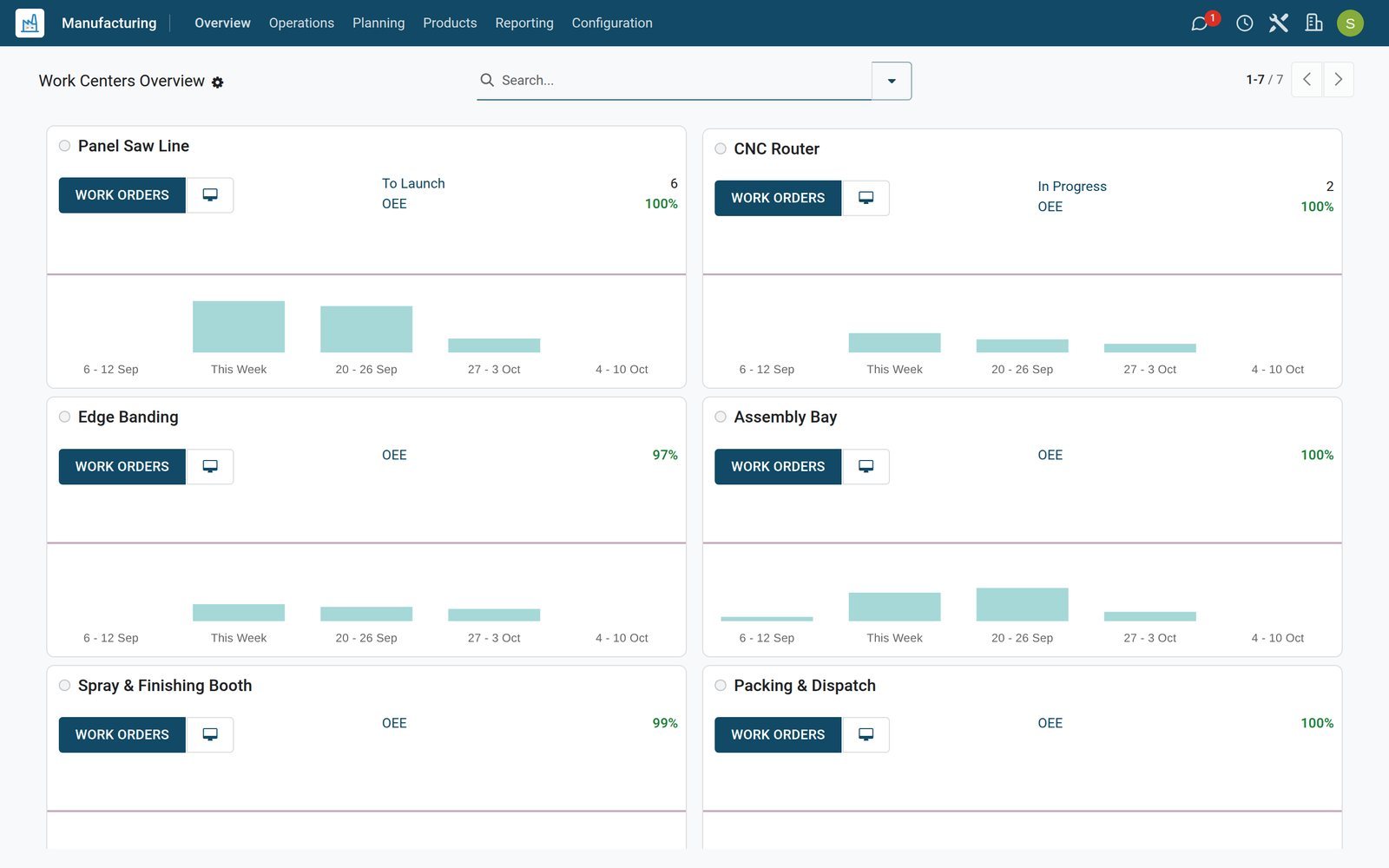
- Manufacturing
Where the hours went
The Overall Equipment Effectiveness report splits recorded time by work centre and loss reason, such as equipment failure, setup or reduced yield.
Explore Manufacturing →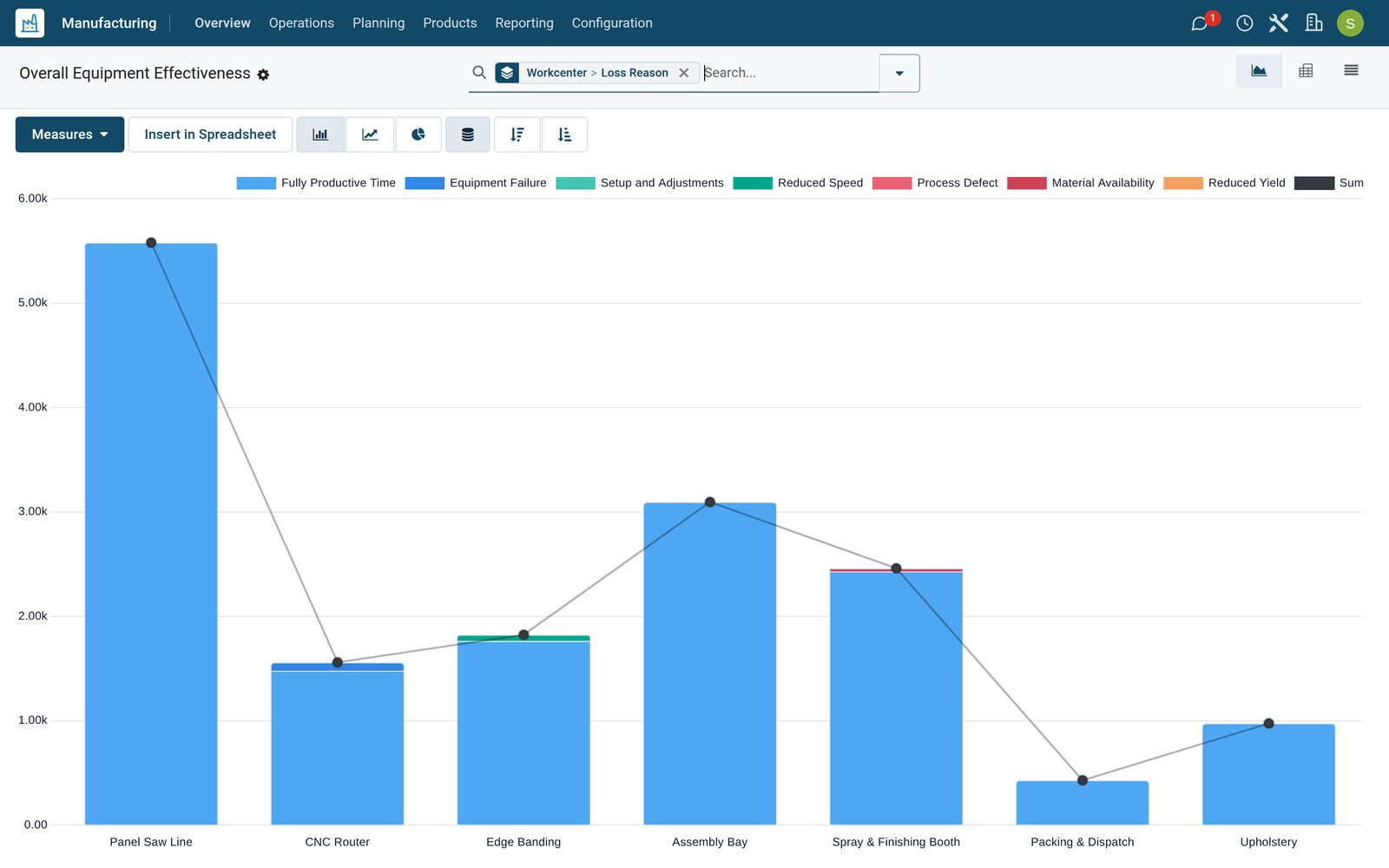
Write the recipe once, build it every time
A bill of materials holds the components, quantities and operations, so every order of that product is built and costed the same way.
 Manufacturing
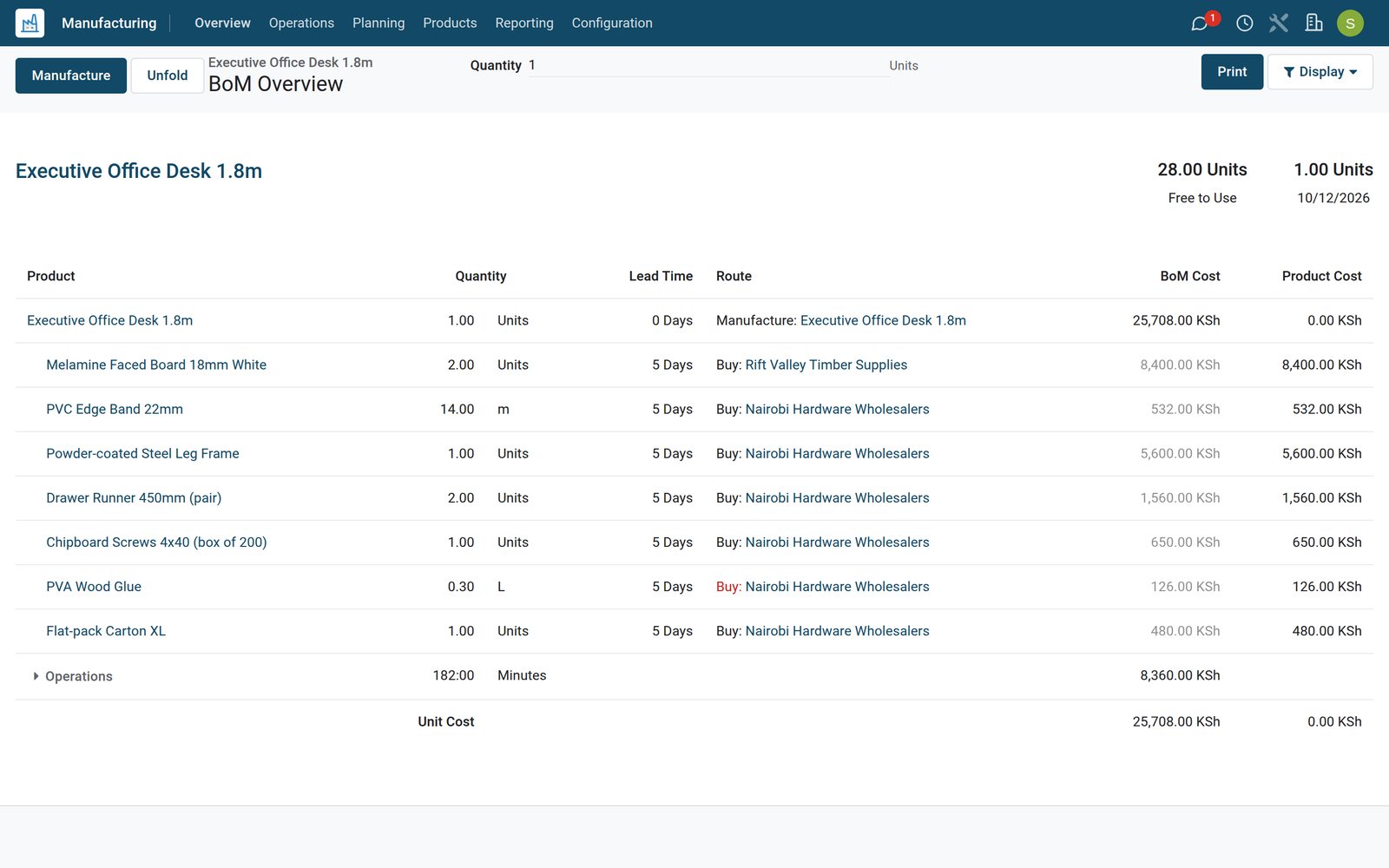
Components, operations and cost of a real product
The BoM Overview of the executive desk lists its boards, edging, fittings and carton with quantities and costs, the operations that build it and the total.
Explore Manufacturing →Know what each product really cost to make
Production Analysis compares component, operation and total costs per product across the orders you finished.
 Manufacturing
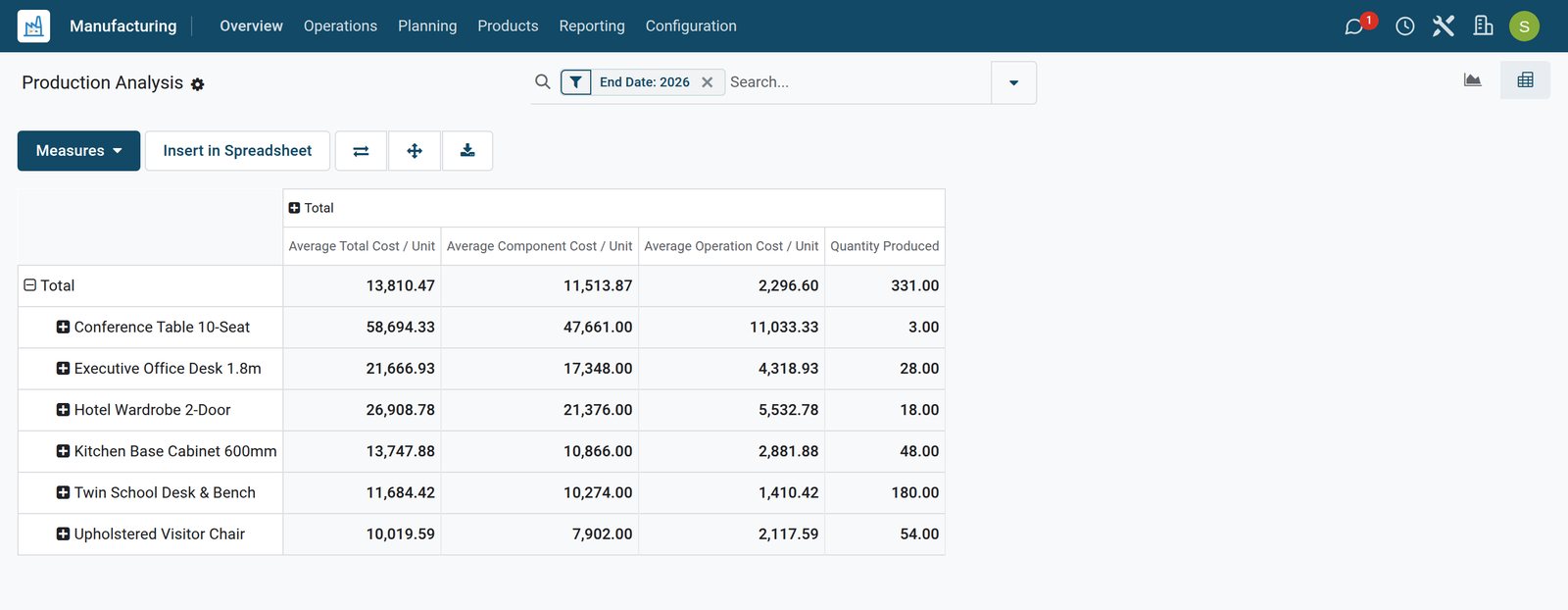
Cost per unit, order by order
Production Analysis turns finished orders into component cost, operation cost and cost per unit, ready to regroup by product or period.
Explore Manufacturing →Who uses it
Who uses it, and what they see
One app, different screens for the people who keep the workshop running.
Production planner
Confirms orders, checks component availability and moves work orders on the planning chart when priorities change.
Operator
Opens assigned work orders in Shop Floor, starts the timer, follows the instructions and records produced quantities.
Supervisor
Watches work centre load and OEE, and sends a machine that keeps failing to maintenance.
Quality inspector
Runs the checks set on operations and raises an alert when a batch fails its inspection.
Storekeeper and buyer
Sees reserved components, reorders what is short and receives the purchases linked to production.
Accountant
Reads real production costs and stock value, including landed costs spread over manufacturing orders.
Works with
Runs with the rest of BridgeERP
Apps that share the same products, stock and costs.
 InventoryComponents reserved and finished goods stocked
 PurchaseMissing components bought for the order
 SalesOrders made to what customers confirmed
 QualityChecks on operations and alerts
 MaintenanceRequests for work centre machines
 PLMEngineering changes to bills of materials
 AccountingProduction costs and stock valuation
 EmployeesOperators on work orders
 PayrollPay for the people on the floor
 DocumentsDrawings and worksheets in one place
 Point of SaleSell what the workshop makes
 IoTConnect scales and machines
In your country
Built for workshops in any country
What the demo runs for a workshop group with companies in five countries.
E-invoicing for manufacturing
The Kenyan eTIMS manufacturing integration is installed next to the stock one on the demo's Kenyan company.
Costs in your currency
Work centre hourly costs and product costs are kept in the company currency, Kenya shillings for the Nairobi workshop.
Several companies
Companies in different countries run side by side, each with its own orders and stock; the demo holds five of them in one database.
Barcodes on the floor
Components and finished goods are scanned in the Barcode app during manufacturing, which cuts typing errors.
English, French and Arabic
The same database works in the languages the demo has installed, so teams read their screens in their own language.
Tablets instead of paper
Shop Floor runs in the browser on a tablet at the work centre, so instructions and timers replace printed job cards.
Reports and control
Reports and control
The reports the demo produces from its own orders and work orders.
Overall Equipment Effectiveness
Recorded time per work centre split into productive time and losses for availability, performance and quality.
Production Analysis
Component, operation and unit costs of finished orders, in graph and pivot views you can regroup.
Work orders report
Expected against real duration per operation and work centre, to correct routings that promise too little time.
BoM Overview
A printable structure of a bill of materials with its components, operations and their costs.
MO Overview and Cost Analysis
Per order, what was planned against what was consumed and the resulting cost.
Labels and paperwork
Production orders, work orders and finished product labels in PDF or ZPL for label printers.
Getting started
Getting started
How a workshop moves onto BridgeERP Manufacturing.
Import products and BoMs
Products, components and bills of materials come in from spreadsheets through the import on each list.
Set up work centres
Enter machines and teams with their hourly cost and working hours, then the operations each product needs.
Switch on what you need
Work orders, by-products, dependencies and Shop Floor are settings you turn on when the workshop is ready.
Start with one product line
Run one family of products end to end first, then add the rest once the routings match reality.
Try it on the demo
The demo workshop holds real orders, work orders, checks and maintenance requests to click through before you decide.
Add quality and maintenance
Quality checks on operations and maintenance requests for work centres are ready in the same database.
Questions
Questions about Manufacturing
Not covered here? Contact us.
Can BridgeERP plan production against machine capacity?
Yes. Work orders are scheduled on work centres with their working hours and capacity, and the planning chart shows them by work centre or by production.
Does it handle kits as well as manufactured products?
Yes. A bill of materials is either a product you manufacture or a kit, whose components are delivered or sold in its place.
How are production costs calculated?
Components are valued at their cost and operations at the work centre hourly cost times the time recorded. Production Analysis shows the result per order and per unit.
Can operators use tablets on the shop floor?
Yes. Shop Floor shows each operator their work orders with instructions, a timer and quantity entry in the browser.
Can I trace which batch of material went into a product?
Yes, when components and finished goods are tracked by lot or serial number, each finished lot keeps the lots it consumed.
Does it work with country e-invoicing, such as KRA eTIMS?
The Kenyan eTIMS integration for manufacturing is installed on the demo's Kenyan company alongside the stock and invoicing integrations.
Can I start without work orders?
Yes. Manufacturing orders work with components only; switch on work orders in settings when you want to schedule and time operations.
Tax compliance
Invoices your tax authority accepts
In Kenya, Uganda, Rwanda, Burundi and Zambia, each invoice, receipt and stock movement goes to the tax authority's own system when you post it. Ghana and Pakistan come next, and we connect 73 more countries on request.
- KenyaReady
eTIMS KRA
Invoices, credit notes, POS receipts and stock movements
- UgandaReady
EFRIS URA
Invoices, POS receipts and stock
- RwandaReady
EBM RRA
Invoices, POS receipts, stock and imports
- BurundiReady
EBMS OBR
Invoices, POS receipts, stock and manufacturing
- ZambiaReady
Smart Invoice ZRA
Invoices, POS receipts, stock and imports
Where Manufacturing fits
Nothing here is a silo: the apps around it read and write the same records, so the hand-offs happen on their own.
What feeds it, and what it feeds — these are real app connections, not a diagram.
- Operations
Inventory
Stock moves, lots and serials, reordering rules and valuation.
Inventory →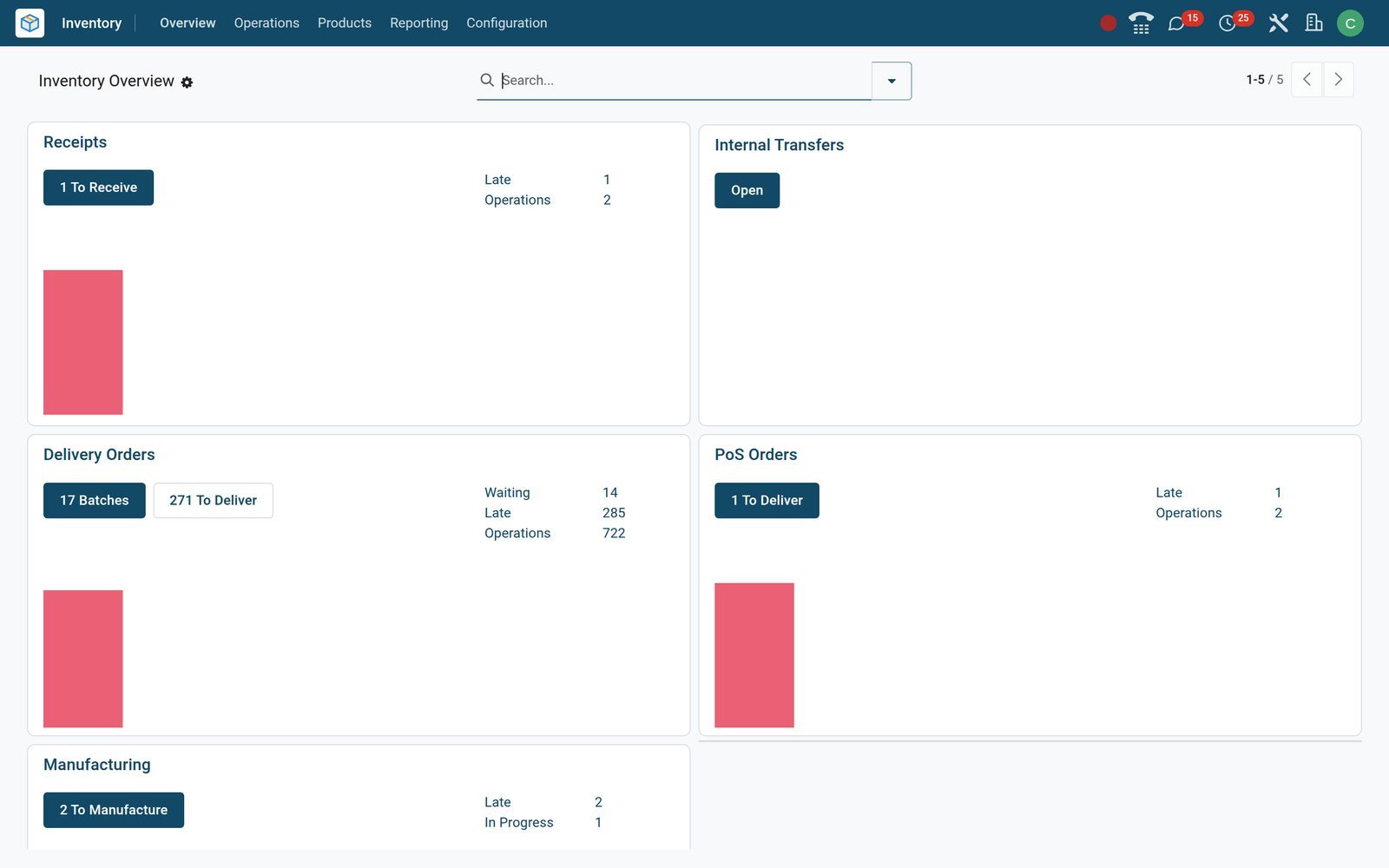
Put Manufacturing to work
Add it to your plan and pay only for what you use, or see it running on your own demo first.