

Pharmacy: Batches, expiry dates and prescriptions for pharmacies
BridgeERP records the batch of every pack sold at the counter, flags batches nearing expiry, writes off expired stock and reorders from the distributor.
Free instant access. No credit card required.
 Invoicing
 Accounting
 Point of Sale
 Inventory
 Purchase
 CRM
CRM
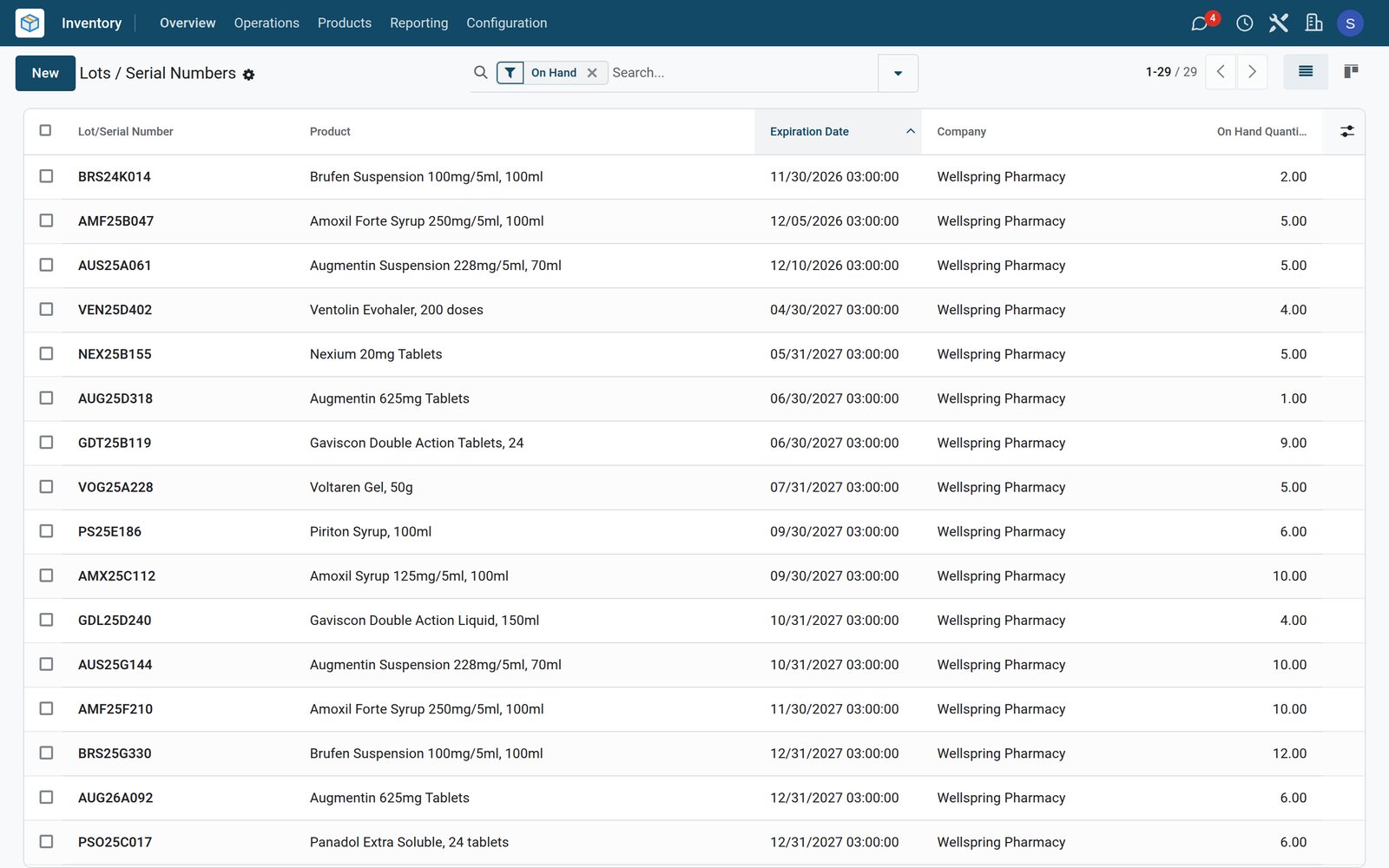
Sold at the counter, batch by batch
Every pack sold records its batch, and prescription medicines carry the prescription number on their line.
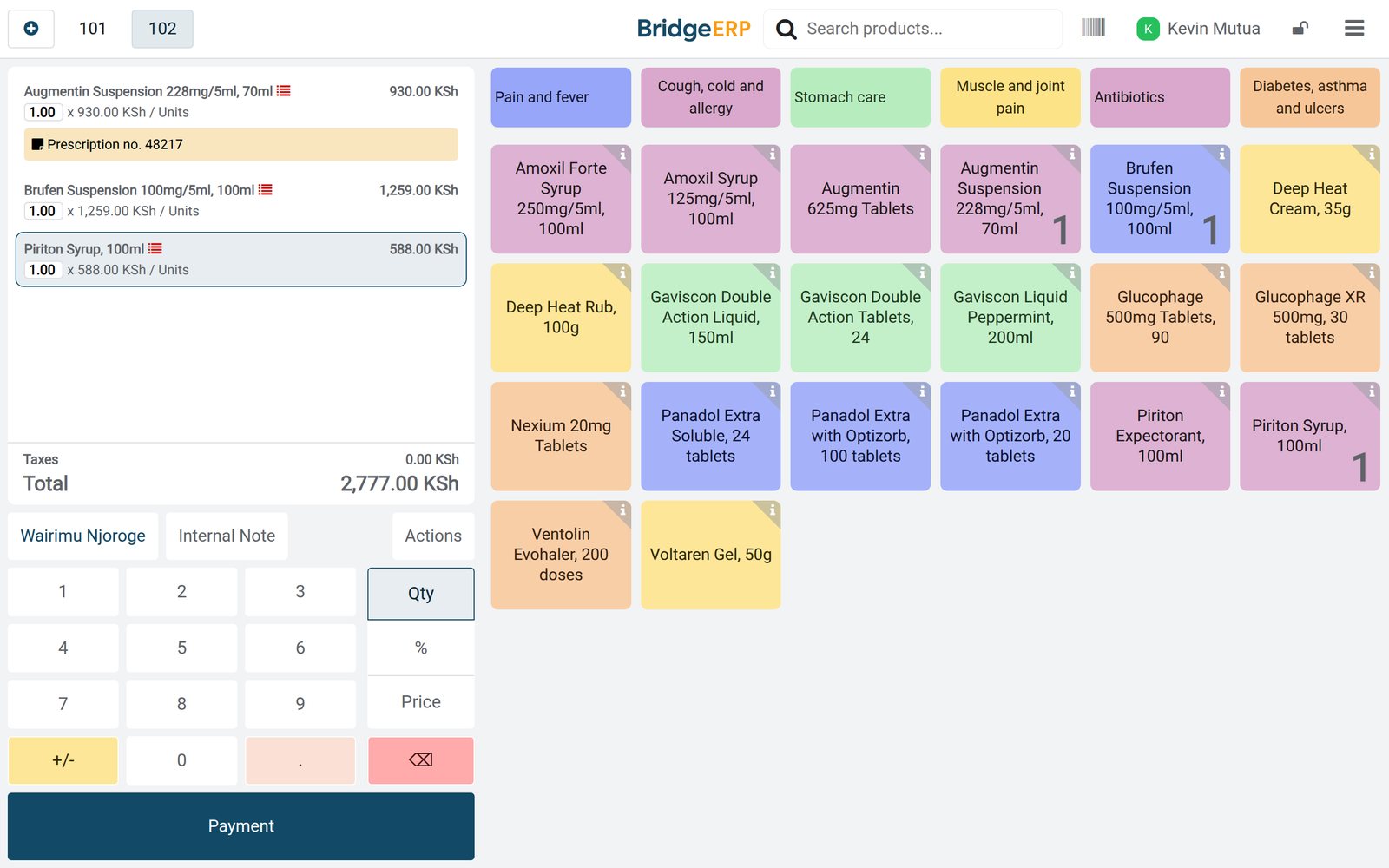 Point of Sale
A prescription and two more medicines
Wairimu Njoroge bought Augmentin suspension on prescription no. 48217 with Brufen suspension and Piriton syrup; each bottle's batch is on its line.
Explore Point of Sale →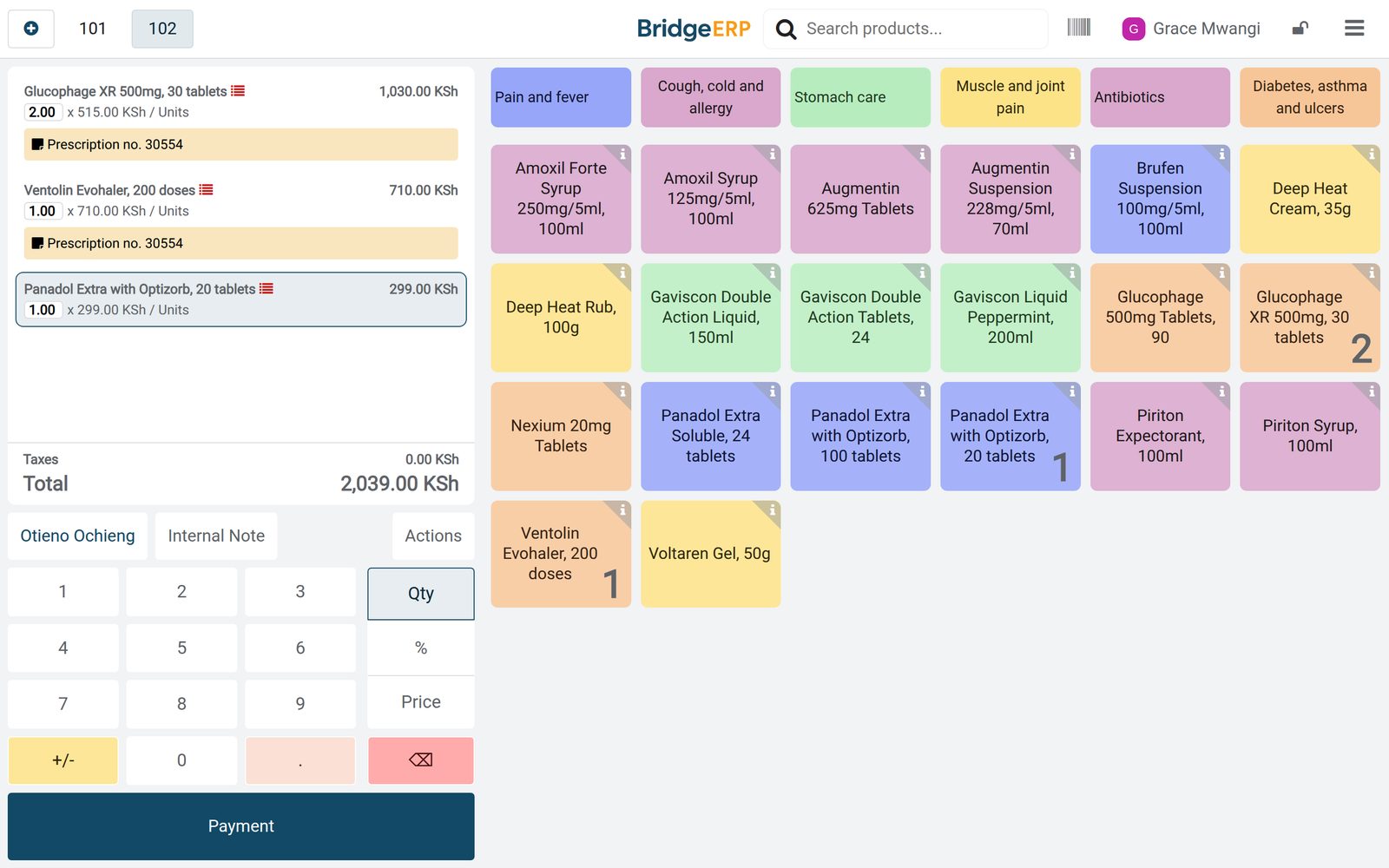 Point of Sale
Two medicines on one prescription
Otieno Ochieng collected Glucophage XR and a Ventolin inhaler on prescription no. 30554, with a pack of Panadol Extra: KSh 2,039.
Explore Point of Sale →By the numbers
What ships inside
Counted in the product.
- 5
- ways stock can leave the shelf: first in first out, last in first out, closest location, least packages, or first expiry first out
- 4
- dates on every batch: expiration, best before, removal and alert
- 3
- ways to track a product: by lots, by unique serial numbers or by quantity only
- 2
- triggers for a reordering rule: automatic, or manual from the replenishment list
Inside the app
What is inside
The apps a pharmacy runs on, and what each does for the day.
Batches and expiry dates
Every medicine can be tracked by batch, and each batch keeps its expiration, best before, removal and alert dates.
First expiry, first out
A product category can take stock out by removal date, so transfers reserve the batch that expires first.
Expiry alerts
Batches that reach their alert date are listed under Expiration Alerts, weeks or months before they expire.
Prescription numbers
The counter adds a note to an order line, such as the prescription number, and it is kept with the sale.
Batch trace
The moves history of a batch lists every sale it went out on, with the date and the customer when one was named.
Write-offs with a reason
Expired or damaged packs are scrapped from their batch with a reason, and the stock drops at once.
Reorder levels
Minimum and maximum levels per medicine show what to order, and purchase orders go to the distributor.
Shift rota
Shifts are planned by role, so each opening hour has a pharmacist and a technologist on the counter.
Step by step
From the distributor to the patient
How a medicine moves through BridgeERP, and which app does each step.
- Step 1
Order
The pharmacy orders from the distributor, with the distributor reference and the delivery date on the order.
Purchase - Step 2
Receive
Each delivery is received with the batch number and expiry date of every medicine.
Inventory - Step 3
Sell
At the counter the batch of each pack is recorded, with the prescription number on the line when there is one.
Point of Sale - Step 4
Watch expiry
Batches reaching their alert date appear under Expiration Alerts, well before they expire.
Inventory - Step 5
Write off
Expired or damaged packs are scrapped from their batch, with the reason recorded.
Inventory - Step 6
Reorder
Medicines under their minimum level show in the replenishment list and go on the next purchase order.
Purchase
Every batch: its dates and where it went
Each batch keeps its expiry dates and its history; on the demo a batch reaches its alert date 90 days before it expires.
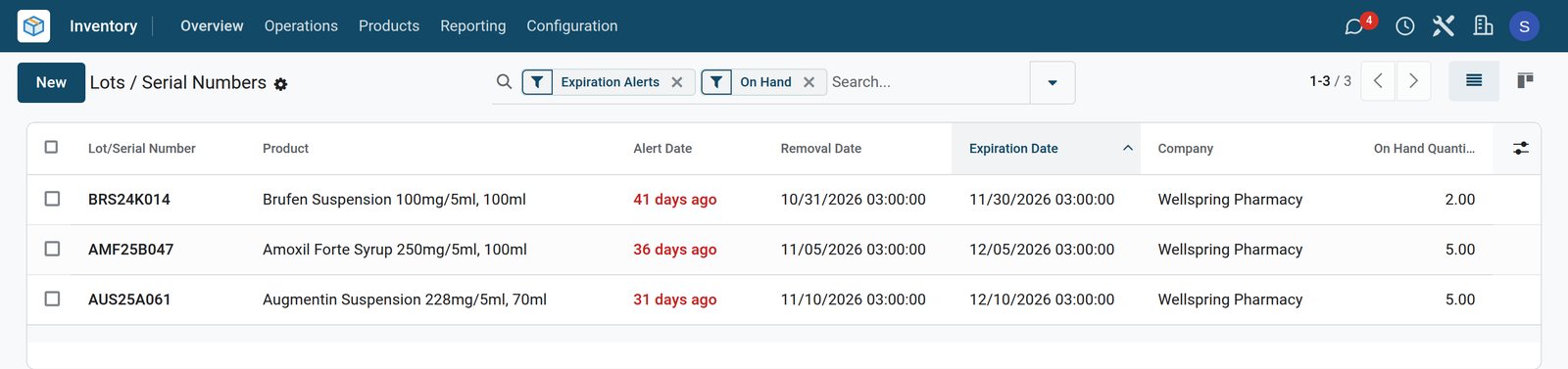 Inventory
Three batches on the alert list
Expiration Alerts lists the three batches in stock that expire by mid-December; each is due off the shelf a month before it expires.
Explore Inventory →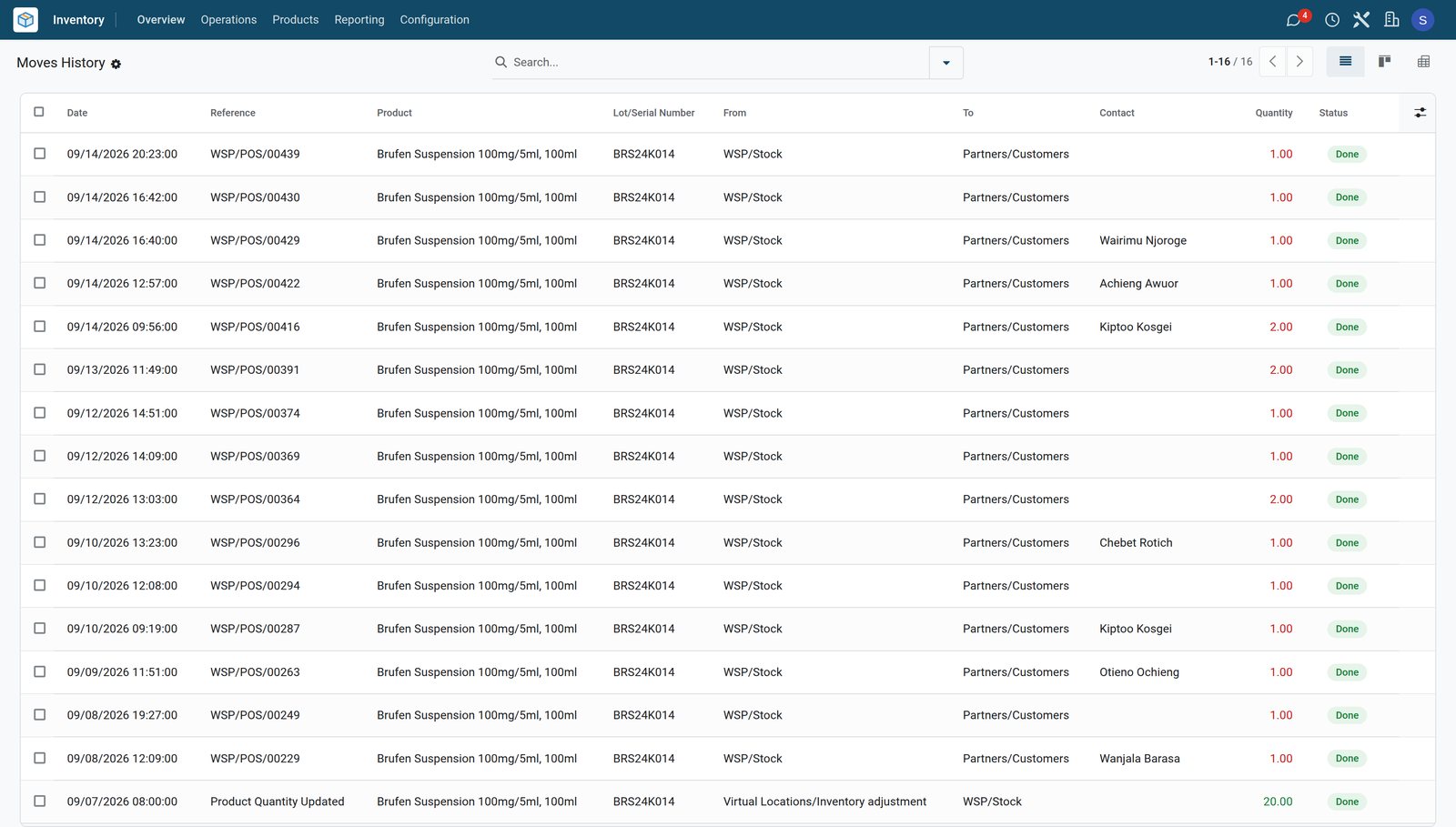 Inventory
Where one batch went
Twenty bottles of Brufen batch BRS24K014 were counted in on 7 September; 18 went out in 15 counter sales, 7 of them to named customers.
Explore Inventory →The batch that expires first leaves first
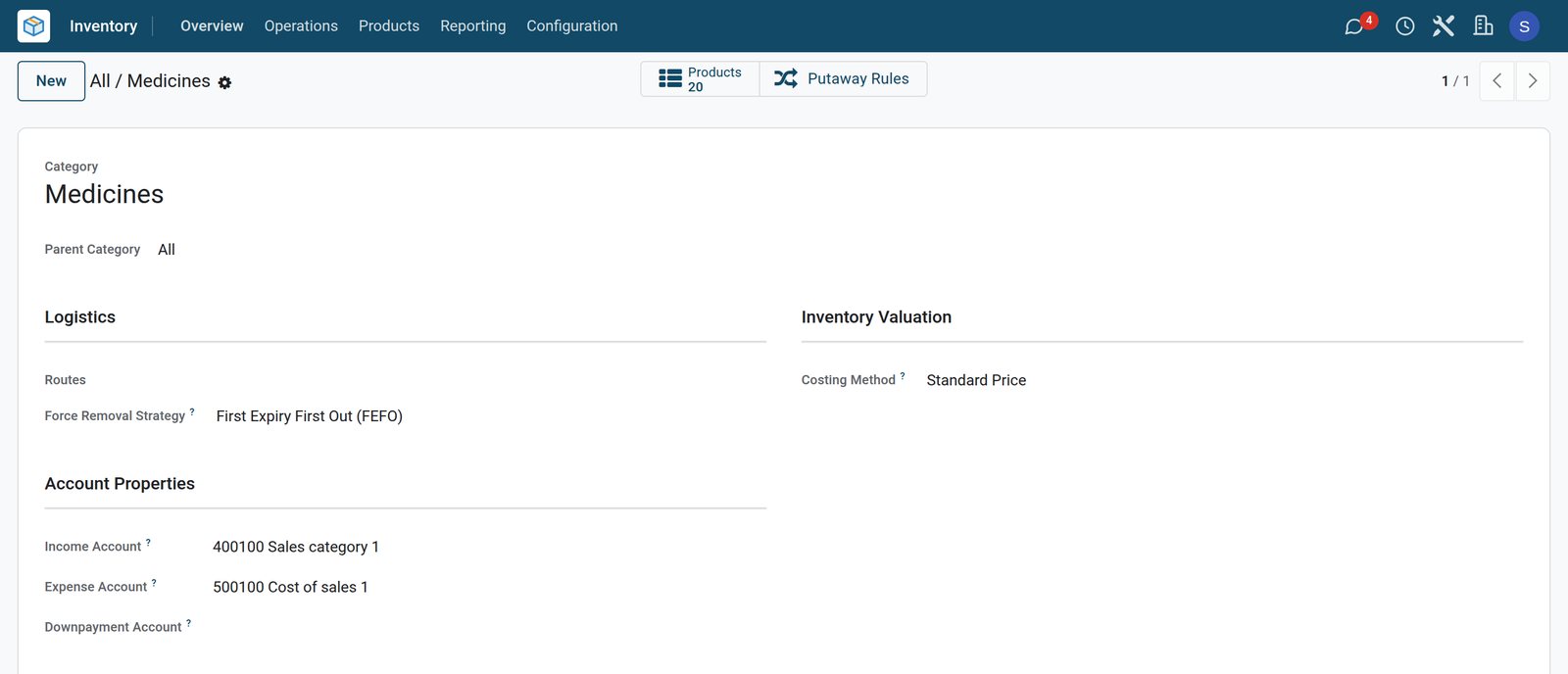
The medicines category takes stock out by earliest expiry, and each medicine sets how long its batches last.
 Inventory
First expiry, first out
The Medicines category forces the First Expiry First Out removal strategy on its 20 medicines, so transfers reserve the batch that expires first.
Explore Inventory →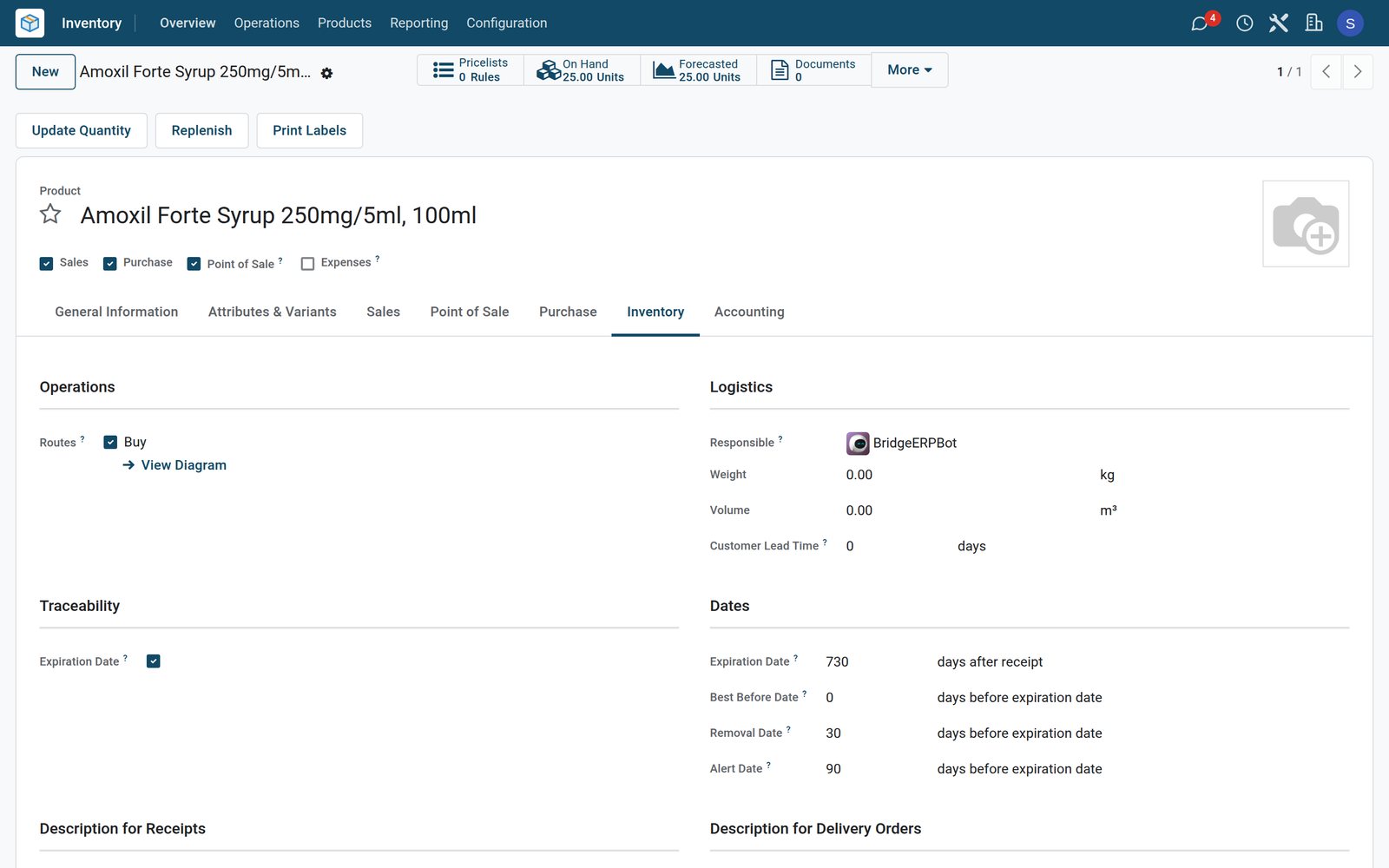 Inventory
Two years, with an alert at 90 days
Amoxil Forte is tracked by lots with expiry dates: a batch lasts 730 days, is due off the shelf 30 days before it expires and raises an alert 90 days before.
Explore Inventory →Expired and damaged stock written off
Packs that expire or break are scrapped from their batch with a reason, and the stock drops at once.
 Inventory
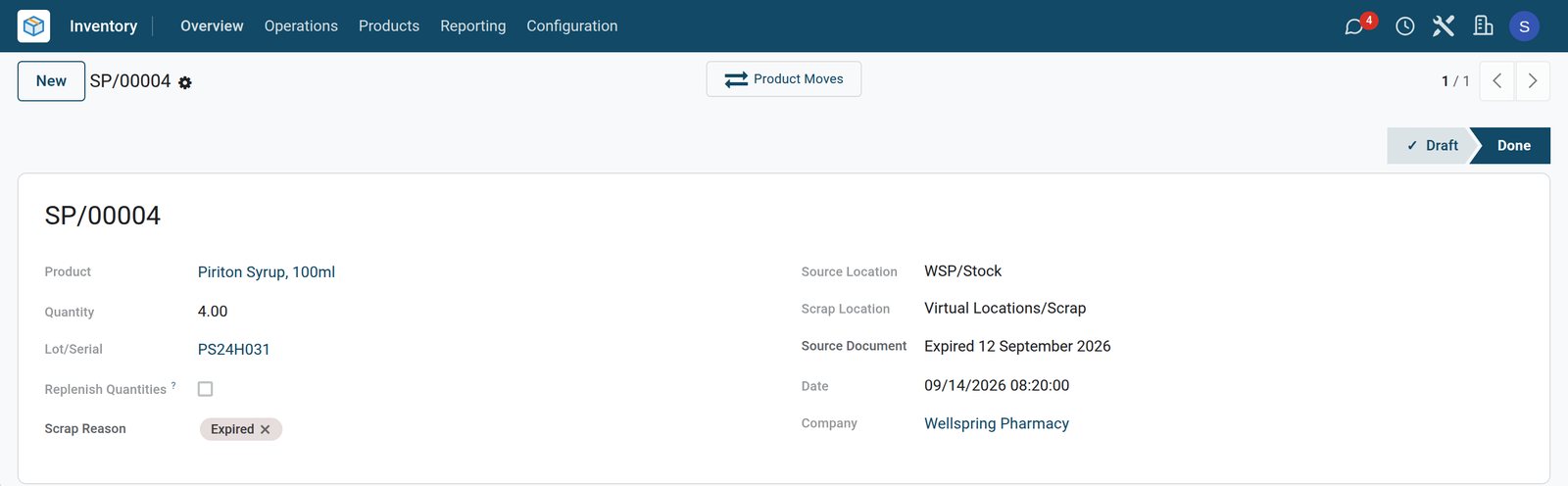
Four expired bottles
The last four bottles of Piriton syrup batch PS24H031 expired on 12 September and were written off on Monday with the reason Expired.
Explore Inventory →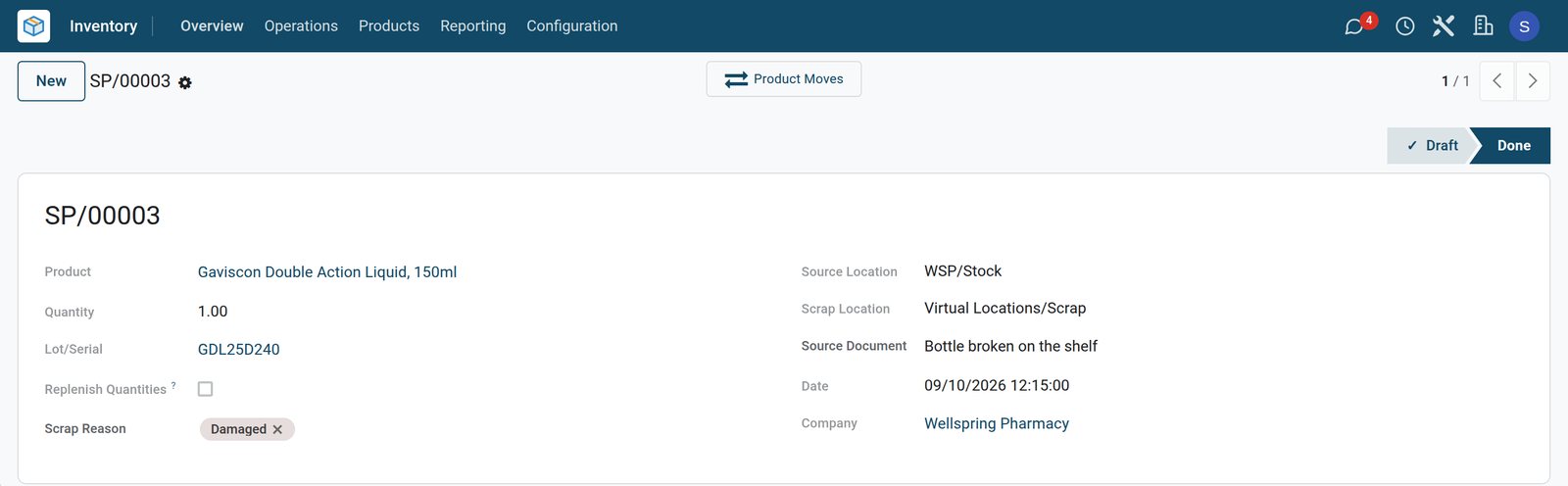 Inventory
A broken bottle
A bottle of Gaviscon Double Action liquid broke on the shelf on 10 September and was scrapped from batch GDL25D240 as Damaged.
Explore Inventory →Deliveries with batches, orders from minimum levels
Distributor deliveries arrive with their batch numbers and expiry dates, and minimum levels show what to order next.
- Purchase
Monday's delivery, four new batches
Cedarvale Medical Wholesale delivered Gaviscon liquid, Brufen suspension, Nexium and Deep Heat cream on 14 September, each received as a new batch.
Explore Purchase →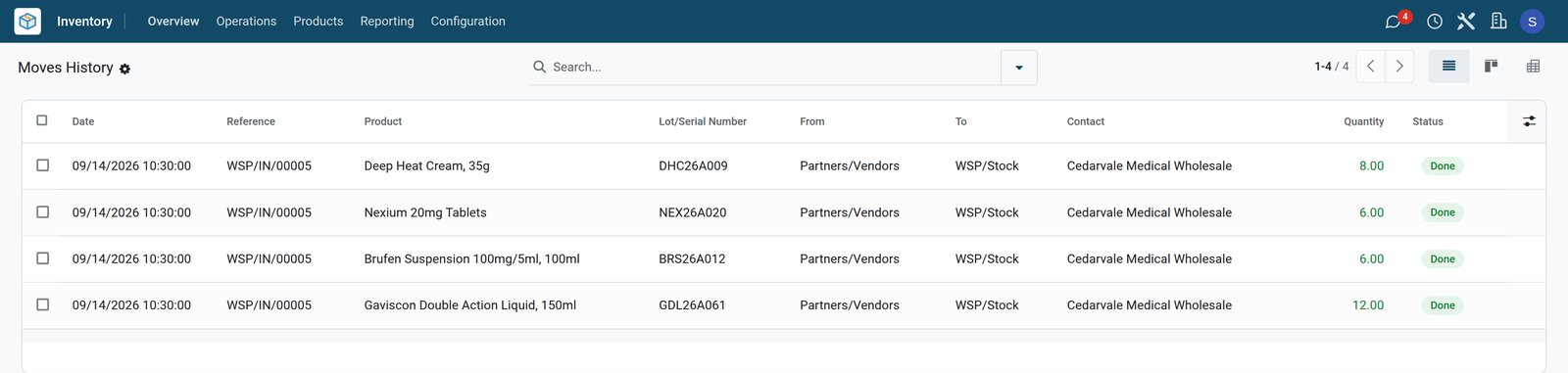
- Inventory
Minimum and maximum levels
Five medicines fell below their minimum on Monday and were ordered up to their maximum; with that order counted, nothing more is to order.
Explore Inventory →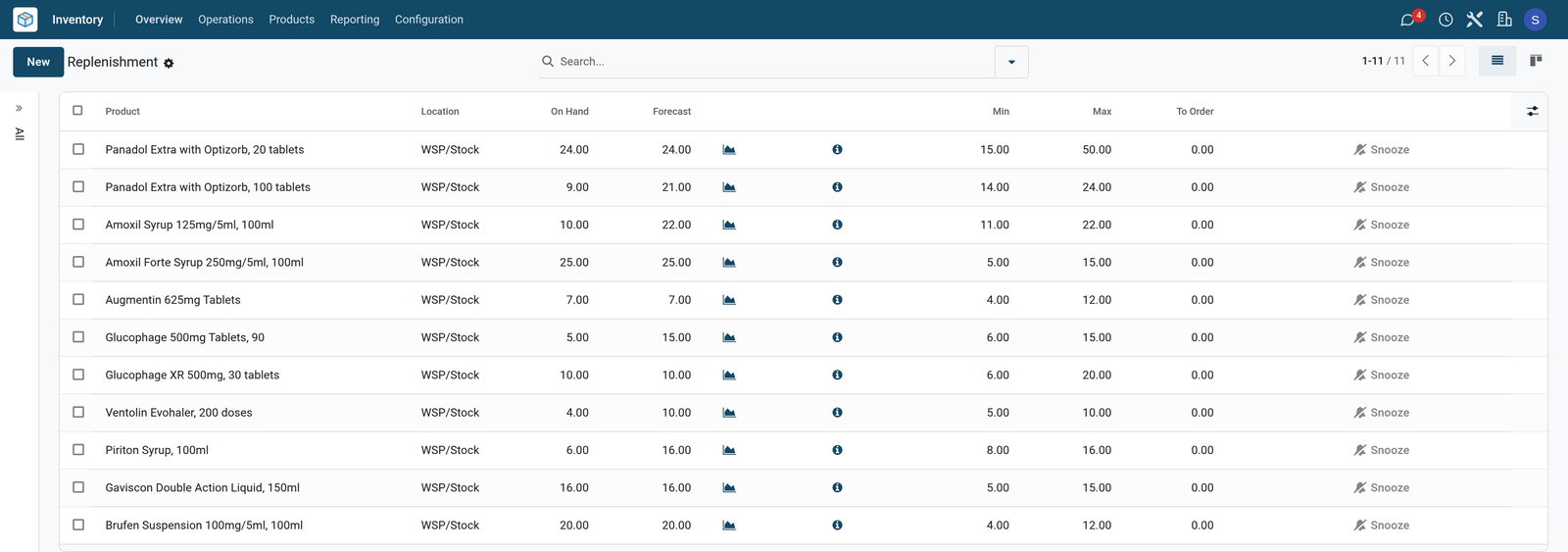
- Purchase
Wednesday's delivery, ordered on Monday
Panadol, Amoxil syrup, Glucophage, Ventolin and Piriton syrup were ordered from Amberfield Pharma Distributors on 14 September for delivery on 16 September.
Explore Purchase →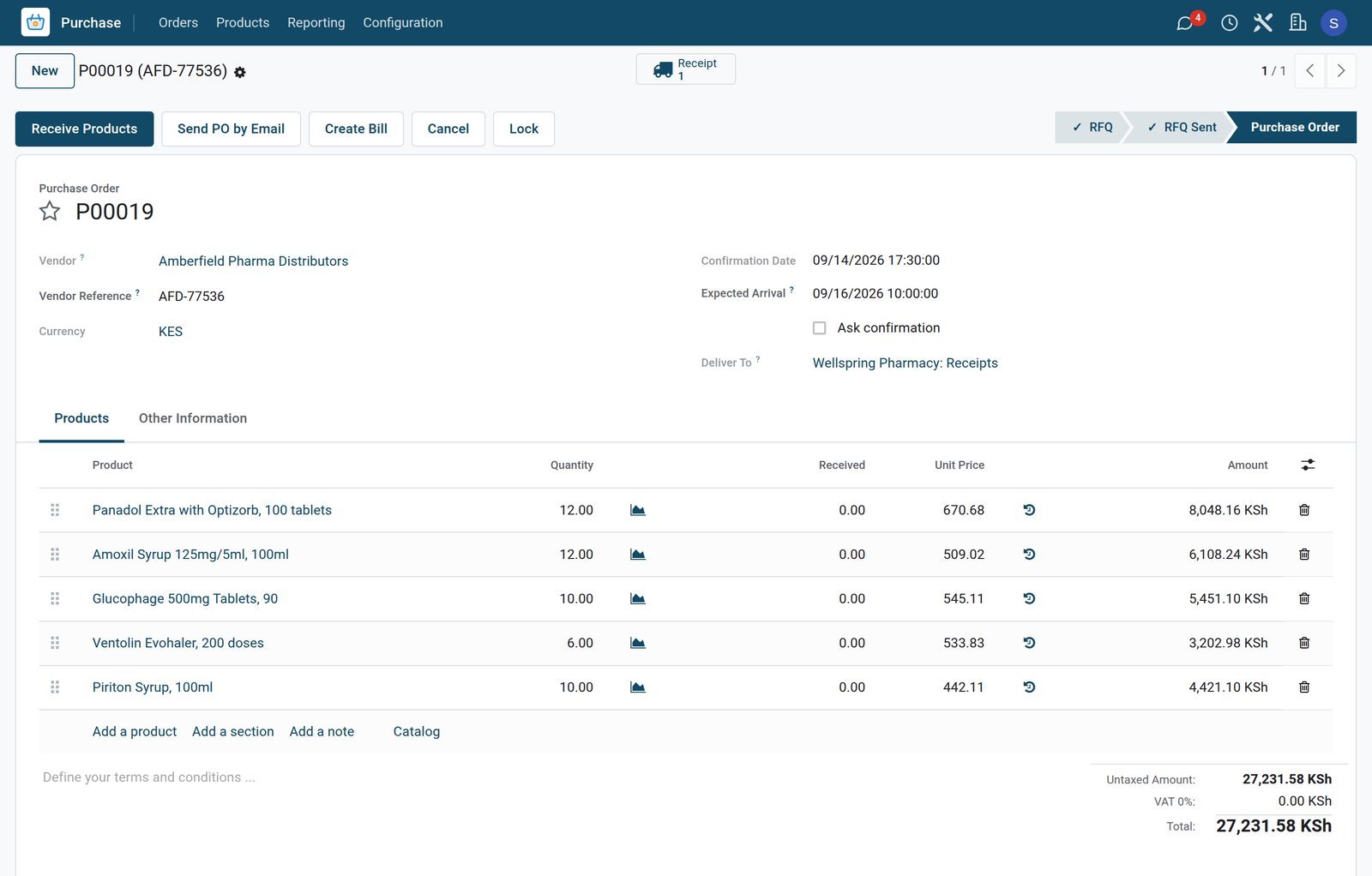
A pharmacist on every shift
The rota puts a pharmacist and a pharmaceutical technologist on the early and the late shift each day.
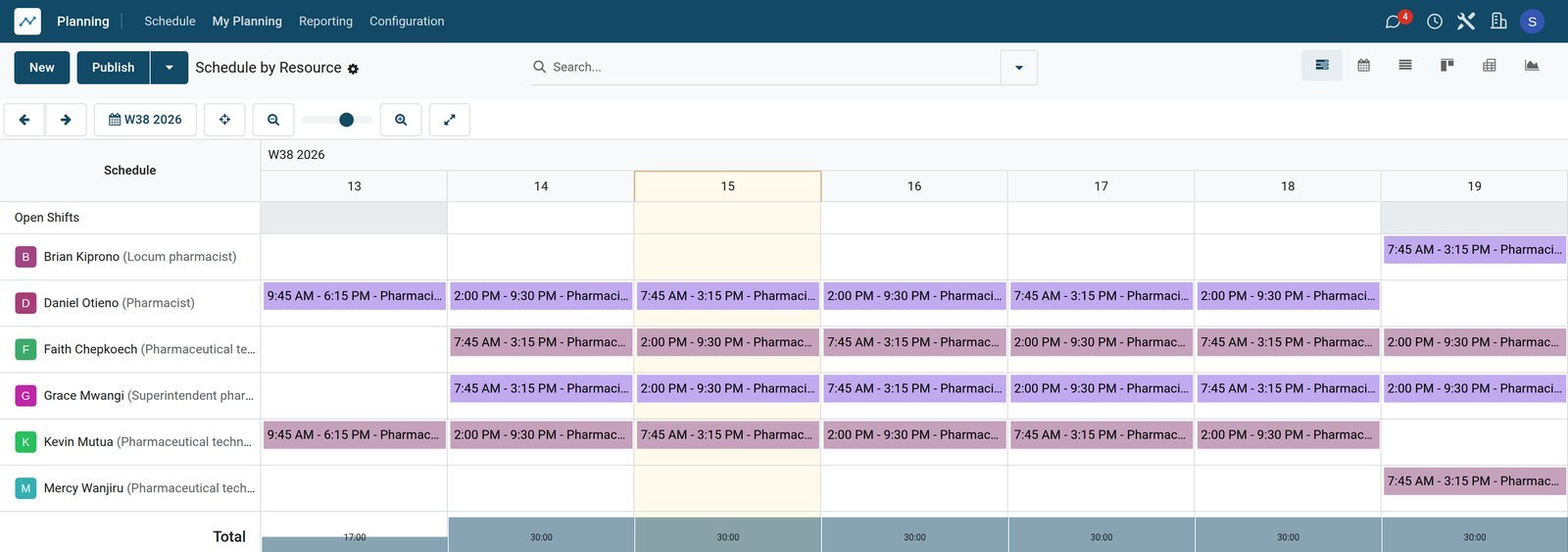
 Shift Planning
The team from Sunday to Saturday
Early shifts start at 07:45 and late shifts end at 21:30; Brian Kiprono and Mercy Wanjiru, who work part time, take Saturday morning.
Explore Shift Planning →What the counter sold
The analysis shows the week's sales by category of medicine.
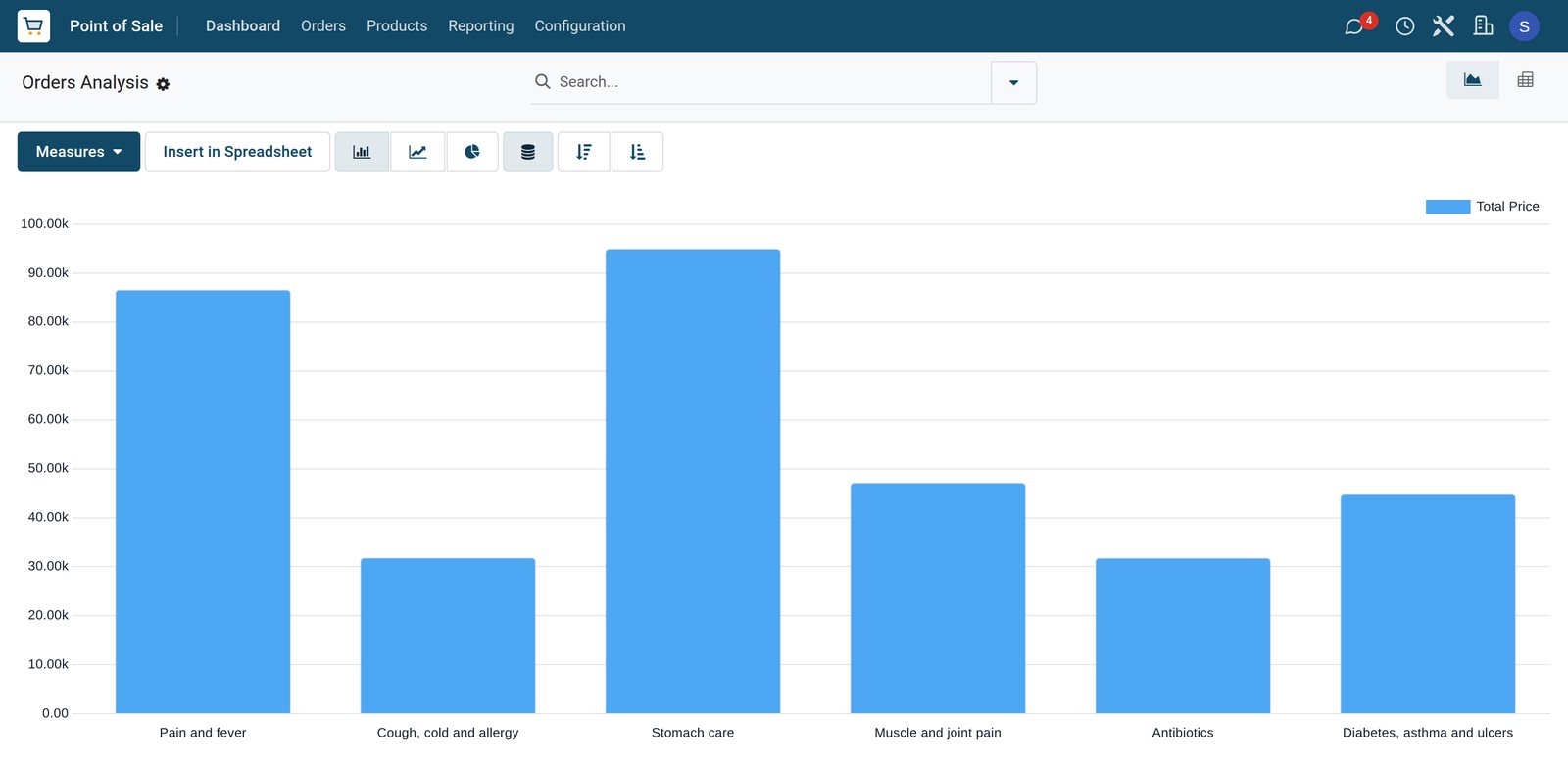 Point of Sale
A week by category
From 8 to 14 September stomach care sold the most, ahead of pain and fever, then muscle and joint pain and diabetes, asthma and ulcers.
Explore Point of Sale →Who uses it
Who uses it, and what they see
One system for the counter, the stock room and the books.
Superintendent pharmacist
Sets the expiry rules and reorder levels, checks the alert list and approves write-offs and distributor orders.
Pharmacists
Sell at the counter with the batch of each pack and the prescription number on the line.
Pharmaceutical technologists
Receive distributor deliveries with their batches, sell over the counter and scrap expired or damaged packs.
Owner or bookkeeper
Follows sales by category and counts the cash when each counter session closes into accounting.
Works with
Runs with the rest of BridgeERP
Apps a pharmacy draws on.

In your country
Your currency, payments and taxes
Set to the country the pharmacy trades in.
Company currency
Prices, costs and payments are kept in the currency of the company; the demo pharmacy trades in KES.
Exempt, zero-rated or taxed
Each product carries its own tax, so exempt medicines and taxed items can share a receipt; the demo medicines are VAT exempt.
Cash, card and mobile money
Each till has its own payment methods, such as cash, card and mobile money; the demo counter takes M-Pesa.
Accounting by country
Accounting packages for more than 100 countries set up the chart of accounts and the taxes for the pharmacy.
Getting started
Getting started
How a pharmacy moves onto BridgeERP.
Load the medicines
Import medicines with their prices, costs, distributors and batch tracking with expiry, removal and alert days.
Count stock by batch
Enter the stock on hand batch by batch, with the expiry date of each batch.
Open the counter
Create the till with its payment methods and the pharmacists and technologists who sell on it.
Set reorder levels
Give each medicine its distributor and its minimum and maximum levels.
Questions
Questions about Pharmacy
Not covered here? Contact us.
Can we track batch numbers and expiry dates?
Yes. Medicines can be tracked by batch, and each batch keeps its expiration, best before, removal and alert dates.
Does the batch that expires first go out first?
Yes. A product category set to First Expiry First Out reserves stock in order of removal date, and at the counter the batch of each pack is recorded on the order line.
Can we see which batches are about to expire?
Yes. Batches that reach their alert date are listed under Expiration Alerts, with their quantity on hand and expiry date.
Can a prescription number be recorded at the counter?
Yes. A note on the order line, such as the prescription number, is kept with the sale.
Can we find where a batch went?
Yes. The moves history of a batch lists every sale it went out on, with the date and the customer when one was named.
Can expired stock be written off?
Yes. Expired or damaged packs are scrapped from their batch with a reason, and the stock drops at once.
Tax compliance
Invoices your tax authority accepts
In Kenya, Uganda, Rwanda, Burundi and Zambia, each invoice, receipt and stock movement goes to the tax authority's own system when you post it. Ghana and Pakistan come next, and we connect 73 more countries on request.
- KenyaReady
eTIMS KRA
Invoices, credit notes, POS receipts and stock movements
- UgandaReady
EFRIS URA
Invoices, POS receipts and stock
- RwandaReady
EBM RRA
Invoices, POS receipts, stock and imports
- BurundiReady
EBMS OBR
Invoices, POS receipts, stock and manufacturing
- ZambiaReady
Smart Invoice ZRA
Invoices, POS receipts, stock and imports
Pharmacy, app by app
One connected flow instead of separate systems — the work moves from one team to the next without re-typing anything.
Every stop is a real app in your plan, and the hand-offs between them are the product.
- Customers & sales
- Operations
- Finance
Point of Sale
Touch till, offline mode, sessions, cash control and receipts.
Point of Sale →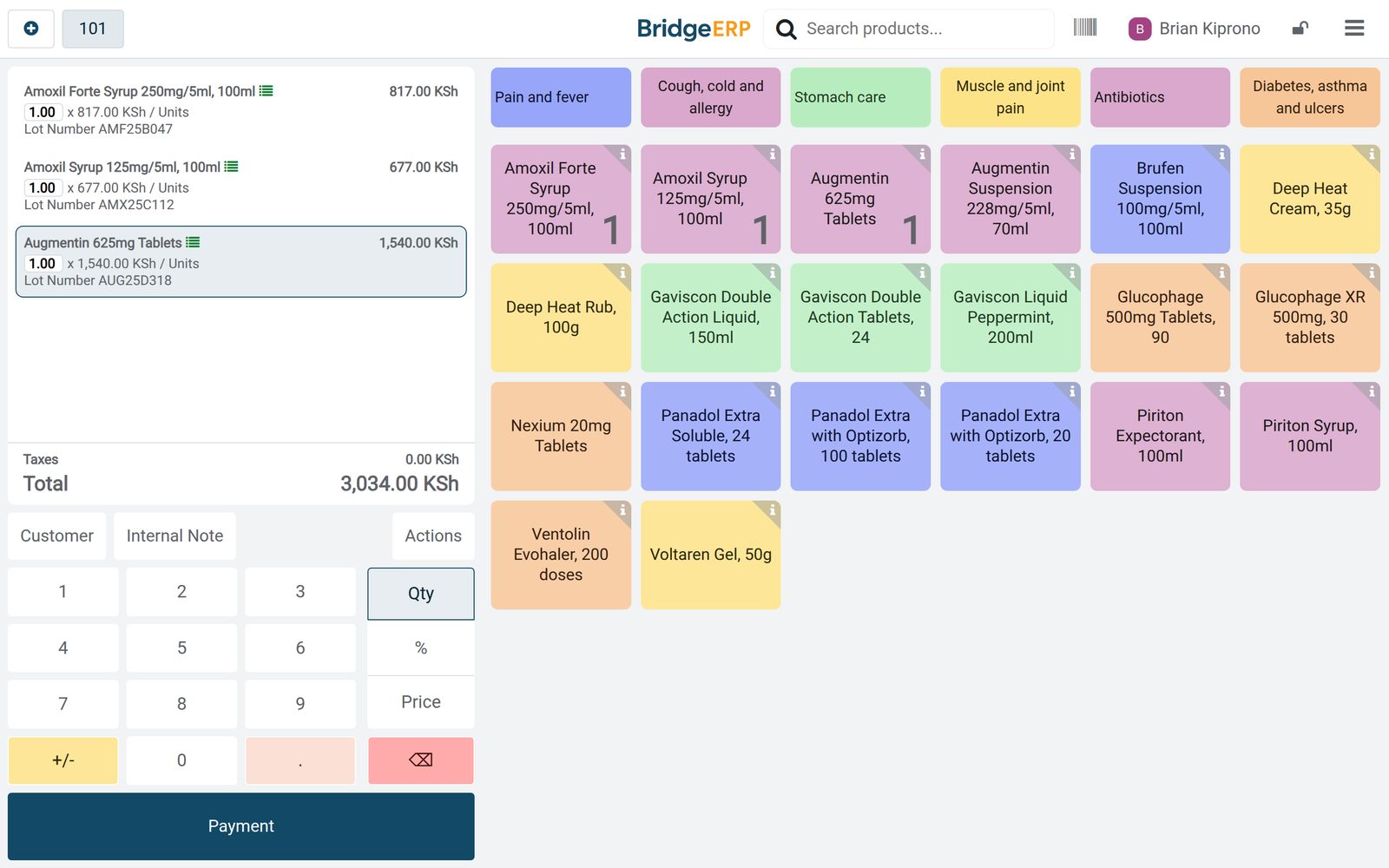
Ready when you are
Open the plan builder with the right apps for this industry already selected, or see it running first.