

Beauty Shop: Bookings, treatments and retail for beauty shops
BridgeERP books every treatment room, nail station and makeup chair, charges the visit at the front desk and restocks the retail shelf.
Free instant access. No credit card required.
 Invoicing
 Point of Sale
 Inventory
 Appointments
 CRM
CRM
Every room and chair, booked by the hour
Treatments are booked on the room, station or chair they need, and each booking shows whether the client came.
- Appointments
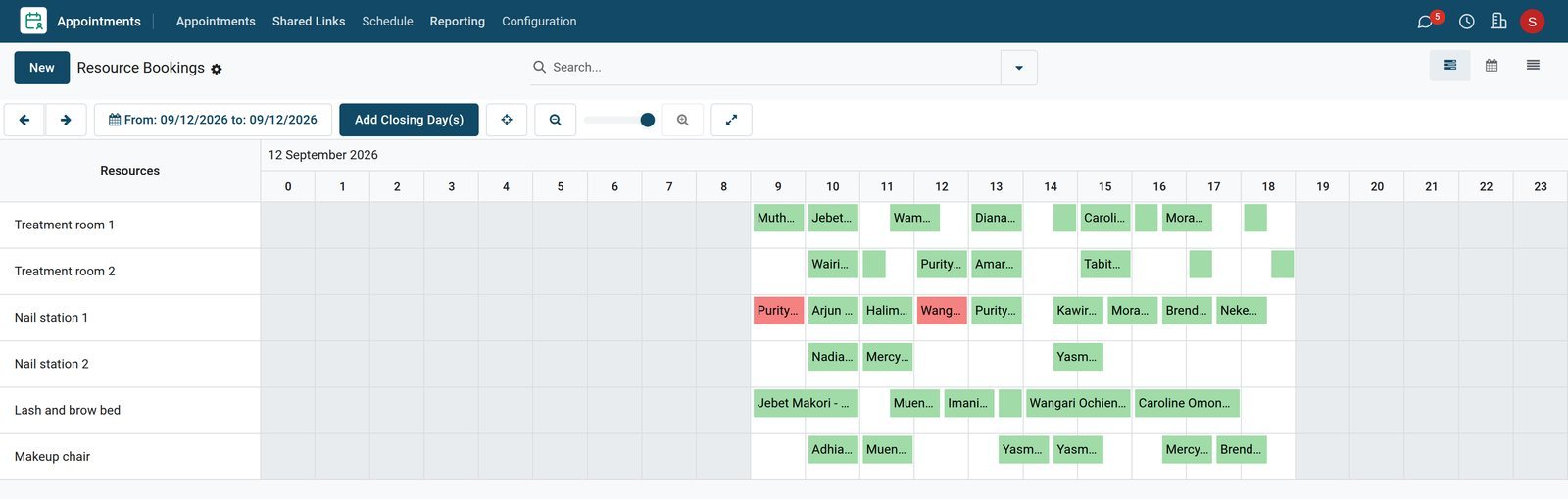
Next Saturday, booked ahead
Next Saturday is already booked on all six resources, from the first facial, pedicure and lash extensions at 9:00 to the last massage at 18:00.
Explore Appointments →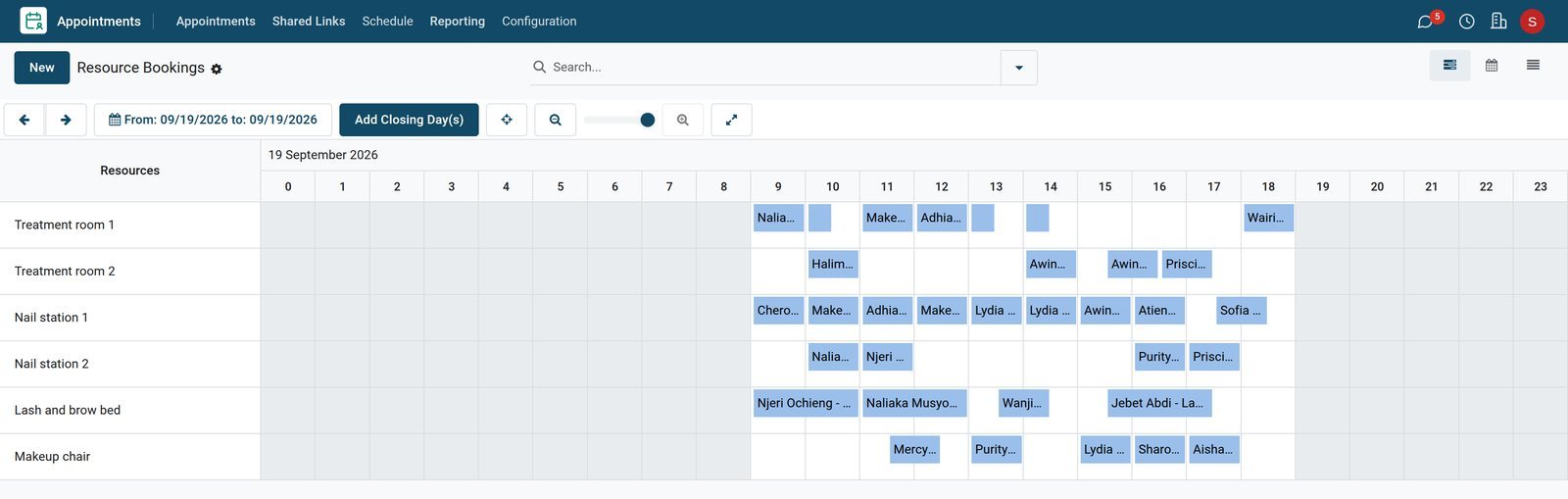
- Appointments
Checked in or no show
On Tuesday afternoon thirteen bookings were checked in, and one facial at 17:00 was marked as a no-show.
Explore Appointments →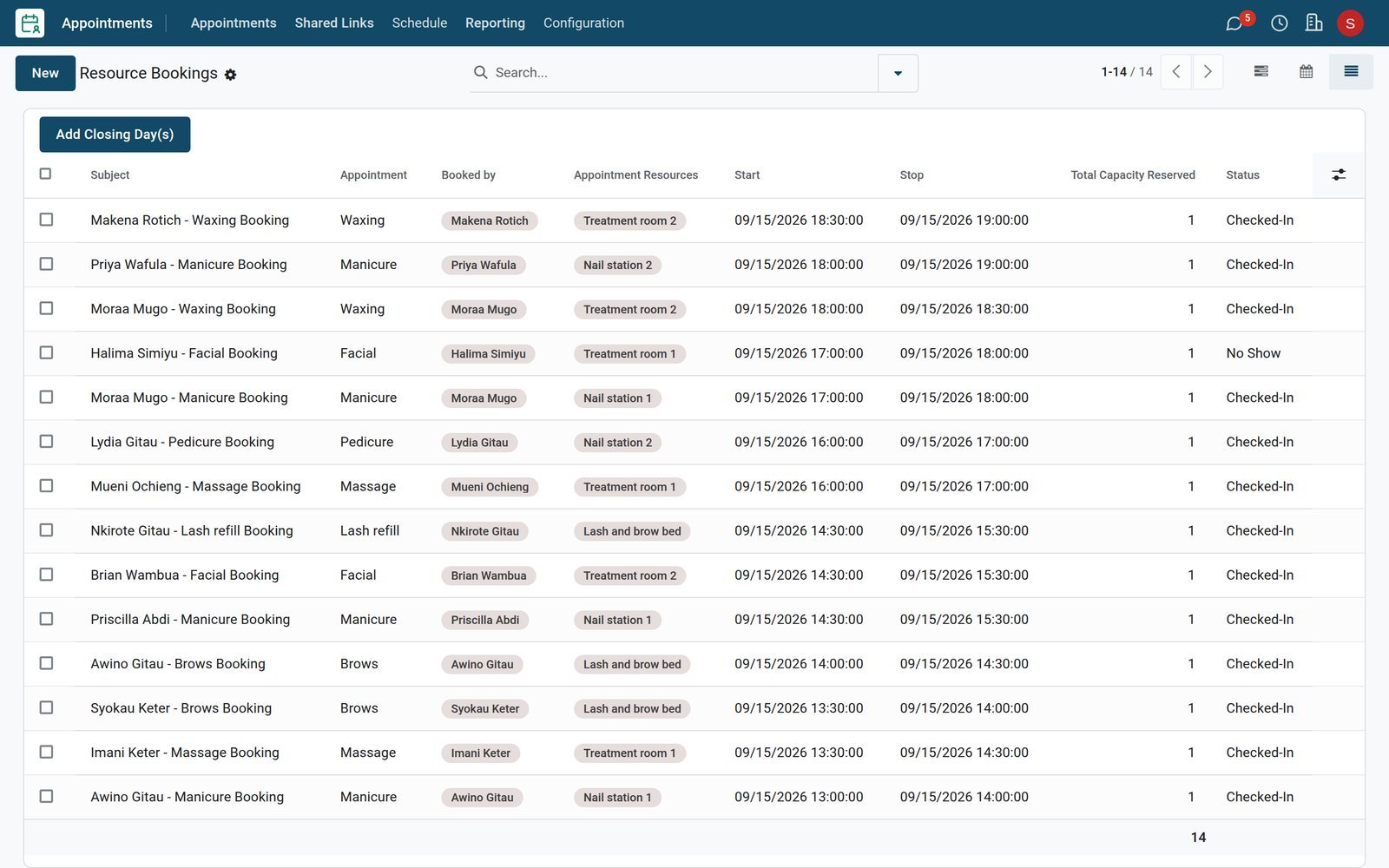
- Appointments
A facial books a treatment room
A facial takes one hour in either treatment room, Monday to Saturday from 09:00 to 19:00, booked at least two hours ahead.
Explore Appointments →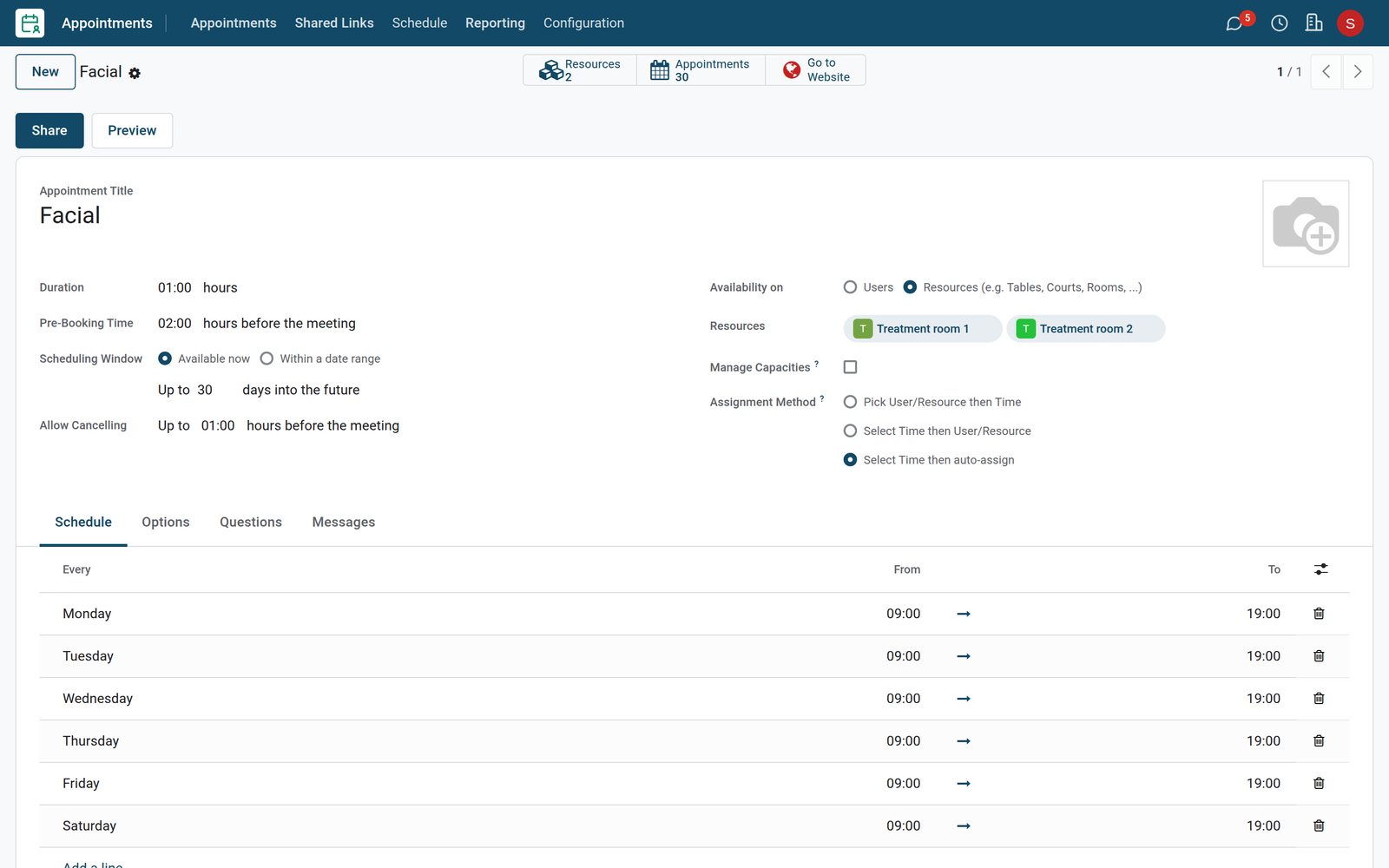
By the numbers
What ships inside
Counted in the product.
- 5
- statuses a booking can have: request, booked, checked in, no show and cancelled
- 2
- ways to schedule an appointment type: on staff members or on resources such as rooms and chairs
- 3
- ways to assign a booking: resource first, time first, or a time with the resource assigned automatically
- 2
- ways a reordering rule runs: automatically, or manually from the replenishment list
Inside the app
What is inside
The apps a beauty shop runs on, and what each does for the day.
Bookings by room and chair
Appointment types book the treatment rooms, nail stations, lash bed and makeup chair, and the schedule shows each one hour by hour.
Booking statuses
Each booking is marked booked, checked in, no show or cancelled, so the day's schedule shows who actually came.
Checkout at the front desk
The till charges the treatments of a visit and any product bought with them on one order.
Retail by barcode
Skincare and makeup are sold by barcode from stock, each product with its distributor and purchase price.
Reordering rules
A minimum and a maximum per product put low shelves on the replenishment list with the quantity to order.
Bridal and event quotations
Wedding, graduation and company event enquiries move through a pipeline, with a quotation for each party.
Staff rota
Shifts by role show who works the front desk, the treatment rooms, the nail stations and the lash bed each day.
Sales by category
The sales analysis splits the takings by category, from facials and nails to skincare and cosmetics.
Step by step
From the booking to the books
How a visit moves through a beauty shop in BridgeERP, and which app does each step.
- Step 1
Book
A treatment is booked on a free room, station or chair for the length of the service.
Appointments - Step 2
Check in
The booking is checked in when the client arrives, or marked as a no-show when they do not come.
Appointments - Step 3
Pay
The front desk charges the treatments and any products on one order, by mobile money, card or cash.
Point of Sale - Step 4
Restock
Products under their minimum are ordered from the distributor and received into stock.
Purchase - Step 5
Quote
Bridal and event makeup is quoted from the pipeline and confirmed as a sales order.
Sales - Step 6
Close
Each day's closing posts the takings and the VAT to accounting.
Accounting

One order for the whole visit
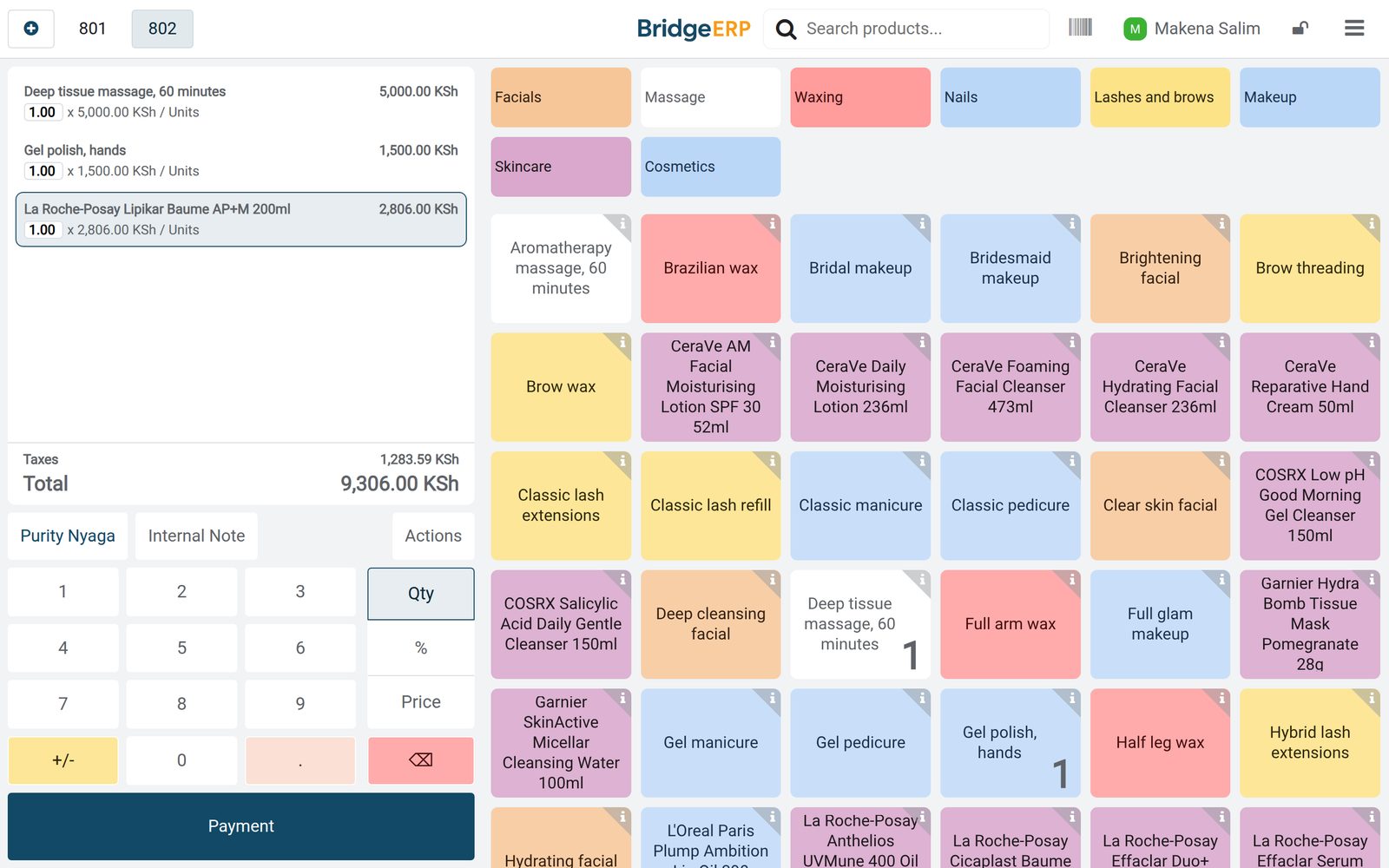
The front desk charges every treatment of the visit, and any product the client takes home, on one order.
 Point of Sale
A massage, gel polish and a body balm
Purity Nyaga had a deep tissue massage and gel polish, then took a La Roche-Posay balm home: KES 9,306 on one order.
Explore Point of Sale →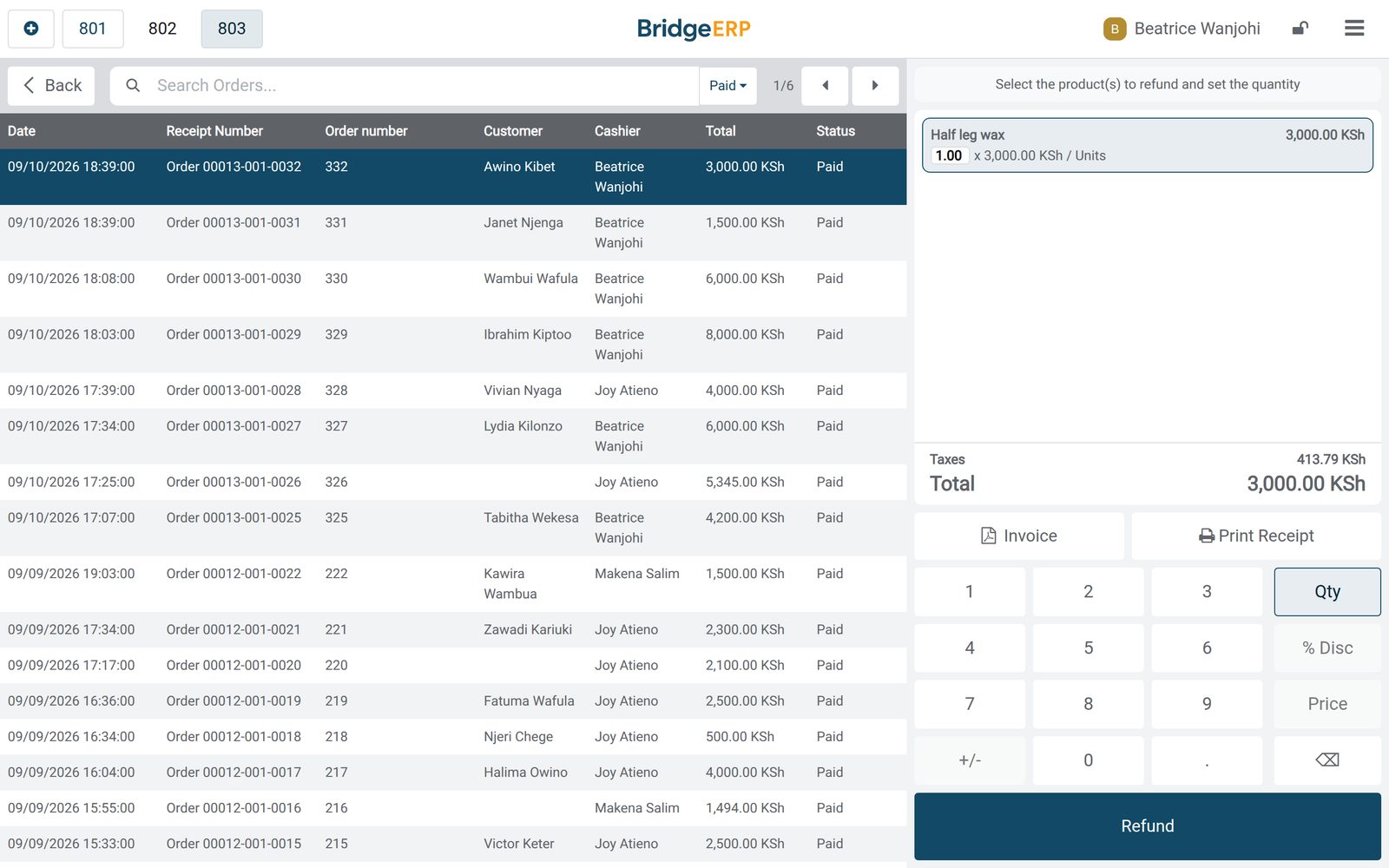 Point of Sale
A day at the front desk
Tuesday at the front desk: each visit paid a few minutes after its treatment, walk-in product sales without a customer, and the cashier on every order.
Explore Point of Sale →The retail shelf, restocked by rules
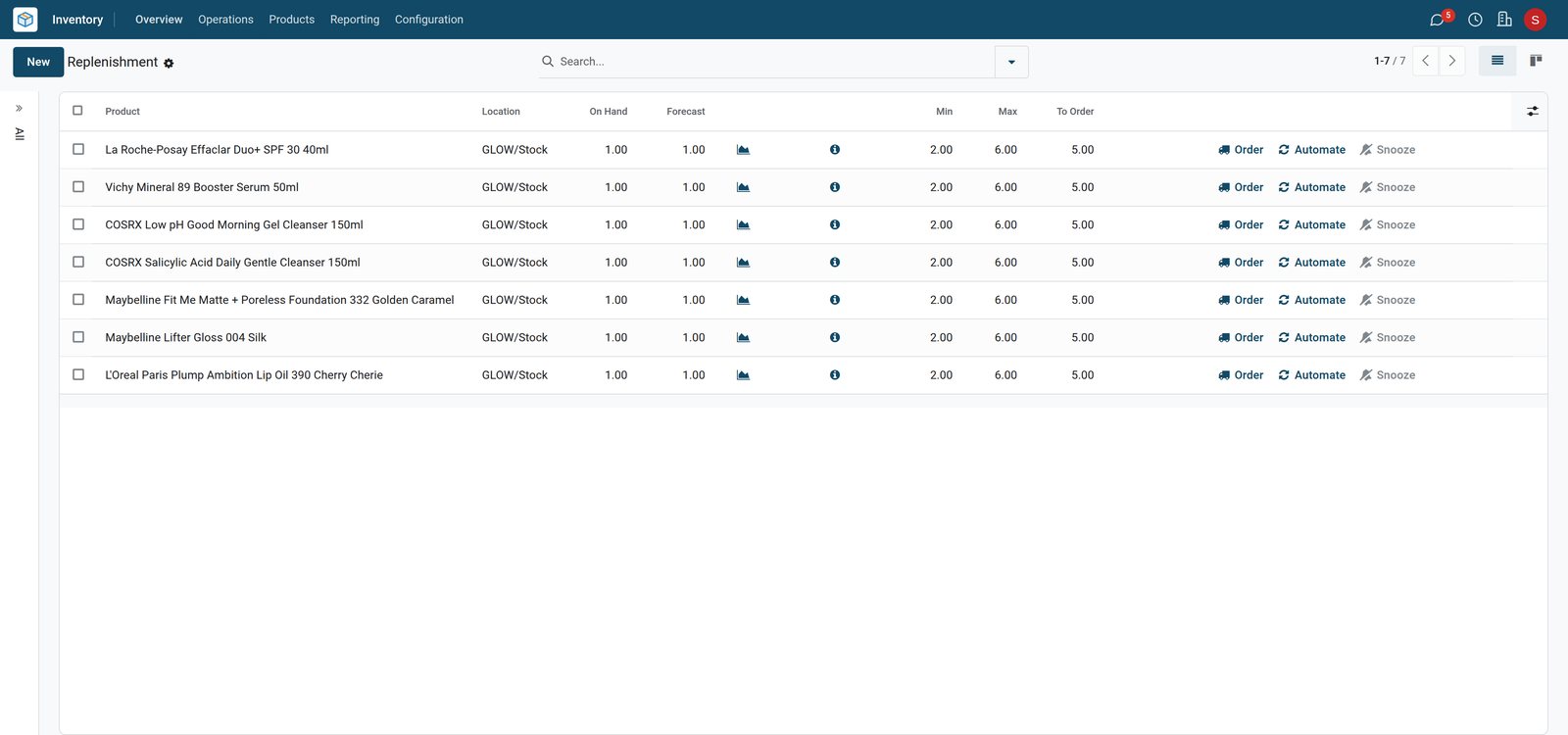
Each product has a minimum and a maximum, and the distributor order brings low shelves back up.
 Inventory
What to order next
Seven products sold down to one unit, under their minimum of two: each shows five to order to bring the shelf back to six.
Explore Inventory →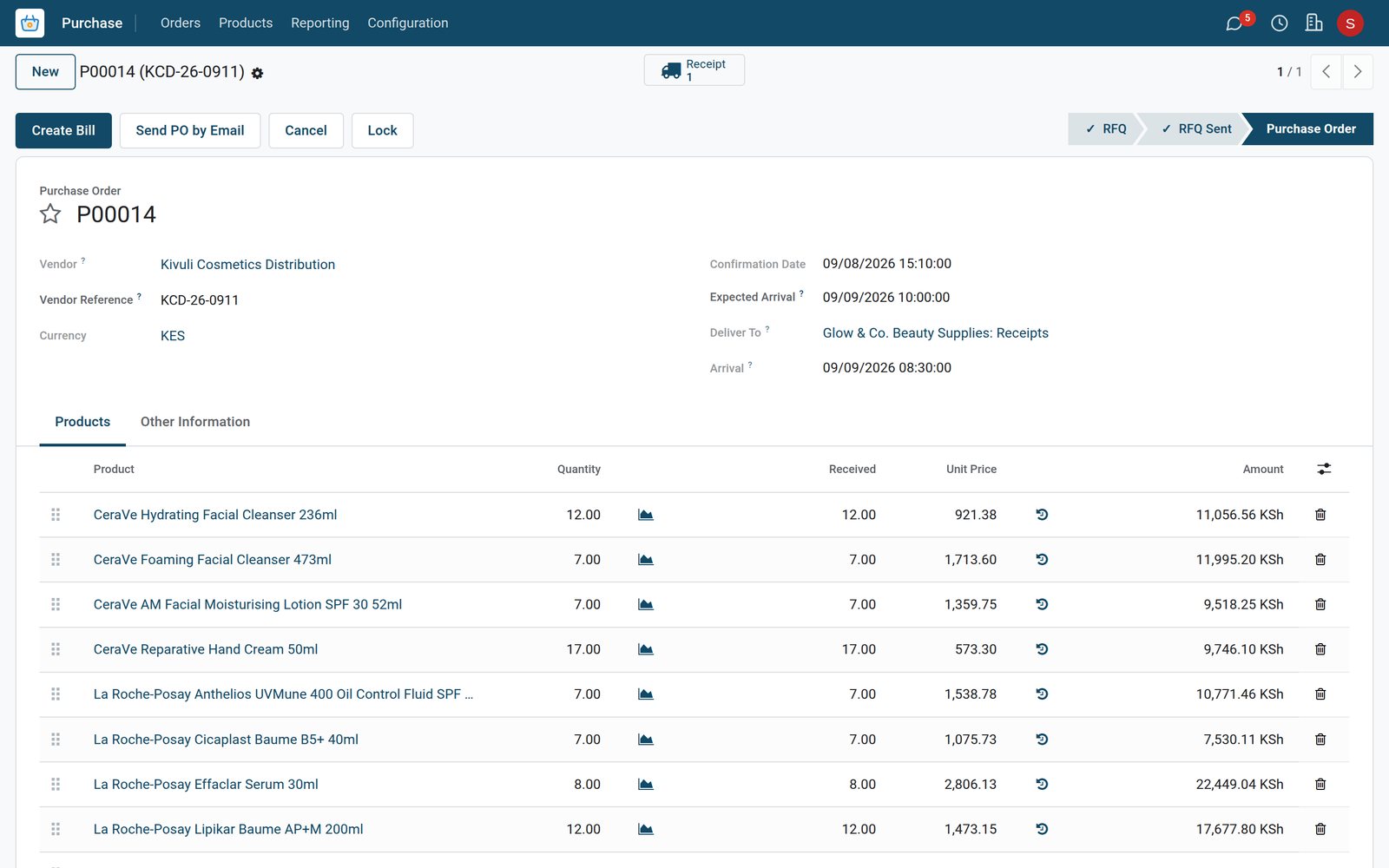
 Purchase
The distributor order
The order to Kivuli Cosmetics Distribution, confirmed on Tuesday afternoon, arrived on Wednesday at 08:30, before the shop opened.
Explore Purchase →Bridal parties, quoted ahead
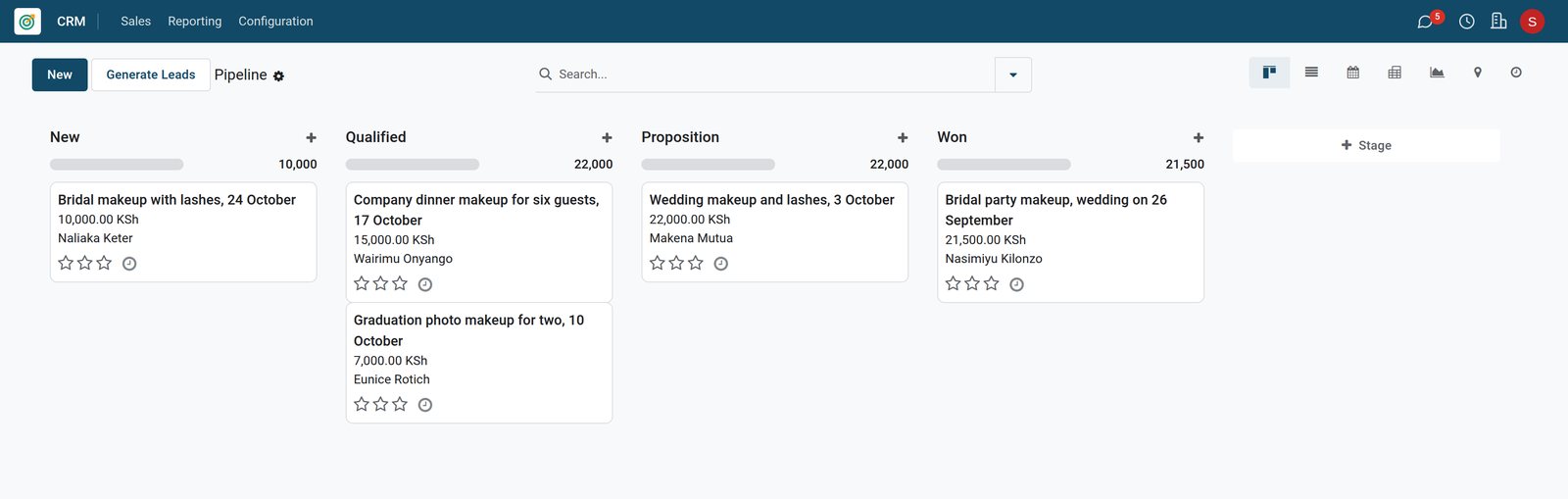
Wedding and event makeup is tracked from the first enquiry to the confirmed order.
 CRM
CRMBridal and event enquiries
Five bridal and event enquiries by stage, from a bridal enquiry just in to a September wedding party already won.
Explore CRM →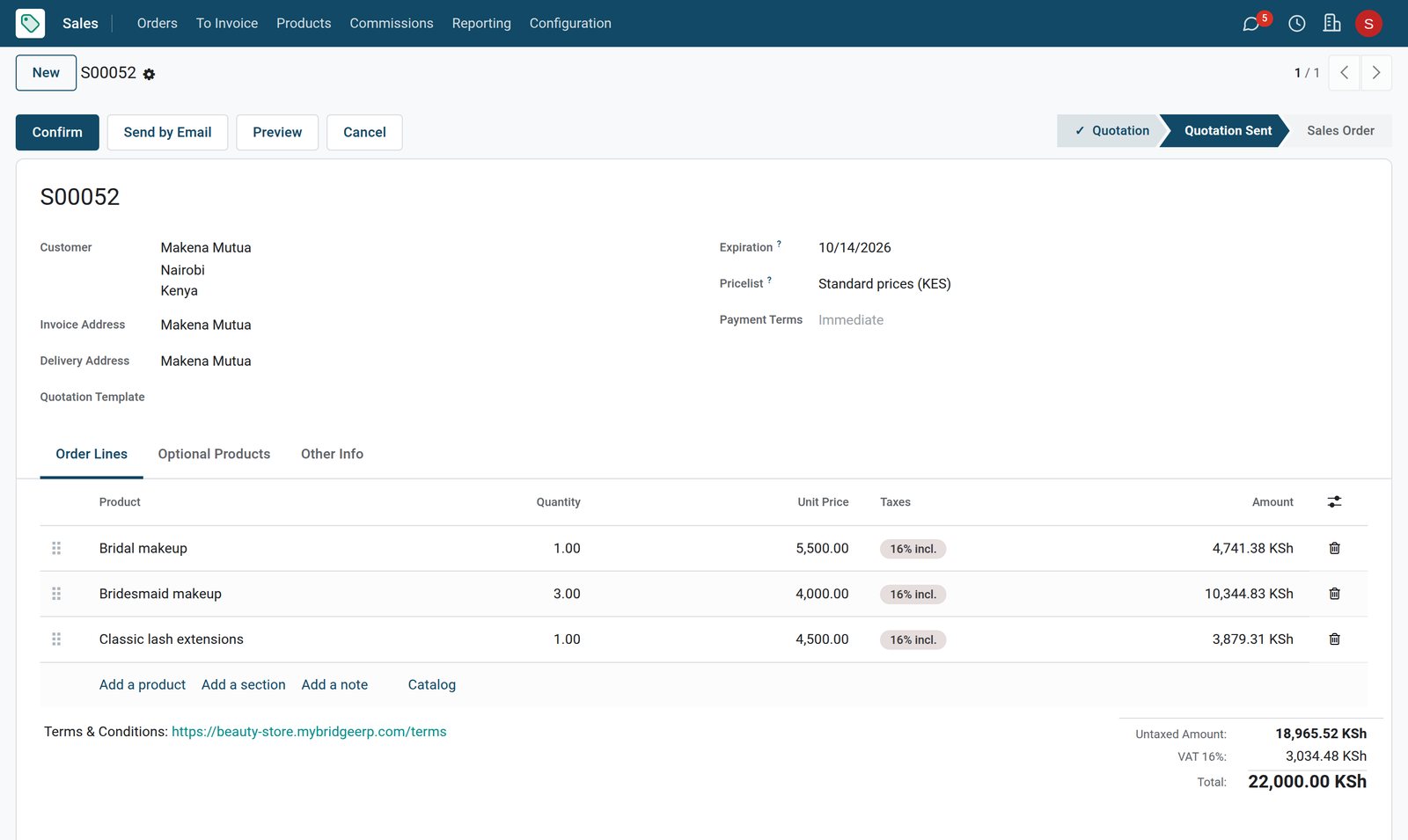
 Sales
SalesA wedding party quotation
The quotation sent for the 3 October wedding: bridal makeup, makeup for three bridesmaids and classic lash extensions, KES 22,000 with VAT included.
Explore Sales →Who works when
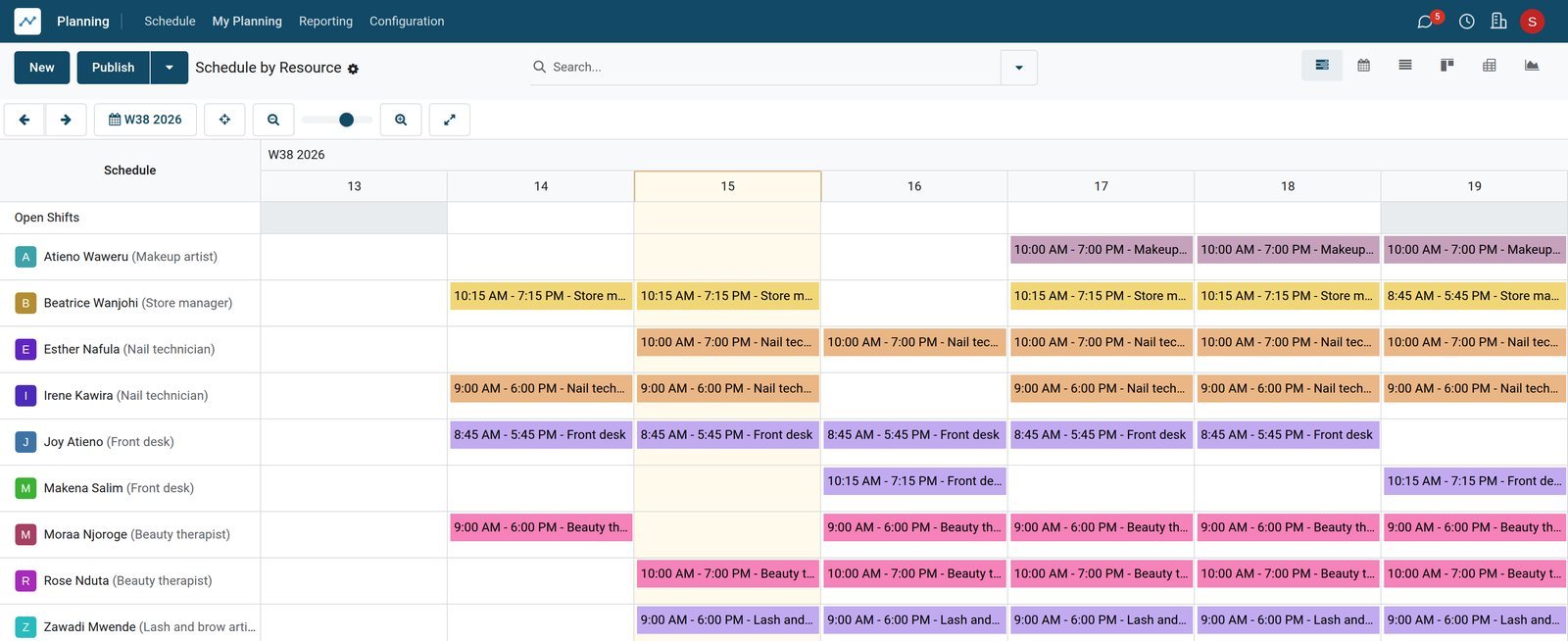
The rota shows who is on shift at the front desk, in the treatment rooms, at the nail stations and on the lash bed.
 Shift Planning
The week's shifts by role
This week's shifts by person and role: the front desk covered from 08:45 to 19:15, and the makeup artist in from Thursday to Saturday.
Explore Shift Planning →Takings by category, bookings by status
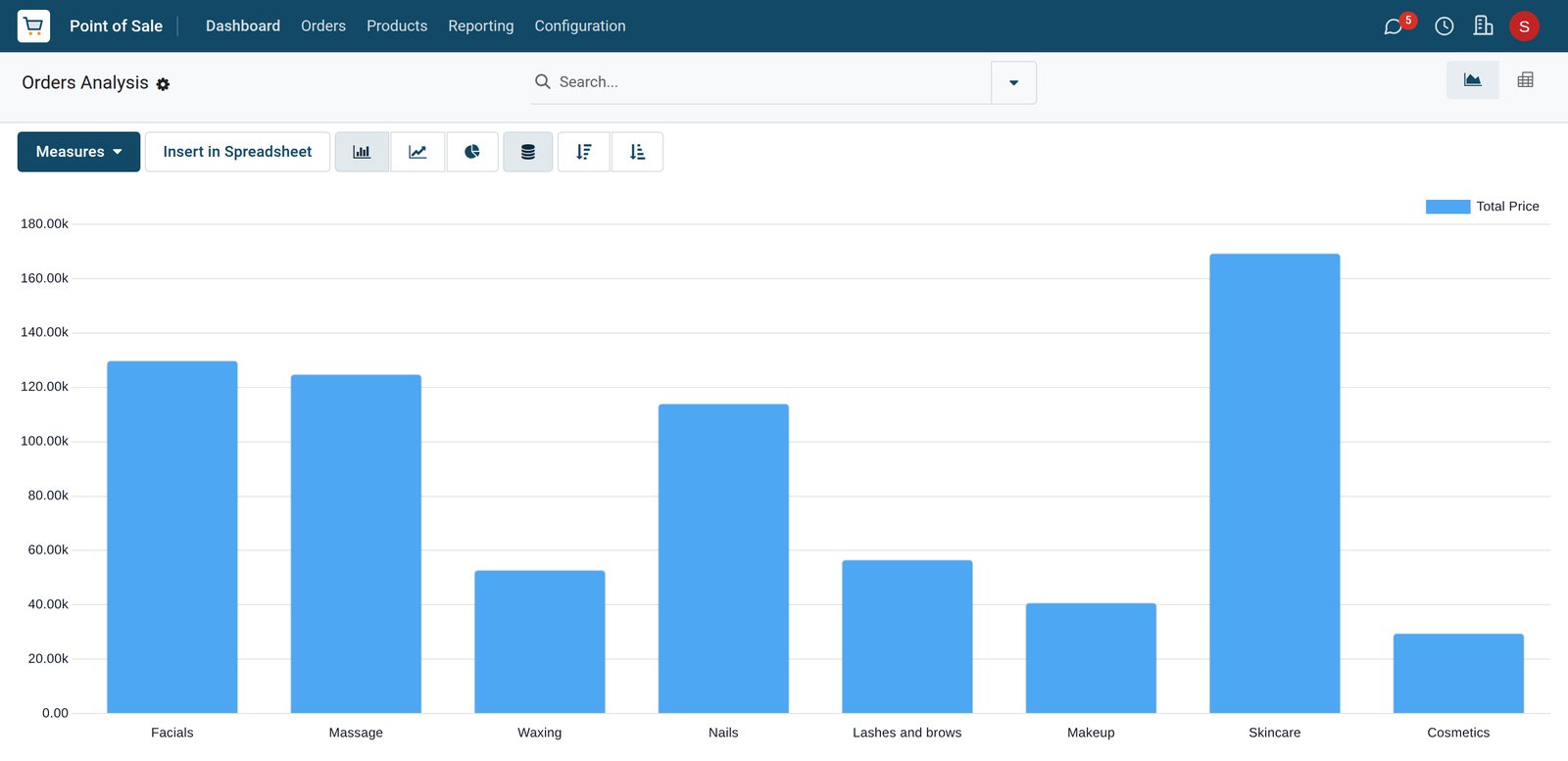
The sales analysis splits the week's takings by category, and the appointments report counts bookings by status.
 Point of Sale
Six days by category
From 9 to 15 September skincare sold the most, ahead of facials, massage and nails, then lashes and brows, waxing, makeup and cosmetics.
Explore Point of Sale →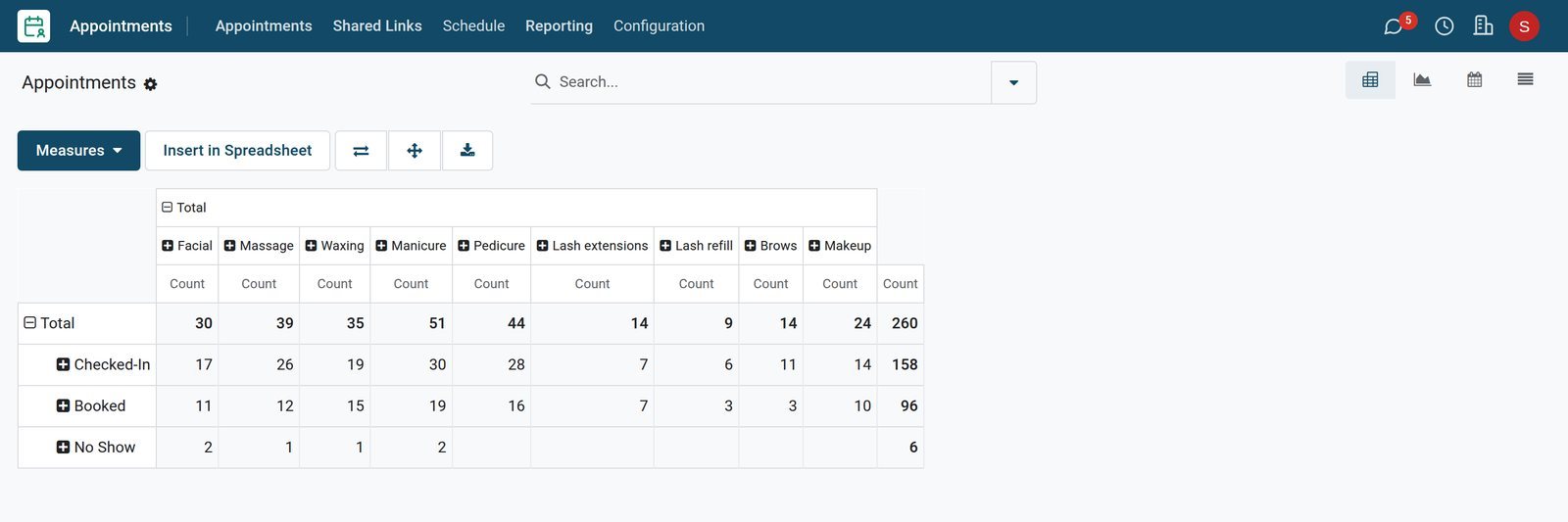 Appointments
Bookings by type and status
Bookings by treatment and status: 158 checked in and 6 no-shows over the last six open days, and 96 booked for the next four.
Explore Appointments →Who uses it
Who uses it, and what they see
One system for the front desk, the treatment rooms, the stock room and the bridal diary.
Front desk
Checks clients in, charges the visit and its products, and books the next appointment.
Therapists and technicians
See the bookings on their room, station or chair, and their own shifts in the rota.
Shop manager
Sets the reordering rules, orders from the distributor and follows the takings by category.
Makeup artist
Follows bridal and event enquiries and the quotations sent for each party.
Works with
Runs with the rest of BridgeERP
Apps a beauty shop draws on.
In your country
Your currency, payments and taxes
Set to the country the shop trades in.
Company currency
Treatment prices, retail prices and the daily takings are kept in the currency of the company; the demo shop trades in KES.
Prices with tax included
A tax can be included in the price, so the till charges the menu price and works the VAT out of it; the demo follows a Kenyan example.
Mobile money, card and cash
Each till has its own payment methods; the demo front desk takes M-Pesa, card and cash.
Accounting by country
Accounting packages for more than 100 countries set up the chart of accounts, the taxes and the tax report.
Getting started
Getting started
How a beauty shop moves onto BridgeERP.
Add rooms and chairs
Create the treatment rooms, nail stations and chairs as resources, with the hours the shop is open.
Set up the treatments
Create each treatment with its price, and an appointment type with its duration and the resources it books.
Load the retail shelf
Import skincare and makeup with barcodes, prices, costs and distributors, then set a minimum and maximum per product.
Open the front desk
Create the till with its payment methods, the staff who use it and the treatment and retail categories.
Questions
Questions about Beauty Shop
Not covered here? Contact us.
Can we book treatments by room instead of by therapist?
Yes. An appointment type can be scheduled on resources such as treatment rooms, nail stations or a makeup chair, and the bookings schedule shows each resource's day hour by hour.
How do we record clients who do not turn up?
Each booking has a status. It can be checked in when the client arrives, marked as a no-show, or cancelled, and the reporting shows bookings by status.
Can a client pay for two treatments and a product at once?
Yes. The front desk puts the treatments of the visit and any retail product on one order and takes the payment by the method the client chooses.
Does the shop know when to reorder products?
Yes. Each product can have a minimum and a maximum quantity. When stock falls below the minimum, the replenishment list shows the quantity to order from the distributor.
Can we quote bridal parties before the wedding?
Yes. The enquiry is tracked in CRM with its expected revenue and date, and a quotation lists the makeup for the bride and each bridesmaid.
Can staff see their shifts?
Yes. Planning shows each person's shifts by role for the week, so the front desk, therapists, nail technicians and makeup artists know when they work.
Tax compliance
Invoices your tax authority accepts
In Kenya, Uganda, Rwanda, Burundi and Zambia, each invoice, receipt and stock movement goes to the tax authority's own system when you post it. Ghana and Pakistan come next, and we connect 73 more countries on request.
- KenyaReady
eTIMS KRA
Invoices, credit notes, POS receipts and stock movements
- UgandaReady
EFRIS URA
Invoices, POS receipts and stock
- RwandaReady
EBM RRA
Invoices, POS receipts, stock and imports
- BurundiReady
EBMS OBR
Invoices, POS receipts, stock and manufacturing
- ZambiaReady
Smart Invoice ZRA
Invoices, POS receipts, stock and imports
Beauty Shop, app by app
One connected flow instead of separate systems — the work moves from one team to the next without re-typing anything.
Every stop is a real app in your plan, and the hand-offs between them are the product.
- Customers & sales
- Operations
- Finance
Point of Sale
Touch till, offline mode, sessions, cash control and receipts.
Point of Sale →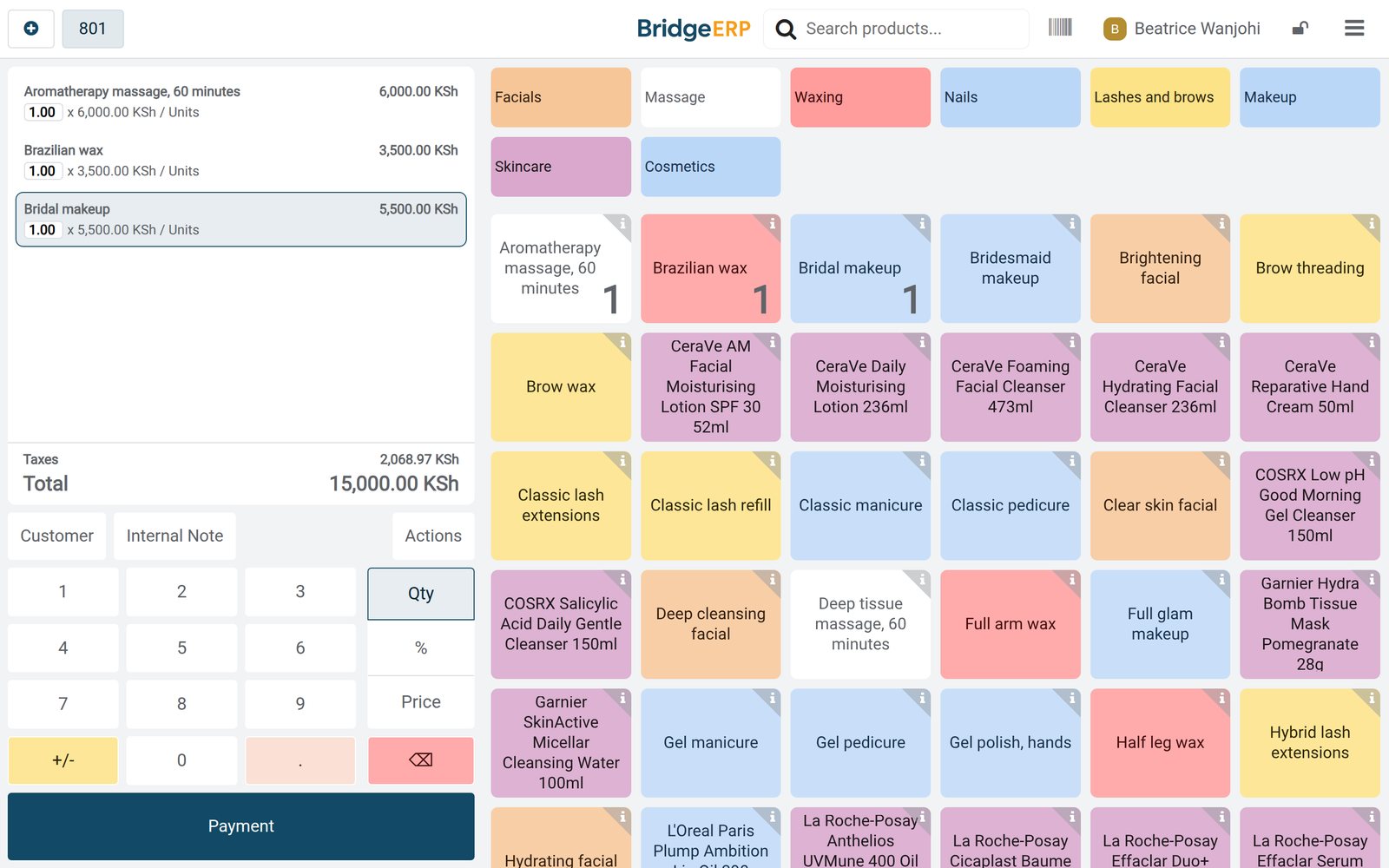
Ready when you are
Open the plan builder with the right apps for this industry already selected, or see it running first.