

 Recruitment: See every applicant for every open position on one board, from first CV to signed contract
Job positions publish to your careers page from the job card, applications land as cards in a staged pipeline, interviews become Calendar meetings, offers go out for e-signature and the hire becomes an employee without retyping.
Free instant access. No credit card required.
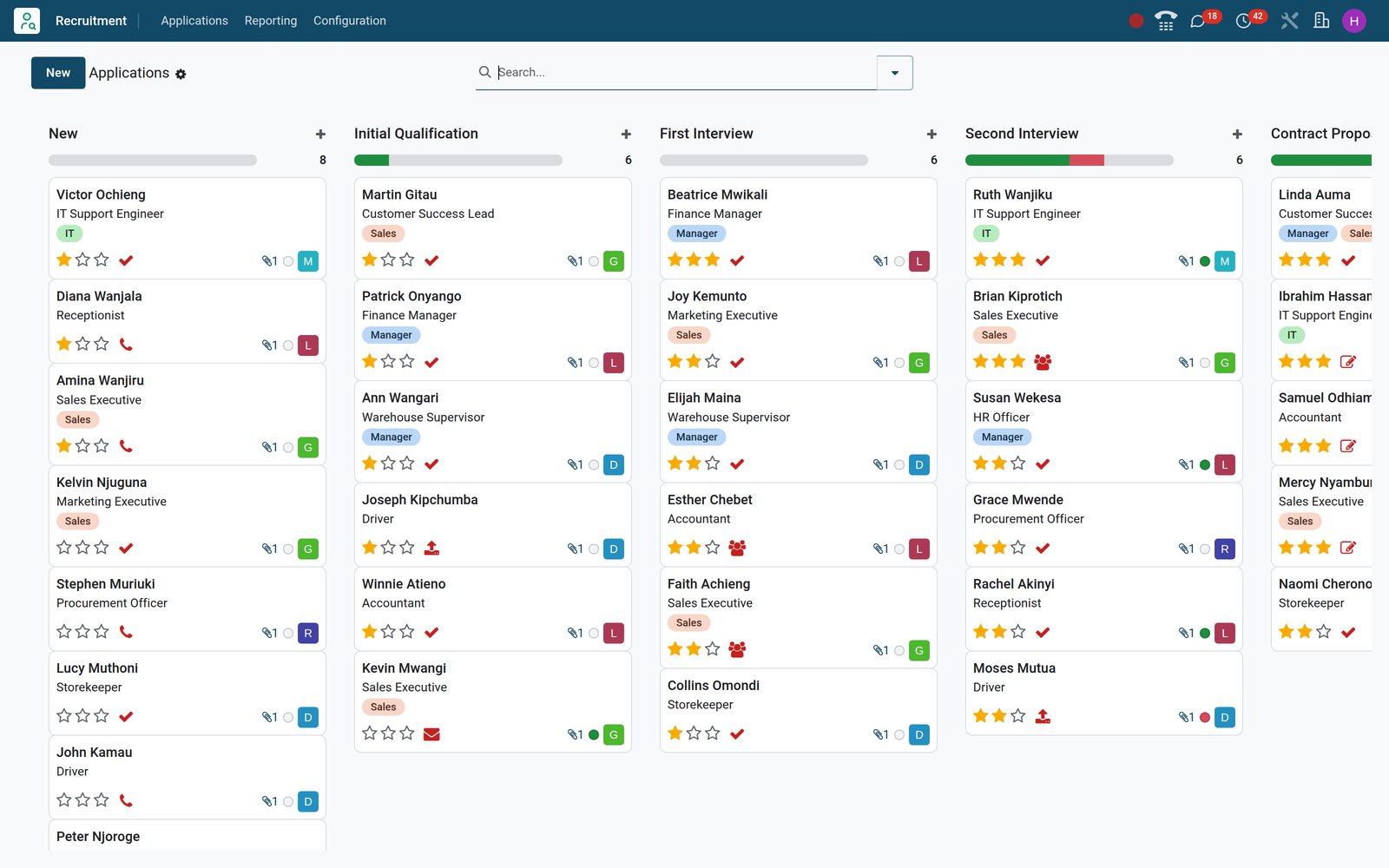
Know how every vacancy is doing before anyone asks
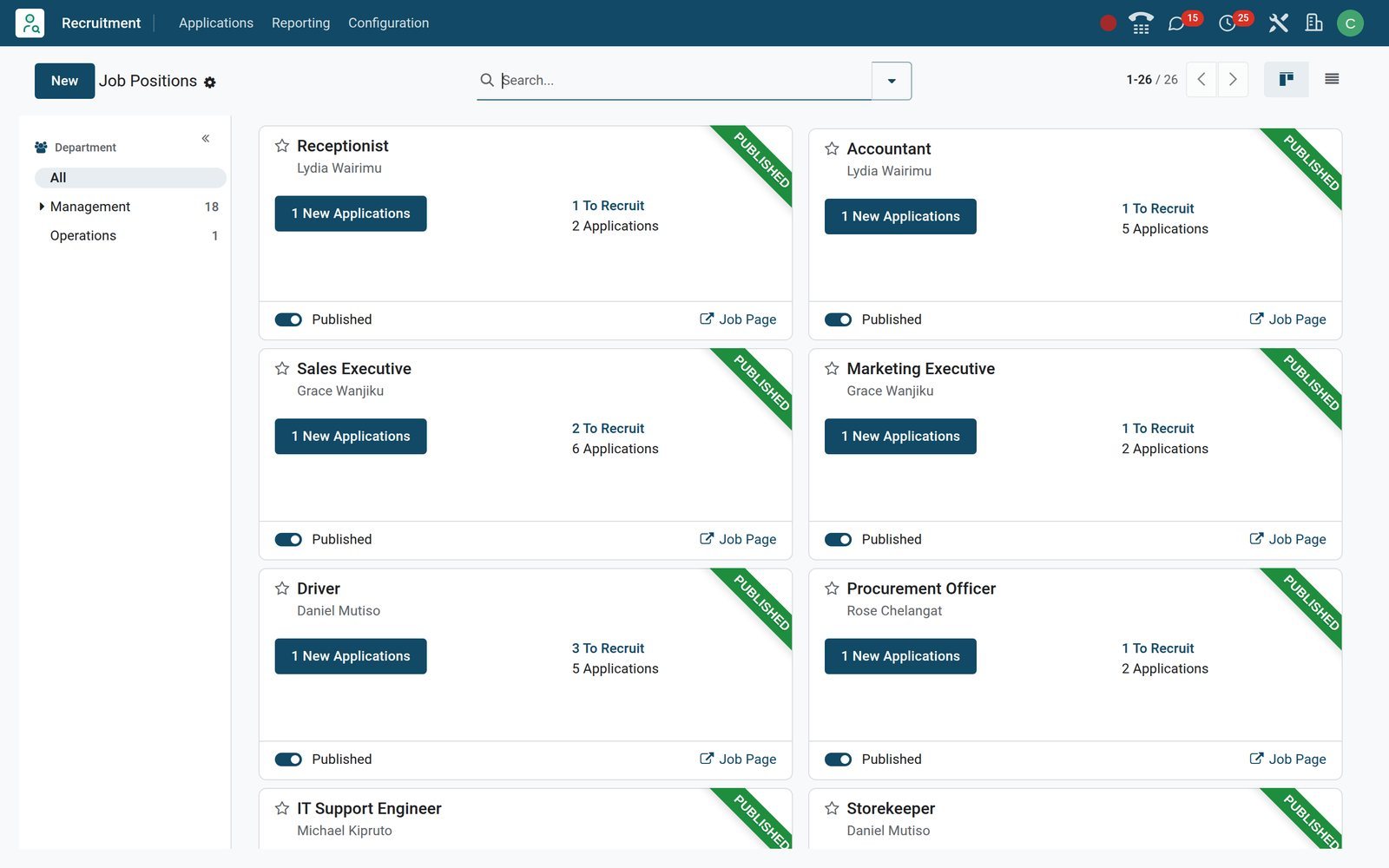
The Job Positions board is the front page of the app. Each vacancy card shows new applications, seats still to fill and whether the post is live on the website, and flags your own activities due today or overdue.
 Recruitment
A card per vacancy, with counters that update themselves
Sales Executive shows its recruiter Grace Wanjiku, new applications, seats to recruit and a green Published ribbon; the star keeps your favourite positions near the front.
Explore Recruitment →By the numbers
What ships inside the Recruitment app
Counts of things set up under the Recruitment menus on the demo, not estimates.
- 6
- pipeline stages ready to use: New, Initial Qualification, First Interview, Second Interview, Contract Proposal and Contract Signed
- 4
- analyses under Reporting: Applicant Analysis, Source Analysis, Velocity Analysis and Team Performance
- 5
- candidate email templates, from the application acknowledgement to the interview invitation and the refusal
- 6
- refuse reasons, each tied to an email template so a refusal reaches the applicant in the same step
Inside the app
What is inside
The Recruitment menus on the demo, grouped by what they do for a hiring team.
Job Positions
Each vacancy carries recruiter, interviewers, department, employment type, expected skills, seats to fill and an email alias for applications sent by mail.
Applications pipeline
Drag cards between stages, star the strongest, mark a card ready or blocked, refuse with a reason and let the stage send its email template.
Candidates
A person, many applications: the candidate record keeps contact details, degree, availability and skill levels, and counts similar candidates already in the pool.
Interviews and activities
Schedule Interview opens a Calendar meeting linked to the applicant; Call, Email, Meeting and Upload Document activities carry deadlines on the cards.
Online job board
Published positions appear on the website's /jobs page, and the application form takes name, email, phone, LinkedIn profile, a CV file and a short introduction.
Sourcing and trackers
Sources like LinkedIn, Facebook and Glassdoor tag each application, each job keeps a tracker link per channel, and Job Boards rules read LinkedIn, Indeed and JobsDB emails.
Offers and signatures
Expected and proposed salary sit on the Salary Package tab; an offer letter or employment contract goes out from Sign and counts on the Signature Requests button.
Reporting
Applicant Analysis, Source Analysis, Velocity Analysis and Team Performance open as pivots and graphs; each job card also links to its own Analysis, Source and Time By Stages.
Step by step
From open vacancy to signed employee in six steps
Each step names the BridgeERP application that does the work; all of them write to the same applicant card.
- Step 1
Open the position
Create the job with recruiter, interviewers, seats to fill, employment type and the skills you expect; tick Published and it is live on the careers page.
Recruitment - Step 2
Collect applications
Online applications, emailed CVs and manual entries all become cards in New; the CV attaches to the card and Digitize document reads it into the candidate.
Website Builder - Step 3
Qualify
Moving a card to Initial Qualification sends the Schedule interview template; tags, degree, priority stars and the ready or blocked flag sort the shortlist.
Recruitment - Step 4
Interview
Schedule Interview books a Calendar meeting linked to the card; an Interviews availabilities appointment type lets the candidate pick a free slot instead.
Appointments - Step 5
Make the offer
Record the proposed salary beside the expected figure at Contract Proposal and send the offer letter for electronic signature from Sign.
Sign - Step 6
Hire
Contract Signed is the hired stage; Create Employee opens a profile with name, job position and contact details filled in, ready for the Onboarding plan.
Employees
Everything about one applicant on one form
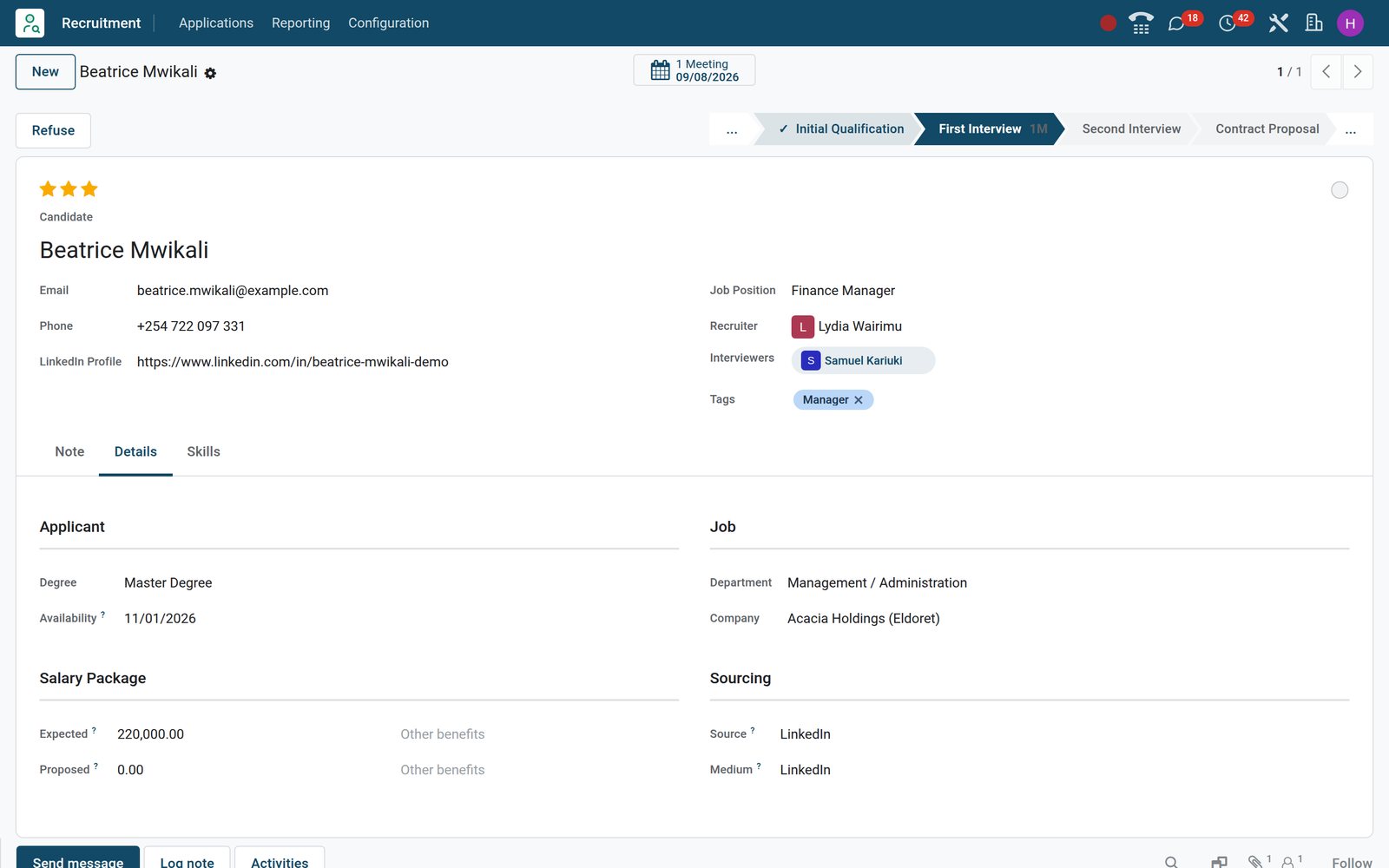
The applicant form keeps the stage bar, recruiter and interviewers at the top, Note, Details and Skills tabs underneath and the next activities in the chatter, so the whole panel reads the same page.
 Recruitment
Stage bar, salary and source on one form
Beatrice Mwikali's Finance Manager application shows First Interview in the stage bar, the Meeting button, her degree, availability, expected salary and LinkedIn as source.
Explore Recruitment →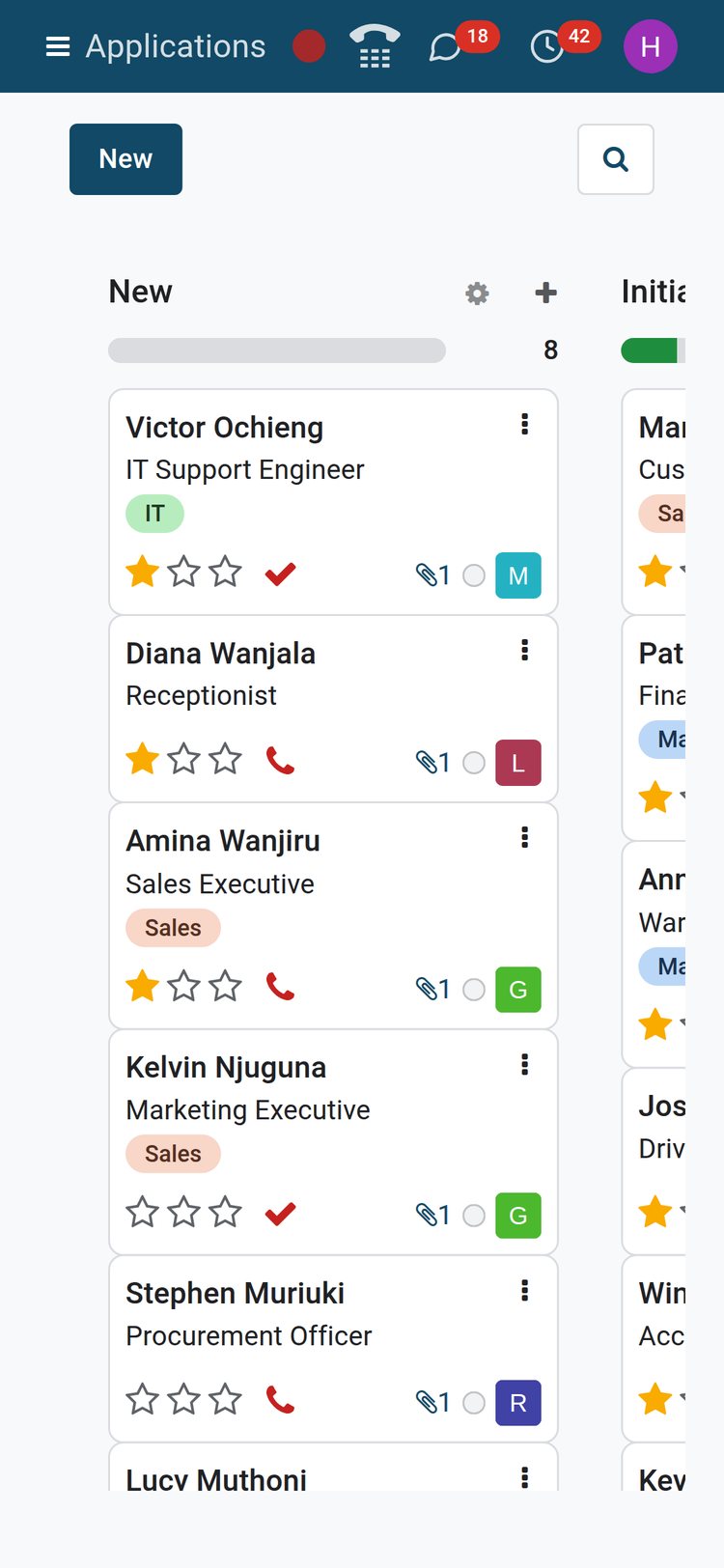 Recruitment
The same pipeline on a phone between interviews
On a phone the pipeline shows a stage at a time with the same cards, stars and activity icons, so a hiring manager can move candidates between interviews.
Explore Recruitment →Every interview is a meeting tied to its application
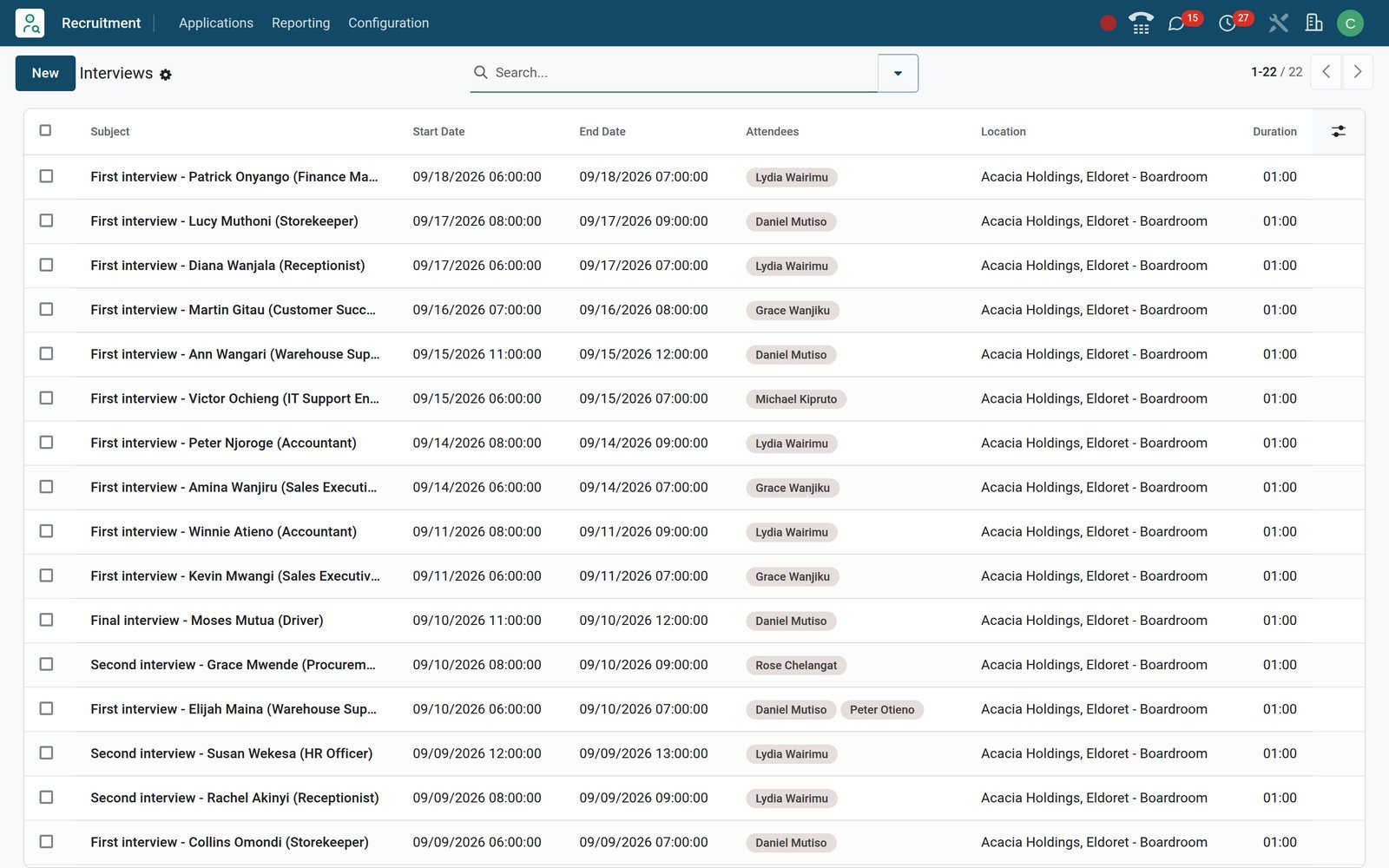
Schedule Interview on a card opens Calendar with the meeting already linked to the applicant; the next meeting then shows on the applicant form and in the invitees' calendars.
 Recruitment
The interview list, booked from the cards
First interviews for Amina Wanjiru, Peter Njoroge, Victor Ochieng, Lucy Muthoni and Patrick Onyango line up with date, time and invitees, each linked back to its application.
Explore Recruitment →Applications arrive from the website, job boards and email without retyping
Online Posting puts published positions on your own careers page; every application, job-board notice or emailed CV becomes a card on the pipeline and a person in the candidate pool.
 Recruitment
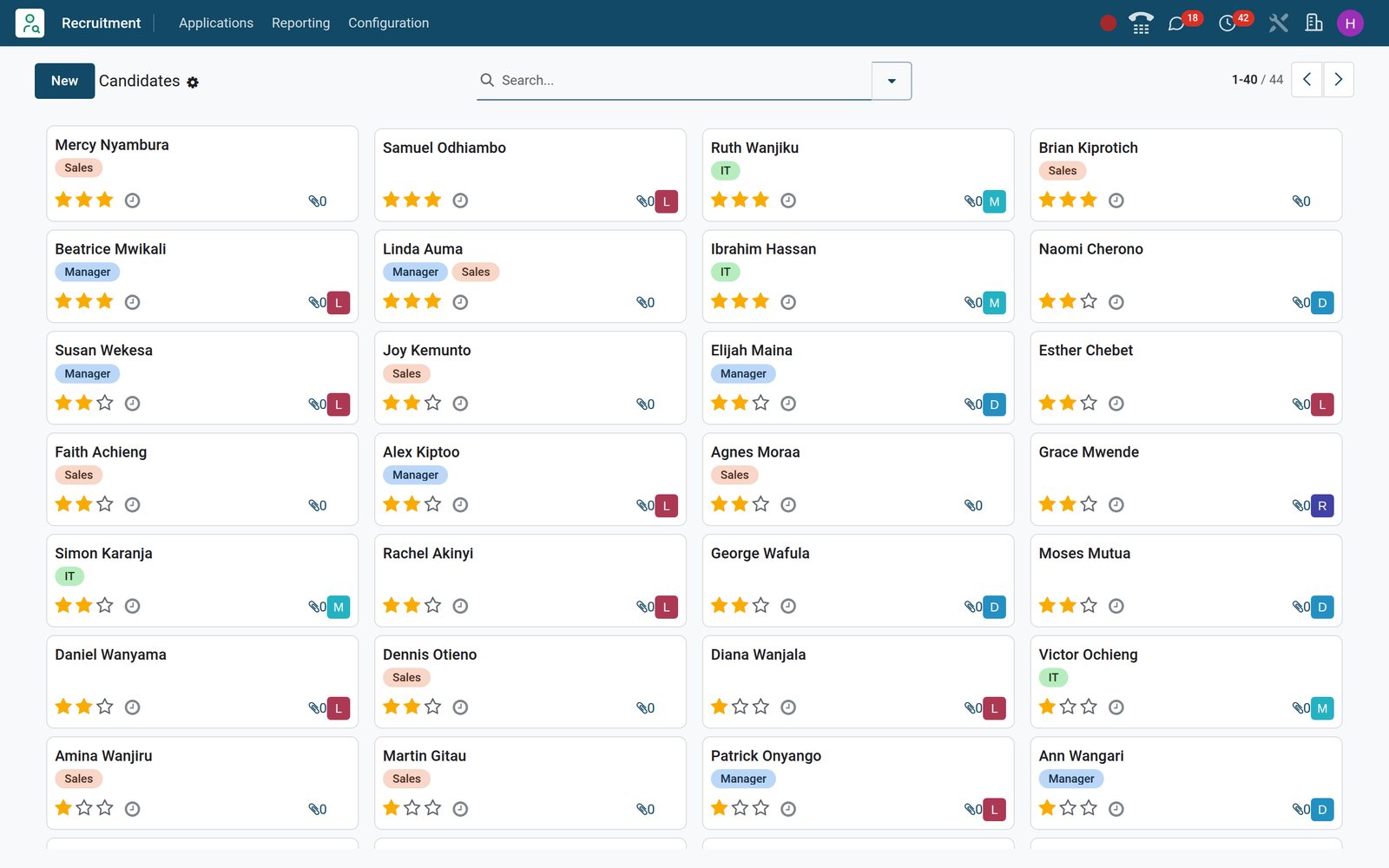
A candidate pool ready for the next opening
Candidates keep a single card across applications, with tags, priority stars and recruiter, so the next vacancy starts from people you already know.
Explore Recruitment →Who uses it
Who it is for
Four people touch every hire; each one gets a different view of the same application.
Recruiter or HR officer
Owns the job positions, works the pipeline, sends email templates and SMS from the chatter, books interviews and runs Source and Velocity analyses.
Hiring manager as interviewer
Named as interviewer on a job, sees that position under By Job Positions, reads the CV on the application and logs interview notes in the chatter.
Candidate
Applies from the careers page with a CV and LinkedIn profile, receives the acknowledgement and interview emails, and can book an interview slot through Appointments.
Director or owner
Reads Team Performance and Applicant Analysis for hired, refused and in-progress counts per position and recruiter, and Velocity Analysis for days spent in each stage.
Works with
Runs with the rest of BridgeERP
Every application below is installed on the demo and reads or writes the applicant, candidate or job position.
 EmployeesCreate Employee turns the hired applicant into a profile; job positions, departments and skills are shared.
 WebsiteOnline Posting publishes positions to /jobs and hosts the application form with CV upload.
 SignOffer letters and employment contracts go out for e-signature and count on the applicant's Signature Requests button.
 ChatEvery email, SMS and note to a candidate threads in the card's chatter; followers are notified in Chat.
 AppointmentsSchedule Interview books the Calendar meeting; an Interviews availabilities appointment type lets candidates pick a free slot.
 PayrollEmployment types and the contract created after hiring feed the payslips once the employee exists.
In your country
Built for how hiring happens, in any country
Salaries, phones, companies and channels are handled on the record, not in a side spreadsheet.
Salaries in your currency
Expected and proposed salary are plain amounts on the Salary Package tab, entered in shillings on the demo, each with a free-text line for allowances such as housing.
Several companies, one database
Every position and application carries its company, so each of the 5 companies on the demo can run its own vacancies in the same database.
SMS to the candidate's phone
The SMS setting is on, so a recruiter can text an applicant from the chatter or a whole shortlist from the list view; delivery uses SMS credits.
Channels that reflect the market
On the demo LinkedIn, Facebook and Search engine bring in most sourced applications; sources are yours to name, so a radio advert or a referral counts too.
Email that files itself
With a mail domain set, each position takes its own alias and every emailed CV becomes a card; preset Job Boards rules read LinkedIn, Indeed and JobsDB notices.
Works on the phone
The pipeline, applicant form and candidate pool reflow to a phone screen, so a hiring manager away from the office can move cards without a laptop.
Know which channel brings the people you actually hire
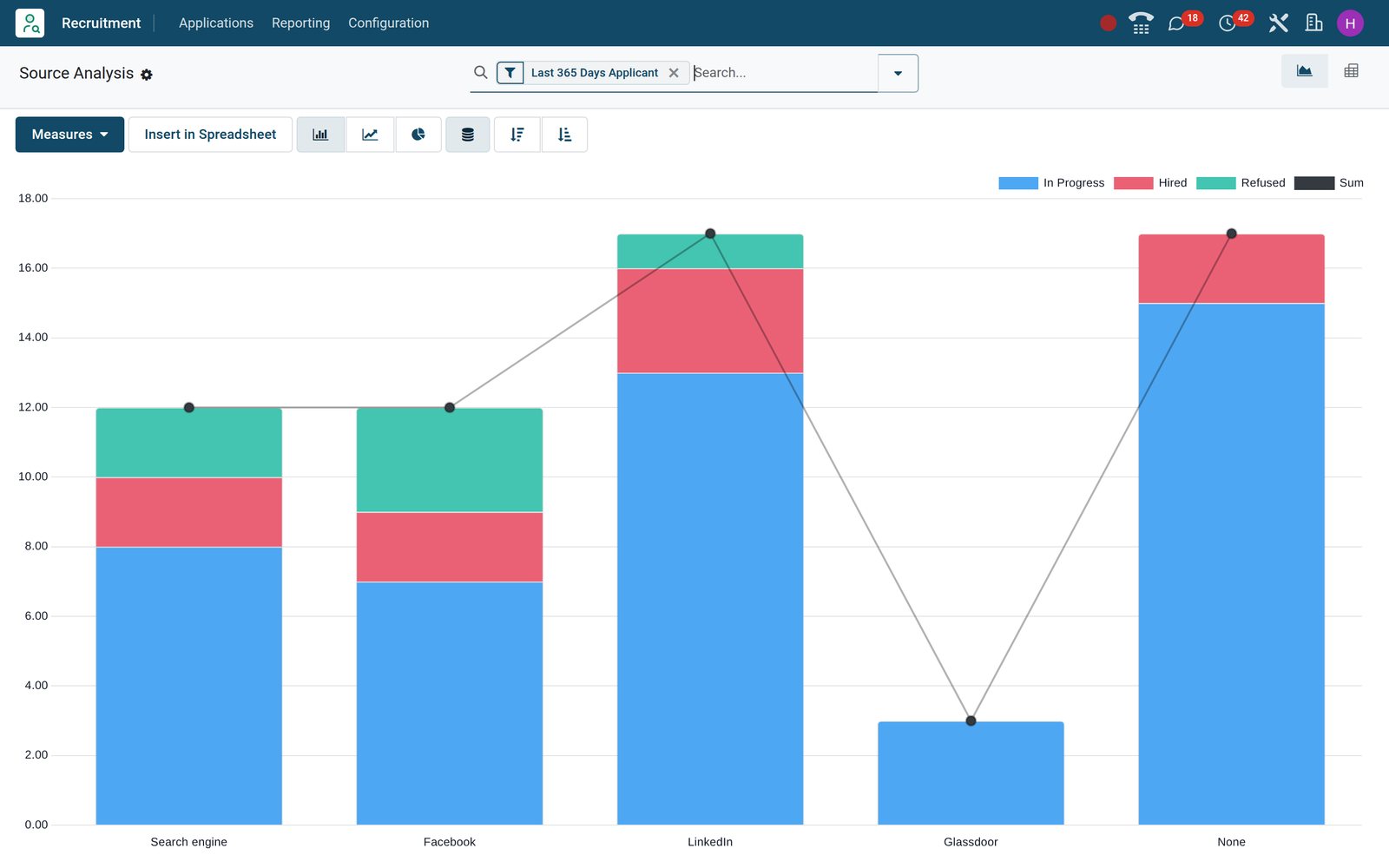
Source Analysis charts applications by source and outcome, so the channel that brings hires stands apart from the one that only brings volume.
 Recruitment
Applications by source, split by hired, refused and in progress
LinkedIn brought 17 of the 44 sourced applications and 3 of the hires; the bar chart stacks each source by hired, refused and in progress.
Explore Recruitment →Reports and control
Reports and control
The analyses and counters found under the Recruitment menus on the demo.
Applicant Analysis
Pivot per job position with applications, hired, refused and in-progress counts, plus hiring ratio, meetings and process duration as extra measures; line graph over time.
Source Analysis
Applications by source and medium, stacked by state, so a paid job board can be weighed against what came in through the careers page.
Velocity Analysis
Days in stage per job position and stage, built from the stage history of every application, to show where candidates wait longest.
Team Performance
Applications, hires and refusals per recruiter over the last year; on the demo Daniel Mutiso, Grace Wanjiku and Lydia Wairimu carry most of the load.
Job board counters
New Applications, To Recruit, Activities Today and Late Activities on every job card; each card links to its own Analysis, Source and Time By Stages.
Pipeline views
Applications also open as list, pivot, graph, calendar and activity views, with filters for My Applications, Unassigned, Ready for Next Stage, Blocked, Hired and Refused.
What sets it apart
What sets it apart
Product facts you can check on the demo, not slogans.
Candidate and application are separate records
A person who applies again keeps a single candidate card holding every application; Similar Candidates and Other applications buttons stop duplicate interviews.
Search inside the CV
The applications search bar has a Resume's content field that reads the attached PDF text, so a search for CPA or CCNA finds the right people.
Skills matched against the job
Positions list the skills they expect; candidates carry skill levels, and the candidate record works out matching and missing skills against a position.
Interviewers see only their vacancies
With the Interviewer role, a hiring manager's By Job Positions shows only the jobs naming them, and a record rule limits applications to the ones they interview for.
Refuse with a reason and a template
Every refuse reason on the demo is tied to an email template, so the candidate hears back and the analysis can be read by refusal reason.
Hire, sign and onboard in the same database
Offer letter through Sign, Create Employee from the card and the Onboarding plan in Employees, without exporting anything to another HR tool.
Getting started
Getting started
What a first week on the Recruitment app looks like.
Import what you have
Job positions, candidates and open applications load from a spreadsheet through the list view import, with stage, job and recruiter matched to existing records.
Shape the pipeline
Add or rename stages from the pipeline columns and tie an email template to each; refuse reasons, degrees, tags and employment types sit under Configuration.
Switch on the extras
Settings toggles Online Posting, CV digitisation, Skills Management, SMS and the CV display beside the form; Interview Forms installs the Surveys app.
Publish and train
Tick Published on a live vacancy, share its Job Page link, and walk recruiters through drag-and-drop, Schedule Interview and Create Employee on real cards.
Questions
Questions about Recruitment
Not covered here? Contact us.
Can candidates apply from their phone without an account?
Yes. The public /jobs page and its application form work on a phone; the form asks for name, email, phone, LinkedIn profile, a CV file and a short introduction, and creates the applicant card immediately.
Do I need a separate careers website?
No. Online Posting is a setting in Recruitment; published positions appear on the Website app's /jobs page under your own domain, each with its own application form.
Where do CVs go and can I search them?
The CV attaches to the applicant card and the candidate record, shows in the chatter, and the applications search bar has a Resume's content field that reads the PDF text.
Can a hiring manager see only the positions they interview for?
Yes. Give them the Interviewer role and name them as interviewer on the job; their By Job Positions menu then shows only those vacancies, and a record rule limits the applications they can open.
Which emails go out automatically?
Each stage can carry a template; on the demo New sends the Application Acknowledgement and Initial Qualification sends Schedule interview. Refuse reasons send Refuse or Not interested anymore.
What happens when we hire someone?
Moving the card to Contract Signed marks it hired; Create Employee opens an Employees profile with the name, job position and contact details filled, and the Signature Requests button keeps the signed contract.
Can we tell which job board or channel each applicant came from?
Every application carries a source and medium; each job has trackers with links per channel, and Source Analysis charts applications, hires and refusals by source.
Is there interview scoring or a screening questionnaire?
Interview Forms is a switch in Settings that installs the Surveys app and adds a form per position; it is not switched on in the demo shown here.
Put Recruitment to work
Add it to your plan and pay only for what you use, or see it running on your own demo first.