

Bookstore: ISBN barcodes, special orders and reader rewards for bookshops
BridgeERP runs the bookshop counter, scans every book by its ISBN, orders the titles customers ask for, sells class sets to schools on account and rewards regular readers.
Free instant access. No credit card required.
 Invoicing
 Point of Sale
 Inventory
 Purchase
 eCommerce
 Website Builder
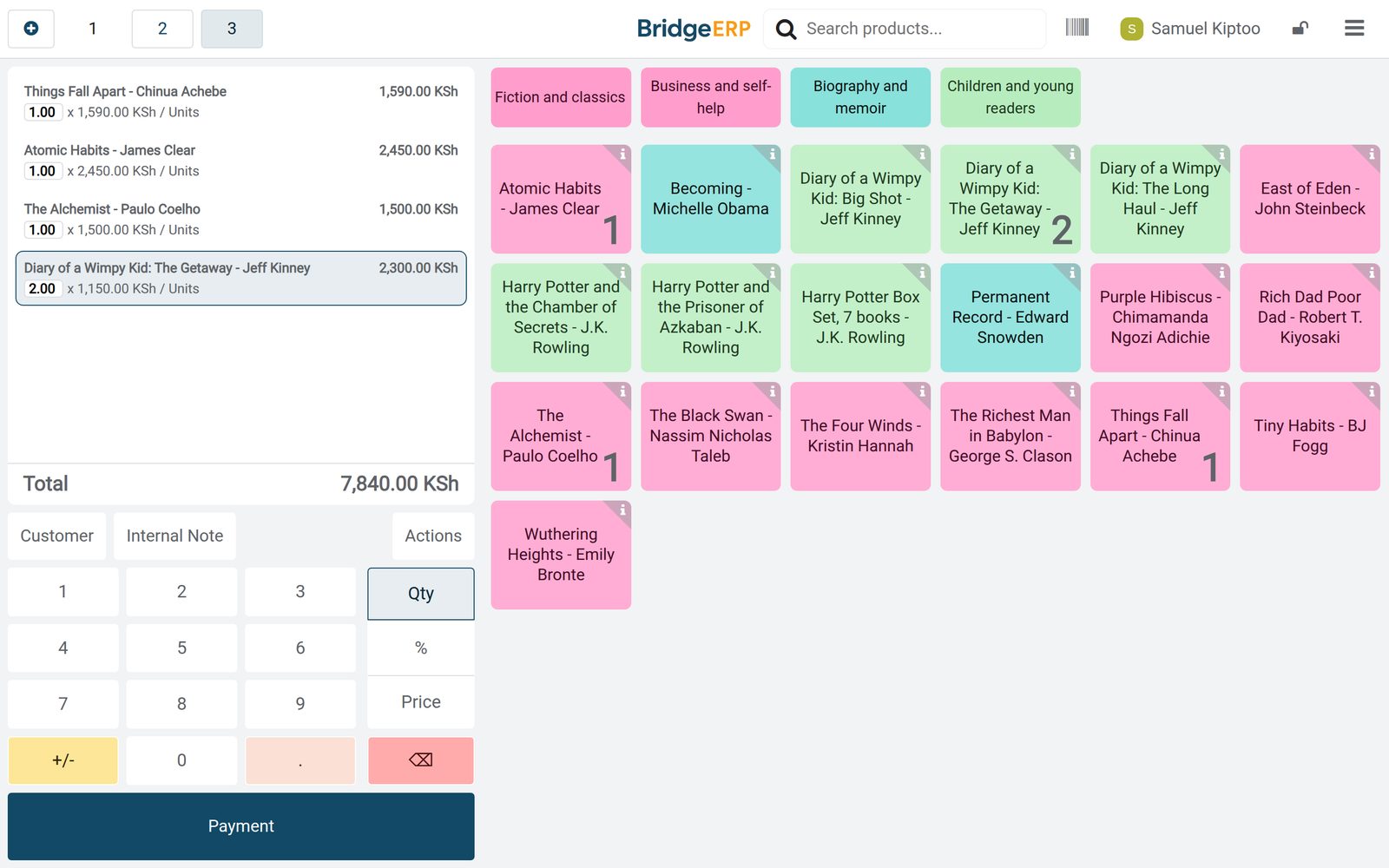
Every book by its ISBN
Each title keeps its ISBN as the barcode, so the counter finds it with one scan.
 Point of Sale
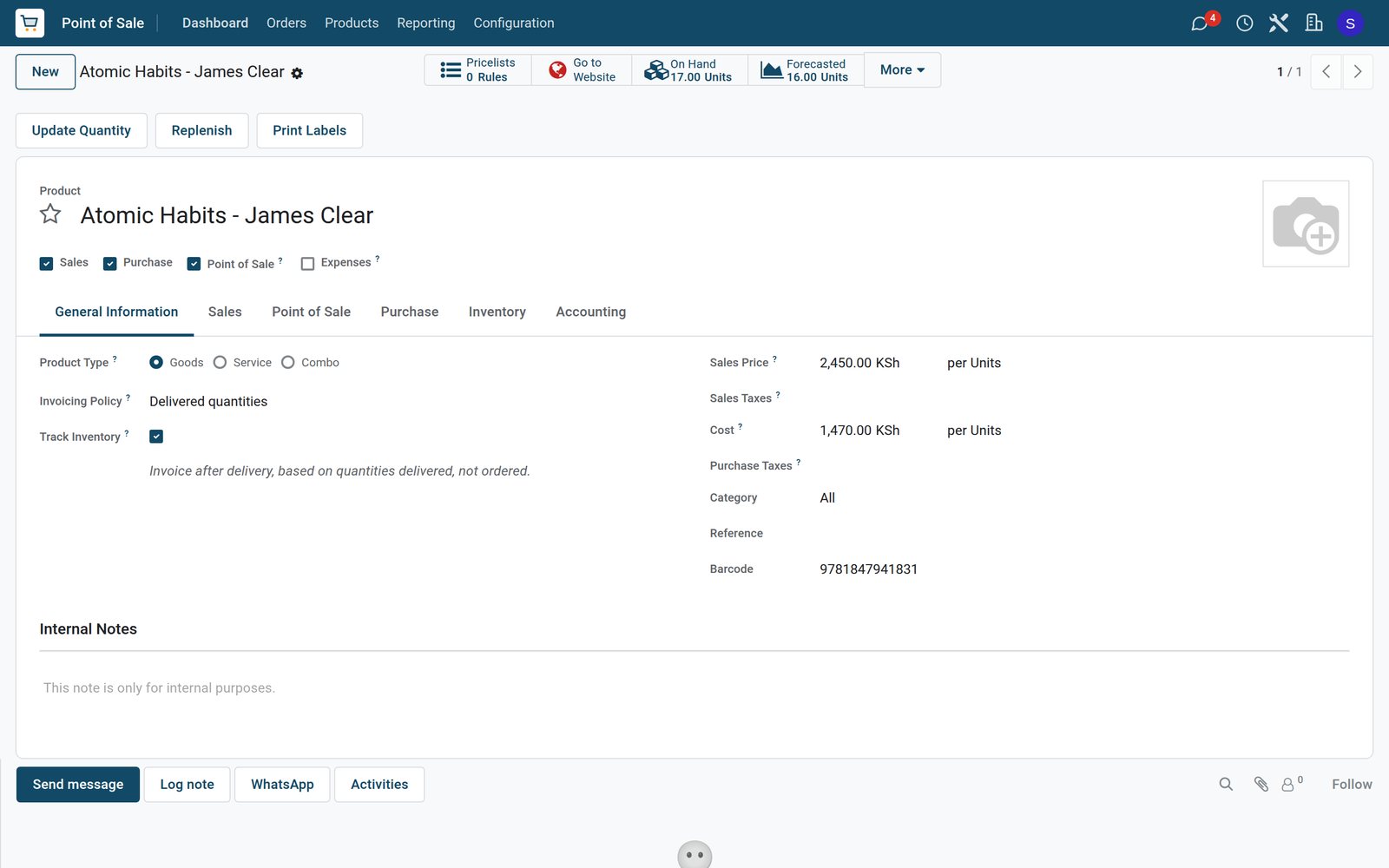
The ISBN is the barcode
Atomic Habits carries its ISBN, 9781847941831, as the barcode the counter scans, with a shelf price of KSh 2,450 and a cost of KSh 1,470.
Explore Point of Sale →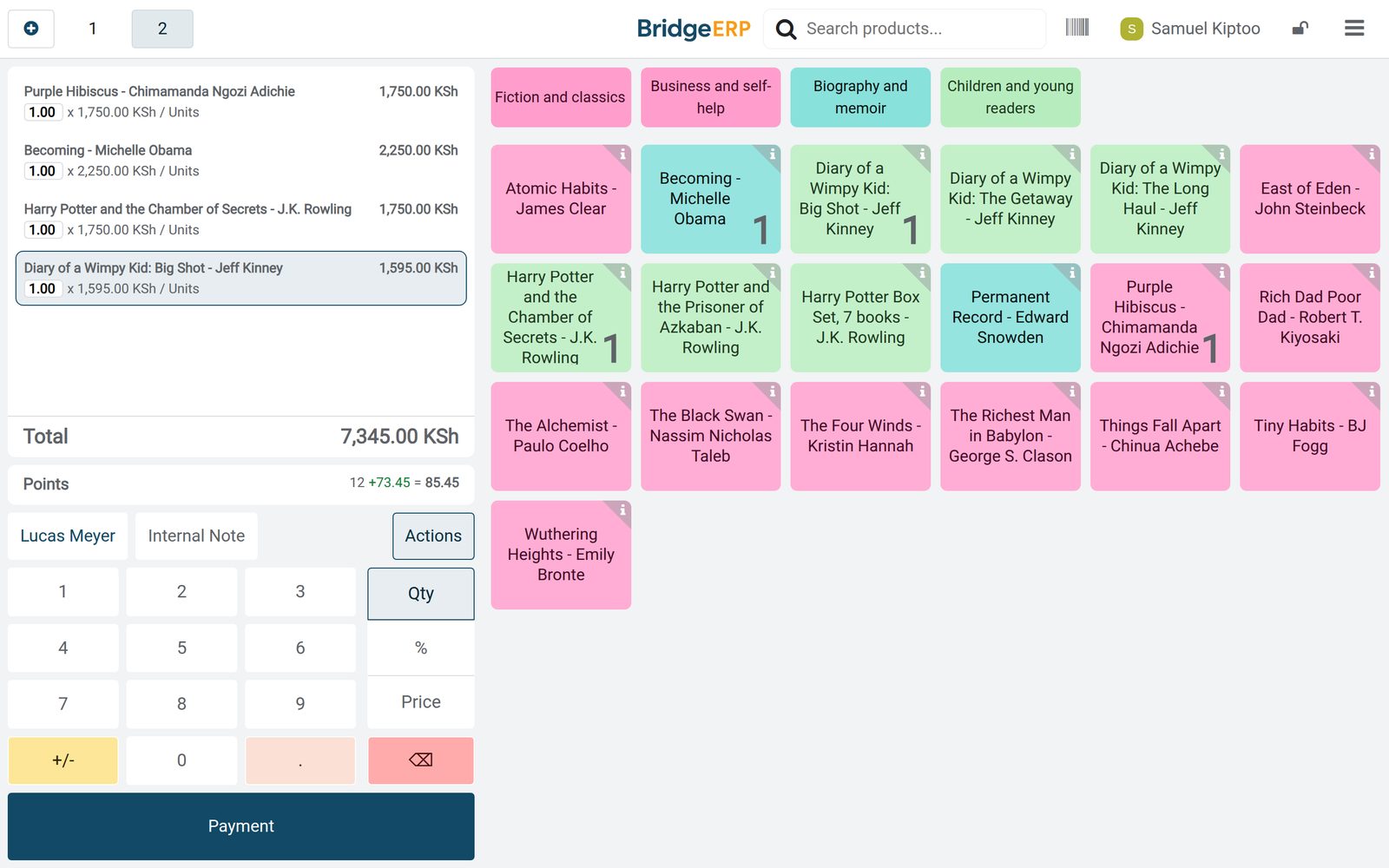 Point of Sale
Monday afternoon at the counter
Samuel Kiptoo sold Lucas Meyer four books, Purple Hibiscus, Becoming and two for younger readers, KSh 7,345 in all.
Explore Point of Sale →By the numbers
What ships inside
Counted in the product.
- 8
- kinds of promotion and loyalty programme, from loyalty cards and gift cards to buy X get Y
- 3
- kinds of reward for loyal readers: a free product, a discount or free shipping
- 4
- steps in the life of a till session, from opening control to closed and posted
Inside the app
What is inside
The apps a bookshop runs on, and what each does for the day.
Counter sales
Books are scanned by ISBN at the counter and grouped into shelves such as fiction, business, biography and children.
Special orders
A title the shop does not stock is paid at the counter and delivered once the copy ordered from the distributor arrives.
School orders on account
Schools and companies buy class sets on their customer account and settle the balance later.
Reader rewards
Regular readers collect points on every purchase and turn them into a discount at the counter.
Distributor orders
Purchase orders to book distributors are received title by title into stock.
Reordering bestsellers
Minimum and maximum levels show which bestsellers to reorder and how many copies.
Daily close
At closing the cash in the drawer is counted and the day's takings post to accounting.
Sales by shelf
The sales analysis shows what each shelf brought in, from fiction to children's books.
Step by step
From the distributor to the reader
How a bookshop week runs in BridgeERP, and which app does each step.
- Step 1
Order
New titles and reorders go to the distributors as purchase orders.
Purchase - Step 2
Receive
Each delivery is received title by title, and the copies go on the shelves.
Inventory - Step 3
Sell
The counter scans each book by its ISBN and takes mobile money, cash, card or the customer account.
Point of Sale - Step 4
Reward
Regular readers earn points on the purchase and spend them on a later one.
Point of Sale - Step 5
Reorder
Bestsellers that fall below their minimum level come back on the replenishment list.
Inventory
The book a reader asked for
The customer pays at the counter, the shop orders the copy, and the delivery waits for it.
 Inventory
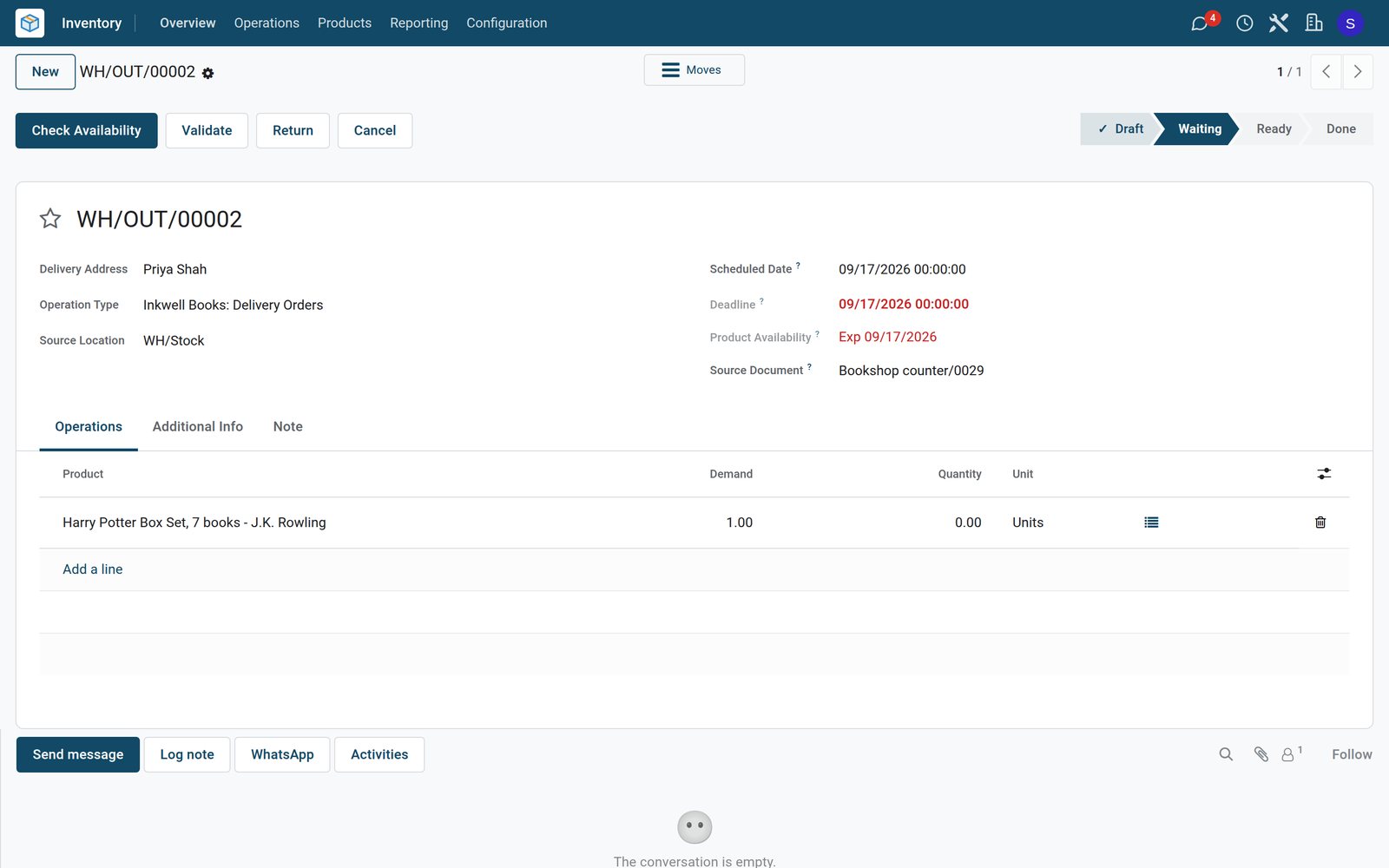
Waiting for the copy
Priya Shah's Harry Potter box set, sold at the counter, waits as a delivery that expects the distributor's copy on 17 September.
Explore Inventory →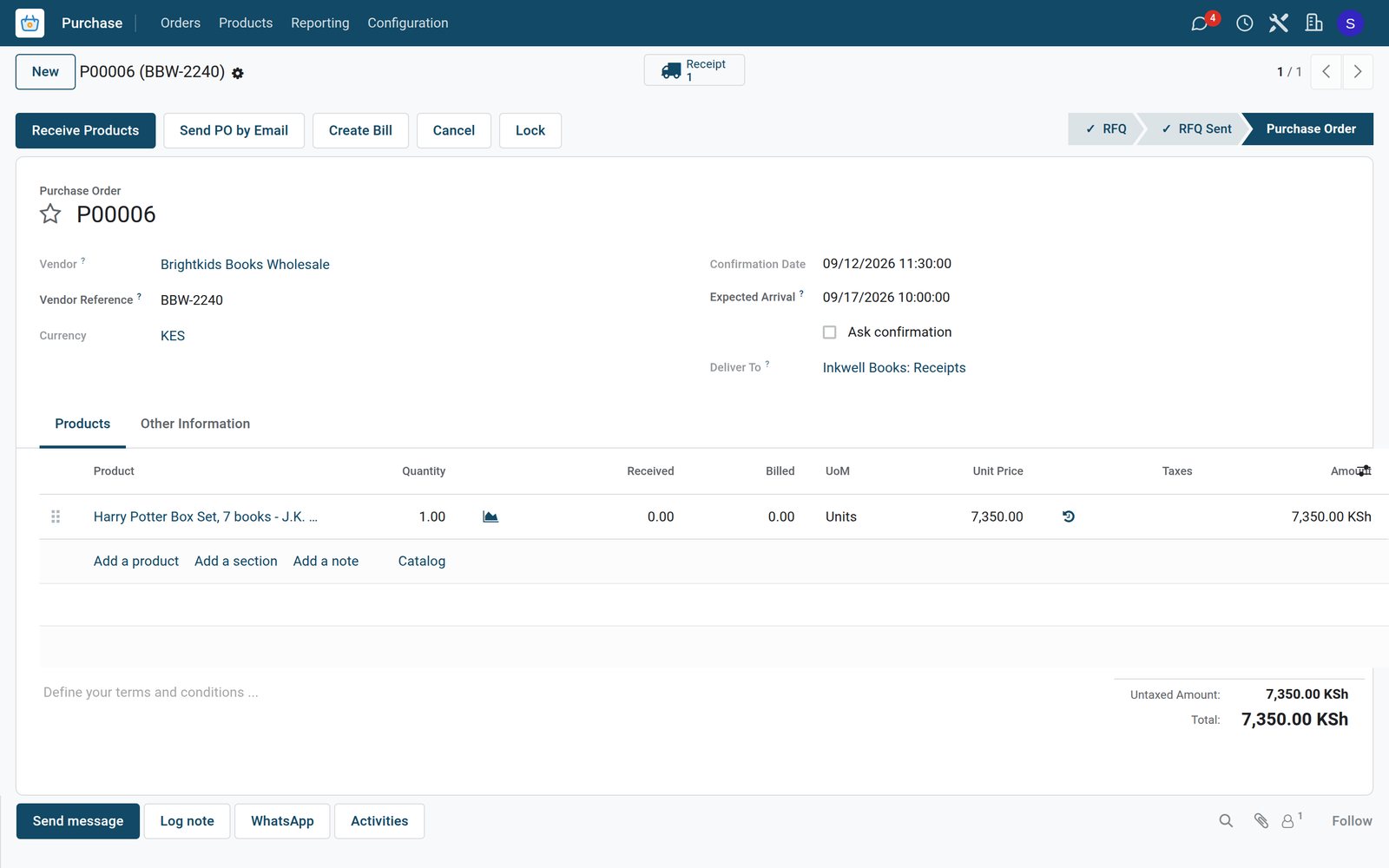 Purchase
Ordered from the distributor
One box set was ordered from Brightkids Books Wholesale at KSh 7,350 on Saturday at 11:30, expected to arrive on 17 September.
Explore Purchase →Class sets for schools, on account
A school order is rung up like any other, with its discount and a customer account payment.
 Point of Sale
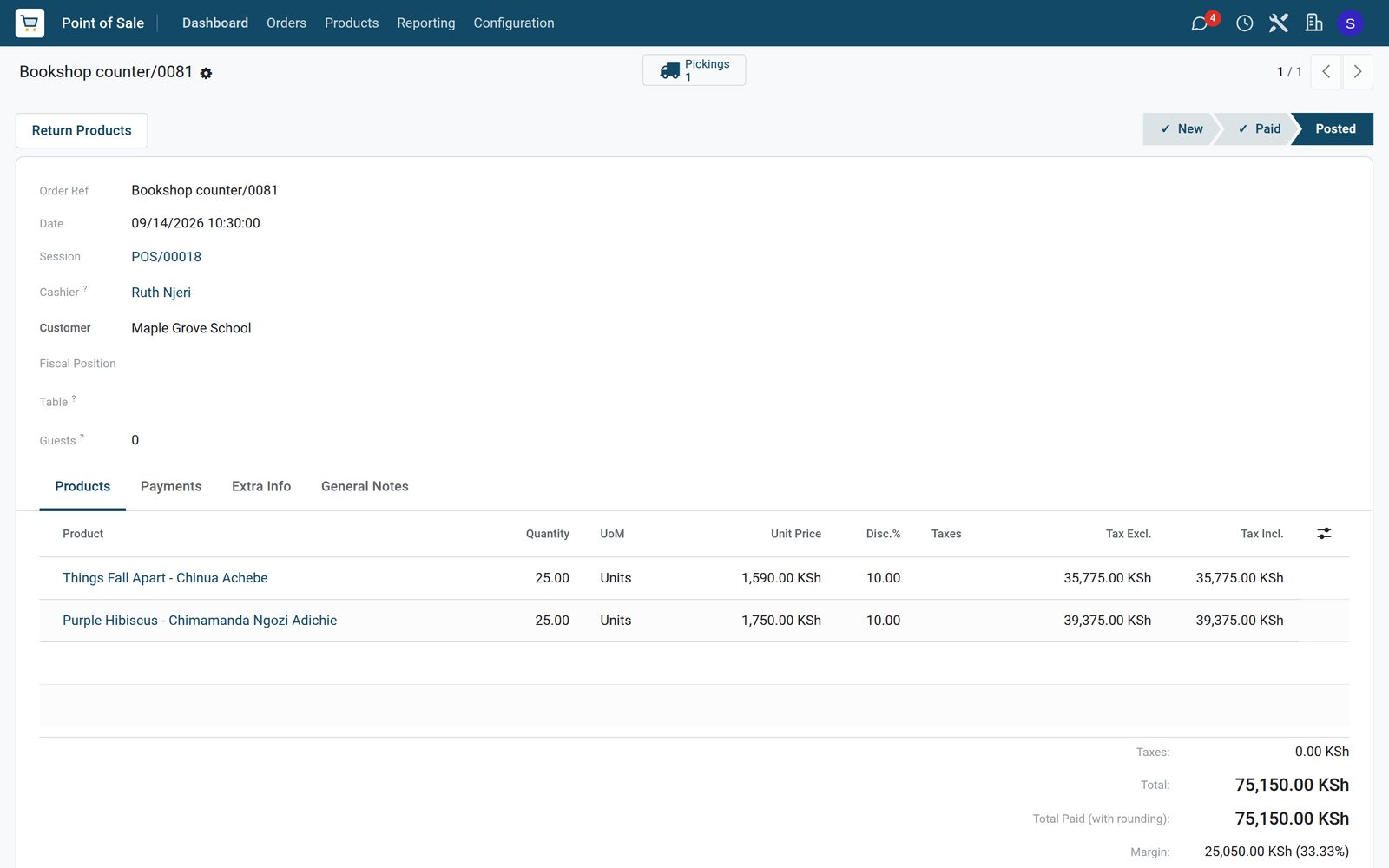
Two class sets at a school discount
Maple Grove School bought 25 copies each of Things Fall Apart and Purple Hibiscus with a 10% school discount, KSh 75,150 in all.
Explore Point of Sale →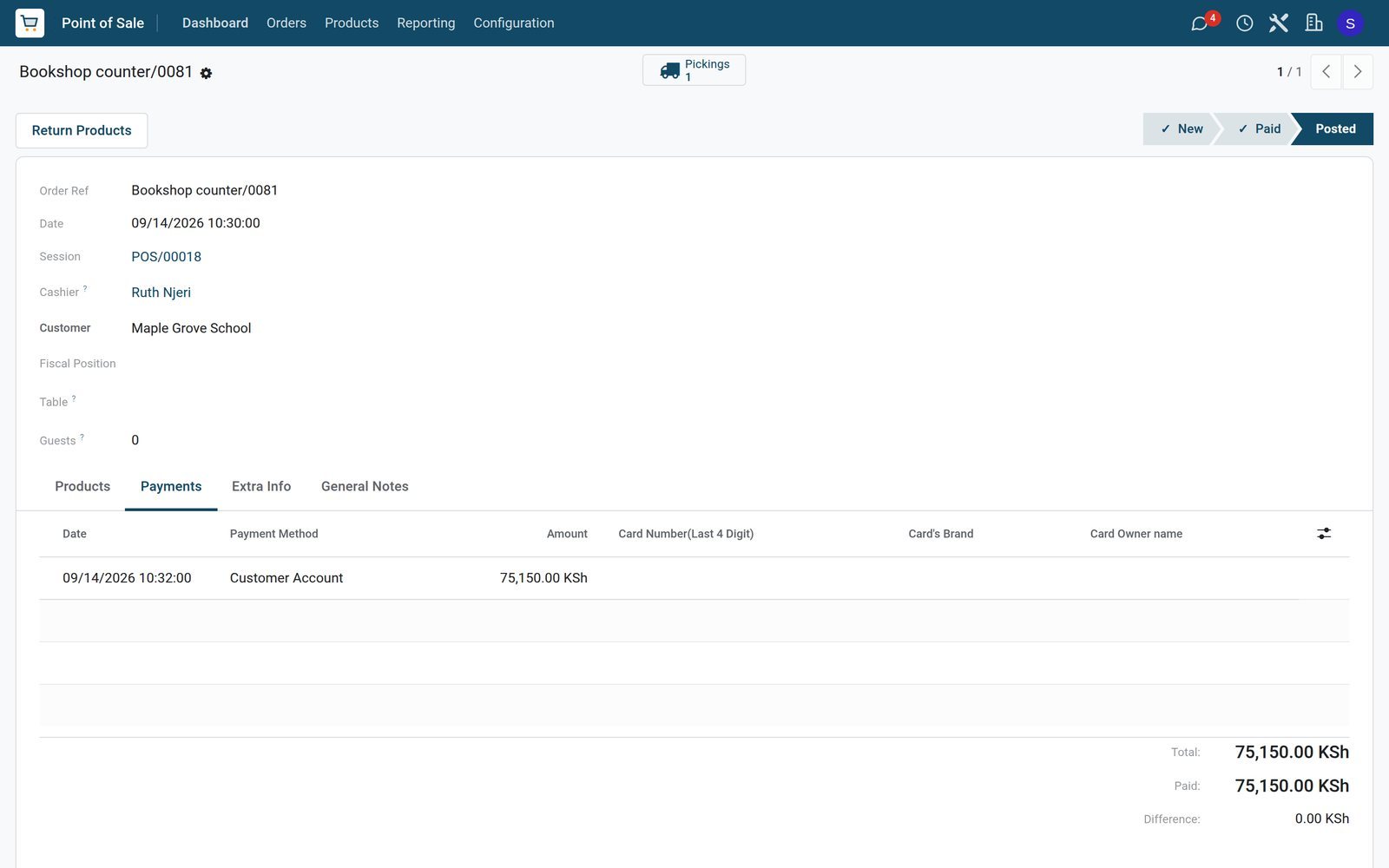 Point of Sale
Paid later
The whole KSh 75,150 was put on the school's customer account instead of being paid at the counter.
Explore Point of Sale →Points for regular readers
The loyalty programme runs on the counter till, and each reader's card keeps the balance.
 Point of Sale
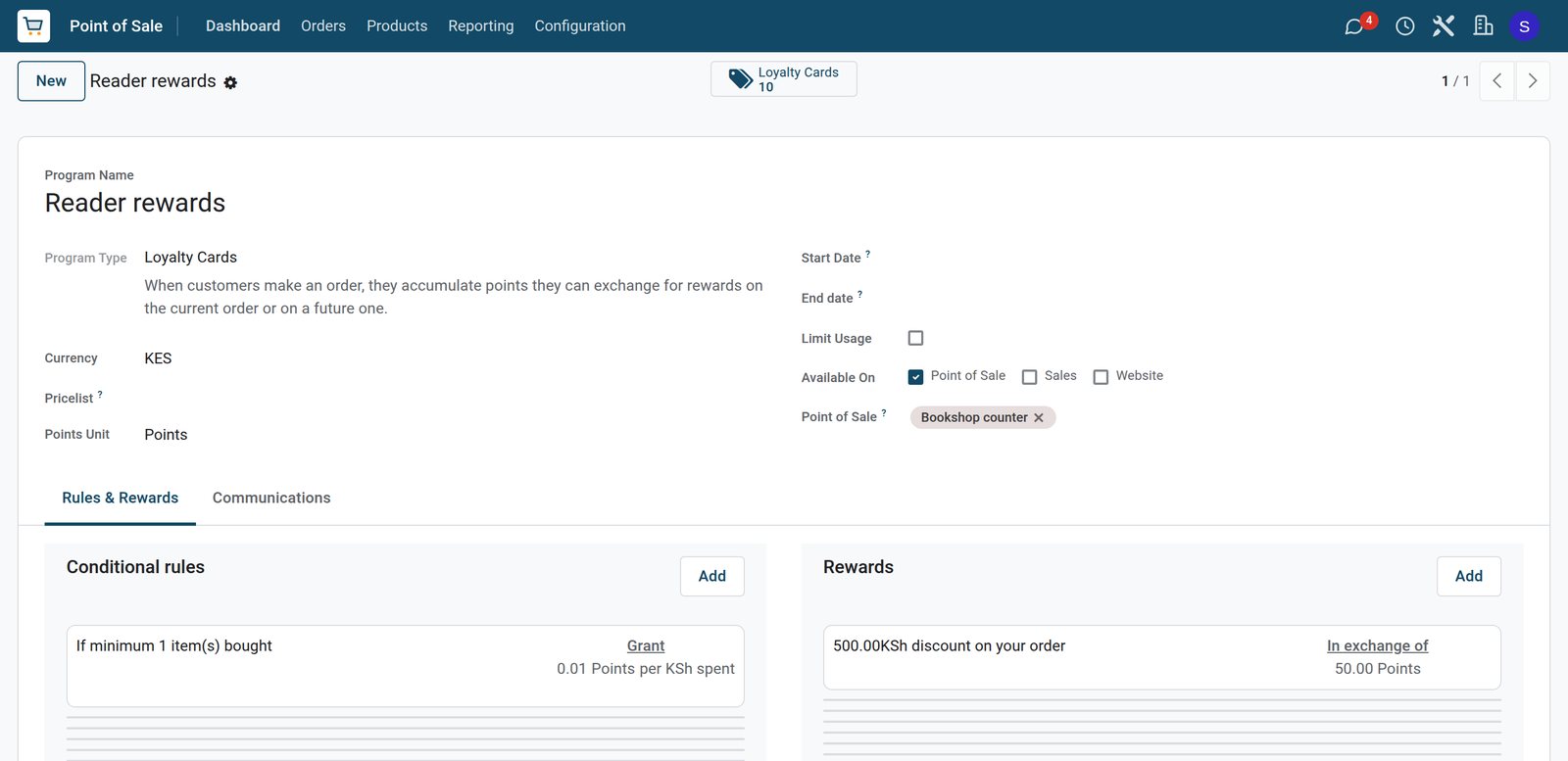
A point for every KSh 100
Reader rewards gives a point for every KSh 100 spent at the Bookshop counter, and 50 points take KSh 500 off the order.
Explore Point of Sale →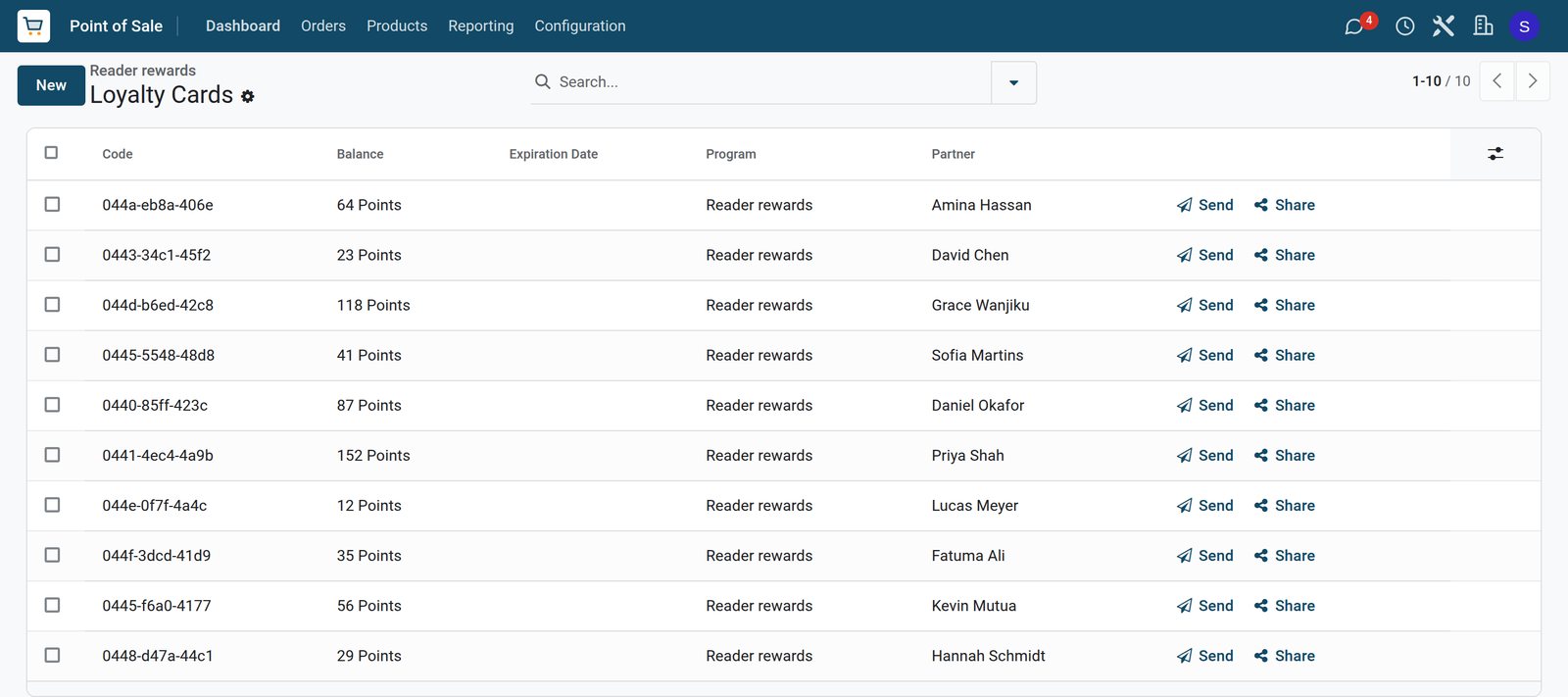 Point of Sale
Every reader's balance
Priya Shah has the most points, 152, followed by Grace Wanjiku with 118 and Daniel Okafor with 87, each on their own card.
Explore Point of Sale →Deliveries in, bestsellers reordered
Distributor deliveries are received title by title, and the reorder list shows what to buy next.
 Purchase
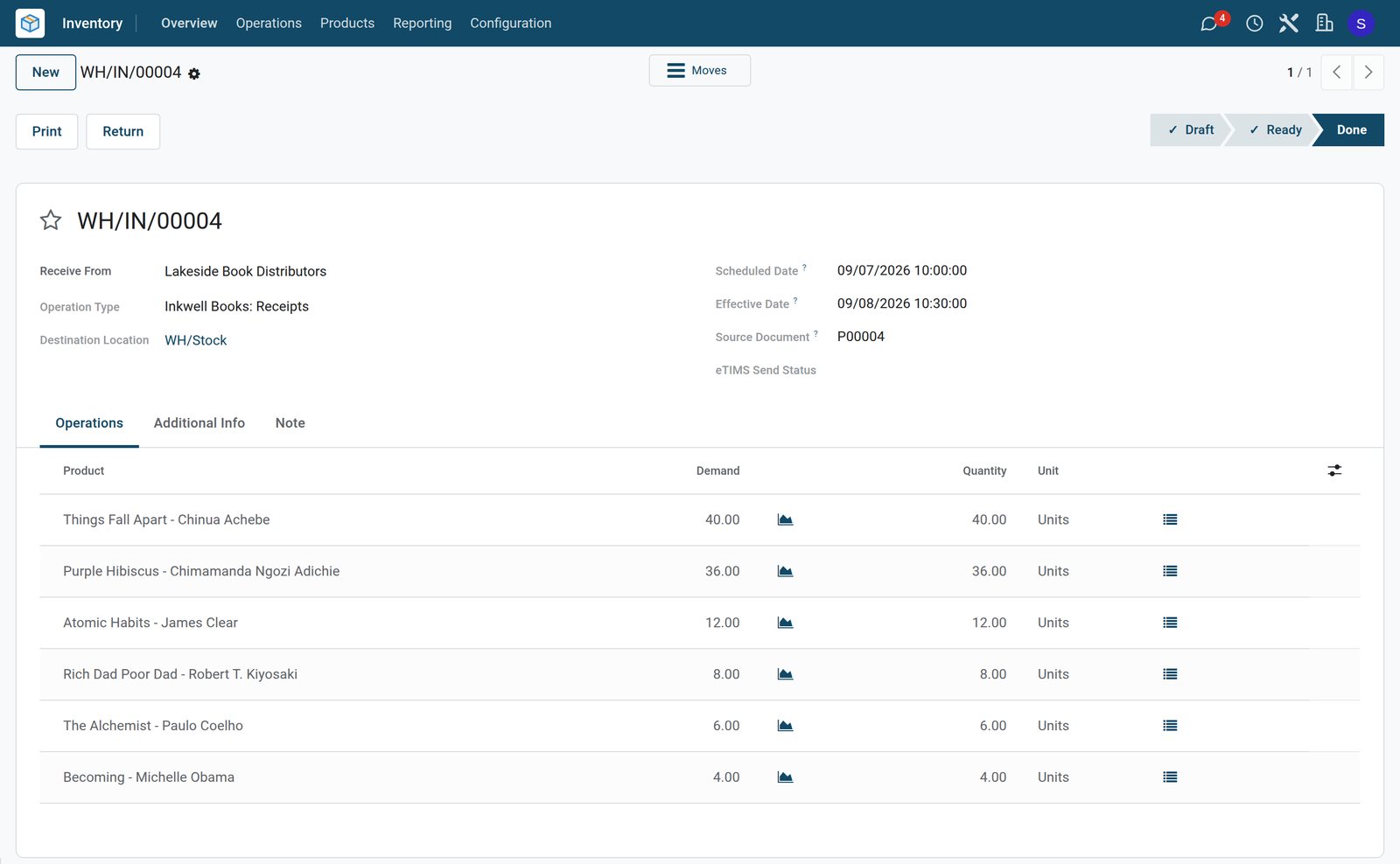
Tuesday's delivery from the distributor
Lakeside Book Distributors delivered 106 copies of six titles on 8 September, led by 40 of Things Fall Apart and 36 of Purple Hibiscus.
Explore Purchase →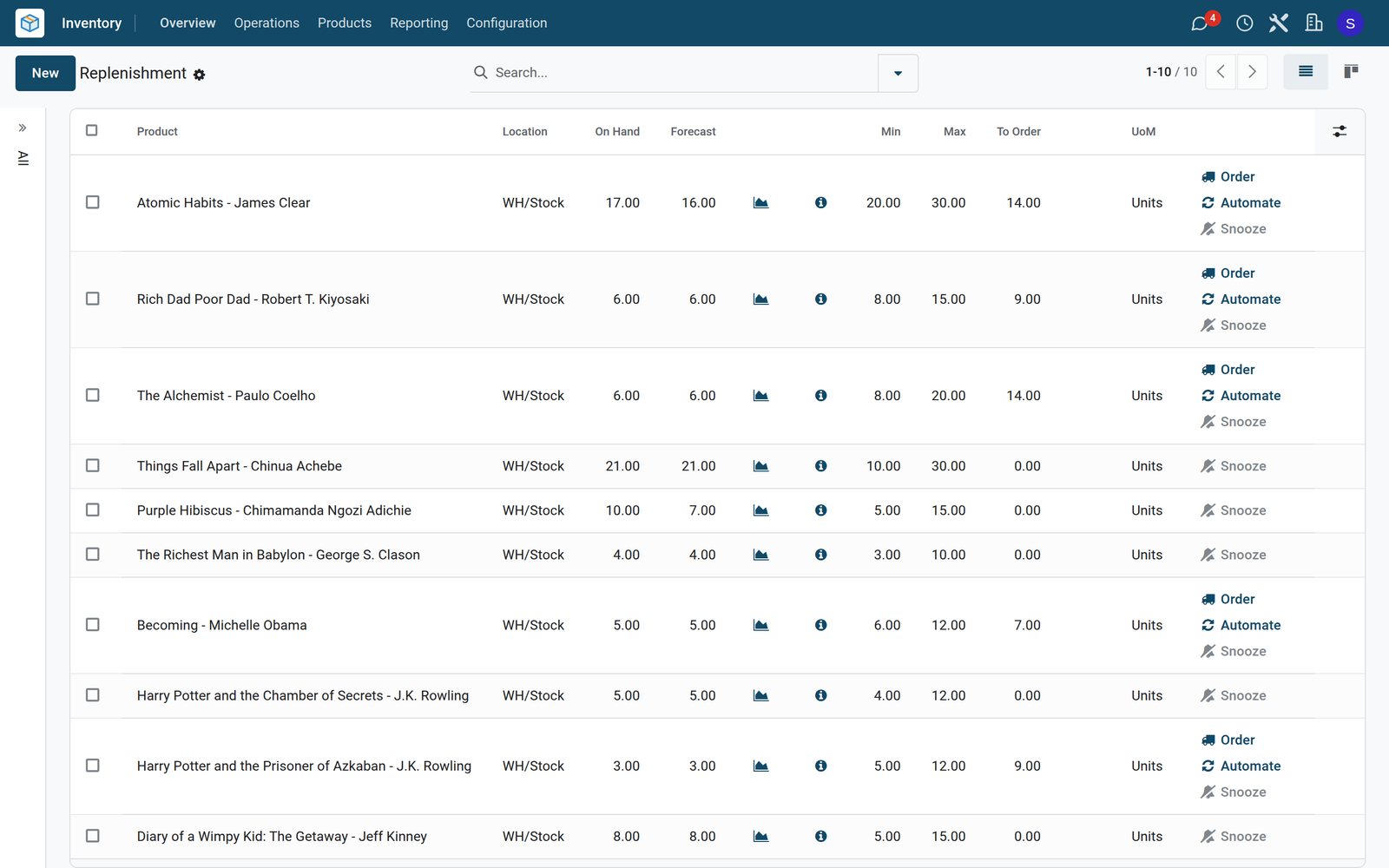 Inventory
What to order next
Atomic Habits, The Alchemist, Rich Dad Poor Dad, Becoming and Harry Potter and the Prisoner of Azkaban are below their minimum, each with the copies to order.
Explore Inventory →A day at the counter, closed and counted
The session keeps the float, the orders and the payments, and the analysis shows what each shelf sold.
 Point of Sale
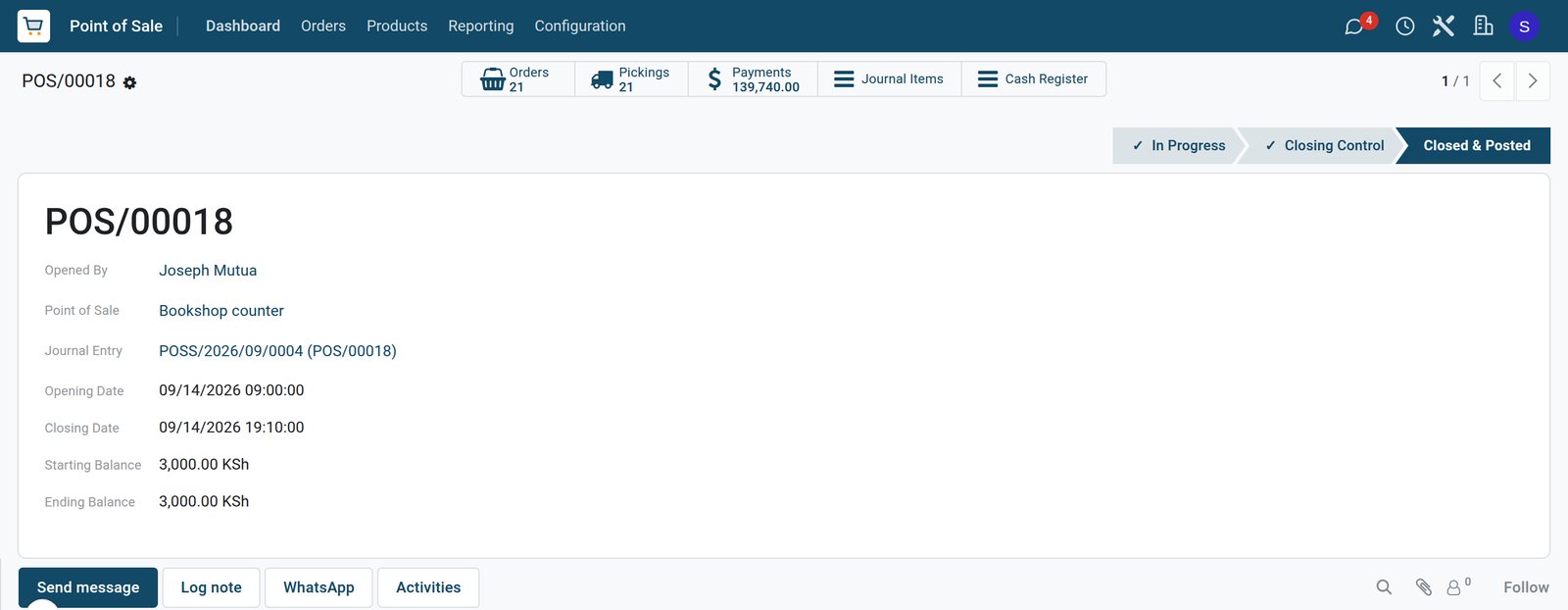
Monday at the counter
The counter opened at 09:00 on Monday with a KSh 3,000 float and closed at 19:10 after 21 orders.
Explore Point of Sale →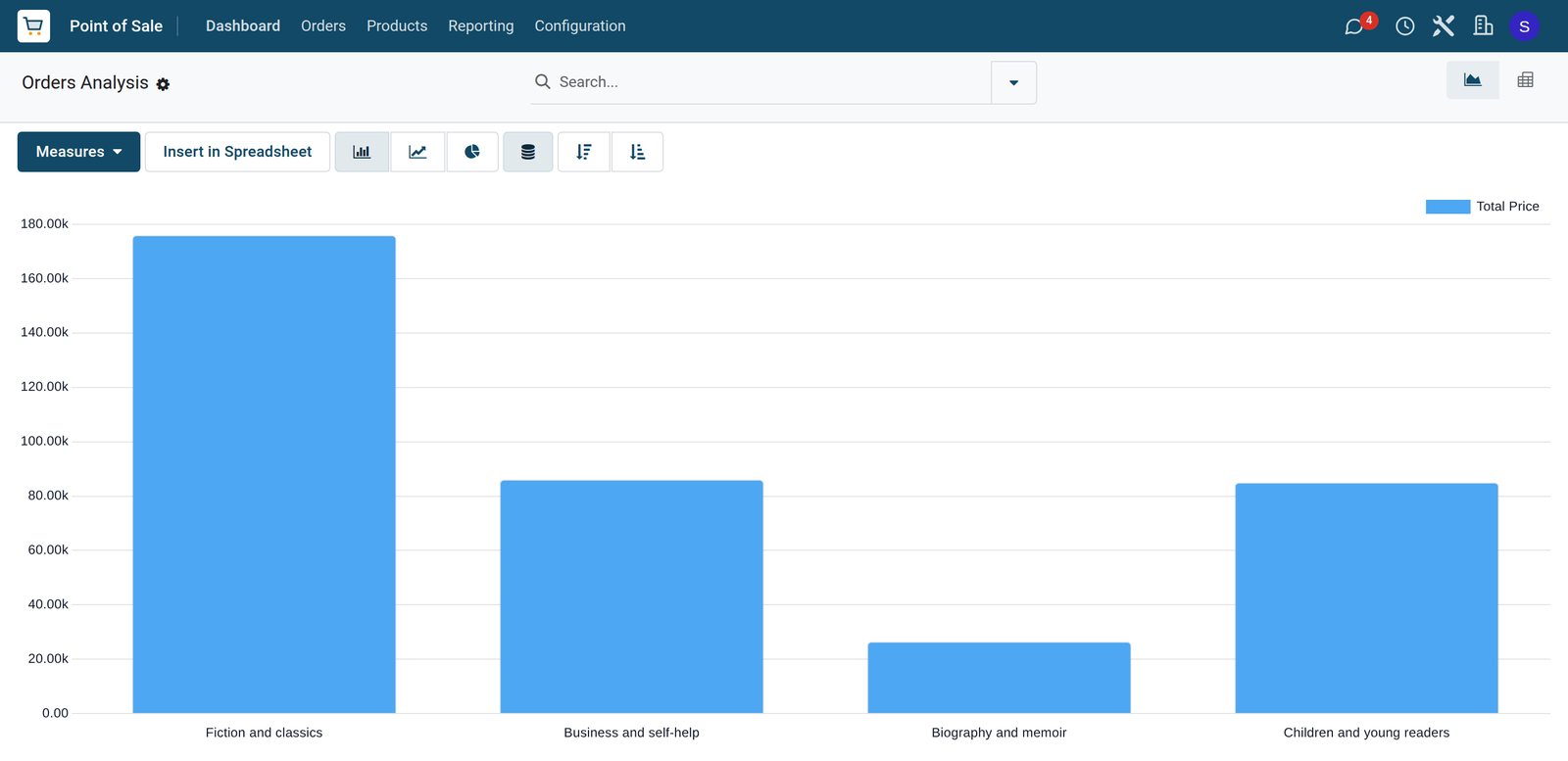 Point of Sale
Four days by shelf
Fiction and classics brought in the most over the four days, ahead of business and self-help, children and young readers, and biography and memoir.
Explore Point of Sale →Who uses it
Who uses it, and what they see
One system for the manager, the booksellers and the stock room.
Shop manager
Sells class sets to schools on account, closes the till and reorders bestsellers from the distributors.
Bookseller
Logs in on the counter, scans books by ISBN, takes special orders and adds points to a reader's card.
Stock and receiving
Receives distributor deliveries title by title and sees which special orders are waiting for a copy.
Accounts
Follows the balances that schools and companies owe on their customer accounts until they settle.
Works with
Runs with the rest of BridgeERP
Apps a bookshop draws on.


In your country
Your currency, payments and taxes
Set to the country the shop trades in.
Company currency
Shelf prices, distributor costs and daily takings are kept in the currency of the company; the demo shop trades in KES.
Mobile money at the counter
Mobile money, M-Pesa on the demo, sits next to cash, card and the customer account on the till.
Tax set per title
Accounting packages for more than 100 countries set up the taxes, and each title carries its own sales tax, or none, as on the demo.
Getting started
Getting started
How a bookshop moves onto BridgeERP.
Load the titles
Import titles with their ISBN barcodes, shelf prices, costs and shelves.
Add the distributors
Set the distributor and cost of each title, so purchase orders fill in the price.
Open the counter
Create the till with cash, mobile money, card and customer account, and allow orders to be delivered later.
Add the booksellers
Add the shop team as employees who log in on the counter till with their own PIN.
Set reorder levels
Count the opening stock and set minimum and maximum levels for the bestsellers.
Start the rewards
Create the loyalty programme with its points and reward, and add it to the counter till.
Questions
Questions about Bookstore
Not covered here? Contact us.
Can we scan books by their ISBN?
Yes. The ISBN-13 printed on a book is an EAN-13 barcode, so it is stored as the product barcode and scanned at the counter.
Can a customer order a book we do not have?
Yes. The order is paid at the counter with a later delivery date, and the delivery waits until the copy ordered from the distributor is received.
Can schools buy class sets on account?
Yes. With the customer account payment method the order is recorded against the school, and the balance is settled later.
How do reader rewards work?
The loyalty programme sets how many points each purchase earns and what the points are worth; on the demo a point is earned for every KSh 100 and 50 points take KSh 500 off.
How do we know which books to reorder?
The replenishment list shows the titles below their minimum and how many copies bring them back to the maximum.
Can we see which shelves sell best?
Yes. The point of sale analysis groups sales by category, so fiction, business, biography and children's books can be compared.
Tax compliance
Invoices your tax authority accepts
In Kenya, Uganda, Rwanda, Burundi and Zambia, each invoice, receipt and stock movement goes to the tax authority's own system when you post it. Ghana and Pakistan come next, and we connect 73 more countries on request.
- KenyaReady
eTIMS KRA
Invoices, credit notes, POS receipts and stock movements
- UgandaReady
EFRIS URA
Invoices, POS receipts and stock
- RwandaReady
EBM RRA
Invoices, POS receipts, stock and imports
- BurundiReady
EBMS OBR
Invoices, POS receipts, stock and manufacturing
- ZambiaReady
Smart Invoice ZRA
Invoices, POS receipts, stock and imports
Bookstore, app by app
One connected flow instead of separate systems — the work moves from one team to the next without re-typing anything.
Every stop is a real app in your plan, and the hand-offs between them are the product.
- Customers & sales
- Operations
- Finance
Point of Sale
Touch till, offline mode, sessions, cash control and receipts.
Point of Sale →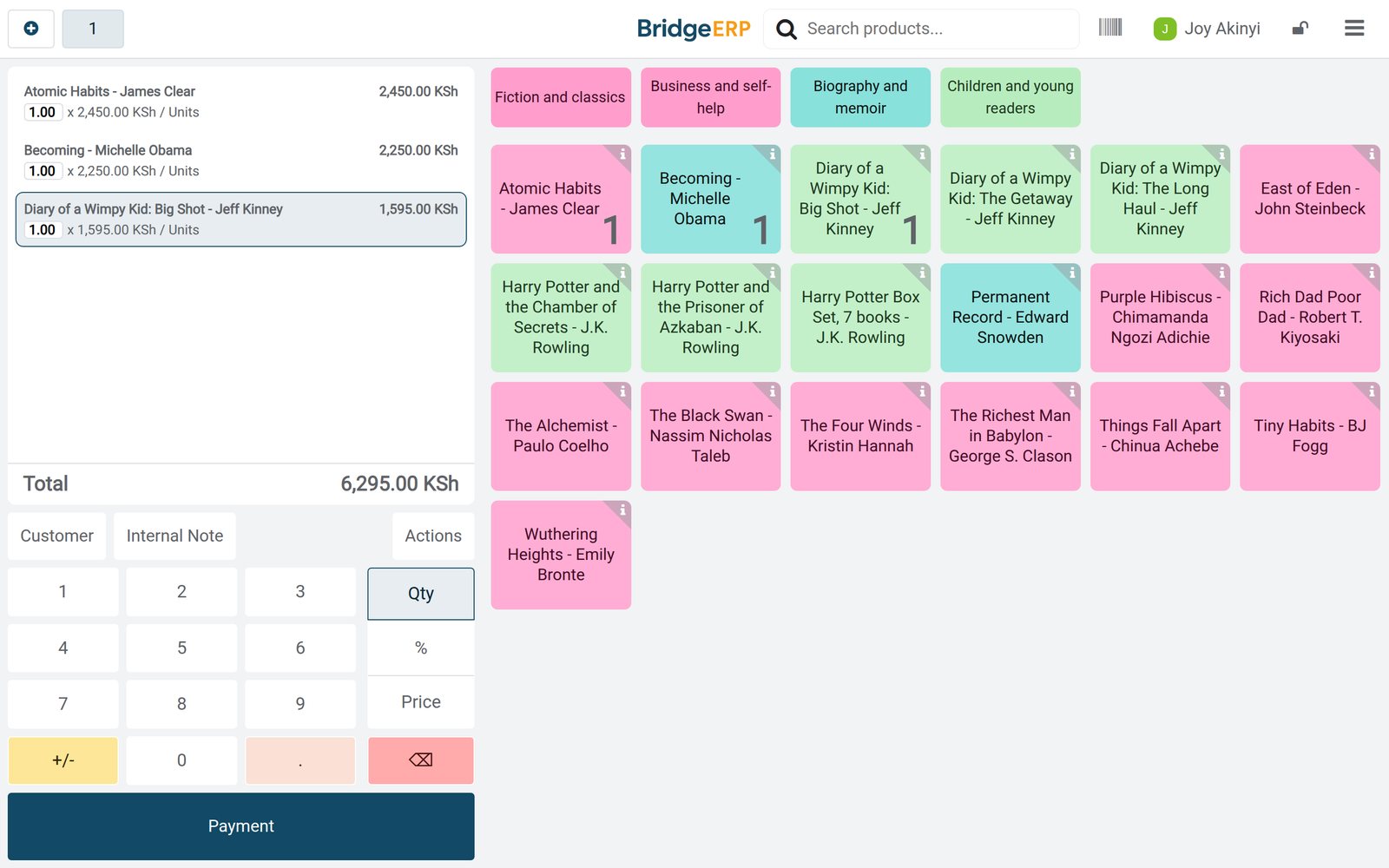
Ready when you are
Open the plan builder with the right apps for this industry already selected, or see it running first.