

Fitness Centers & Gyms: Memberships, classes and the front desk for gyms
BridgeERP bills every membership on its plan, books members into classes up to the size of the studio and runs the front desk till.
Free instant access. No credit card required.
 Invoicing
 Appointments
 CRM
CRM Point of Sale
 Purchase
 Sales
Sales
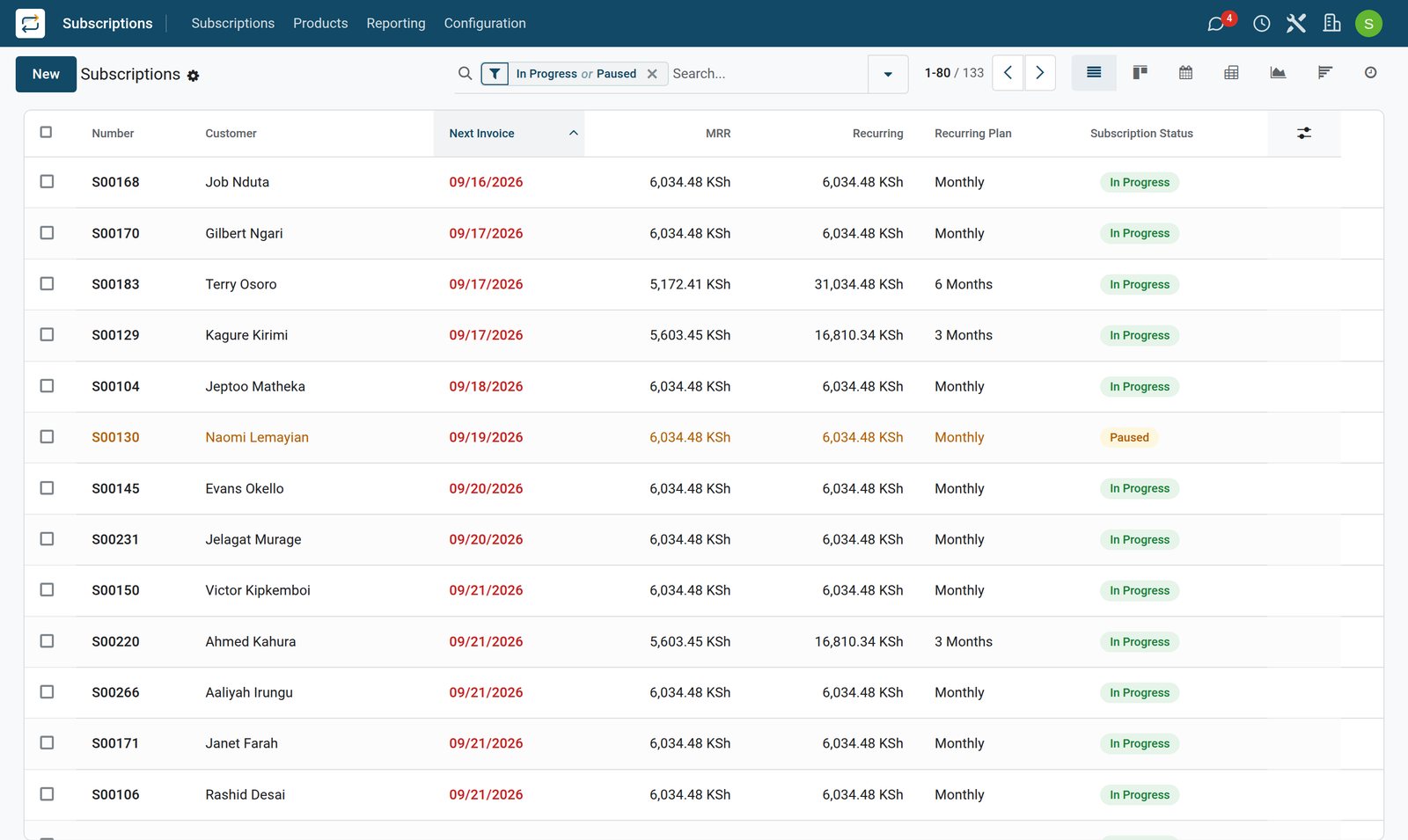
Every membership billed on its plan
Each member has a subscription on a monthly, 3-month, 6-month or yearly plan, invoiced at the start of every period.
 Subscriptions
A member since the first month
A member on the monthly plan since September last year. The subscription carries the plan, the date of the next invoice and every invoice raised so far.
Explore Subscriptions →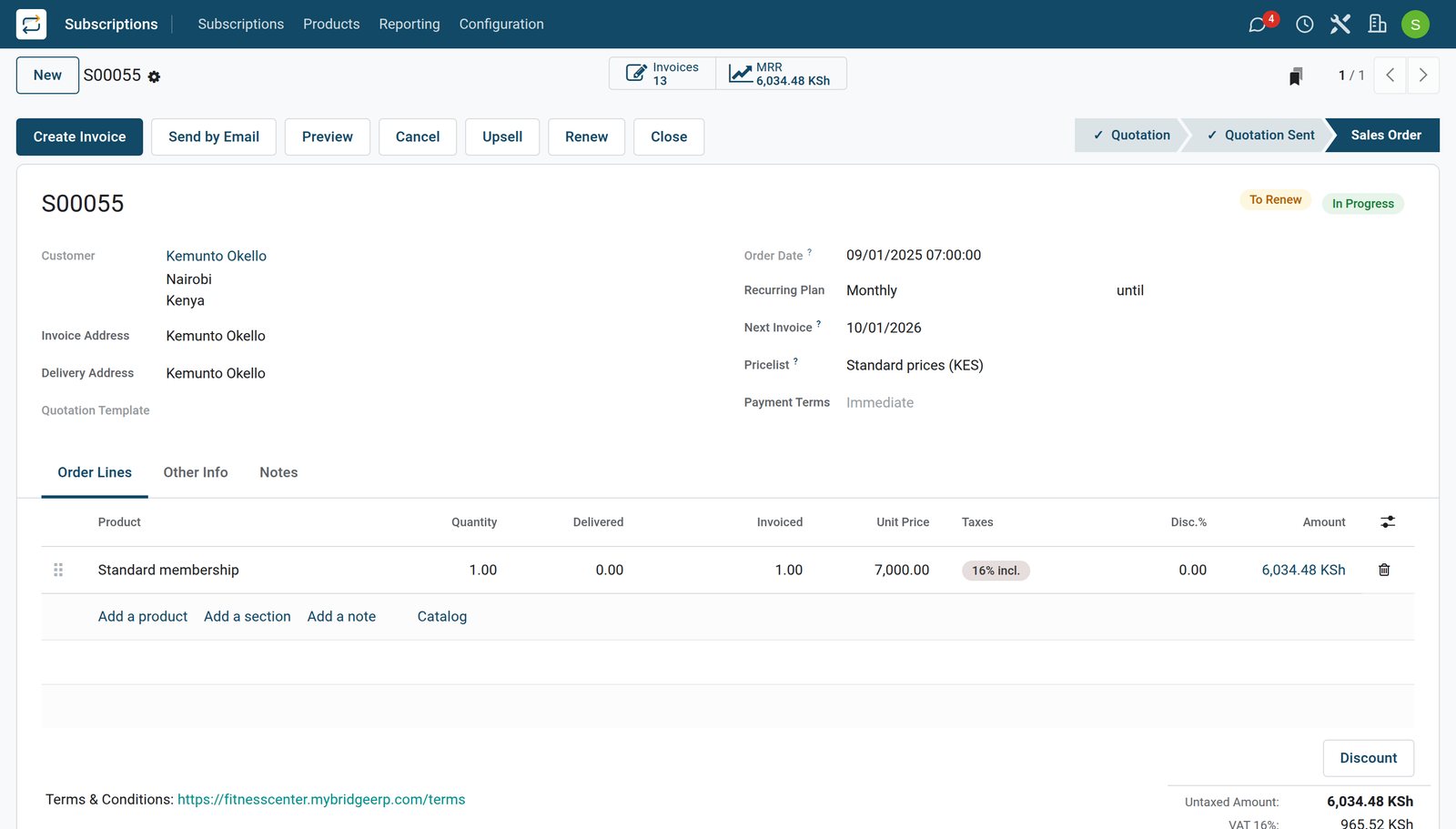
- Subscriptions
One membership, four plans
One membership product priced on four plans: 7,000 a month, 19,500 for three months, 36,000 for six and 66,000 for the year.
Explore Subscriptions →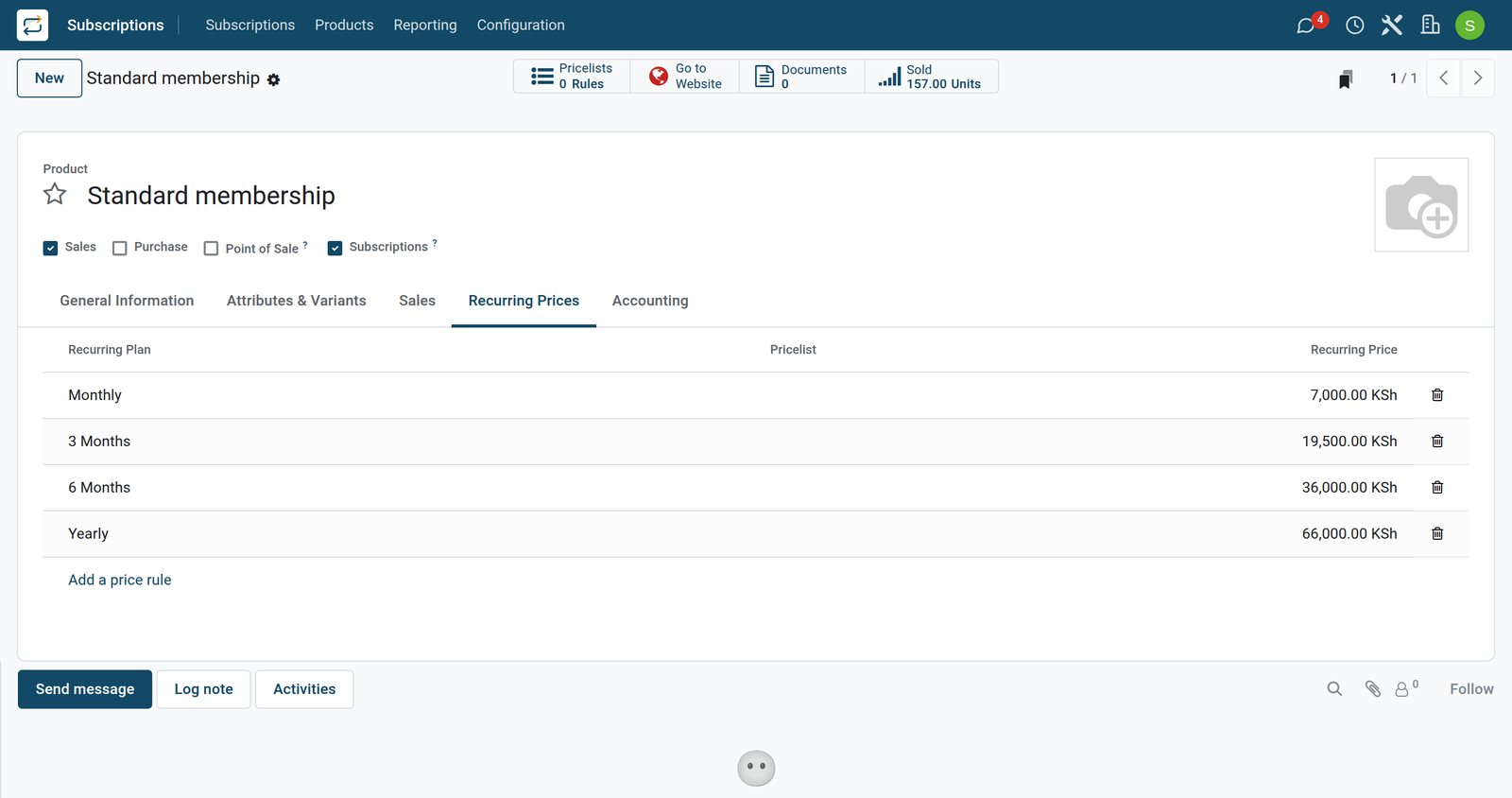
- Subscriptions
A new member signing up
Someone joining on the three-month plan. Until it is confirmed it stays a quotation, and the first invoice follows when the membership starts.
Explore Subscriptions →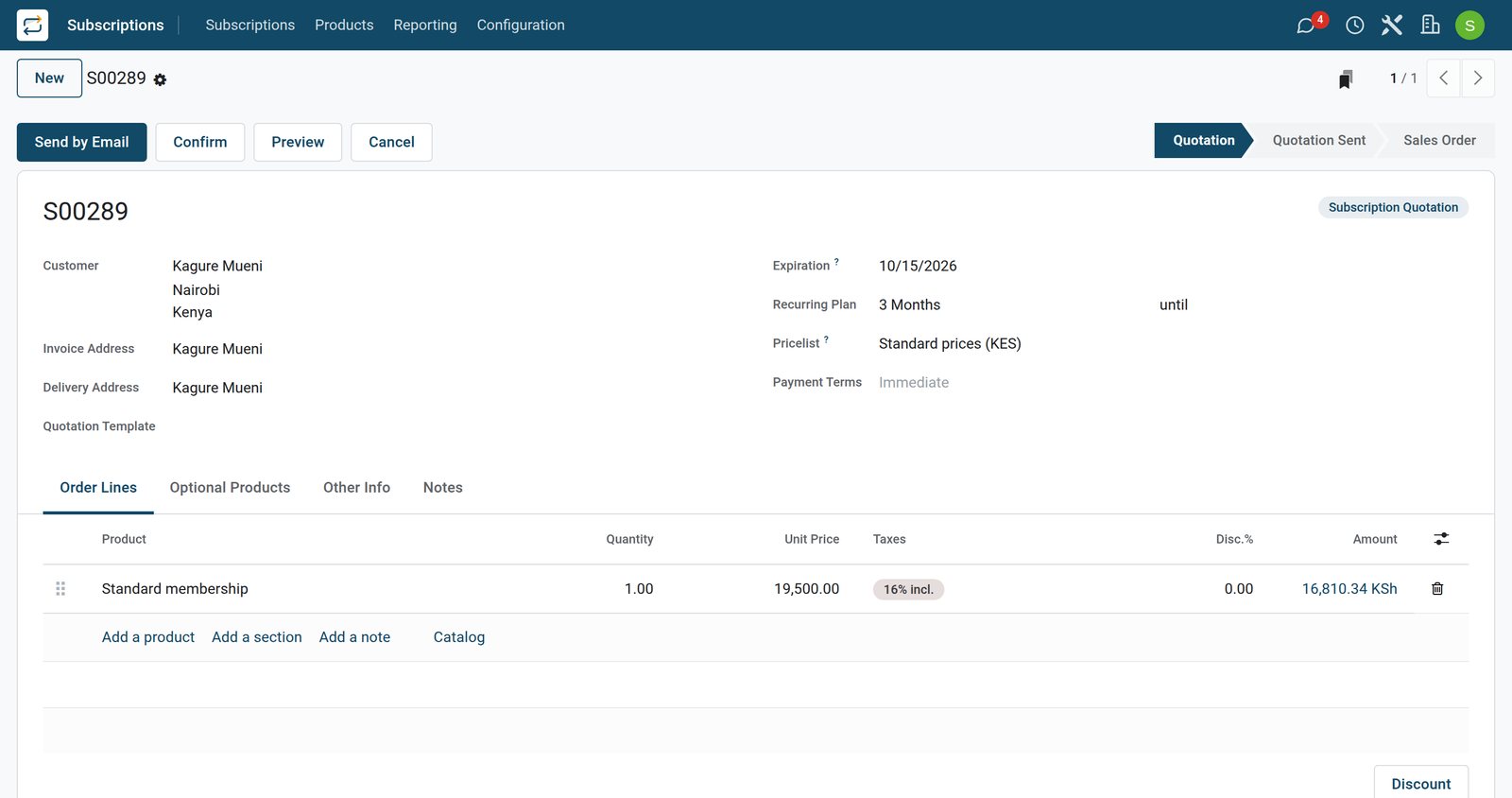
By the numbers
What ships inside
Counted in the product.
- 7
- statuses a subscription moves through, from quotation, in progress and paused to churned
- 5
- kinds of change the recurring revenue reports track: new, expansion, contraction, churn and transfer
- 5
- statuses a class booking can have: request, booked, checked in, no show and cancelled
- 2
- ways a reordering rule runs: automatically, or manually from the replenishment list
Inside the app
What is inside
The apps a gym runs on, and what each does for the day.
Memberships on plans
Each membership is a subscription on a monthly, 3-month, 6-month or yearly plan, priced per plan on one membership product.
An invoice every period
Each period is invoiced on its first day, and the next invoice date moves on to the following period.
Pauses and cancellations
A membership can be paused, or closed with a reason that the churn and retention reports count.
Classes by studio
Each class is an appointment type on its studio, with a weekly timetable and a capacity shared by everyone booked.
Check-ins and no-shows
Each booking is marked checked in or no-show, so every class shows who actually came.
The front desk till
Day passes, drinks, supplements by flavour and accessories are rung up by the staff member signed in to the till.
Shop stock and reordering
Supplements and drinks have a minimum and a maximum, and distributor orders bring low shelves back up.
The rota
Shifts by role cover the front desk, the gym floor and each class, with the instructor on the class.
Step by step
From joining to renewing
How a membership moves through a gym in BridgeERP, and which app does each step.
- Step 1
Join
The new member signs up on a plan, and the membership starts on the chosen day.
Subscriptions - Step 2
Pay each period
Each period is invoiced on its first day and paid at the desk by mobile money, card or cash.
Invoicing - Step 3
Book a class
The member is booked into a class, up to the number of places in the studio.
Appointments - Step 4
Check in
The booking is checked in when the member arrives, or marked as a no-show.
Appointments - Step 5
Buy at the desk
Drinks, supplements and day passes are rung up at the front desk till.
Point of Sale - Step 6
Pause or cancel
A membership can be paused, or closed at the end of a paid period with the reason.
Subscriptions
Classes up to the size of the studio
Each class books its studio for as long as it lasts, and the studio's places are shared by everyone booked.
- Appointments
The HIIT class and its timetable
The HIIT class: 45 minutes in its own studio, fifteen places shared by everyone booked, six times a week from Monday to Saturday.
Explore Appointments →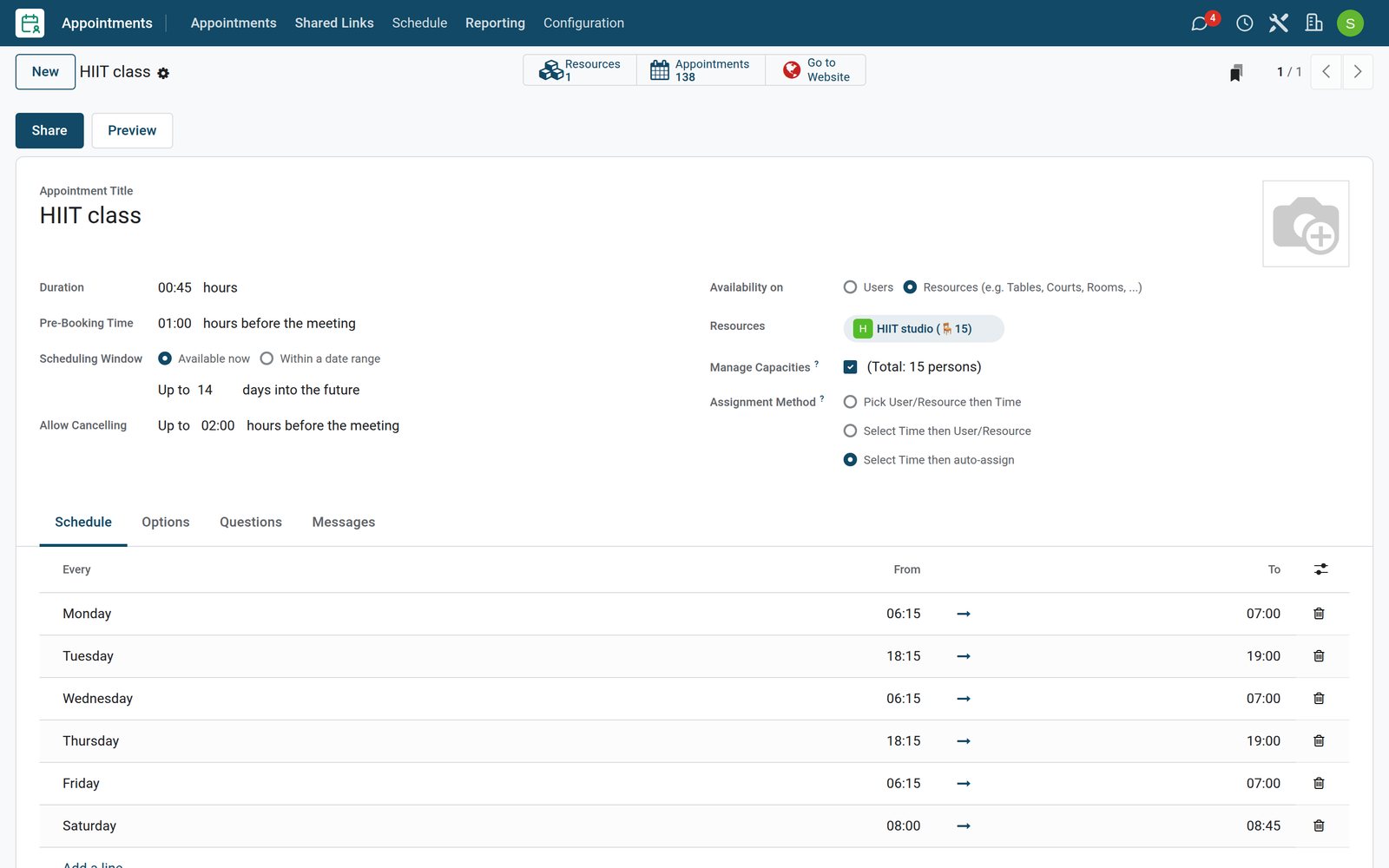
- Appointments
Who came to the class
The Tuesday six-fifteen spin class: ten members booked, eight checked in and two no-shows.
Explore Appointments →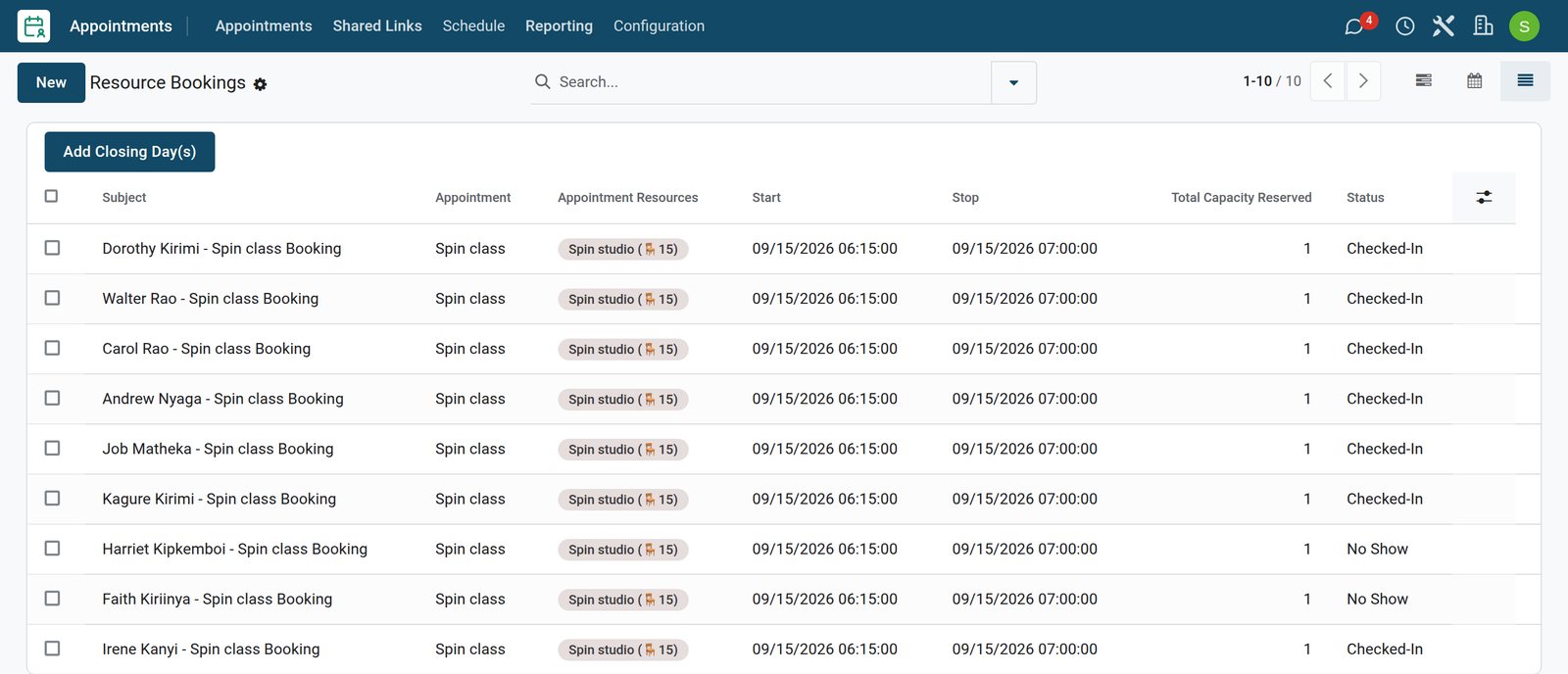
- Appointments
A day of classes by studio
Tuesday in the three studios: the six-fifteen spin class, the seven o'clock yoga class and the evening HIIT class, each booking under its member's name.
Explore Appointments →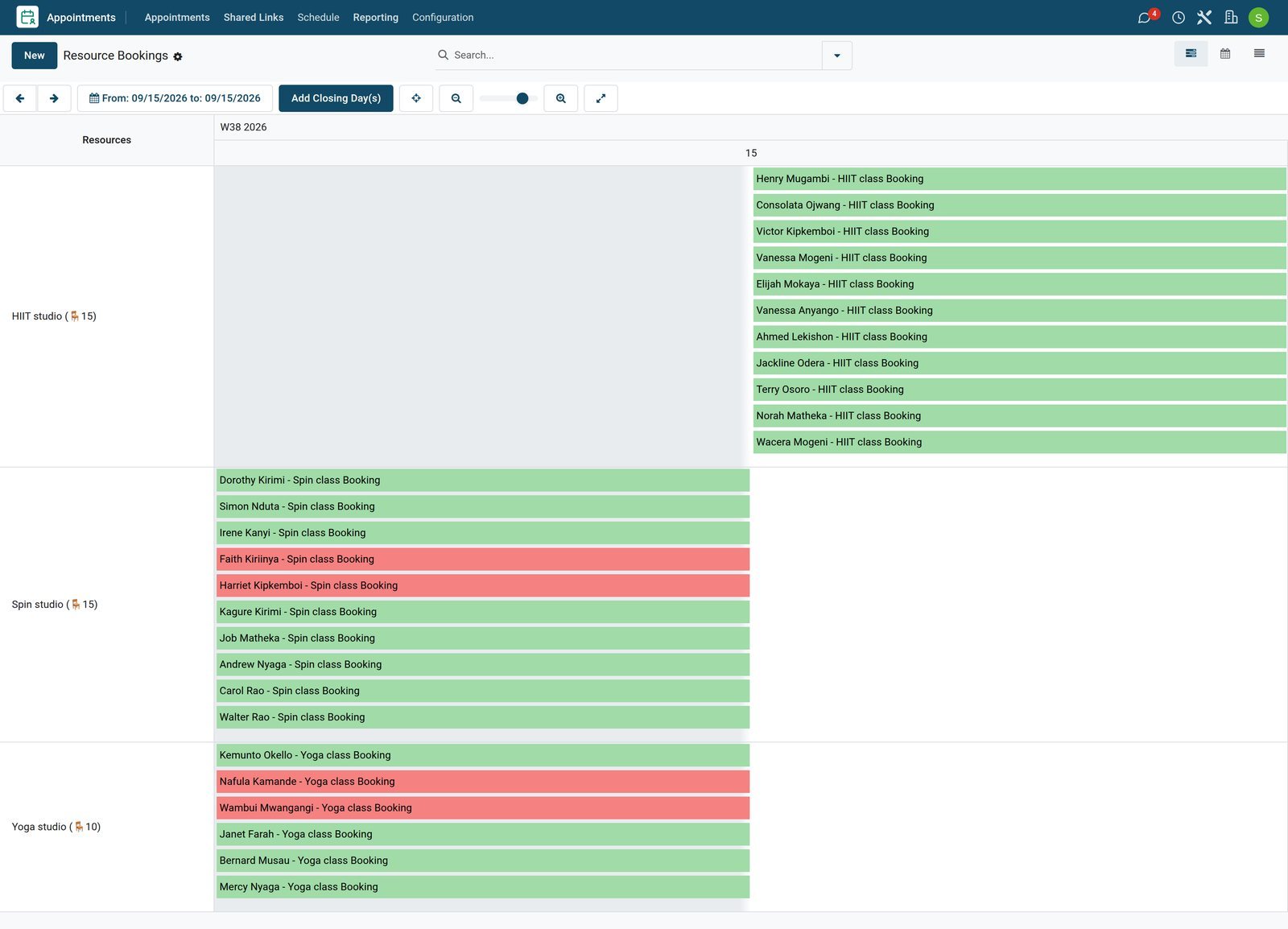
The front desk till
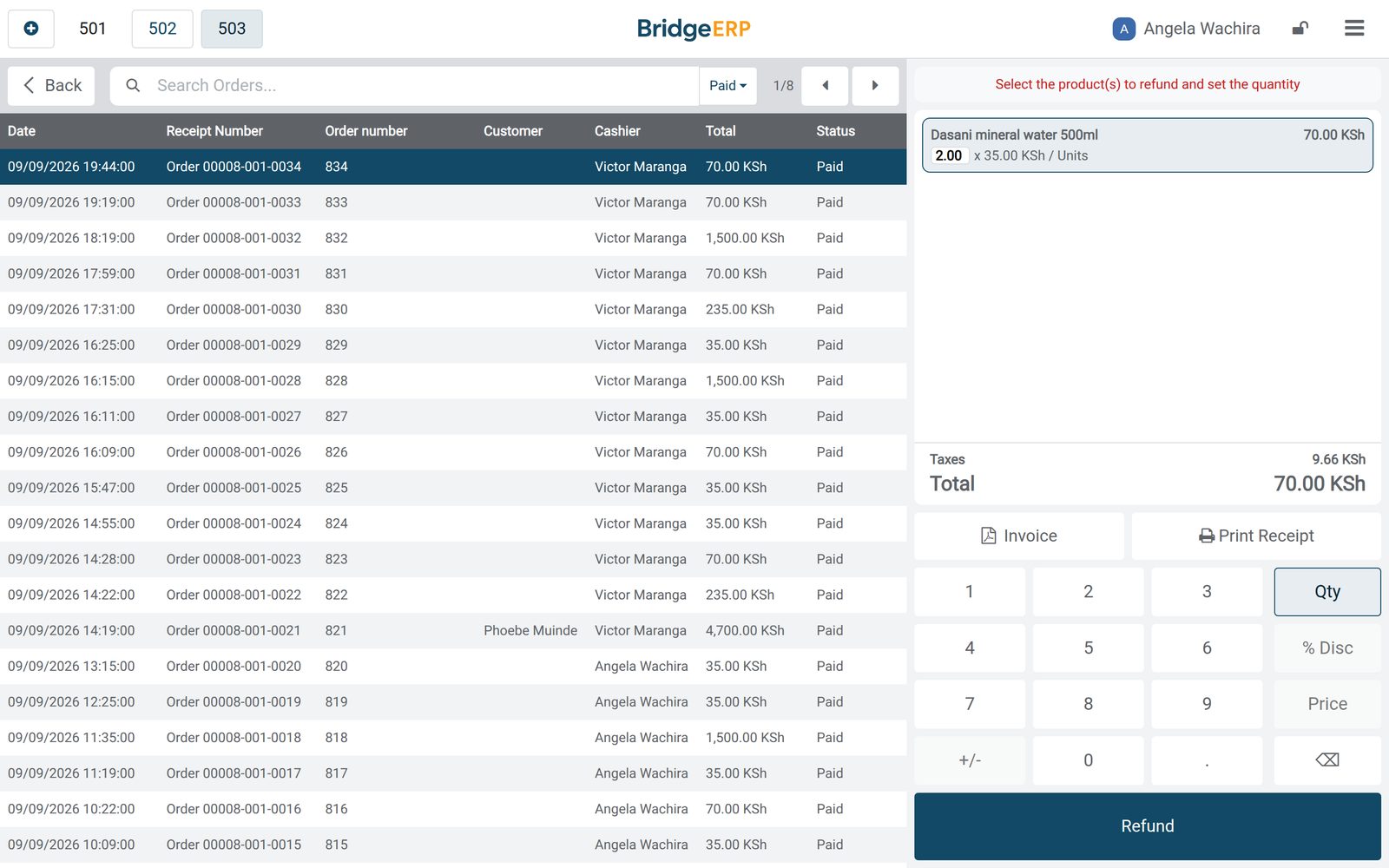
Staff sign in to the till and ring up day passes, drinks, supplements and accessories, with the member's name when they buy.
 Point of Sale
A day at the front desk
A Tuesday at the desk: 34 orders of day passes, drinks and supplements, each with the staff member who rang it up and, when the buyer is a member, their name.
Explore Point of Sale →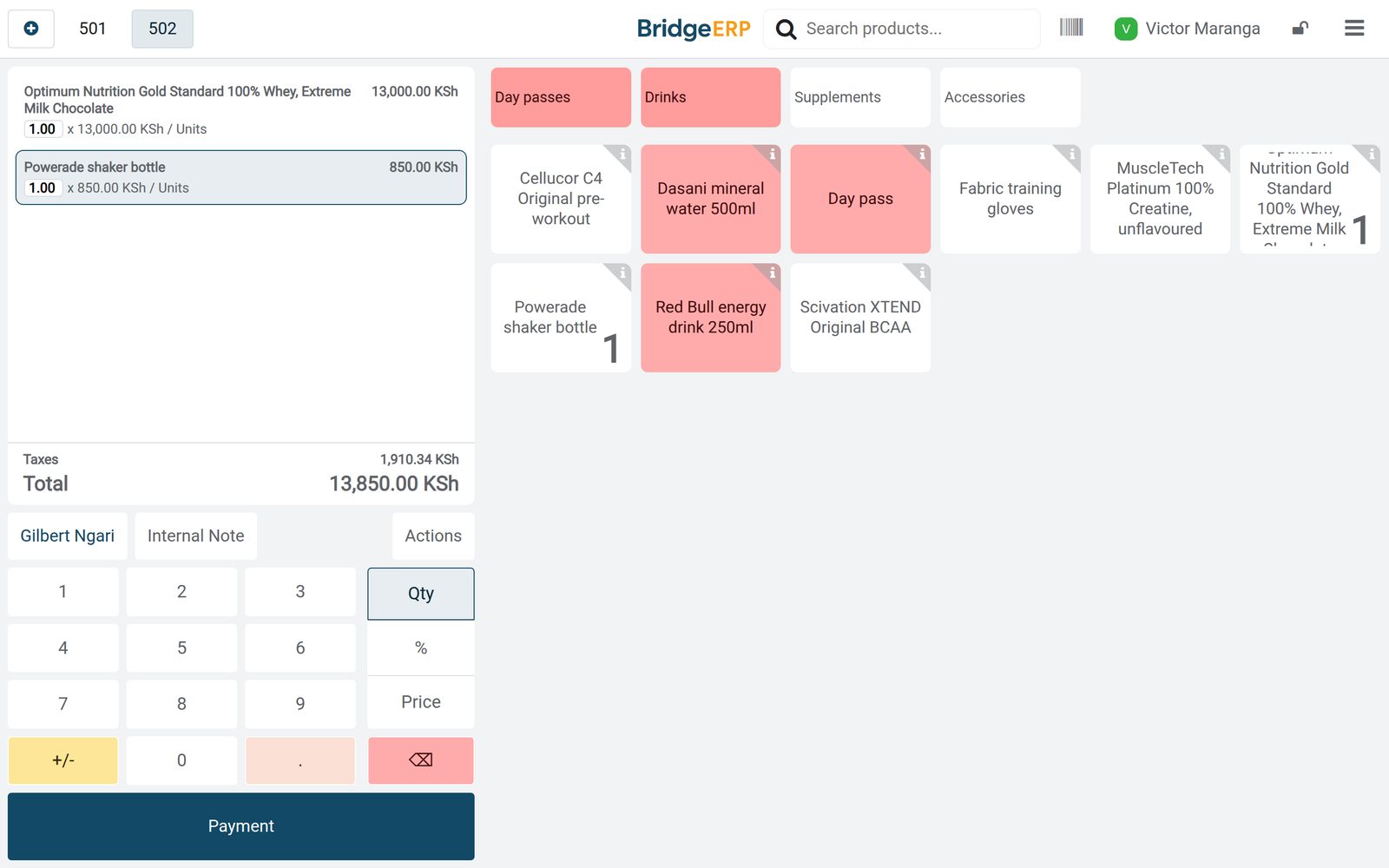 Point of Sale
A member buys supplements
A member picking up a tub of whey and a shaker at the desk, under their name and the cashier who rang it up.
Explore Point of Sale →Supplements and drinks, restocked by rules
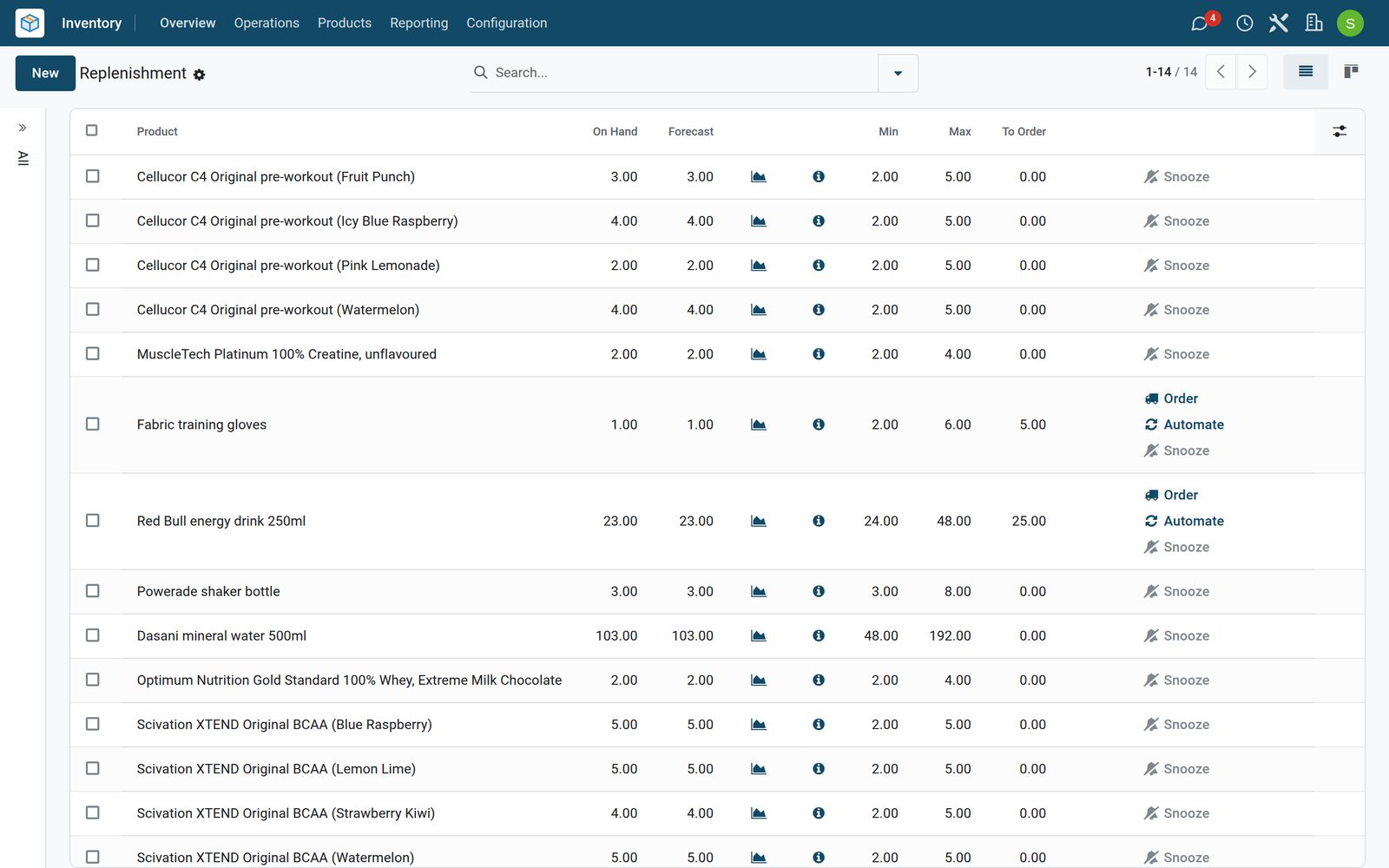
Each product and flavour has a minimum and a maximum, and the distributor order brings low shelves back up.
 Inventory
What to order next
Every supplement, drink and accessory with its minimum and maximum. The training gloves and the energy drinks have fallen below their minimum, and the quantity to order is worked out for them.
Explore Inventory →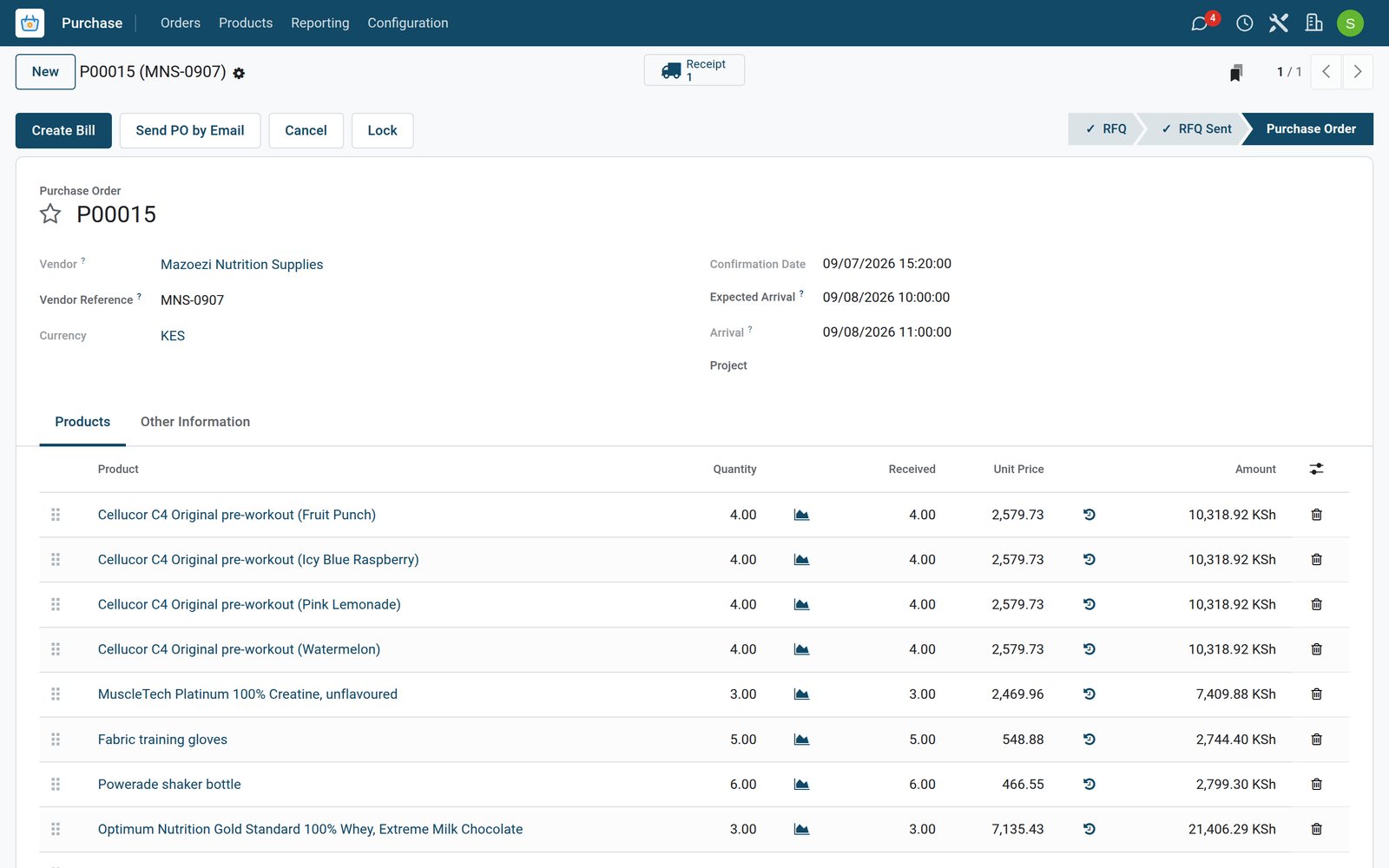 Purchase
The supplements order
The order that brought the shelves back up: the pre-workout flavours, creatine, whey and the accessories, received from the distributor the next morning.
Explore Purchase →The front desk, the floor and every class on one rota
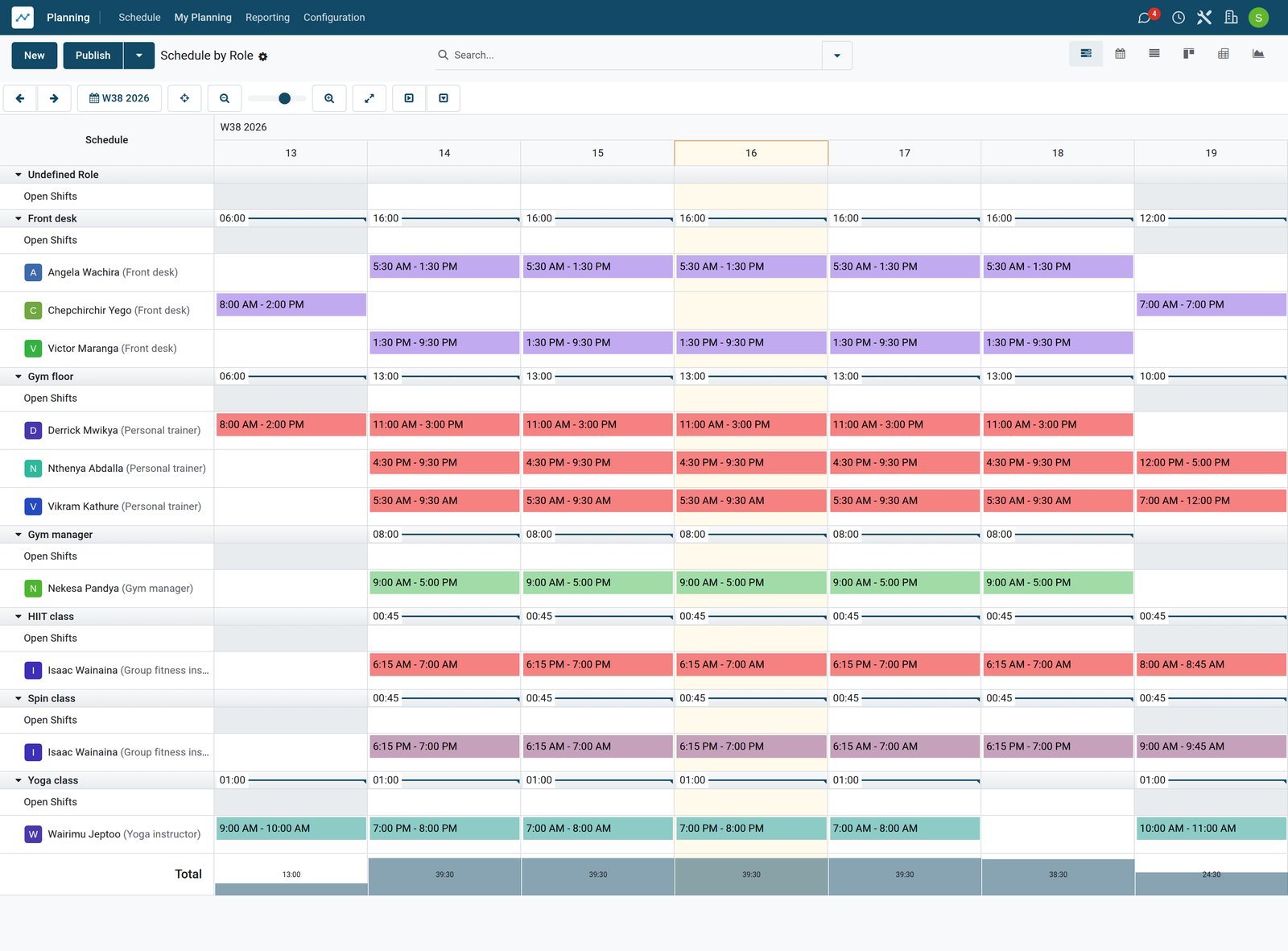
Shifts by role show who opens the desk, who covers the gym floor and who teaches each class.
 Shift Planning
The week by role
The week by role: the desk opened and closed, the gym floor covered from the first hour to closing, and an instructor on every class.
Explore Shift Planning →Recurring revenue, retention and classes
The subscription reports follow monthly recurring revenue and how long members stay, and the appointments report counts class bookings by status.
- Subscriptions
Monthly recurring revenue over the year
Monthly recurring revenue month by month as members joined, moved plan and left.
Explore Subscriptions →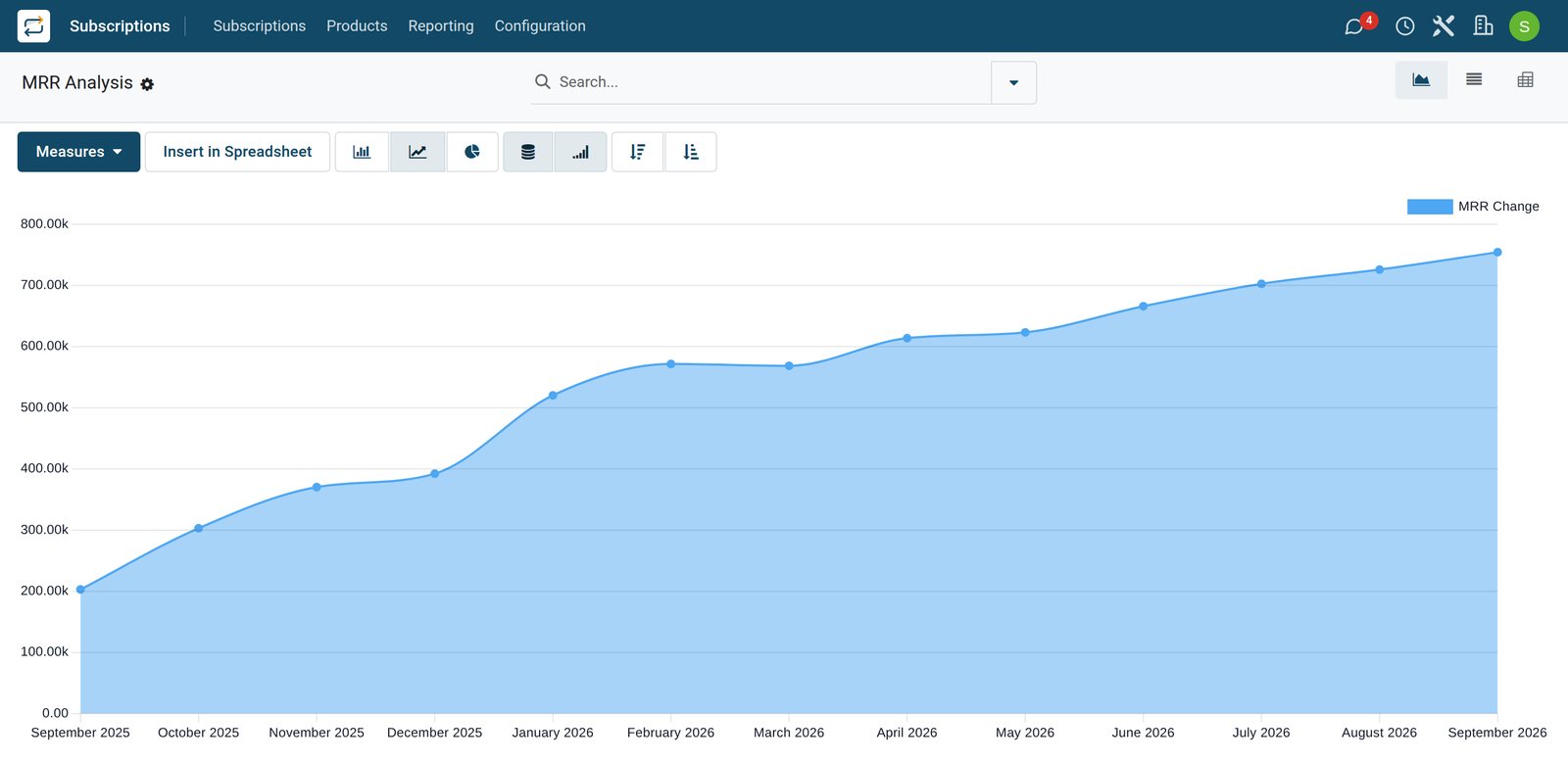
- Subscriptions
How long members stay
Retention by joining month: of the members who signed up in each month, how many are still on their plan a month, two months, six months later.
Explore Subscriptions →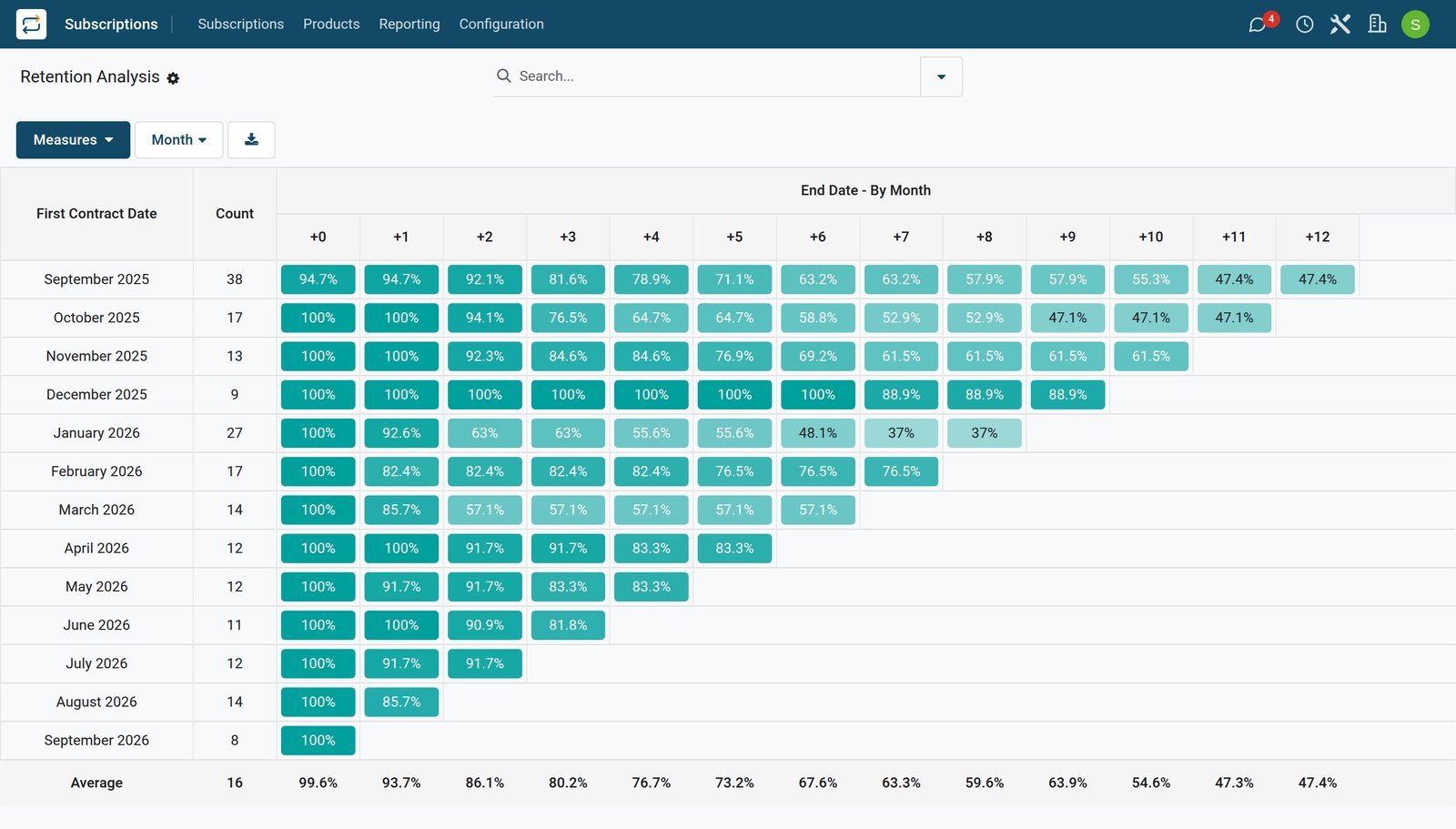
- Appointments
Class bookings by status
Every booking of the three classes, by class and status: who came, who did not show, and who is booked for the days ahead.
Explore Appointments →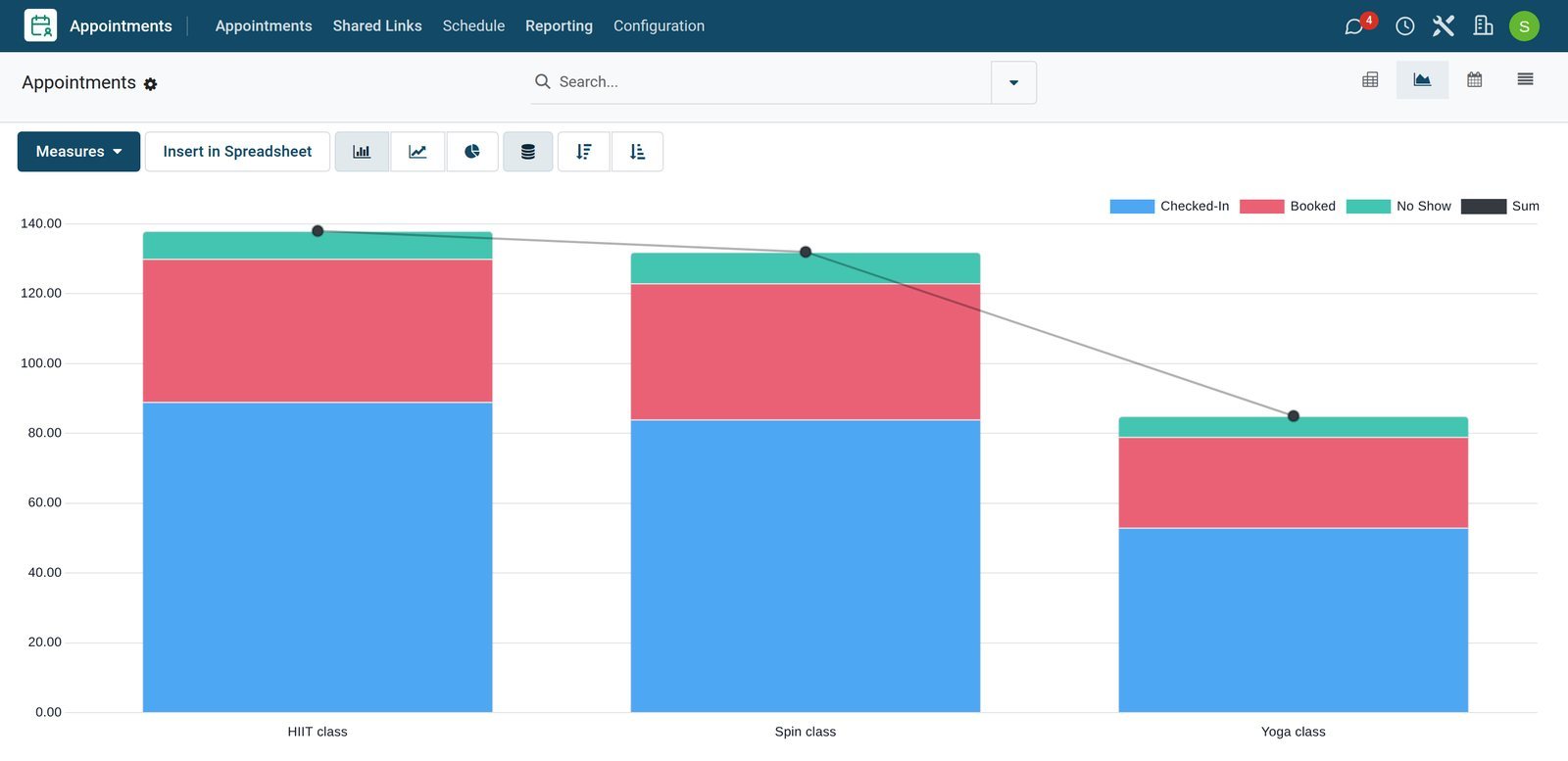
Who uses it
Who uses it, and what they see
One system for the front desk, the studios, the gym floor and the office.
Front desk
Signs members up, takes the period payments, checks members into classes and runs the till.
Instructors and trainers
See their classes, the members booked and their own shifts on the rota.
Gym manager
Keeps the timetable and the rota, sets the reordering rules and orders from distributors.
Owner
Follows recurring revenue, retention, cancellations by reason and the takings at the till.
Works with
Runs with the rest of BridgeERP
Apps a gym draws on.

In your country
Your currency, payments and taxes
Set to the country the gym trades in.
Company currency
Membership fees, till takings and recurring revenue are kept in the currency of the company; the demo gym trades in KES.
Prices with tax included
A tax can be included in the price, so members pay the published fee and the VAT is worked out of it; the demo follows a Kenyan example.
Mobile money, card and cash
Each till has its own payment methods; the demo gym's front desk takes M-Pesa, card and cash.
Accounting by country
Accounting packages for more than 100 countries set up the chart of accounts, the taxes and the tax report.
Getting started
Getting started
How a gym moves onto BridgeERP.
Set up the plans
Create the membership product with a price for each plan the gym sells.
Add the studios and classes
Create each studio with its places, and each class with its length and weekly timetable.
Import the members
Import members with their plan and start date, so each membership invoices on its own day.
Open the till
Create the front desk till with its payment methods, the staff who sign in and the shop products.
Questions
Questions about Fitness Centers & Gyms
Not covered here? Contact us.
Can members pay monthly, every three months or once a year?
Yes. Each plan has its own price on the membership product, and each membership invoices at the start of every period of its plan.
How are membership fees invoiced?
Each membership has a next invoice date. The invoice for the period is created on that date, and once it is posted the next invoice date moves on to the following period.
Can a membership be paused or cancelled?
Yes. A membership can be paused and resumed, or closed with a reason. Closed memberships and their reasons feed the churn and retention reports.
Can a class be limited to the size of the studio?
Yes. The studio has a number of places, and each booking takes one, so a class cannot take more members than the studio holds.
How do we record who came to a class?
Each booking has a status. It is checked in when the member arrives or marked as a no-show, and the reporting counts bookings by class and status.
Can the front desk sell supplements by flavour?
Yes. Each flavour is a variant of the product with its own stock and reordering rule, so the till sells the exact flavour and the replenishment list shows what to order.
Tax compliance
Invoices your tax authority accepts
In Kenya, Uganda, Rwanda, Burundi and Zambia, each invoice, receipt and stock movement goes to the tax authority's own system when you post it. Ghana and Pakistan come next, and we connect 73 more countries on request.
- KenyaReady
eTIMS KRA
Invoices, credit notes, POS receipts and stock movements
- UgandaReady
EFRIS URA
Invoices, POS receipts and stock
- RwandaReady
EBM RRA
Invoices, POS receipts, stock and imports
- BurundiReady
EBMS OBR
Invoices, POS receipts, stock and manufacturing
- ZambiaReady
Smart Invoice ZRA
Invoices, POS receipts, stock and imports
Fitness Centers & Gyms, app by app
One connected flow instead of separate systems — the work moves from one team to the next without re-typing anything.
Every stop is a real app in your plan, and the hand-offs between them are the product.
- Customers & sales
- Operations
- Finance
- Platform & insight
CRM
Leads, opportunity pipeline, activities and sales forecasting.
CRM →CRMLeads, opportunity pipeline, activities and sales forecasting.Ready when you are
Open the plan builder with the right apps for this industry already selected, or see it running first.